Strange Attractors: Clifford Attractor Art with Pathogen
Prerequisites: This post uses for loops, user-defined functions, layers, and Color.palette. If you're new to Pathogen, start with the getting started guide.
Every previous blog post on this site has built geometry by design — placing shapes, computing curves, arranging data. This post is different. We're going to write a tight loop, iterate a pair of equations ten thousand times, and watch structure emerge from arithmetic. The result is a Clifford attractor: a strange attractor discovered by Clifford Pickover and documented beautifully by Paul Bourke.
Strange attractors are the visual fingerprints of chaotic dynamical systems. You feed a point through a set of equations, and the output becomes the input for the next iteration. The trajectory never repeats, never diverges, but settles into a bounded region of space — tracing intricate, self-similar patterns along the way.
Pathogen turns out to be a surprisingly capable tool for this kind of work. If you've built attractors in Processing or p5.js, you'll recognize the core loop — the Pathogen-specific parts are the layer system and SVG output. Its trig functions, variable mutation in loops, and multi-layer system handle the core algorithm cleanly. But the exercise also reveals friction — places where the language's design, optimized for geometry construction, bumps against the needs of iterative generative art. We'll build the attractor first, then talk honestly about what could be better.
The Math
The Clifford attractor is defined by two equations:
xₙ₊₁ = sin(a · yₙ) + c · cos(a · xₙ)
yₙ₊₁ = sin(b · xₙ) + d · cos(b · yₙ)
Four parameters — a, b, c, d — control the shape. Starting from a seed point (x₀, y₀), each iteration produces a new point. The trajectory doesn't converge to a fixed point or diverge to infinity — it's trapped in a bounded region, orbiting forever without repeating. That region is the attractor.
// viewBox="0 0 560 260"
// Iteration concept diagram — shows how points map through the Clifford equations

let a = -1.4;
let b = 1.6;
let c = 1.0;
let d = 0.7;

let scale = 42;
let cx = 280;
let cy = 110;

// Compute first 8 points to show the trajectory
let x0 = 0.1;
let y0 = 0.1;
let x1 = calc(sin(a * y0) + c * cos(a * x0));
let y1 = calc(sin(b * x0) + d * cos(b * y0));
let x2 = calc(sin(a * y1) + c * cos(a * x1));
let y2 = calc(sin(b * x1) + d * cos(b * y1));
let x3 = calc(sin(a * y2) + c * cos(a * x2));
let y3 = calc(sin(b * x2) + d * cos(b * y2));
let x4 = calc(sin(a * y3) + c * cos(a * x3));
let y4 = calc(sin(b * x3) + d * cos(b * y3));
let x5 = calc(sin(a * y4) + c * cos(a * x4));
let y5 = calc(sin(b * x4) + d * cos(b * y4));
let x6 = calc(sin(a * y5) + c * cos(a * x5));
let y6 = calc(sin(b * x5) + d * cos(b * y5));
let x7 = calc(sin(a * y6) + c * cos(a * x6));
let y7 = calc(sin(b * x6) + d * cos(b * y6));

// Light background for text readability in dark mode
let bg = PathLayer('bg') ${
  fill: #f8f7f4;
  stroke: none;
};
bg.apply { roundRect(0, 0, 560, 260, 6); }

// Trajectory lines
let trail = PathLayer('trail') ${
  stroke: oklch(0.70 0.10 260);
  stroke-width: 1;
  stroke-dasharray: 4 3;
  fill: none;
};

trail.apply {
  M calc(cx + x0 * scale) calc(cy + y0 * scale)
  L calc(cx + x1 * scale) calc(cy + y1 * scale)
  L calc(cx + x2 * scale) calc(cy + y2 * scale)
  L calc(cx + x3 * scale) calc(cy + y3 * scale)
  L calc(cx + x4 * scale) calc(cy + y4 * scale)
  L calc(cx + x5 * scale) calc(cy + y5 * scale)
  L calc(cx + x6 * scale) calc(cy + y6 * scale)
  L calc(cx + x7 * scale) calc(cy + y7 * scale)
}

// Points — larger for early, smaller for later
let dots = PathLayer('dots') ${
  stroke: none;
  fill: oklch(0.45 0.20 260);
};

dots.apply {
  circle(calc(cx + x0 * scale), calc(cy + y0 * scale), 5);
  circle(calc(cx + x1 * scale), calc(cy + y1 * scale), 4.5);
  circle(calc(cx + x2 * scale), calc(cy + y2 * scale), 4);
  circle(calc(cx + x3 * scale), calc(cy + y3 * scale), 3.5);
  circle(calc(cx + x4 * scale), calc(cy + y4 * scale), 3);
  circle(calc(cx + x5 * scale), calc(cy + y5 * scale), 2.5);
  circle(calc(cx + x6 * scale), calc(cy + y6 * scale), 2);
  circle(calc(cx + x7 * scale), calc(cy + y7 * scale), 1.5);
}

// Labels
let labels = TextLayer('labels') ${
  font-size: 10;
  fill: #444;
  font-family: system-ui, sans-serif;
};

labels.apply {
  text(calc(cx + x0 * scale + 12), calc(cy + y0 * scale - 4))`(x₀, y₀)`
  text(calc(cx + x1 * scale - 52), calc(cy + y1 * scale + 4))`(x₁, y₁)`
  text(calc(cx + x2 * scale + 12), calc(cy + y2 * scale + 16))`(x₂, y₂)`
  text(calc(cx + x3 * scale + 12), calc(cy + y3 * scale - 8))`(x₃, y₃)`
  text(calc(cx + x7 * scale + 8), calc(cy + y7 * scale + 12))`(x₇, y₇)`
}

// Formula text
let formula = TextLayer('formula') ${
  font-size: 13;
  fill: #333;
  font-family: ui-monospace, monospace;
  text-anchor: start;
};

formula.apply {
  text(30, 228)`xₙ₊₁ = sin(a · yₙ) + c · cos(a · xₙ)`
  text(30, 246)`yₙ₊₁ = sin(b · xₙ) + d · cos(b · yₙ)`
}

let g = GroupLayer('concept') ${};
g.append(bg, trail, dots, labels, formula);
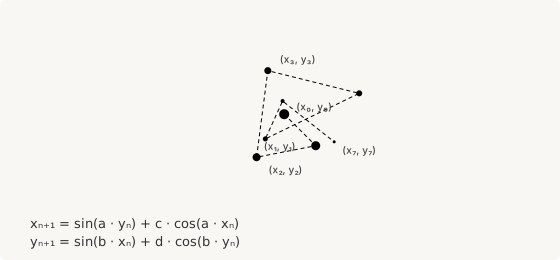
The diagram above shows the first 8 iterations from seed point (0.1, 0.1) with parameters a = -1.4, b = 1.6, c = 1.0, d = 0.7. The points jump unpredictably — that's the chaos — but they stay bounded roughly within [-3, 3] on both axes. Draw enough points and the attractor's structure emerges.
First Implementation: A Sparse Point Cloud
Let's start with just 100 iterations. The core pattern is a for loop that computes each new point from the previous one:
let a = -1.4;
let b = 1.6;
let c = 1.0;
let d = 0.7;

let scale = 80;
let cx = 200;
let cy = 170;

let x = 0.1;
let y = 0.1;

for (i in 0..99) {
  let nx = calc(sin(a * y) + c * cos(a * x));
  let ny = calc(sin(b * x) + d * cos(b * y));
  circle(calc(cx + nx * scale), calc(cy + ny * scale), 3);
  x = nx;
  y = ny;
}
A few things to notice:
Temporary variables are essential. Both nx and ny depend on the current x and y. If you updated x before computing ny, you'd be mixing old and new values — a classic pitfall in iterative algorithms. The pattern let nx = ...; let ny = ...; x = nx; y = ny; keeps both computations reading from the same state.
Coordinate mapping. The attractor lives in a small mathematical space (roughly [-3, 3]). To render in SVG, we scale and offset to the canvas center. This calc(cx + value * scale) pattern is the same coordinate transform you'd write in any graphics system.
circle() for visibility. At 100 points, individual dots need to be large enough to see. We use radius 3 here — we'll optimize this later.
// viewBox="0 0 400 340"
// First Clifford Attractor — 100 iterations, circle() dots

let a = -1.4;
let b = 1.6;
let c = 1.0;
let d = 0.7;

let scale = 80;
let cx = 200;
let cy = 170;

let x = 0.1;
let y = 0.1;

define default PathLayer('attractor') ${
  stroke: none;
  fill: oklch(0.45 0.18 260);
  opacity: 0.7;
}

for (i in 0..99) {
  let nx = calc(sin(a * y) + c * cos(a * x));
  let ny = calc(sin(b * x) + d * cos(b * y));
  circle(calc(cx + nx * scale), calc(cy + ny * scale), 3);
  x = nx;
  y = ny;
}
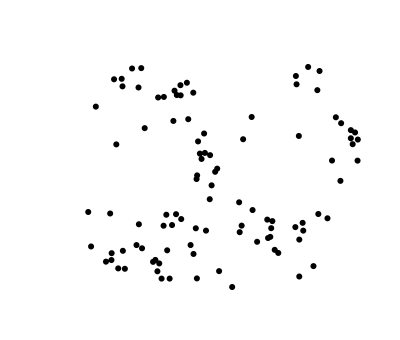
With only 100 points, you can see individual dots scattered across the canvas. Some clustering is visible — the attractor's structure is already hinting at itself — but the image is sparse. We need more iterations.
Scaling Up: 10,000 Points
Pathogen's for loop supports up to 32,000 iterations per loop (a safety limit to prevent runaway programs). For our first full render, 10,000 points is plenty to reveal the attractor's structure.
But first, an optimization. Each circle() call generates two SVG arc commands — for 10,000 circles, that's 30,000 path commands and roughly 800KB of SVG data. Instead, we can render each point as a zero-length line segment: M x y l 0 0. With stroke-linecap: round set on the layer, SVG renders this as a circular dot. Two commands per point instead of three, cutting the SVG output nearly in half.
define default PathLayer('attractor') ${
  stroke: oklch(0.55 0.18 260);
  stroke-width: 1.0;
  stroke-linecap: round;
  fill: none;
}

// Seed point — iteration 0
M calc(cx + x * scale) calc(cy + y * scale)

// Iterations 1–9,999
for (i in 1..9999) {
  let nx = calc(sin(a * y) + c * cos(a * x));
  let ny = calc(sin(b * x) + d * cos(b * y));
  x = nx;
  y = ny;
  M calc(cx + nx * scale) calc(cy + ny * scale) l 0 0
}
The initial M command plots the seed point before the loop, so the loop starts at 1 rather than 0 — together they produce exactly 10,000 points (the per-loop iteration limit). The M x y l 0 0 idiom is a well-known SVG trick for point rendering, but it's admittedly non-obvious. A dedicated dot(x, y) function would communicate intent more clearly — we'll return to this idea later.
// viewBox="0 0 600 480"
// Full Clifford Attractor — 10,000 points, efficient line rendering

let a = -1.4;
let b = 1.6;
let c = 1.0;
let d = 0.7;

let scale = 100;
let cx = 300;
let cy = 240;

let x = 0.1;
let y = 0.1;

define default PathLayer('attractor') ${
  stroke: oklch(0.55 0.18 260);
  stroke-width: 1.0;
  stroke-linecap: round;
  fill: none;
}

// Initial move
M calc(cx + x * scale) calc(cy + y * scale)

for (i in 1..9999) {
  let nx = calc(sin(a * y) + c * cos(a * x));
  let ny = calc(sin(b * x) + d * cos(b * y));
  x = nx;
  y = ny;
  // Each point is a zero-length line segment rendered as a dot
  M calc(cx + nx * scale) calc(cy + ny * scale) l 0 0
}
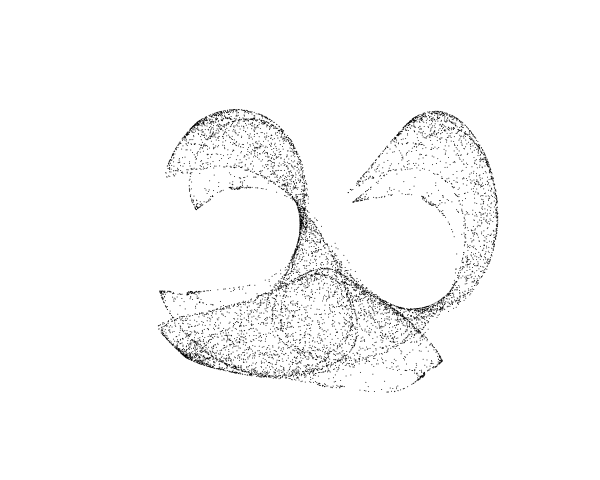
At 10,000 points, the attractor's character is unmistakable. The classic parameter set (a = -1.4, b = 1.6, c = 1.0, d = 0.7) produces a figure that resembles overlapping leaf forms, with dense filaments tracing the trajectories that the system visits most often.
Color Mapping with Layers
A single-color attractor is striking, but color can reveal the attractor's temporal structure — how the trajectory evolves over time. In many attractor renderers, each point's color is determined by its iteration index or by the local density of visits. Pathogen's layer system gives us a clean way to approximate this.
The idea: split 10,000 iterations into 5 chunks of 2,000 each. Each chunk renders to a different layer with a different color from a palette. Early iterations (exploring the attractor's outline) get one color; later iterations (filling in the dense interior) get another.
let baseStyles = ${
  stroke-width: 1;
  stroke-linecap: round;
  fill: none;
};
let colors = Color.palette(Color('#1e40af'), Color('#f97316'), 5);
let layers = colors.map {|c, i|
  return PathLayer(`color-${i}`) ${ stroke: c; } << baseStyles;
};
Color.palette() generates 5 evenly interpolated colors between blue and orange. .map iterates over them, creating a PathLayer for each — the << operator merges the per-layer stroke color with the shared base styles. No repetition, and the layer count is driven by the palette size.
The nested loop handles iteration and color dispatch:
for ([colorLayer, chunk] in layers) {
  for (i in 0..1999) {
    let nx = calc(sin(a * y) + c * cos(a * x));
    let ny = calc(sin(b * x) + d * cos(b * y));
    x = nx;
    y = ny;
    colorLayer.apply {
      M calc(cx + nx * scale) calc(cy + ny * scale) l 0 0
    }
  }
}
The outer loop destructures each layer and its index. The inner loop draws 2,000 points. Since x and y are declared in the outer scope, they persist across chunks — the attractor's trajectory is continuous even though the color changes.
// viewBox="0 0 600 480"
// Color-mapped Clifford Attractor — 10,000 points across 5 temporal layers

let a = -1.4;
let b = 1.6;
let c = 1.0;
let d = 0.7;

let scale = 100;
let cx = 300;
let cy = 240;

let x = 0.1;
let y = 0.1;

// Shared styles + 5-color palette from deep blue to warm orange
let baseStyles = ${
  stroke-width: 1;
  stroke-linecap: round;
  fill: none;
};
let colors = Color.palette(Color('#1e40af'), Color('#f97316'), 5);
let layers = colors.map {|c, i|
  return PathLayer(`color-${i}`) ${ stroke: c; } << baseStyles;
};

// Each chunk renders 2,000 iterations in a different color.
// Early iterations (blue) explore the attractor's outline;
// later iterations (orange) fill in the dense interior.
for ([colorLayer, chunk] in layers) {
  for (i in 0..1999) {
    let nx = calc(sin(a * y) + c * cos(a * x));
    let ny = calc(sin(b * x) + d * cos(b * y));
    x = nx;
    y = ny;
    colorLayer.apply {
      M calc(cx + nx * scale) calc(cy + ny * scale) l 0 0
    }
  }
}

let g = GroupLayer('all') ${};
g.append(layers[0], layers[1], layers[2], layers[3], layers[4]);
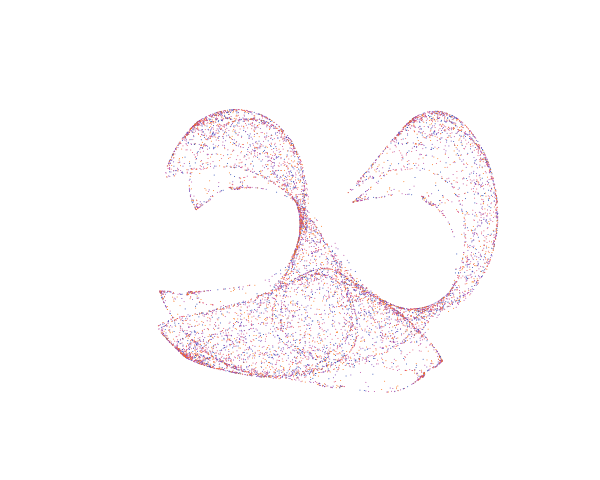
The color reveals something the monochrome version hides: the attractor doesn't fill uniformly. Early iterations (blue) trace the broad outline. Later iterations (orange) concentrate in the densest filaments, reinforcing the paths the system visits repeatedly. This temporal layering is a rough proxy for the density-based histogram rendering that professional attractor tools use.
Parameter Exploration
The four parameters are the soul of the attractor. Small changes produce dramatically different forms. Here are three parameter sets that show the range:
// viewBox="0 0 900 370"
// Parameter Gallery — three Clifford attractors with different parameters

// Reusable attractor function
fn cliffordStep(x, y, a, b, c, d) {
  return {
    x: calc(sin(a * y) + c * cos(a * x)),
    y: calc(sin(b * x) + d * cos(b * y))
  };
}

fn drawAttractor(target, ox, oy, a, b, c, d) {
  let x = 0.1;
  let y = 0.1;
  let scale = 50;
  target.apply {
    for (i in 0..4999) {
      let next = cliffordStep(x, y, a, b, c, d);
      x = next.x;
      y = next.y;
      M calc(ox + x * scale) calc(oy + y * scale) l 0 0
    }
  }
}

// --- Set 1: Classic ---
let p1 = PathLayer('set1') ${
  stroke: oklch(0.50 0.20 260);
  stroke-width: 0.8;
  stroke-linecap: round;
  fill: none;
};

// --- Set 2: Swirl ---
let p2 = PathLayer('set2') ${
  stroke: oklch(0.50 0.20 330);
  stroke-width: 0.8;
  stroke-linecap: round;
  fill: none;
};

// --- Set 3: Organic ---
let p3 = PathLayer('set3') ${
  stroke: oklch(0.50 0.20 150);
  stroke-width: 0.8;
  stroke-linecap: round;
  fill: none;
};

drawAttractor(p1, 150, 175, -1.4, 1.6, 1.0, 0.7);
drawAttractor(p2, 450, 175, 1.6, -0.6, -1.2, 1.6);
drawAttractor(p3, 750, 175, 1.7, 1.7, 0.6, 1.2);

// Labels
let names = TextLayer('names') ${
  font-size: 14;
  fill: oklch(0.75 0.05 260);
  font-family: system-ui, sans-serif;
  font-weight: bold;
  text-anchor: middle;
};

names.apply {
  text(150, 332)`Classic`
  text(450, 332)`Swirl`
  text(750, 332)`Organic`
}

let params = TextLayer('params') ${
  font-size: 11;
  fill: oklch(0.55 0.03 260);
  font-family: ui-monospace, monospace;
  text-anchor: middle;
};

params.apply {
  text(150, 348)`a=-1.4  b=1.6  c=1.0  d=0.7`
  text(450, 348)`a=1.6  b=-0.6  c=-1.2  d=1.6`
  text(750, 348)`a=1.7  b=1.7  c=0.6  d=1.2`
}

let g = GroupLayer('gallery') ${};
g.append(p1, p2, p3, names, params);
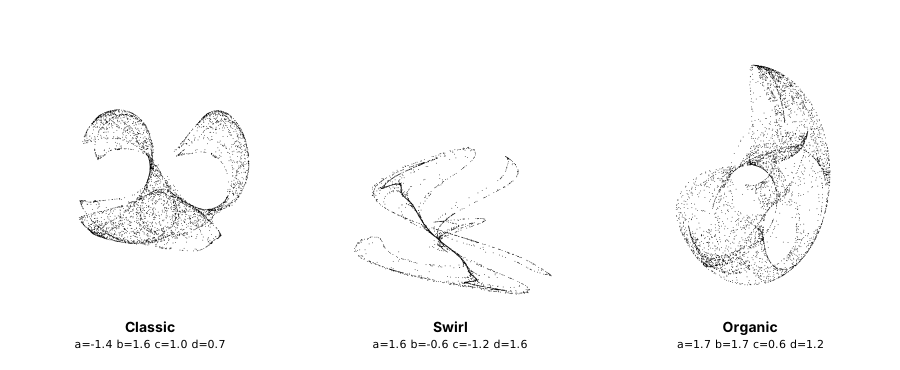
The Classic set produces overlapping leaf forms with clearly defined filaments. The Swirl set creates an angular, dispersed figure with sharper trajectories. The Organic set forms a denser, moon-like structure where the trajectories pack tightly together. All three emerge from the same two equations — only the four parameters differ.
The implementation extracts the Clifford step into a reusable function:
fn cliffordStep(x, y, a, b, c, d) {
  return {
    x: calc(sin(a * y) + c * cos(a * x)),
    y: calc(sin(b * x) + d * cos(b * y))
  };
}
The function returns an object with x and y properties, which the caller destructures. This pattern — packaging both return values in an object — avoids the temporary-variable dance when the computation is factored out of the loop.
Interactive Colors
Since the attractor parameters control the geometry and must be baked in at compile time, we can't make them reactive via CSS variables. But we can make the color palette reactive. The sample below uses CSSVar for the early and late colors — try changing them in the playground's CSS variable panel to see the palette update in real time:
// viewBox="0 0 600 480"
// Interactive Clifford Attractor — CSS variable colors

let a = -1.4;
let b = 1.6;
let c = 1.0;
let d = 0.7;

let scale = 100;
let cx = 300;
let cy = 240;

let x = 0.1;
let y = 0.1;

// Reactive colors — change in the playground's CSS variable panel
let earlyColor = Color(CSSVar('--early-color', '#1e40af'));
let lateColor = Color(CSSVar('--late-color', '#f97316'));

let baseStyles = ${
  stroke-width: 1.2;
  stroke-linecap: round;
  fill: none;
};
let colors = Color.palette(earlyColor, lateColor, 5);
let layers = colors.map {|c, i|
  return PathLayer(`color-${i}`) ${ stroke: c; } << baseStyles;
};

for ([colorLayer, chunk] in layers) {
  for (i in 0..1999) {
    let nx = calc(sin(a * y) + c * cos(a * x));
    let ny = calc(sin(b * x) + d * cos(b * y));
    x = nx;
    y = ny;
    colorLayer.apply {
      M calc(cx + nx * scale) calc(cy + ny * scale) l 0 0
    }
  }
}

let g = GroupLayer('all') ${};
g.append(layers[0], layers[1], layers[2], layers[3], layers[4]);

This works because Color.palette() generates CSS color functions that reference the underlying variables. The geometry stays fixed, but the visual character transforms instantly.
Where the Language Could Grow
Building this attractor was a satisfying exercise, but it also exposed genuine friction. These aren't bugs — they're places where Pathogen's design, shaped by geometry construction, meets the different demands of iterative generative art.
A dot() function
The M x y l 0 0 idiom for rendering individual points works, but it's an SVG implementation detail leaking into the language. A dot(x, y) function (optionally dot(x, y, radius)) would express intent clearly and let the compiler choose the most efficient SVG representation. This is a small addition to stdlib — analogous to how circle() wraps two arc commands — but it would make point-cloud rendering feel like a first-class use case rather than a clever workaround.
Higher iteration limits
The 32,000-iteration cap per loop is sufficient for most attractor visualizations, but generative art routinely wants 50,000 or 100,000 iterations for high-resolution output. A configurable compiler option like --max-iterations=100000 would let users opt in to higher limits when they know what they're doing.
The nested-loop workaround (outer loop over chunks, inner loop over iteration batches) does get you past the per-loop limit today — x/y persist across the outer scope. But a single loop with a higher cap would be cleaner.
Per-point color
All segments within a layer share one stroke color. The .map + << pattern we used above eliminates the boilerplate of declaring layers individually, but the color mapping is still discrete — 5 bands, not a continuous gradient. True per-point coloring would require SVG <circle> elements (each independently styleable) rather than a single <path>. That's a fundamental constraint of the SVG model, not just Pathogen. A scatter() function that emits individual elements from a list of {x, y, color} objects would trade path efficiency for per-element styling. Even without that, the multi-layer approach produces compelling results.
What We Built
Starting from two lines of math, we built:
- A 100-point sparse point cloud showing the basic algorithm and the temporary-variable pattern
- A 10,000-point full render using the
M x y l 0 0optimization for efficient SVG output - A 5-layer color-mapped visualization that reveals temporal structure through nested loops and array-dispatched layers
- A parameter gallery comparing three distinct attractor forms via a reusable
cliffordStep()function - An interactive variant with reactive CSS variable colors
The Clifford attractor is a small window into a vast space. Pathogen handles the core workflow — iterate, map coordinates, render — cleanly. The friction points we identified aren't blockers; they're signposts for where the language wants to grow as generative art becomes a larger part of its story.
Try It Yourself
Paste any of the samples above into the playground and start changing parameters. Try a = 1.5, b = -1.8, c = 1.6, d = 0.9 for a dense spiral, or a = -1.7, b = 1.3, c = -0.1, d = -1.2 for something angular and unexpected. Swap the color palette endpoints. Adjust the scale. The attractor space is vast — most parameter combinations produce something worth looking at.