Drop the Quotes: Color Literals in Pathogen
A UX bug became a language feature.
When users changed colors via the playground's color picker on Color('#cc0000'), the picker stripped the quotes — producing Color(#cc0000), which failed to compile. Rather than just fixing the quoting, we asked: why require quotes at all?
The result is color literals — bare hex codes and CSS color functions that are first-class expressions. Writing colors now feels like writing CSS, not calling an API. No Color() wrapper, no string quoting — just #cc0000 directly in your code. Everything is backwards-compatible; existing Color() calls continue to work unchanged.
// viewBox="0 0 540 280"
// Before/After — Color('#cc0000') vs #cc0000
// Shows that both produce identical output, but the literal is cleaner

// ═══════════════════════════════════════
// Style variables
// ═══════════════════════════════════════

let kw   = ${ fill: #c084fc; };
let str  = ${ fill: #a3e635; };
let hex  = ${ fill: #fb923c; };
let pct  = ${ fill: #38bdf8; };
let base = ${ fill: #94a3b8; };

// ═══════════════════════════════════════
// Background
// ═══════════════════════════════════════

let bg = PathLayer('bg') ${ fill: #0f172a; stroke: none; };
bg.apply { rect(0, 0, 540, 280) }

// ═══════════════════════════════════════
// Title
// ═══════════════════════════════════════

let title = TextLayer('title') ${
  font-family: system-ui, sans-serif;
  font-size: 14;
  fill: #e2e8f0;
  text-anchor: start;
};
title.apply {
  text(30, 30)`Before & After`
}

let subtitle = TextLayer('subtitle') ${
  font-family: system-ui, sans-serif;
  font-size: 10;
  fill: #64748b;
  text-anchor: start;
};
subtitle.apply {
  text(30, 46)`Same output — less ceremony`
}

// ═══════════════════════════════════════
// Divider
// ═══════════════════════════════════════

let divider = PathLayer('divider') ${
  stroke: #334155;
  stroke-width: 1;
  stroke-dasharray: "4 4";
  fill: none;
};
divider.apply {
  M 270 66 v 196
}

// ═══════════════════════════════════════
// "Before" panel (left)
// ═══════════════════════════════════════

let before_label = TextLayer('before-label') ${
  font-family: system-ui, sans-serif;
  font-size: 11;
  fill: #94a3b8;
  text-anchor: middle;
};
before_label.apply {
  text(150, 78)`Before`
}

// Code block background
let before_code_bg = PathLayer('before-code-bg') ${
  fill: #1e293b;
  stroke: #334155;
  stroke-width: 1;
};
before_code_bg.apply { roundRect(30, 90, 225, 80, 6) }

// Code text with tspan-based syntax coloring
let before_code = TextLayer('before-code') ${
  font-family: monospace;
  font-size: 9;
  fill: #94a3b8;
  text-anchor: start;
};
before_code.apply {
  text(42, 111) {
    tspan(0, 0, 0, kw)`let`
    tspan(0, 0, 0, base)` c = Color(`
    tspan(0, 0, 0, str)`'#cc0000'`
    tspan(0, 0, 0, base)`);`
  }
  text(42, 127) {
    tspan(0, 0, 0, kw)`let`
    tspan(0, 0, 0, base)` light = c.lighten(0.2);`
  }
  text(42, 143) {
    tspan(0, 0, 0, kw)`let`
    tspan(0, 0, 0, base)` faded = c.alpha(0.5);`
  }
}

// Swatches for before
let b_swatch1 = PathLayer('b-sw1') ${ fill: Color('#cc0000'); stroke: #475569; stroke-width: 1; };
b_swatch1.apply { roundRect(48, 183, 55, 40, 4) }

let b_swatch2 = PathLayer('b-sw2') ${ fill: Color('#cc0000').lighten(0.2); stroke: #475569; stroke-width: 1; };
b_swatch2.apply { roundRect(113, 183, 55, 40, 4) }

let b_swatch3 = PathLayer('b-sw3') ${ fill: Color('#cc0000').alpha(0.5); stroke: #475569; stroke-width: 1; };
b_swatch3.apply { roundRect(178, 183, 55, 40, 4) }

let b_sw_labels = TextLayer('b-sw-labels') ${
  font-family: monospace;
  font-size: 8;
  fill: #64748b;
  text-anchor: middle;
};
b_sw_labels.apply {
  text(75, 238)`c`
  text(140, 238)`light`
  text(205, 238)`faded`
}

// ═══════════════════════════════════════
// "After" panel (right)
// ═══════════════════════════════════════

let after_label = TextLayer('after-label') ${
  font-family: system-ui, sans-serif;
  font-size: 11;
  fill: #38bdf8;
  text-anchor: middle;
};
after_label.apply {
  text(400, 78)`After`
}

// Code block background
let after_code_bg = PathLayer('after-code-bg') ${
  fill: #1e293b;
  stroke: #38bdf8;
  stroke-width: 1;
};
after_code_bg.apply { roundRect(285, 90, 225, 80, 6) }

// Code text with tspan-based syntax coloring
let after_code = TextLayer('after-code') ${
  font-family: monospace;
  font-size: 9;
  fill: #94a3b8;
  text-anchor: start;
};
after_code.apply {
  text(297, 111) {
    tspan(0, 0, 0, kw)`let`
    tspan(0, 0, 0, base)` c = `
    tspan(0, 0, 0, hex)`#cc0000`
    tspan(0, 0, 0, base)`;`
  }
  text(297, 127) {
    tspan(0, 0, 0, kw)`let`
    tspan(0, 0, 0, base)` light = c.lighten(`
    tspan(0, 0, 0, pct)`20%`
    tspan(0, 0, 0, base)`);`
  }
  text(297, 143) {
    tspan(0, 0, 0, kw)`let`
    tspan(0, 0, 0, base)` faded = c.alpha(`
    tspan(0, 0, 0, pct)`50%`
    tspan(0, 0, 0, base)`);`
  }
}

// Swatches for after
let a_swatch1 = PathLayer('a-sw1') ${ fill: #cc0000; stroke: #475569; stroke-width: 1; };
a_swatch1.apply { roundRect(298, 183, 55, 40, 4) }

let a_swatch2 = PathLayer('a-sw2') ${ fill: (#cc0000).lighten(20%); stroke: #475569; stroke-width: 1; };
a_swatch2.apply { roundRect(363, 183, 55, 40, 4) }

let a_swatch3 = PathLayer('a-sw3') ${ fill: (#cc0000).alpha(50%); stroke: #475569; stroke-width: 1; };
a_swatch3.apply { roundRect(428, 183, 55, 40, 4) }

let a_sw_labels = TextLayer('a-sw-labels') ${
  font-family: monospace;
  font-size: 8;
  fill: #64748b;
  text-anchor: middle;
};
a_sw_labels.apply {
  text(325, 238)`c`
  text(390, 238)`light`
  text(455, 238)`faded`
}

// ═══════════════════════════════════════
// Equals sign between swatches
// ═══════════════════════════════════════

let equals = TextLayer('equals') ${
  font-family: system-ui, sans-serif;
  font-size: 20;
  fill: #38bdf8;
  text-anchor: middle;
};
equals.apply {
  text(270, 210)`=`
}
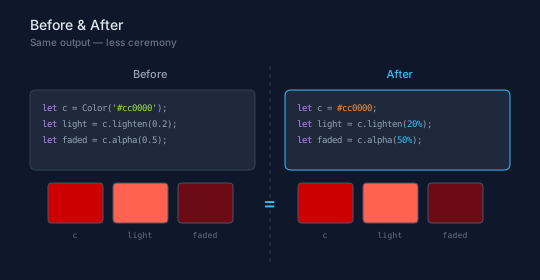
The left panel shows the old way: wrap a string in Color(), call methods with decimal arguments. The right panel shows the new way: bare hex literal, percent suffix. Both produce the same three swatches. The Color() wrapper still works — it now accepts bare hex values as a pass-through — but you no longer need it for hex colors.
Hex Literals
Hex color codes are first-class expressions anywhere a value is expected:
let c = #cc0000;            // 6-digit hex
let c = #f00;               // 3-digit shorthand
let c = #cc000080;          // 8-digit with alpha
let c = #f008;              // 4-digit with alpha
Wrap in parentheses for method chaining:
let lighter = (#cc0000).lighten(20%);
let shifted = (#0066ff).hueShift(60);
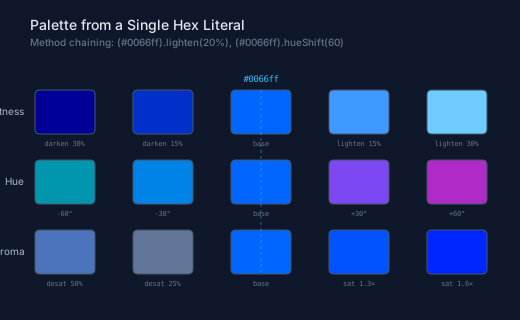
From a single hex literal you can build full color palettes — lighten, darken, shift hue, adjust saturation, set alpha. The demo below starts from #0066ff and derives an entire palette using method chaining and the percent suffix:
// viewBox="0 0 520 320"
// Hex Palette — Building a color palette from a single hex literal
// Demonstrates method chaining on hex color literals

// ═══════════════════════════════════════
// Background
// ═══════════════════════════════════════

let bg = PathLayer('bg') ${ fill: #0f172a; stroke: none; };
bg.apply { rect(0, 0, 520, 320) }

// ═══════════════════════════════════════
// Title
// ═══════════════════════════════════════

let title = TextLayer('title') ${
  font-family: system-ui, sans-serif;
  font-size: 14;
  fill: #e2e8f0;
  text-anchor: start;
};
title.apply {
  text(30, 30)`Palette from a Single Hex Literal`
}

let subtitle = TextLayer('subtitle') ${
  font-family: system-ui, sans-serif;
  font-size: 10;
  fill: #64748b;
  text-anchor: start;
};
subtitle.apply {
  text(30, 46)`Method chaining: (#0066ff).lighten(20%), (#0066ff).hueShift(60)`
}

// ═══════════════════════════════════════
// Base color
// ═══════════════════════════════════════

let base = #0066ff;

// ── Lightness ramp ──────────────────

let dark2  = (base).darken(30%);
let dark1  = (base).darken(15%);
let light1 = (base).lighten(15%);
let light2 = (base).lighten(30%);

let lightness_row = [dark2, dark1, base, light1, light2];
let lightness_names = ['darken 30%', 'darken 15%', 'base', 'lighten 15%', 'lighten 30%'];

// ── Hue shift ramp ─────────────────

let hue1 = (base).hueShift(-60);
let hue2 = (base).hueShift(-30);
let hue3 = (base).hueShift(30);
let hue4 = (base).hueShift(60);

let hue_row = [hue1, hue2, base, hue3, hue4];
let hue_names = ['-60°', '-30°', 'base', '+30°', '+60°'];

// ── Saturation ramp ────────────────

let desat2 = (base).desaturate(25%);
let desat1 = (base).desaturate(50%);
let sat1   = (base).saturate(1.3);
let sat2   = (base).saturate(1.6);

let sat_row = [desat1, desat2, base, sat1, sat2];
let sat_names = ['desat 50%', 'desat 25%', 'base', 'sat 1.3×', 'sat 1.6×'];

// ═══════════════════════════════════════
// Swatch grid
// ═══════════════════════════════════════

let sx = 65;
let sp = 98;
let sw = 60;
let sh = 44;
let sr = 5;

// ── Row labels ──────────────────────

let row_labels = TextLayer('row-labels') ${
  font-family: system-ui, sans-serif;
  font-size: 10;
  fill: #94a3b8;
  text-anchor: end;
};

// ── Swatch labels ───────────────────

let sw_labels = TextLayer('sw-labels') ${
  font-family: monospace;
  font-size: 7;
  fill: #64748b;
  text-anchor: middle;
};

// ── Row 1: Lightness ────────────────

let row1_y = 90;

row_labels.apply {
  text(24, calc(row1_y + sh / 2 + 3))`Lightness`
}

for ([color, i] in lightness_row) {
  let x = calc(sx + i * sp);
  let swatch = PathLayer(`l_${i}`) ${ fill: color; stroke: #475569; stroke-width: 1; };
  swatch.apply { roundRect(calc(x - sw / 2), row1_y, sw, sh, sr) }
}

sw_labels.apply {
  for ([name, i] in lightness_names) {
    text(calc(sx + i * sp), calc(row1_y + sh + 12))`${name}`
  }
}

// ── Row 2: Hue Shift ────────────────

let row2_y = 160;

row_labels.apply {
  text(24, calc(row2_y + sh / 2 + 3))`Hue`
}

for ([color, i] in hue_row) {
  let x = calc(sx + i * sp);
  let swatch = PathLayer(`h_${i}`) ${ fill: color; stroke: #475569; stroke-width: 1; };
  swatch.apply { roundRect(calc(x - sw / 2), row2_y, sw, sh, sr) }
}

sw_labels.apply {
  for ([name, i] in hue_names) {
    text(calc(sx + i * sp), calc(row2_y + sh + 12))`${name}`
  }
}

// ── Row 3: Saturation ───────────────

let row3_y = 230;

row_labels.apply {
  text(24, calc(row3_y + sh / 2 + 3))`Chroma`
}

for ([color, i] in sat_row) {
  let x = calc(sx + i * sp);
  let swatch = PathLayer(`s_${i}`) ${ fill: color; stroke: #475569; stroke-width: 1; };
  swatch.apply { roundRect(calc(x - sw / 2), row3_y, sw, sh, sr) }
}

sw_labels.apply {
  for ([name, i] in sat_names) {
    text(calc(sx + i * sp), calc(row3_y + sh + 12))`${name}`
  }
}

// ═══════════════════════════════════════
// Base indicator
// ═══════════════════════════════════════

let base_indicator = TextLayer('base-indicator') ${
  font-family: monospace;
  font-size: 9;
  fill: #38bdf8;
  text-anchor: middle;
};
base_indicator.apply {
  text(calc(sx + 2 * sp), calc(row1_y - 8))`#0066ff`
}

// ── Vertical base line ──────────────

let base_line = PathLayer('base-line') ${
  stroke: #38bdf8;
  stroke-width: 1;
  stroke-dasharray: "3 3";
  fill: none;
  opacity: 0.5;
};
base_line.apply {
  M calc(sx + 2 * sp) row1_y
  v calc(row3_y + sh - row1_y)
}
CSS Color Function Literals
All major CSS color functions work as bare expressions. You can paste any CSS color value directly into Pathogen code and it will just work — % and / inside function arguments are treated as literal characters, not operators:
let c = rgb(255, 0, 0);
let c = hsl(0, 100%, 50%);
let c = oklch(0.6 0.15 30);
let c = oklch(0.6 0.15 30 / 0.5);  // slash alpha
let c = hwb(0 0% 0%);
let c = lab(50 40 59.5);
let c = lch(50 64 30);
let c = oklab(0.6 -0.1 0.15);
Method chaining works directly — no wrapper needed:
let lighter = rgb(255, 0, 0).lighten(20%);
let muted = hsl(210, 80%, 50%).desaturate(50%);
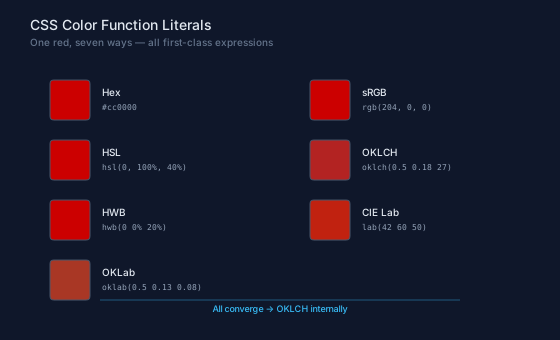
The demo below expresses the same red in seven different color spaces. Every format converts to OKLCH internally, so the swatches are near-identical — minor rounding differences between color spaces are invisible at screen resolution:
// viewBox="0 0 560 340"
// Color Spaces — The same red expressed in 7 CSS color function syntaxes
// All produce the same ColorValue internally

// ═══════════════════════════════════════
// Background
// ═══════════════════════════════════════

let bg = PathLayer('bg') ${ fill: #0f172a; stroke: none; };
bg.apply { rect(0, 0, 560, 340) }

// ═══════════════════════════════════════
// Title
// ═══════════════════════════════════════

let title = TextLayer('title') ${
  font-family: system-ui, sans-serif;
  font-size: 14;
  fill: #e2e8f0;
  text-anchor: start;
};
title.apply {
  text(30, 30)`CSS Color Function Literals`
}

let subtitle = TextLayer('subtitle') ${
  font-family: system-ui, sans-serif;
  font-size: 10;
  fill: #64748b;
  text-anchor: start;
};
subtitle.apply {
  text(30, 46)`One red, seven ways — all first-class expressions`
}

// ═══════════════════════════════════════
// Colors — all expressing the same red
// ═══════════════════════════════════════

let c_hex   = #cc0000;
let c_rgb   = rgb(204, 0, 0);
let c_hsl   = hsl(0, 100%, 40%);
let c_oklch = oklch(0.5 0.18 27);
let c_hwb   = hwb(0 0% 20%);
let c_lab   = lab(42 60 50);
let c_oklab = oklab(0.5 0.13 0.08);

let colors = [c_hex, c_rgb, c_hsl, c_oklch, c_hwb, c_lab, c_oklab];
let labels = ['#cc0000', 'rgb(204, 0, 0)', 'hsl(0, 100%, 40%)', 'oklch(0.5 0.18 27)', 'hwb(0 0% 20%)', 'lab(42 60 50)', 'oklab(0.5 0.13 0.08)'];
let space_names = ['Hex', 'sRGB', 'HSL', 'OKLCH', 'HWB', 'CIE Lab', 'OKLab'];

// ═══════════════════════════════════════
// Grid layout — 2 columns
// ═══════════════════════════════════════

let cols = 2;
let sx = 50;
let sy = 80;
let col_w = 260;
let row_h = 60;
let sw = 40;
let sh = 40;
let sr = 4;

let space_label = TextLayer('space-label') ${
  font-family: system-ui, sans-serif;
  font-size: 10;
  fill: #e2e8f0;
  text-anchor: start;
};

let code_label = TextLayer('code-label') ${
  font-family: monospace;
  font-size: 8;
  fill: #94a3b8;
  text-anchor: start;
};

for ([color, i] in colors) {
  let col = calc(i % cols);
  let row = calc((i - col) / cols);
  let x = calc(sx + col * col_w);
  let y = calc(sy + row * row_h);

  // Swatch
  let swatch = PathLayer(`cs_${i}`) ${ fill: color; stroke: #475569; stroke-width: 1; };
  swatch.apply { roundRect(x, y, sw, sh, sr) }

  // Space name
  space_label.apply {
    text(calc(x + sw + 12), calc(y + 16))`${space_names[i]}`
  }

  // Code syntax
  code_label.apply {
    text(calc(x + sw + 12), calc(y + 30))`${labels[i]}`
  }
}

// ═══════════════════════════════════════
// Convergence annotation
// ═══════════════════════════════════════

let arrow_label = TextLayer('arrow-label') ${
  font-family: system-ui, sans-serif;
  font-size: 9;
  fill: #38bdf8;
  text-anchor: middle;
};
arrow_label.apply {
  text(280, 312)`All converge → OKLCH internally`
}

let arrow_line = PathLayer('arrow-line') ${
  stroke: #38bdf8;
  stroke-width: 1;
  fill: none;
  opacity: 0.4;
};
arrow_line.apply {
  M 100 300 h 360
}
Note: CSS color function names (
rgb,rgba,hsl,hsla,oklch,hwb,lab,lch,oklab) are effectively reserved — they always produce color literals, even if a user-defined function of the same name exists. Thea-suffixed legacy forms (rgba,hsla) are also supported. See the syntax reference for the full list.
The Percent Suffix
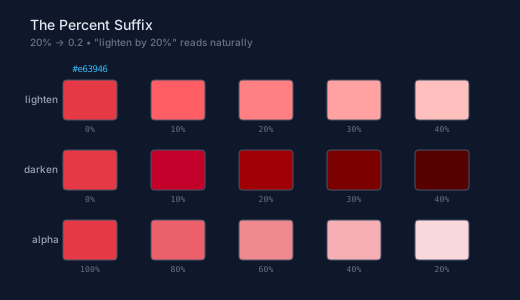
The % suffix converts a number to its decimal form: 20% becomes 0.2, 50% becomes 0.5. This reads naturally with color methods — "lighten by 20%" instead of "lighten by 0.2":
let c = #e63946;
let tint  = c.lighten(20%);      // 20% → 0.2
let shade = c.darken(15%);       // 15% → 0.15
let faded = c.alpha(50%);        // 50% → 0.5
let muted = c.desaturate(40%);   // 40% → 0.4
The percent suffix isn't limited to color methods — it works anywhere a number is expected. 50% is 0.5 whether it's a color alpha, a mix ratio, or a variable assignment.
Disambiguation: 20% (no space) is a percent literal. 20 % 5 (with spaces) is the modulus operator. Existing code that uses modulus with spaces continues to work unchanged.
// viewBox="0 0 520 300"
// Percent Tints — Using % suffix with color methods for tint/shade scales
// 20% becomes 0.2, reads naturally: "lighten by 20%"

// ═══════════════════════════════════════
// Background
// ═══════════════════════════════════════

let bg = PathLayer('bg') ${ fill: #0f172a; stroke: none; };
bg.apply { rect(0, 0, 520, 300) }

// ═══════════════════════════════════════
// Title
// ═══════════════════════════════════════

let title = TextLayer('title') ${
  font-family: system-ui, sans-serif;
  font-size: 14;
  fill: #e2e8f0;
  text-anchor: start;
};
title.apply {
  text(30, 30)`The Percent Suffix`
}

let subtitle = TextLayer('subtitle') ${
  font-family: system-ui, sans-serif;
  font-size: 10;
  fill: #64748b;
  text-anchor: start;
};
subtitle.apply {
  text(30, 46)`20% → 0.2  •  "lighten by 20%" reads naturally`
}

// ═══════════════════════════════════════
// Tint scale — lighten by 0% to 40%
// ═══════════════════════════════════════

let base = #e63946;

let tints = [
  base,
  (base).lighten(10%),
  (base).lighten(20%),
  (base).lighten(30%),
  (base).lighten(40%)
];
let tint_labels = ['0%', '10%', '20%', '30%', '40%'];

// ── Shade scale — darken by 0% to 40% ──

let shades = [
  base,
  (base).darken(10%),
  (base).darken(20%),
  (base).darken(30%),
  (base).darken(40%)
];
let shade_labels = ['0%', '10%', '20%', '30%', '40%'];

// ── Alpha scale — alpha from 100% to 20% ──

let alphas = [
  base,
  (base).alpha(80%),
  (base).alpha(60%),
  (base).alpha(40%),
  (base).alpha(20%)
];
let alpha_labels = ['100%', '80%', '60%', '40%', '20%'];

// ═══════════════════════════════════════
// Layout
// ═══════════════════════════════════════

let sx = 90;
let sp = 88;
let sw = 54;
let sh = 40;
let sr = 4;

let row_label = TextLayer('row-label') ${
  font-family: system-ui, sans-serif;
  font-size: 10;
  fill: #94a3b8;
  text-anchor: end;
};

let sw_label = TextLayer('sw-label') ${
  font-family: monospace;
  font-size: 8;
  fill: #64748b;
  text-anchor: middle;
};

// ── Row 1: Tints ────────────────────

let row1_y = 80;

row_label.apply {
  text(58, calc(row1_y + sh / 2 + 3))`lighten`
}

for ([color, i] in tints) {
  let x = calc(sx + i * sp);
  let swatch = PathLayer(`t_${i}`) ${ fill: color; stroke: #475569; stroke-width: 1; };
  swatch.apply { roundRect(calc(x - sw / 2), row1_y, sw, sh, sr) }
}

sw_label.apply {
  for ([name, i] in tint_labels) {
    text(calc(sx + i * sp), calc(row1_y + sh + 12))`${name}`
  }
}

// ── Row 2: Shades ───────────────────

let row2_y = 150;

row_label.apply {
  text(58, calc(row2_y + sh / 2 + 3))`darken`
}

for ([color, i] in shades) {
  let x = calc(sx + i * sp);
  let swatch = PathLayer(`d_${i}`) ${ fill: color; stroke: #475569; stroke-width: 1; };
  swatch.apply { roundRect(calc(x - sw / 2), row2_y, sw, sh, sr) }
}

sw_label.apply {
  for ([name, i] in shade_labels) {
    text(calc(sx + i * sp), calc(row2_y + sh + 12))`${name}`
  }
}

// ── Row 3: Alpha ────────────────────

let row3_y = 220;

row_label.apply {
  text(58, calc(row3_y + sh / 2 + 3))`alpha`
}

// White background behind alpha row so opacity gradient is visible
for ([_, i] in alphas) {
  let x = calc(sx + i * sp - sw / 2);
  let checker = PathLayer(`ck_${i}`) ${ fill: #ffffff; stroke: none; };
  checker.apply { roundRect(x, row3_y, sw, sh, sr) }
}

for ([color, i] in alphas) {
  let x = calc(sx + i * sp);
  let swatch = PathLayer(`a_${i}`) ${ fill: color; stroke: #475569; stroke-width: 1; };
  swatch.apply { roundRect(calc(x - sw / 2), row3_y, sw, sh, sr) }
}

sw_label.apply {
  for ([name, i] in alpha_labels) {
    text(calc(sx + i * sp), calc(row3_y + sh + 12))`${name}`
  }
}

// ═══════════════════════════════════════
// Base indicator
// ═══════════════════════════════════════

let base_ind = TextLayer('base-ind') ${
  font-family: monospace;
  font-size: 9;
  fill: #38bdf8;
  text-anchor: middle;
};
base_ind.apply {
  text(sx, calc(row1_y - 8))`#e63946`
}
Reactive Colors
Color literals compose naturally with Pathogen's CSSVar-backed reactive colors. Use a bare hex as the fallback value in Color(CSSVar(...)) to create colors that update at runtime when the CSS custom property changes:
let base = Color(CSSVar('--base-color', #0066ff));
let light = base.lighten(20%);
let comp = base.complement();
let triad = base.triadic();
Change --base-color and every derived value recalculates — lighten, complement, triadic harmony, everything. The compiler emits @property declarations so the browser knows these are interpolatable <color> values.
The first demo below shows a full reactive palette — lightness ramp, color transformations, and triadic harmony, all driven by a single CSS variable. Use the color picker to change --base-color and watch every swatch update:
// viewBox="0 0 520 340"
// Reactive Palette — CSSVar base color + hex literals + % suffix
// Change --base-color in the playground to recolor every swatch

// ═══════════════════════════════════════
// Background
// ═══════════════════════════════════════

let bg = PathLayer('bg') ${ fill: #0f172a; stroke: none; };
bg.apply { rect(0, 0, 520, 340) }

// ═══════════════════════════════════════
// Title
// ═══════════════════════════════════════

let title = TextLayer('title') ${
  font-family: system-ui, sans-serif;
  font-size: 14;
  fill: #e2e8f0;
  text-anchor: start;
};
title.apply {
  text(30, 30)`Reactive Palette`
}

let subtitle = TextLayer('subtitle') ${
  font-family: system-ui, sans-serif;
  font-size: 10;
  fill: #64748b;
  text-anchor: start;
};
subtitle.apply {
  text(30, 46)`Change --base-color to update all swatches`
}

// ═══════════════════════════════════════
// Reactive base color — try changing it!
// ═══════════════════════════════════════

let base = Color(CSSVar('--base-color', #0066ff));

// ── Derived palette ─────────────────

let darker  = base.darken(20%);
let dark    = base.darken(10%);
let light   = base.lighten(10%);
let lighter = base.lighten(20%);
let pale    = base.lighten(30%);

let comp     = base.complement();
let shifted  = base.hueShift(60);
let muted    = base.desaturate(50%);
let semi     = base.alpha(50%);

// ═══════════════════════════════════════
// Row 1: Lightness ramp
// ═══════════════════════════════════════

let sx = 65;
let sp = 80;
let sw = 54;
let sh = 44;
let sr = 5;

let row_label = TextLayer('row-label') ${
  font-family: system-ui, sans-serif;
  font-size: 10;
  fill: #94a3b8;
  text-anchor: end;
};

let sw_label = TextLayer('sw-label') ${
  font-family: monospace;
  font-size: 7;
  fill: #64748b;
  text-anchor: middle;
};

let row1_y = 80;
let ramp = [darker, dark, base, light, lighter, pale];
let ramp_names = ['-20%', '-10%', 'base', '+10%', '+20%', '+30%'];

row_label.apply {
  text(30, calc(row1_y + sh / 2 + 3))`light`
}

for ([color, i] in ramp) {
  let x = calc(sx + i * sp);
  let swatch = PathLayer(`r_${i}`) ${ fill: color; stroke: #475569; stroke-width: 1; };
  swatch.apply { roundRect(calc(x - sw / 2), row1_y, sw, sh, sr) }
}

sw_label.apply {
  for ([name, i] in ramp_names) {
    text(calc(sx + i * sp), calc(row1_y + sh + 12))`${name}`
  }
}

// ═══════════════════════════════════════
// Row 2: Transformations
// ═══════════════════════════════════════

let row2_y = 160;
let transforms = [base, comp, shifted, muted, semi];
let xform_names = ['base', 'complement', 'hue +60', 'desat 50%', 'alpha 50%'];

row_label.apply {
  text(30, calc(row2_y + sh / 2 + 3))`xform`
}

for ([color, i] in transforms) {
  let x = calc(sx + i * sp);
  let swatch = PathLayer(`x_${i}`) ${ fill: color; stroke: #475569; stroke-width: 1; };
  swatch.apply { roundRect(calc(x - sw / 2), row2_y, sw, sh, sr) }
}

sw_label.apply {
  for ([name, i] in xform_names) {
    text(calc(sx + i * sp), calc(row2_y + sh + 12))`${name}`
  }
}

// ═══════════════════════════════════════
// Row 3: Triadic harmony
// ═══════════════════════════════════════

let row3_y = 240;
let triad = base.triadic();

row_label.apply {
  text(30, calc(row3_y + sh / 2 + 3))`triad`
}

for ([color, i] in triad) {
  let x = calc(sx + i * sp);
  let swatch = PathLayer(`tri_${i}`) ${ fill: color; stroke: #475569; stroke-width: 1; };
  swatch.apply { roundRect(calc(x - sw / 2), row3_y, sw, sh, sr) }
}

let triad_names = ['0°', '+120°', '+240°'];
sw_label.apply {
  for ([name, i] in triad_names) {
    text(calc(sx + i * sp), calc(row3_y + sh + 12))`${name}`
  }
}

// ═══════════════════════════════════════
// Code annotation
// ═══════════════════════════════════════

let code_bg = PathLayer('code-bg') ${ fill: #1e293b; stroke: #334155; stroke-width: 1; };
code_bg.apply { roundRect(30, 300, 460, 28, 4) }

let code = TextLayer('code') ${
  font-family: monospace;
  font-size: 9;
  fill: #94a3b8;
  text-anchor: start;
};
code.apply {
  text(42, 318)`let base = Color(CSSVar('--base-color', #0066ff));`
}

let code_kw = TextLayer('code-kw') ${
  font-family: monospace;
  font-size: 9;
  fill: #c084fc;
  text-anchor: start;
};
code_kw.apply {
  text(42, 318)`let`
}

The second demo shows a tint/shade scale — seven lighten steps and seven darken steps from a single reactive base:
// viewBox="0 0 520 280"
// Reactive Tints — CSSVar + percent suffix for tint/shade scales
// Change --tint-color to update every row

// ═══════════════════════════════════════
// Background
// ═══════════════════════════════════════

let bg = PathLayer('bg') ${ fill: #0f172a; stroke: none; };
bg.apply { rect(0, 0, 520, 280) }

// ═══════════════════════════════════════
// Title
// ═══════════════════════════════════════

let title = TextLayer('title') ${
  font-family: system-ui, sans-serif;
  font-size: 14;
  fill: #e2e8f0;
  text-anchor: start;
};
title.apply {
  text(30, 30)`Reactive Tint / Shade Scale`
}

let subtitle = TextLayer('subtitle') ${
  font-family: system-ui, sans-serif;
  font-size: 10;
  fill: #64748b;
  text-anchor: start;
};
subtitle.apply {
  text(30, 46)`Change --tint-color — every swatch updates`
}

// ═══════════════════════════════════════
// Reactive base
// ═══════════════════════════════════════

let base = Color(CSSVar('--tint-color', #e63946));

// ═══════════════════════════════════════
// Layout
// ═══════════════════════════════════════

let sx = 70;
let sp = 58;
let sw = 44;
let sh = 44;
let sr = 4;
let steps = 7;

let row_label = TextLayer('row-label') ${
  font-family: system-ui, sans-serif;
  font-size: 10;
  fill: #94a3b8;
  text-anchor: end;
};

let pct_label = TextLayer('pct-label') ${
  font-family: monospace;
  font-size: 7;
  fill: #64748b;
  text-anchor: middle;
};

// ═══════════════════════════════════════
// Row 1: Lighten 0% → 60%
// ═══════════════════════════════════════

let row1_y = 76;

row_label.apply {
  text(42, calc(row1_y + sh / 2 + 3))`lighten`
}

let tints = [
  base,
  base.lighten(10%),
  base.lighten(20%),
  base.lighten(30%),
  base.lighten(40%),
  base.lighten(50%),
  base.lighten(60%)
];

for ([color, i] in tints) {
  let x = calc(sx + i * sp);
  let swatch = PathLayer(`lt_${i}`) ${ fill: color; stroke: #475569; stroke-width: 1; };
  swatch.apply { roundRect(calc(x - sw / 2), row1_y, sw, sh, sr) }
}

let tint_pcts = ['0%', '10%', '20%', '30%', '40%', '50%', '60%'];
pct_label.apply {
  for ([pct, i] in tint_pcts) {
    text(calc(sx + i * sp), calc(row1_y + sh + 11))`${pct}`
  }
}

// ═══════════════════════════════════════
// Row 2: Darken 0% → 60%
// ═══════════════════════════════════════

let row2_y = 152;

row_label.apply {
  text(42, calc(row2_y + sh / 2 + 3))`darken`
}

let shades = [
  base,
  base.darken(10%),
  base.darken(20%),
  base.darken(30%),
  base.darken(40%),
  base.darken(50%),
  base.darken(60%)
];

for ([color, i] in shades) {
  let x = calc(sx + i * sp);
  let swatch = PathLayer(`dk_${i}`) ${ fill: color; stroke: #475569; stroke-width: 1; };
  swatch.apply { roundRect(calc(x - sw / 2), row2_y, sw, sh, sr) }
}

let shade_pcts = ['0%', '10%', '20%', '30%', '40%', '50%', '60%'];
pct_label.apply {
  for ([pct, i] in shade_pcts) {
    text(calc(sx + i * sp), calc(row2_y + sh + 11))`${pct}`
  }
}

// ═══════════════════════════════════════
// Code annotation
// ═══════════════════════════════════════

let code_bg = PathLayer('code-bg') ${ fill: #1e293b; stroke: #334155; stroke-width: 1; };
code_bg.apply { roundRect(30, 228, 460, 40, 4) }

let code = TextLayer('code') ${
  font-family: monospace;
  font-size: 9;
  fill: #94a3b8;
  text-anchor: start;
};
code.apply {
  text(42, 245)`let base = Color(CSSVar('--tint-color', #e63946));`
  text(42, 259)`let tint = base.lighten(20%);`
}

let code_kw = TextLayer('code-kw') ${
  font-family: monospace;
  font-size: 9;
  fill: #c084fc;
  text-anchor: start;
};
code_kw.apply {
  text(42, 245)`let`
  text(42, 259)`let`
}

let code_comment = TextLayer('code-comment') ${
  font-family: monospace;
  font-size: 9;
  fill: #64748b;
  text-anchor: start;
};
code_comment.apply {
  text(274, 259)`// 20% → 0.2`
}

What Still Needs Color()
The Color() wrapper isn't going away. You still need it for:
- Named colors:
Color('coral'),Color('dodgerblue')— all 148 CSS named colors - Direct OKLCH construction:
Color(0.6, 0.15, 30)— numeric L, C, H values - String-based input:
Color('rgb(255, 0, 0)')— when the color format is in a string variable
Everything is backwards-compatible. Existing Color('#cc0000') calls continue to work — Color() now accepts a bare ColorValue as a pass-through.
Try It
Open the Pathogen playground, start from #0066ff, and build your own palette — lighten, shift hue, take the complement. The full API reference is in the Color documentation, and the syntax details are in the Color Literals and Percent Suffix sections.