Cutting Paths: Slicing Shapes Apart with cut()
Part 5 of 5 in our series on PathBlock extensions.
Series: PathBlock Extensions
- Introduction to PathBlocks
- Exploring Parametric Sampling
- Fillets and Chamfers
- Boolean Operations
- Cutting Paths (this post)
Prerequisites: This post assumes familiarity with PathBlock basics — the
@{}sigil,.draw(), and.project(). If you're new to Pathogen, start with Introduction to PathBlocks. The Boolean Operations post is useful contrast but not required.
Boolean operations combine two closed shapes into one. cut() goes the other direction: it takes a shape apart.
You draw a second PathBlock whose strokes act as a knife — open lines and curves, as many as you like — and shape.cut(knife) hands back an array of pieces. Each piece is a complete PathBlock, sealed shut along the lines that cut it. And because every piece is a real PathBlock, nearly everything you already know applies: give each piece its own fill, measure it with boundingBox(), offset it, rotate it, cut it again. Since this post first ran, labels made the trip too: pieces keep the subject's as segment(...) names on their surviving edges, and every healed seam answers segmentAll('cut') — The Cutting Room series is four projects built on exactly that.
One rectangle, one stroke
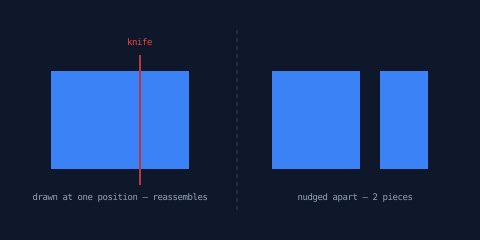
The barest possible picture: a rectangle, a single straight stroke through it, two pieces.
let box = @{
  h 140
  v 100
  h -140
  z
};
let knife = @{
  m 90 -15
  l 0 130
};
let pieces = box.cut(knife);
log(pieces.length);    // 2
Two things to notice before anything fancier. First, the knife overshoots the box on both ends — a stroke cuts wherever it fully crosses the shape, so the safe habit is to draw strokes a little longer than they need to be. Second, the pieces come back exactly where they were: drawing them all at the same position reassembles the rectangle, and nudging each one apart produces an exploded view. That's the left and right halves of this demo — same pieces, two ways of placing them:
define ViewBox(0, 0, 480, 240);
// The barest picture: one rectangle, one straight stroke, two pieces.
// Left: the pieces drawn at the same position — the shape reassembles.
// Right: the same pieces pushed apart to show the cut.

let bg = PathLayer('bg') #{
  fill: #0f172a;
  stroke: none;
};
layer('bg').apply {
  rect(0, 0, 480, 240);
}

let scene = GroupLayer('scene') #{};
let pieceLayer = PathLayer('pieces') #{
  fill: #3b82f6;
  stroke: #0f172a;
  stroke-width: 2;
};
let knifeLayer = PathLayer('knife') #{
  stroke: #ef4444;
  stroke-width: 1.5;
  fill: none;
};
let divider = PathLayer('divider') #{
  stroke: #334155;
  stroke-width: 1;
  stroke-dasharray: 4 4;
  fill: none;
};
let labels = TextLayer('labels') #{
  font-family: monospace;
  font-size: 9;
  fill: #94a3b8;
  text-anchor: middle;
};
let knifeLabel = TextLayer('knife-label') #{
  font-family: monospace;
  font-size: 9;
  fill: #ef4444;
  text-anchor: middle;
};
scene.append(pieceLayer,
    knifeLayer,
    divider,
    labels,
    knifeLabel);

let box = @{
  h 140
  v 100
  h -140
  z
};
let knife = @{
  m 90 -15
  l 0 130
};
let pieces = box.cut(knife);
let kx = 90;

pieceLayer.apply {
  // Reassembled: every piece at one position.
  for ([p, i] in pieces) {
    M 50 70 p.draw()
  }
  // Exploded: each piece nudged away from the cut line.
  for ([p, i] in pieces) {
    let bb = p.boundingBox();
    let side = calc(bb.x + bb.width / 2 < kx ? -9 : 9);
    M calc(280 + side) 70 p.draw()
  }
}

knifeLayer.apply {
  knife.drawTo(50, 70);
}

divider.apply {
  M 237 30
  L 237 210
}

labels.apply {
  text(120, 200)`drawn at one position — reassembles`;
  text(355, 200)`nudged apart — 2 pieces`;
}
knifeLabel.apply {
  text(140, 45)`knife`;
}
The cut that started it
This feature began with a sketch: the letter 'O', one two-stroke knife, two positions. On the left, both strokes cross the whole glyph — four pieces. On the right, the same knife sits so its strokes run into the letter's counter (the hole in the middle) and stop there — they only sever the left ring, so you get two pieces.
define ViewBox(0, 0, 620, 290);
// The example that motivated cut(): the same two-stroke knife, two positions.
// Left: both strokes cross the whole 'O' — four pieces.
// Right: the knife shifted so its strokes dead-end inside the counter —
// they sever only the left ring, leaving two pieces.

@font "Playfair Display" 700;

let bg = PathLayer('bg') #{
  fill: #0f172a;
  stroke: none;
};
layer('bg').apply {
  rect(0, 0, 620, 290);
}

let scene = GroupLayer('scene') #{};
let pieceLayer = PathLayer('pieces') #{
  fill: #3b82f6;
  stroke: #0f172a;
  stroke-width: 2;
};
let knifeLayer = PathLayer('knife') #{
  stroke: #ef4444;
  stroke-width: 1.2;
  fill: none;
};
let divider = PathLayer('divider') #{
  stroke: #334155;
  stroke-width: 1;
  stroke-dasharray: 4 4;
  fill: none;
};
let labels = TextLayer('labels') #{
  font-family: monospace;
  font-size: 9;
  fill: #94a3b8;
  text-anchor: middle;
};
let knifeLabel = TextLayer('knife-label') #{
  font-family: monospace;
  font-size: 9;
  fill: #ef4444;
  text-anchor: middle;
};
scene.append(pieceLayer,
    knifeLayer,
    divider,
    labels,
    knifeLabel);

let styles = #{
  font-family: "Playfair Display";
  font-weight: 700;
  font-size: 200;
};
let glyphs = PathBlock.fromGlyph('O', styles);
let o = glyphs[0];

// Knife in glyph-local coordinates: two strokes converging to the right.
let knife = @{
  m -20 -125
  l 190 45
  m -190 55
  l 190 -35
};

let x1 = 75;
let x2 = 390;
let y = 220;
let bb = o.boundingBox();
let cx = calc(bb.x + bb.width / 2);
let cy = calc(bb.y + bb.height / 2);

fn drawExploded(pieces, ox, oy) {
  for ([p, i] in pieces) {
    let pb = p.boundingBox();
    let px = calc(pb.x + pb.width / 2 - cx);
    let py = calc(pb.y + pb.height / 2 - cy);
    let len = calc(sqrt(px * px + py * py) + 0.001);
    M calc(ox + px / len * 14) calc(oy + py / len * 14) p.draw()
  }
}

let piecesL = o.cut(knife);
let piecesR = o.cut(knife.project(-95, 0));

pieceLayer.apply {
  drawExploded(piecesL, x1, y);
  drawExploded(piecesR, x2, y);
}

knifeLayer.apply {
  knife.drawTo(x1, y);
  knife.drawTo(calc(x2 - 95), y);
}

divider.apply {
  M 262 30
  L 262 260
}

labels.apply {
  text(150, 262)`4 pieces`;
  text(465, 262)`2 pieces — strokes end in the counter`;
}
knifeLabel.apply {
  text(48, 82)`knife`;
}
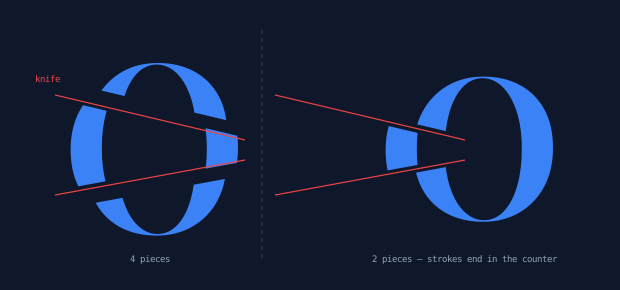
The right-hand case is worth a second look. Those strokes look like they stop mid-letter — but the middle of an 'O' is a hole, and the part of a stroke that lands in a hole (or outside the shape) is simply ignored. Each stroke crosses the left ring completely, outer edge to inner edge, so the left ring severs cleanly. Behind it is the rule the whole feature is built on: a stroke must fully cross material to cut it — one that dead-ends inside solid material cuts nothing.
This sample also shows how a knife is positioned. Both blocks overlay in block-local coordinates, exactly like the boolean operations, and you slide the knife with project(): the right-hand cut is o.cut(knife.project(-95, 0)) — the same knife, 95 units further left relative to the glyph.
What doesn't cut
Naming the sharp edges now, before the pretty pictures:
- Dead-end strokes. As above — a stroke that stops inside solid material leaves that region whole.
cut()never invents geometry to finish your stroke for you. - Almost-touching endpoints are forgiven. If a stroke's endpoint lands on the boundary — or within about half a unit of it at typical drawing scales — it snaps onto the boundary and the cut completes there, like a T-junction. The same forgiveness applies to strokes passing through a corner vertex.
- Grazes and edge-riders. A stroke that only touches the boundary tangentially, or runs along an edge without crossing it, doesn't cut.
- Piece order is deterministic but unspecified. The same program always produces the same array, but don't assume which index is which piece — inspect pieces (
boundingBox(),subPathCount) or just iterate.
The full contract lives in the Cutting Paths documentation.
Cutting through holes
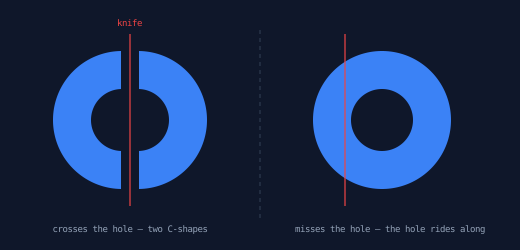
Shapes with holes — a donut, a glyph with a counter — cut the way you'd hope. When the knife crosses the hole, each piece's boundary heals across both contours: outer edge, cut line, inner edge, cut line. A donut split through its middle becomes two C-shapes, each a single clean closed contour.
And when the knife misses the hole? The hole isn't lost — it rides along as an extra subpath (a separate contour inside the same piece) in whichever piece contains it. Cut a sliver off a donut and the big remaining piece still has its hole; each piece's contours property exposes that structure when you want to look inside.
define ViewBox(0, 0, 520, 250);
// Cutting multi-contour shapes. Left: the knife crosses the donut AND its
// hole — two C-shapes whose boundaries heal across both contours.
// Right: the knife misses the hole — a lens comes off, and the hole rides
// along inside the big remaining piece.

let bg = PathLayer('bg') #{
  fill: #0f172a;
  stroke: none;
};
layer('bg').apply {
  rect(0, 0, 520, 250);
}

let scene = GroupLayer('scene') #{};
let pieceLayer = PathLayer('pieces') #{
  fill: #3b82f6;
  stroke: #0f172a;
  stroke-width: 2;
};
let knifeLayer = PathLayer('knife') #{
  stroke: #ef4444;
  stroke-width: 1.2;
  fill: none;
};
let divider = PathLayer('divider') #{
  stroke: #334155;
  stroke-width: 1;
  stroke-dasharray: 4 4;
  fill: none;
};
let labels = TextLayer('labels') #{
  font-family: monospace;
  font-size: 9;
  fill: #94a3b8;
  text-anchor: middle;
};
let knifeLabel = TextLayer('knife-label') #{
  font-family: monospace;
  font-size: 9;
  fill: #ef4444;
  text-anchor: middle;
};
scene.append(pieceLayer,
    knifeLayer,
    divider,
    labels,
    knifeLabel);

let big = @{
  circle(0, 0, 70);
};
let small = @{
  circle(0, 0, 30);
};

fn drawSplit(pieces, centerX) {
  for ([p, i] in pieces) {
    let pb = p.boundingBox();
    let side = calc(pb.x + pb.width / 2 < centerX ? -8 : 8);
    // Cut pieces come back projected, already where they sit in the donut, so
    // the exploded view nudges each one from its own position rather than
    // seating the pen and letting a leading `m` carry it.
    let at = p.startPoint;
    p.drawTo(calc(at.x + side), at.y);
  }
}

// Left donut, centered (130, 120): knife straight through the hole.
let donutL = big.project(130, 120).difference(small.project(130, 120));
let knifeL = @{
  m 130 34
  l 0 172
};
let piecesL = donutL.cut(knifeL);
pieceLayer.apply {
  drawSplit(piecesL, 130);
}

// Right donut, centered (390, 120): knife 45 units off-center misses the
// 30-unit hole entirely.
let donutR = big.project(390, 120).difference(small.project(390, 120));
let knifeR = @{
  m 345 34
  l 0 172
};
let piecesR = donutR.cut(knifeR);
pieceLayer.apply {
  drawSplit(piecesR, 345);
}

knifeLayer.apply {
  knifeL.drawTo(0, 0);
  knifeR.drawTo(0, 0);
}

divider.apply {
  M 260 30
  L 260 220
}

labels.apply {
  text(130, 232)`crosses the hole — two C-shapes`;
  text(390, 232)`misses the hole — the hole rides along`;
}
knifeLabel.apply {
  text(130, 26)`knife`;
}
Cookie cutters
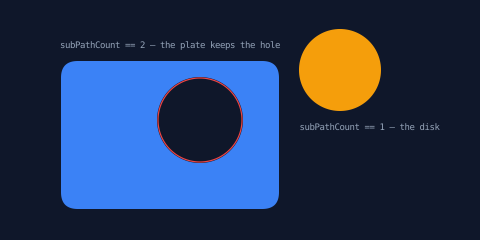
Every stroke so far has been open. A closed stroke — a loop — acts as a cookie cutter: it stamps the region inside it out of the shape. You get the stamped piece and the shape it left behind, which now carries a hole.
let plate = @{ roundRect(0, 0, 220, 150, 18); };
let stamp = @{ circle(0, 0, 42); };
let pieces = plate.cut(stamp.project(140, 60));
Since piece order is unspecified, this demo tells the pieces apart by structure instead: the stamped disk has one subpath (subPathCount == 1), the plate-with-a-hole has two. That's usually the most robust way to route pieces to different treatments.
define ViewBox(0, 0, 480, 240);
// A closed cutter loop is a cookie cutter: it stamps the region inside it
// out of the shape. The stamped disk lifts away; the plate keeps the hole.

let bg = PathLayer('bg') #{
  fill: #0f172a;
  stroke: none;
};
layer('bg').apply {
  rect(0, 0, 480, 240);
}

let scene = GroupLayer('scene') #{};
let plateLayer = PathLayer('plate') #{
  fill: #3b82f6;
  stroke: #0f172a;
  stroke-width: 2;
};
let cookieLayer = PathLayer('cookie') #{
  fill: #f59e0b;
  stroke: #0f172a;
  stroke-width: 2;
};
let knifeLayer = PathLayer('knife') #{
  stroke: #ef4444;
  stroke-width: 1.2;
  fill: none;
};
let labels = TextLayer('labels') #{
  font-family: monospace;
  font-size: 9;
  fill: #94a3b8;
  text-anchor: middle;
};
scene.append(plateLayer, cookieLayer, knifeLayer, labels);

let plate = @{
  roundRect(0,
      0,
      220,
      150,
      18);
};
let stamp = @{
  circle(0, 0, 42);
};

let pieces = plate.cut(stamp.project(140, 60));

for ([p, i] in pieces) {
  if (p.subPathCount == 1) {
    // The stamped-out disk: lift it up and away.
    cookieLayer.apply {
      M 200 10 p.draw()
    }
  }
  if (p.subPathCount == 2) {
    // The plate, now carrying the hole.
    plateLayer.apply {
      M 60 60 p.draw()
    }
  }
}

// The cutter loop itself, traced where it cut the plate.
knifeLayer.apply {
  stamp.drawTo(200, 120);
}

labels.apply {
  text(170, 48)`subPathCount == 2 — the plate keeps the hole`;
  text(370, 130)`subPathCount == 1 — the disk`;
}
One nicety: the loop doesn't have to be authored as a single closed subpath. Separate strokes whose endpoints meet are recognized as a loop geometrically — draw four sides in any order and they still stamp.
Severing open paths
Everything above cut closed outlines. Open paths cut too, with simpler results: each crossing severs the path, and you get the open fragments back. No healing — there's no interior to close.
define ViewBox(0, 0, 480, 170);
// Open paths cut too: each crossing severs the path into open fragments —
// no healing, since there's no interior to close. Nine vertical strokes
// turn one long wave into alternating-color dashes.

let bg = PathLayer('bg') #{
  fill: #0f172a;
  stroke: none;
};
layer('bg').apply {
  rect(0, 0, 480, 170);
}

let scene = GroupLayer('scene') #{};
let warm = PathLayer('warm') #{
  stroke: #f59e0b;
  stroke-width: 5;
  fill: none;
  stroke-linecap: round;
};
let cool = PathLayer('cool') #{
  stroke: #3b82f6;
  stroke-width: 5;
  fill: none;
  stroke-linecap: round;
};
let knifeLayer = PathLayer('knife') #{
  stroke: #ef4444;
  stroke-width: 0.75;
  fill: none;
  opacity: 0.55;
};
let labels = TextLayer('labels') #{
  font-family: monospace;
  font-size: 9;
  fill: #94a3b8;
  text-anchor: middle;
};
scene.append(warm, cool, knifeLayer, labels);

let wave = @{
  q 50 -70 100 0
  q 50 70 100 0
  q 50 -70 100 0
  q 50 70 100 0
};

let knives = @{
  m 40 -90
  for (i in 0..8) {
    l 0 180
    m 40 -180
  }
};

// Shorter display copy of the knives, trimmed to the canvas.
let knifeMarks = @{
  m 40 -45
  for (i in 0..8) {
    l 0 90
    m 40 -90
  }
};

let parts = wave.cut(knives);

for ([p, i] in parts) {
  if (calc(i % 2) == 0) {
    warm.apply {
      M 40 82 p.draw()
    }
  }
  if (calc(i % 2) == 1) {
    cool.apply {
      M 40 82 p.draw()
    }
  }
}

knifeLayer.apply {
  knifeMarks.drawTo(40, 82);
}

labels.apply {
  text(240, 152)`9 knives -> 10 fragments`;
}
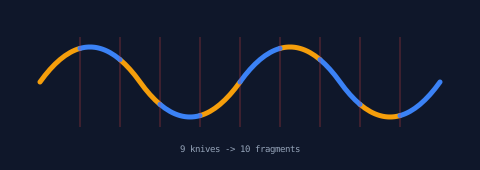
Here one long quadratic wave is crossed by nine vertical strokes and comes back as ten open fragments, drawn alternately from two differently-styled layers. (Alternating by index is fine here — it only needs the order to be stable, which determinism guarantees. It's assigning meaning to a particular index that the earlier gotcha warns against.) The payoff: real, individually addressable dash pieces that follow the curve, not a stroke-dasharray illusion.
Finale: shattering a wordmark
Everything in one place: the full "pathogen.studio" wordmark, every glyph shattered.
define ViewBox(0, 0, 960, 170);
// The finale: "pathogen.studio", every glyph shattered. Each letter is laid
// out by its advance width, cut with its own two-stroke knife (angles and
// positions varied deterministically with hashRange), and every fragment
// drifts outward and rotates a little — offsets and spins are per-piece,
// because each piece is a full PathBlock.

@font "Baumans";

let bg = PathLayer('bg') #{
  fill: #0f172a;
  stroke: none;
};
layer('bg').apply {
  rect(0, 0, 960, 170);
}

let wordmark = GroupLayer('wordmark') #{};
let shard0 = PathLayer('shard0') #{
  fill: #3b82f6;
  stroke: #0f172a;
  stroke-width: 1.5;
};
let shard1 = PathLayer('shard1') #{
  fill: #a78bfa;
  stroke: #0f172a;
  stroke-width: 1.5;
};
let shard2 = PathLayer('shard2') #{
  fill: #f59e0b;
  stroke: #0f172a;
  stroke-width: 1.5;
};
wordmark.append(shard0, shard1, shard2);

let styles = #{
  font-family: Baumans;
  font-size: 120;
};
let glyphs = PathBlock.fromGlyph('pathogen.studio', styles);

let x = 50;
let baseline = 106;

for ([g, i] in glyphs) {
  let bb = g.boundingBox();
  let w = bb.width;
  let gcx = calc(bb.x + w / 2);
  let gcy = calc(bb.y + bb.height / 2);

  // A two-stroke knife per glyph: one steep stroke, one shallow stroke,
  // both overshooting the glyph so every crossing is a full cut.
  let vx = calc(w * hashRange(i, 0.3, 0.7));
  let vs = hashRange(i, -24, 24, 5);
  let hy = calc(bb.y + bb.height * hashRange(i, 0.3, 0.7, 9));
  let ht = hashRange(i, -16, 16, 13);
  let knife = @{
    m vx -130
    l vs 175
    m calc(-15 - vx - vs) calc(hy - ht / 2 - 45)
    l calc(w + 30) ht
  };

  let pieces = g.cut(knife);

  for ([p, j] in pieces) {
    let n = calc(i * 41 + j);
    let pb = p.boundingBox();
    let px = calc(pb.x + pb.width / 2 - gcx);
    let py = calc(pb.y + pb.height / 2 - gcy);
    let len = calc(sqrt(px * px + py * py) + 0.001);
    let dx = calc(px / len * 3.5 + hashRange(n, -1.5, 1.5, 17));
    let dy = calc(py / len * 3.5 + hashRange(n, -1.5, 1.5, 23));
    // rotateAtVertexIndex rebases its result to the pivot vertex, so add
    // the pivot's glyph-local position back when placing the shard.
    let pivot = p.vertices[0];
    let rp = p.rotateAtVertexIndex(0, hashRange(n, -0.07, 0.07, 29));
    let sx = calc(x + pivot.x + dx);
    let sy = calc(baseline + pivot.y + dy);

    // Round-robin tint by computed layer name — no if-chain needed.
    layer(`shard${n % 3}`).apply {
      M sx sy rp.draw()
    }
  }


  x = calc(x + g.advanceWidth);
}

The composition stacks four ideas from this series:
- Layout — each glyph comes from
PathBlock.fromGlyphand is placed by accumulatingadvanceWidth, the same technique as the glyph extraction post. - A knife per glyph — two strokes whose position and slant vary per letter via
hashRange(a deterministic random pick — same inputs, same answer, forever), so every glyph shatters differently but deterministically: the composition renders identically on every compile. - Per-piece drift — each fragment moves a few units outward from its glyph's center, plus a little hashed jitter.
- Per-piece rotation — each fragment turns up to ±4° with
rotateAtVertexIndex.
One honest gotcha from building it: like the other transforms, rotateAtVertexIndex normalizes its result to start at the origin — the rotated piece forgets where it lived inside its glyph. The fix is to read the pivot's position first (p.vertices[0]) and add it back when placing the shard. The sample's comments show the pattern; the first draft without it rendered the wordmark as very legible confetti. (The newer rotate(angle, origin) is frame-preserving and skips this bookkeeping entirely — the jigsaw post shows the two-line version.)
Where to go next
The Cutting Paths documentation has the full behavior contract — tolerances, the degenerate cases, and what happens to mixed open-and-closed subjects. The Boolean Operations post covers the combining half of this toolbox: union, difference, intersection, and xor.
And since every piece is a PathBlock, the rest of the series applies to each one: sample along a piece's edge, round a piece's corners, query the labels it kept and the seams it gained, or cut the pieces again.