Jigsaw: Pieces That Know Their Own Edges
Part 2 of 4 in The Cutting Room — projects that put cut() and
segment labels to work together.
Series: The Cutting Room
- Papercraft — cut lines, fold lines, and glue tabs from one plate
- Jigsaw (this post) — wavy knives, piece identity, and a scattered puzzle
- Garment patterns — named edges, seam allowances, and notches
- Stained glass — tinted panes, leading, and a rose window
Prerequisites:
PathBlock.cut()and segment labels. Part 1's seam-stroking idiom — project the piece, loopsegmentAll('cut'), draw each seam on itself — is used here without re-introduction.
What it does
A jigsaw puzzle is a shape whose cuts are the product. Nobody looks at the rectangle; everyone looks at the wiggle. And because a Pathogen knife is an ordinary path, the wiggle is yours to author: a cubic knife cuts a cubic seam, and the healed edges on both sides are exact copies of the arc the knife took through the material.
This post adds three tools to part 1's kit:
- Knife design. Nubs, waves, and hooks are plain
ccommands in the cutter block. Whatever you can draw, you can cut along. - Classification by label. Label the plate's rim before cutting,
and
segmentAll('rim').lengthsorts border pieces from interior pieces with no geometry tests. rotate(angle, origin). Frame-preserving rotation spins a piece around any pivot — its own center, say — with no re-basing and no pivot compensation afterward.
Why you'd use it
The same reason the puzzle industry uses dies instead of rulers: the interesting cut is curved, interlocking, and repeated — miserable to construct by intersection math, trivial to draw once as a stroke. Cut geometry you author once multiplies across every piece, and the seams come back queryable, so the decoration (registration marks, sorting, scattering) is a loop, not a spreadsheet. The classification idiom:
if (piece.segmentAll('rim').length > 0) {
  // this piece kept some of the plate's labeled border
}
Example 1 — The knife is a path
One lazy S-curve, dashed red over a ghost of the plate on the left, and
the two pieces it makes on the right. The amber strokes are each
piece's segmentAll('cut') — notice they are the same curve as the
knife, clipped to the material it actually crossed.
//-- The knife is a path, so curves cut curves: a lazy S-wave slices the
//-- plate, the pieces drift apart, and each healed seam — stroked amber —
//-- is an exact copy of the knife's arc through the material.

define ViewBox(0, 0, 480, 230);

let bg = PathLayer('bg') #{
  fill: #0f172a;
  stroke: none;
};
layer('bg').apply {
  rect(0, 0, 480, 230);
}

let scene = GroupLayer('scene') #{};
let knifeLayer = PathLayer('knife') #{
  stroke: #ef4444;
  stroke-width: 1.2;
  fill: none;
  stroke-dasharray: 2 3;
};
let pieceLayer = PathLayer('pieces') #{
  fill: #e7dfd0;
  stroke: #0f172a;
  stroke-width: 2;
};
let seamLayer = PathLayer('seams') #{
  stroke: #f59e0b;
  stroke-width: 2.2;
  fill: none;
  stroke-linecap: round;
};
let labels = TextLayer('labels') #{
  font-family: monospace;
  font-size: 9;
  fill: #94a3b8;
  text-anchor: middle;
};
scene.append(knifeLayer, pieceLayer, seamLayer, labels);

let plate = @{
  h 150
  v 110
  h -150
  z
};
let knife = @{
  m 80 -15
  c 34 44 -34 82 8 140
};
let pieces = plate.cut(knife);

// The knife's full arc over a ghost of the plate — the overshoot on
// both ends is what makes it a complete cut.
let ghost = PathLayer('ghost') #{
  stroke: #334155;
  stroke-width: 1;
  stroke-dasharray: 3 4;
  fill: none;
};
scene.append(ghost);
ghost.apply {
  plate.drawTo(30, 45);
}
knifeLayer.apply {
  knife.drawTo(30, 45);
}

for (piece in pieces) {
  let bounds = piece.boundingBox();
  let side = calc(bounds.x + bounds.width / 2 < 80 ? -26 : 26);
  let placeX = calc(255 + side);
  pieceLayer.apply {
    M placeX 45 piece.draw()
  }
  let placed = piece.project(placeX, 45);
  seamLayer.apply {
    for (seam in placed.segmentAll('cut')) {
      seam.draw();
    }
  }
}

labels.apply {
  text(118, 205)`the knife`;
  text(300, 205)`the pieces — seams echo the knife`;
}
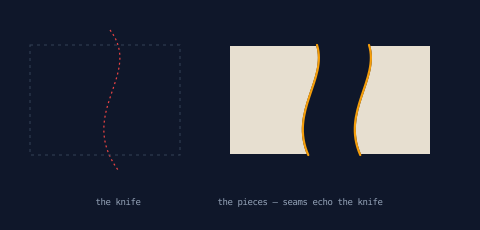
The knife overshoots the plate on both ends — a knife has to fully cross material to cut (part 5 of the PathBlock series covers the rules) — and the seams show only the part that drew blood.
Example 2 — The interlocking nub
The jigsaw signature. Halfway down a straight knife, two cubics bulge out into a knob with a narrow neck, then rejoin the line. One cut, two pieces: the left one wears the knob, the right one the socket, and both seams are the same mushroom silhouette.
//-- The interlocking nub: two cubics bulge the knife into a knob with a
//-- narrow neck. Cut once and the pieces come apart wearing matching
//-- seams — one knob, one socket, from the same stroke.

define ViewBox(0, 0, 480, 250);

let bg = PathLayer('bg') #{
  fill: #0f172a;
  stroke: none;
};
layer('bg').apply {
  rect(0, 0, 480, 250);
}

let scene = GroupLayer('scene') #{};
let knifeLayer = PathLayer('knife') #{
  stroke: #ef4444;
  stroke-width: 1.2;
  fill: none;
  stroke-dasharray: 2 3;
};
let pieceLayer = PathLayer('pieces') #{
  fill: #e7dfd0;
  stroke: #0f172a;
  stroke-width: 2;
};
let seamLayer = PathLayer('seams') #{
  stroke: #f59e0b;
  stroke-width: 2.2;
  fill: none;
  stroke-linecap: round;
};
let labels = TextLayer('labels') #{
  font-family: monospace;
  font-size: 9;
  fill: #94a3b8;
  text-anchor: middle;
};
scene.append(knifeLayer, pieceLayer, seamLayer, labels);

let plate = @{
  h 120
  v 150
  h -120
  z
};
// A vertical knife with a knob halfway down: approach, then two cubics
// swing out into a bulb that spreads wider than the 16-unit neck it
// hangs from, and rejoin the line below.
let nubKnife = @{
  m 60 -15
  l 0 74
  c 8 -6 16 -3 16 8
  c 0 11 -8 14 -16 8
  l 0 90
};
let pieces = plate.cut(nubKnife);

knifeLayer.apply {
  nubKnife.drawTo(50, 50);
}

for (piece in pieces) {
  let bounds = piece.boundingBox();
  let side = calc(bounds.x + bounds.width / 2 < 60 ? -22 : 22);
  let placeX = calc(290 + side);
  pieceLayer.apply {
    M placeX 50 piece.draw()
  }
  let placed = piece.project(placeX, 50);
  seamLayer.apply {
    for (seam in placed.segmentAll('cut')) {
      seam.draw();
    }
  }
}

labels.apply {
  text(115, 230)`the nub knife`;
  text(320, 230)`knob meets socket`;
}
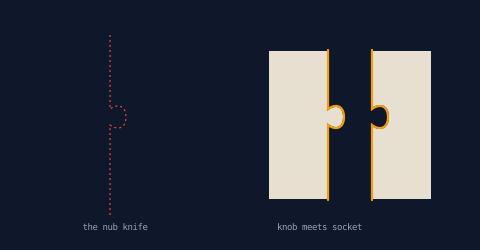
There is no special interlock feature here — that is the point. The nub is knife authorship, nothing more, which means your puzzle's edge style is a design decision you make in path commands.
Example 3 — Which pieces touch the frame?
Puzzle solvers sort edge pieces first, and labels let the program do
the same. The plate names its entire boundary as segment('rim')
before four wavy knives make a 3×3 grid. Afterward, one question per
piece — did you keep any rim? — splits tray pieces from the one
interior piece, tinted amber. The teal strokes make the mechanism
visible: they are each piece's inherited rim runs, the very label the
classification asked about.
//-- Which pieces touch the frame? Label the plate's rim before cutting a
//-- 3x3 wavy grid, and afterward each piece answers for itself: rim run
//-- kept = tray piece (paper), rim count zero = the one that falls out.

define ViewBox(0, 0, 480, 300);

let bg = PathLayer('bg') #{
  fill: #0f172a;
  stroke: none;
};
layer('bg').apply {
  rect(0, 0, 480, 300);
}

let scene = GroupLayer('scene') #{};
let framePieces = PathLayer('frame-pieces') #{
  fill: #e7dfd0;
  stroke: #0f172a;
  stroke-width: 2;
};
let middlePieces = PathLayer('middle-pieces') #{
  fill: #f59e0b;
  stroke: #0f172a;
  stroke-width: 2;
};
let rimRuns = PathLayer('rim-runs') #{
  stroke: #2dd4bf;
  stroke-width: 3;
  fill: none;
  stroke-linecap: round;
};
let labels = TextLayer('labels') #{
  font-family: monospace;
  font-size: 9;
  fill: #94a3b8;
  text-anchor: middle;
};
scene.append(framePieces, middlePieces, rimRuns, labels);

let plate = @{
  h 198 as segment('rim');
  v 198 as segment('rim');
  h -198 as segment('rim');
  z as segment('rim')
};
// One vertical and one horizontal wavy knife per lane — each knife its
// own block, no chained-move arithmetic between strokes.
let knives = [];
for (k in 0..1) {
  let lane = calc(66 + k * 66);
  knives.push(@{
    m lane -15
    c 18 60 -18 118 6 228
  });
  knives.push(@{
    m -15 lane
    c 60 18 118 -18 228 6
  });
}
let pieces = plate.cut(knives);
let originX = 141;
let originY = 40;

let plateBB = plate.boundingBox();
let plateCenterX = calc(plateBB.x + plateBB.width / 2);
let plateCenterY = calc(plateBB.y + plateBB.height / 2);
for (piece in pieces) {
  // Small drift along the ray to each piece's bounding-box center so
  // every edge shows.
  let bounds = piece.boundingBox();
  let dx = calc(bounds.x + bounds.width / 2 - plateCenterX);
  let dy = calc(bounds.y + bounds.height / 2 - plateCenterY);
  let len = calc(sqrt(dx * dx + dy * dy) + 0.001);
  let placeX = calc(originX + dx / len * 10);
  let placeY = calc(originY + dy / len * 10);
  let placed = piece.project(placeX, placeY);
  // The classification: did this piece keep any of the rim?
  if (placed.segmentAll('rim').length > 0) {
    framePieces.apply {
      M placeX placeY piece.draw()
    }
    // Show the inherited label riding on the piece: stroke its rim.
    rimRuns.apply {
      for (run in placed.segmentAll('rim')) {
        run.draw();
      }
    }
  } else {
    middlePieces.apply {
      M placeX placeY piece.draw()
    }
  }
}

labels.apply {
  text(240, 282)`teal = the rim each piece kept - the amber piece kept none`;
}
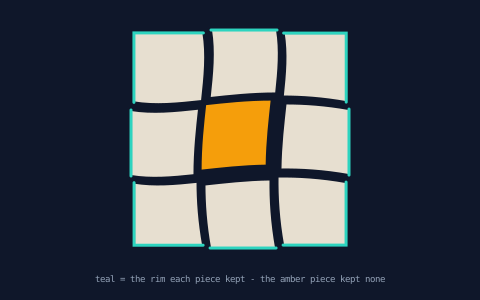
Worth noticing: the rim label rides the plate's edges, so it lands
on whichever pieces inherit those edges, automatically. Nothing about
the knives, the piece count, or the piece order is encoded in the
classification — cut a 5×5 next week and the same if still sorts it.
Example 4 — Registration marks
Print-shop trick: put matching marks on both sides of a cut so
alignment is visible. Twin seams are the same curve, and
partition(n) samples at fixed fractions of arc length — including
both endpoints — so partitioning each piece's own seam puts rings at
identical spots on both copies. The dotted lines just make the pairing
visible across the gap.
//-- Registration marks: partition each piece's seam at the same fractions
//-- and the marks pair up across the gap — twin seams are the same curve,
//-- so the same t lands on the same spot of both copies.

define ViewBox(0, 0, 480, 240);

let bg = PathLayer('bg') #{
  fill: #0f172a;
  stroke: none;
};
layer('bg').apply {
  rect(0, 0, 480, 240);
}

let scene = GroupLayer('scene') #{};
let matchLines = PathLayer('match-lines') #{
  stroke: #475569;
  stroke-width: 1;
  stroke-dasharray: 2 3;
  fill: none;
};
let pieceLayer = PathLayer('pieces') #{
  fill: #e7dfd0;
  stroke: #0f172a;
  stroke-width: 2;
};
let markLayer = PathLayer('marks') #{
  fill: none;
  stroke: #2dd4bf;
  stroke-width: 1.6;
};
let labels = TextLayer('labels') #{
  font-family: monospace;
  font-size: 9;
  fill: #94a3b8;
  text-anchor: middle;
};
scene.append(matchLines, pieceLayer, markLayer, labels);

let plate = @{
  h 170
  v 130
  h -170
  z
};
let knife = @{
  m 92 -15
  c 30 50 -30 90 6 160
};
let pieces = plate.cut(knife);
let gap = 64;

for (piece in pieces) {
  let bounds = piece.boundingBox();
  let side = calc(bounds.x + bounds.width / 2 < 92 ? 0 - gap / 2 : gap / 2);
  let placeX = calc(240 - 85 + side);
  pieceLayer.apply {
    M placeX 40 piece.draw()
  }
  let placed = piece.project(placeX, 40);
  markLayer.apply {
    for (seam in placed.segmentAll('cut')) {
      for (op in seam.partition(3)) {
        circle(op.point.x, op.point.y, 3.5);
      }
    }
  }
  // Dotted match lines bridge the gap from the left piece's marks.
  if (side < 0) {
    matchLines.apply {
      for (seam in placed.segmentAll('cut')) {
        for (op in seam.partition(3)) {
          M calc(op.point.x - 2) calc(op.point.y)
          l calc(gap + 4) 0
        }
      }
    }
  }
}

labels.apply {
  text(240, 215)`same t, same spot - the rings line up when the gap closes`;
}
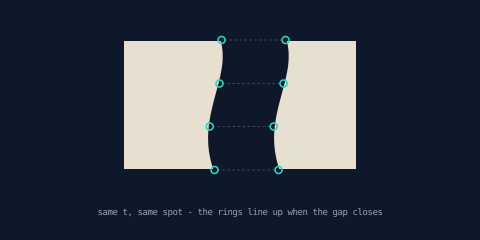
This works even though the two pieces' seams may run in opposite
directions: partition's fraction set is symmetric (0, 1/3, 2/3, 1),
so a reversed twin lands its marks on the same points.
Example 5 — The scattered puzzle
The finished scene. Nine pieces from the wavy grid; the middle piece —
found by the rim test, not by index — has gone missing under the sofa.
The rest spin in place with rotate(angle, center) around their own
bounding-box centers and drift apart with shoves from
hashRange — deterministic randomness, so
the scatter is the same on every compile. The box lid in the
corner keeps the assembled picture: every piece run through
scale(0.44, 0.44) and drawn at one shared origin, reassembling the
plate in miniature because scaled pieces keep their scaled placement.
//-- The finished puzzle: nine wavy-cut pieces spun in place with
//-- rotate() and scattered — except the middle piece, gone missing. The
//-- box lid keeps the assembled picture, scale()d straight from the cut.

define ViewBox(0, 0, 480, 300);

let bg = PathLayer('bg') #{
  fill: #0f172a;
  stroke: none;
};
layer('bg').apply {
  rect(0, 0, 480, 300);
}

let scene = GroupLayer('scene') #{};
let shard0 = PathLayer('shard0') #{
  fill: #3b82f6;
  stroke: #0f172a;
  stroke-width: 1.5;
};
let shard1 = PathLayer('shard1') #{
  fill: #a78bfa;
  stroke: #0f172a;
  stroke-width: 1.5;
};
let shard2 = PathLayer('shard2') #{
  fill: #e7dfd0;
  stroke: #0f172a;
  stroke-width: 1.5;
};
let lid = PathLayer('lid') #{
  fill: #1e293b;
  stroke: #475569;
  stroke-width: 1;
};
let lid0 = PathLayer('lid0') #{
  fill: #3b82f6;
  stroke: #0f172a;
  stroke-width: 0.8;
};
let lid1 = PathLayer('lid1') #{
  fill: #a78bfa;
  stroke: #0f172a;
  stroke-width: 0.8;
};
let lid2 = PathLayer('lid2') #{
  fill: #e7dfd0;
  stroke: #0f172a;
  stroke-width: 0.8;
};
let labels = TextLayer('labels') #{
  font-family: monospace;
  font-size: 9;
  fill: #94a3b8;
  text-anchor: middle;
};
scene.append(shard0,
    shard1,
    shard2,
    lid,
    lid0,
    lid1,
    lid2,
    labels);
let shardLayers = [
  shard0,
  shard1,
  shard2,
];

let plate = @{
  h 198 as segment('rim');
  v 198 as segment('rim');
  h -198 as segment('rim');
  z as segment('rim')
};
// One vertical and one horizontal wavy knife per lane — each knife its
// own block, no chained-move arithmetic between strokes.
let knives = [];
for (k in 0..1) {
  let lane = calc(66 + k * 66);
  knives.push(@{
    m lane -15
    c 18 60 -18 118 6 228
  });
  knives.push(@{
    m -15 lane
    c 60 18 118 -18 228 6
  });
}
let pieces = plate.cut(knives);
let originX = 42;
let originY = 52;

let plateBB = plate.boundingBox();
let plateCenterX = calc(plateBB.x + plateBB.width / 2);
let plateCenterY = calc(plateBB.y + plateBB.height / 2);
for ([piece, i] in pieces) {
  let bounds = piece.boundingBox();
  let pieceCenterX = calc(bounds.x + bounds.width / 2);
  let pieceCenterY = calc(bounds.y + bounds.height / 2);
  // The piece that kept no rim is the missing one — skip it.
  if (piece.segmentAll('rim').length > 0) {
    // Spin in place around the piece's own bounding-box center:
    // frame-preserving, so no pivot compensation — then drift outward
    // with a hashed shove.
    let spun = piece.rotate(hashRange(i, -0.22, 0.22), Point(pieceCenterX, pieceCenterY));
    let dx = calc((pieceCenterX - plateCenterX) / plateCenterX * 26 + hashRange(i, -8, 8, 7));
    let dy = calc((pieceCenterY - plateCenterY) / plateCenterY * 26 + hashRange(i, -8, 8, 13));
    let placeX = calc(originX + dx);
    let placeY = calc(originY + dy);
    // Round-robin tint: layers are values, so index straight into a
    // list of them — no if-chain, no name arithmetic.
    layer(shardLayers[calc(i % 3)]).apply {
      M placeX placeY spun.draw()
    }
  }
}

// The box lid: the assembled picture, scaled straight from the pieces.
lid.apply {
  roundRect(348,
      30,
      112,
      112,
      8);
}
for ([piece, i] in pieces) {
  let mini = piece.scale(0.44, 0.44);
  // Same routed round-robin as the scatter above — no if-chain here
  // either.
  layer(`lid${i % 3}`).apply {
    M 361 43 mini.draw()
  }
}

labels.apply {
  text(404, 165)`the lid`;
  text(240, 280)`eight of nine - the middle piece kept no rim, and it's gone`;
}
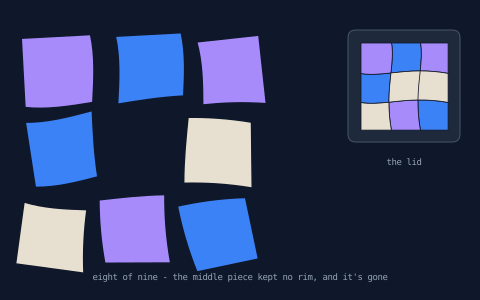
If you saw the shattered-glyph
finale in the cutting post, compare the
spin: it needed rotateAtVertexIndex plus manual pivot compensation.
rotate(angle, origin) is frame-preserving — the piece turns around
the pivot and stays put — so the scatter is two lines per piece.
What this project taught the language
This series doubles as a working friction log (part 1 explains the
convention). Since this post first ran, two of its idioms improved:
the seam idiom it borrows — draw a projected value where it lies —
became a real method (seam.draw() replaced the two-line
drawTo(seam.startPoint.x, seam.startPoint.y) re-anchor), and the
3×3 grid's four wavy knives are now built in a loop and passed to
cut([...]) as an array — one knife per lane, no chained-move
arithmetic between strokes. Part 1's closing section has both
stories.
The scattered puzzle's tints lost their if-chain. Example 5
originally dealt pieces to its three shard layers with
if (calc(i % 3) == 0) { shard0.apply { … } } ×3 — because
layer(...) routing choked on any
argument with a postfix (an array index, a member access, a function
call). The cause turned out to be a whole class: six AST-builder
sites scanned expression siblings without walking postfix chains, so
for (i in 0..arr.length), PathLayer(names[i]), and
define ViewBox(0, 0, sheet.w, …) were all broken the same way. One
fix later, layers are routable as data:
// before: one if per tint
if (calc(i % 3) == 0) { shard0.apply { M placeX placeY spun.draw() } }
if (calc(i % 3) == 1) { shard1.apply { M placeX placeY spun.draw() } }
if (calc(i % 3) == 2) { shard2.apply { M placeX placeY spun.draw() } }

// after: layers are values — index into a list of them
let shardLayers = [shard0, shard1, shard2];
layer(shardLayers[calc(i % 3)]).apply {
  M placeX placeY spun.draw()
}
(The computed-name spelling layer(`shard${i % 3}`) always worked
— it is what the shattered-glyph and tinted-panes samples use, and the
rose-window finale and this post's own lid mosaic route the same way.)
Where to go next
- Garment patterns — part 3 turns label-keeping into a workflow: pieces identified, offset for seam allowance, and notched.
- Papercraft — part 1, if you skipped it: the seam-stroking idiom every example here leaned on.
- PathBlock parametric sampling
—
get,normal,partition, and friends. - Reference: cutting paths and rotate in the docs.