Garment Patterns: Edges with Names Sewn In
Part 3 of 4 in The Cutting Room — projects that put cut() and
segment labels to work together.
Series: The Cutting Room
- Papercraft — cut lines, fold lines, and glue tabs from one plate
- Jigsaw — wavy knives, piece identity, and a scattered puzzle
- Garment patterns (this post) — named edges, seam allowances, and notches
- Stained glass — tinted panes, leading, and a rose window
Prerequisites:
PathBlock.cut()and segment labels, plus part 1's seam-stroking idiom. Parts 1 and 2 asked pieces about the automaticcutlabel; this post is where your own names do the heavy lifting.
What it does
A sewing pattern is a drawing whose edges have jobs. The hem gets folded
twice; the side seam gets 7 units of allowance; the armhole gets eased;
notches tell you which edge meets which. Pattern drafting software is,
to a first approximation, software for remembering which edge is
which — and that is precisely what as segment('name') does:
let bodice = @{
  c 16 18 34 20 46 6 as segment('neck')
  l 22 8 as segment('shoulder')
  // ...armhole, side, hem — Example 1 has the full draft
};
Name the edges once, at drafting time, and every downstream operation — cutting the yoke off, offsetting for allowance — carries the names along. The workflow stops being a ledger of coordinates and becomes a series of questions: who kept the neckline? where is the side seam now?
(An earlier draft of this post carried a blunt caveat here: offsetting the yoke produced a distorted, spiked allowance, and the pattern sheet shipped without it. Building this very post got that fixed — the full story is at the bottom of the post, under What this project taught the language.)
Why you'd use it
Because the alternative is what pattern makers call "walking the pattern" — manually re-measuring every edge after every change. When the edges answer by name, grading and decorating survive redesigns: re-draft the armhole deeper, and the same queries still find the same jobs. The identification idiom this post adds to the kit:
let name = 'body';
if (piece.segmentAll('neck').length > 0) {
  name = 'yoke';    // whoever kept the neckline is the yoke
}
Example 1 — The draft speaks
A half-bodice front, drafted to the right of a center-front fold — the
z edge, named 'front' like the rest, dashed because real patterns
are cut on the fold, so drafting half is the honest shape. Six edges,
six names, six colors: each stroke is one segmentAll query answered
by the block and drawn over the outline.
//-- The pattern draft speaks its own vocabulary: a half-bodice (cut on
//-- the fold) with every edge named as it is drawn. Each labeled run is
//-- stroked in its own color, straight from a segmentAll query.

define ViewBox(0, 0, 480, 260);

let bg = PathLayer('bg') #{
  fill: #0f172a;
  stroke: none;
};
layer('bg').apply {
  rect(0, 0, 480, 260);
}

let scene = GroupLayer('scene') #{};
let panel = PathLayer('panel') #{
  fill: #e7dfd0;
  stroke: #64748b;
  stroke-width: 1;
};
let neckRun = PathLayer('neck-run') #{
  stroke: #2dd4bf;
  stroke-width: 3;
  fill: none;
  stroke-linecap: round;
};
let shoulderRun = PathLayer('shoulder-run') #{
  stroke: #3b82f6;
  stroke-width: 3;
  fill: none;
  stroke-linecap: round;
};
let armholeRun = PathLayer('armhole-run') #{
  stroke: #c084fc;
  stroke-width: 3;
  fill: none;
  stroke-linecap: round;
};
let sideRun = PathLayer('side-run') #{
  stroke: #f59e0b;
  stroke-width: 3;
  fill: none;
  stroke-linecap: round;
};
let hemRun = PathLayer('hem-run') #{
  stroke: #fb7185;
  stroke-width: 3;
  fill: none;
  stroke-linecap: round;
};
let frontRun = PathLayer('front-run') #{
  stroke: #94a3b8;
  stroke-width: 3;
  fill: none;
  stroke-linecap: round;
  stroke-dasharray: 6 4;
};
let legendNeck = TextLayer('legend-neck') #{
  font-family: monospace;
  font-size: 9;
  fill: #2dd4bf;
};
let legendShoulder = TextLayer('legend-shoulder') #{
  font-family: monospace;
  font-size: 9;
  fill: #3b82f6;
};
let legendArmhole = TextLayer('legend-armhole') #{
  font-family: monospace;
  font-size: 9;
  fill: #c084fc;
};
let legendSide = TextLayer('legend-side') #{
  font-family: monospace;
  font-size: 9;
  fill: #f59e0b;
};
let legendHem = TextLayer('legend-hem') #{
  font-family: monospace;
  font-size: 9;
  fill: #fb7185;
};
let legendFold = TextLayer('legend-fold') #{
  font-family: monospace;
  font-size: 9;
  fill: #94a3b8;
};
scene.append(panel,
    neckRun,
    shoulderRun,
    armholeRun,
    sideRun,
    hemRun,
    frontRun,
    legendNeck,
    legendShoulder,
    legendArmhole,
    legendSide,
    legendHem,
    legendFold);

// Half a bodice front, drafted to the right of the center-front fold.
let bodice = @{
  c 16 18 34 20 46 6 as segment('neck');
  l 22 8 as segment('shoulder');
  c -12 16 -2 30 10 40 as segment('armhole');
  l 6 96 as segment('side');
  h -84 as segment('hem');
  z as segment('front')
};
let originX = 120;
let originY = 48;

panel.apply {
  bodice.drawTo(originX, originY);
}

// One query per name; the layer's color does the explaining.
let placed = bodice.project(originX, originY);
fn strokeRun(run) {
  run.draw();
}
neckRun.apply {
  for (run in placed.segmentAll('neck')) {
    strokeRun(run);
  }
}
shoulderRun.apply {
  for (run in placed.segmentAll('shoulder')) {
    strokeRun(run);
  }
}
armholeRun.apply {
  for (run in placed.segmentAll('armhole')) {
    strokeRun(run);
  }
}
sideRun.apply {
  for (run in placed.segmentAll('side')) {
    strokeRun(run);
  }
}
hemRun.apply {
  for (run in placed.segmentAll('hem')) {
    strokeRun(run);
  }
}
frontRun.apply {
  for (run in placed.segmentAll('front')) {
    strokeRun(run);
  }
}

legendNeck.apply {
  text(300, 70)`as segment('neck')`;
}
legendShoulder.apply {
  text(300, 88)`as segment('shoulder')`;
}
legendArmhole.apply {
  text(300, 106)`as segment('armhole')`;
}
legendSide.apply {
  text(300, 124)`as segment('side')`;
}
legendHem.apply {
  text(300, 142)`as segment('hem')`;
}
legendFold.apply {
  text(300, 160)`as segment('front') - on fold`;
}
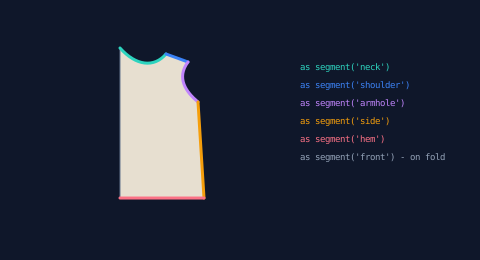
This is the whole trick of the post, shown before any cutting: the draft carries its own vocabulary. Everything after this is asking.
Example 2 — The yoke split
One curved knife across the chest and the bodice becomes yoke + body. Neither piece is found by position, index, or size — each is asked what it kept. The neckline stayed with the top piece, so it announces itself as the yoke; the hem stayed with the bottom, so it is the body.
//-- Split the bodice at the yoke line and ask each piece who it is:
//-- keeping the neckline makes you the yoke, keeping the hem makes you
//-- the body. No coordinates checked, no piece order assumed.

define ViewBox(0, 0, 480, 280);

let bg = PathLayer('bg') #{
  fill: #0f172a;
  stroke: none;
};
layer('bg').apply {
  rect(0, 0, 480, 280);
}

let scene = GroupLayer('scene') #{};
let panel = PathLayer('panel') #{
  fill: #e7dfd0;
  stroke: #64748b;
  stroke-width: 1;
};
let neckRun = PathLayer('neck-run') #{
  stroke: #2dd4bf;
  stroke-width: 3;
  fill: none;
  stroke-linecap: round;
};
let hemRun = PathLayer('hem-run') #{
  stroke: #fb7185;
  stroke-width: 3;
  fill: none;
  stroke-linecap: round;
};
let leaders = PathLayer('leaders') #{
  stroke: #475569;
  stroke-width: 1;
  stroke-dasharray: 2 3;
  fill: none;
};
let captions = TextLayer('captions') #{
  font-family: monospace;
  font-size: 10;
  fill: #94a3b8;
};
scene.append(panel,
    neckRun,
    hemRun,
    leaders,
    captions);

let bodice = @{
  c 16 18 34 20 46 6 as segment('neck');
  l 22 8 as segment('shoulder');
  c -12 16 -2 30 10 40 as segment('armhole');
  l 6 96 as segment('side');
  h -84 as segment('hem');
  z
};
let yokeKnife = @{
  m -15 30
  c 40 6 70 2 110 6
};
let pieces = bodice.cut(yokeKnife);
let originX = 130;

for (piece in pieces) {
  // Even the layout is label-driven: the neckline-keeper slides up,
  // the other piece slides down.
  let isYoke = calc(piece.segmentAll('neck').length > 0 ? 1 : 0);
  let originY = calc(isYoke == 1 ? 52 : 74);
  panel.apply {
    M originX originY piece.draw()
  }
  let placed = piece.project(originX, originY);
  // Who am I? The labels answer.
  let name = 'the body - it kept the hem';
  if (placed.segmentAll('neck').length > 0) {
    name = 'the yoke - it kept the neckline';
  }
  neckRun.apply {
    for (run in placed.segmentAll('neck')) {
      run.draw();
    }
  }
  hemRun.apply {
    for (run in placed.segmentAll('hem')) {
      run.draw();
    }
  }
  let placedBounds = placed.boundingBox();
  let labelY = calc(placedBounds.y + placedBounds.height / 2);
  leaders.apply {
    M calc(placedBounds.x + placedBounds.width + 5) labelY
    L 262 labelY
  }
  captions.apply {
    text(268, calc(labelY + 3))`${name}`;
  }
}
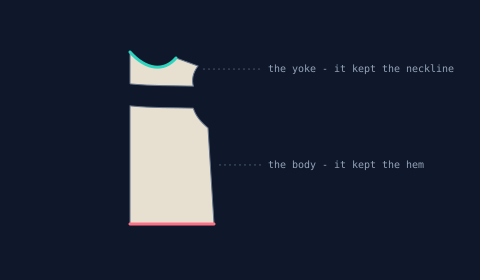
The captions are computed, not typed per piece — the same loop handles both, and would handle a three-way split unchanged. That is the difference between labeling geometry and labeling your assumptions about piece order.
Example 3 — Seam allowance is an offset
The cutting line a seamstress actually scissors along sits 7 units
outside the stitch line. That is offset(7) on the projected piece:
the red ring is the offset, the dashed original is the stitch line —
and because labels survive offset(), the amber stroke finds the side
seam on the allowance outline, not the original.
//-- Seam allowance is an offset: push the body piece's outline out by 7
//-- and you have the cutting line; the original edge, dashed, becomes the
//-- stitch line. The 'side' label survives the offset and says so.

define ViewBox(0, 0, 480, 230);

let bg = PathLayer('bg') #{
  fill: #0f172a;
  stroke: none;
};
layer('bg').apply {
  rect(0, 0, 480, 230);
}

let scene = GroupLayer('scene') #{};
let panel = PathLayer('panel') #{
  fill: #e7dfd0;
  stroke: #64748b;
  stroke-width: 1.2;
  stroke-dasharray: 4 3;
};
let allowance = PathLayer('allowance') #{
  stroke: #ef4444;
  stroke-width: 1.6;
  fill: none;
};
let sideRun = PathLayer('side-run') #{
  stroke: #f59e0b;
  stroke-width: 3;
  fill: none;
  stroke-linecap: round;
};
let legendCut = TextLayer('legend-cut') #{
  font-family: monospace;
  font-size: 9;
  fill: #f87171;
};
let legendStitch = TextLayer('legend-stitch') #{
  font-family: monospace;
  font-size: 9;
  fill: #94a3b8;
};
let legendSide = TextLayer('legend-side') #{
  font-family: monospace;
  font-size: 9;
  fill: #f59e0b;
};
scene.append(panel,
    allowance,
    sideRun,
    legendCut,
    legendStitch,
    legendSide);

let bodice = @{
  c 16 18 34 20 46 6 as segment('neck');
  l 22 8 as segment('shoulder');
  c -12 16 -2 30 10 40 as segment('armhole');
  l 6 96 as segment('side');
  h -84 as segment('hem');
  z
};
let yokeKnife = @{
  m -15 30
  c 40 6 70 2 110 6
};
let pieces = bodice.cut(yokeKnife);

for (piece in pieces) {
  let placedProbe = piece.project(0, 0);
  // Only the body piece gets the allowance treatment here.
  if (placedProbe.segmentAll('hem').length > 0) {
    let placed = piece.project(150, 28);
    panel.apply {
      placed.draw();
    }
    // The cutting line: the same outline, pushed out by the allowance.
    let allow = placed.offset(7);
    allowance.apply {
      allow.draw();
    }
    // Labels survive offset: the allowance still knows its side seam.
    sideRun.apply {
      for (run in allow.segmentAll('side')) {
        run.draw();
      }
    }
  }
}

legendCut.apply {
  text(300, 92)`solid red = cutting line`;
}
legendStitch.apply {
  text(300, 110)`dashed = stitch line`;
}
legendSide.apply {
  text(300, 128)`amber = side, post-offset`;
}
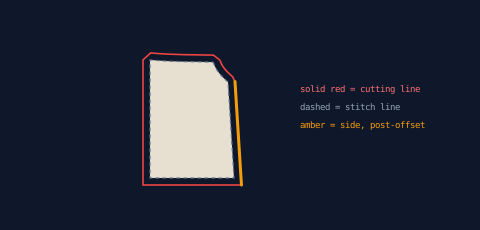
Query-after-offset is the point to take away: the allowance is not dumb geometry. If the next step were "add extra width only along the side seam for grading," the run you'd need is already addressable.
Example 4 — Notches
Sewists cut small ticks on both halves of a seam so the halves align
at the machine. Both pieces get a single notch 30% along the join seam
and a double notch at 70% — but twin seams can run opposite
directions, so a naive get(0.3) might land at 30% on one piece and
70% on the other. The sample normalizes first: compare the seam's two
endpoints, and if it runs right-to-left, flip t.
//-- Notches: a single tick a third of the way along the join seam, a
//-- double tick two thirds along — on BOTH pieces. Twin seams may run
//-- opposite directions, so the walk is normalized left-to-right first.

define ViewBox(0, 0, 480, 280);

let bg = PathLayer('bg') #{
  fill: #0f172a;
  stroke: none;
};
layer('bg').apply {
  rect(0, 0, 480, 280);
}

let scene = GroupLayer('scene') #{};
let panel = PathLayer('panel') #{
  fill: #e7dfd0;
  stroke: #64748b;
  stroke-width: 1;
};
let notches = PathLayer('notches') #{
  stroke: #2dd4bf;
  stroke-width: 2;
  fill: none;
};
let captions = TextLayer('captions') #{
  font-family: monospace;
  font-size: 9;
  fill: #94a3b8;
  text-anchor: middle;
};
scene.append(panel, notches, captions);

let bodice = @{
  c 16 18 34 20 46 6 as segment('neck');
  l 22 8 as segment('shoulder');
  c -12 16 -2 30 10 40 as segment('armhole');
  l 6 96 as segment('side');
  h -84 as segment('hem');
  z
};
let yokeKnife = @{
  m -15 30
  c 40 6 70 2 110 6
};
let pieces = bodice.cut(yokeKnife);
let originX = 150;

// One tick crossing the seam at normalized fraction u.
fn tick(seam, fraction) {
  let seamStart = seam.get(0);
  let seamEnd = seam.get(1);
  // Normalize: walk the seam left-to-right no matter how it runs.
  let t = calc(seamStart.x > seamEnd.x ? 1 - fraction : fraction);
  let tickPoint = seam.get(t);
  let tickNormal = seam.normal(t);
  M calc(tickPoint.x - cos(tickNormal.angle) * 5) calc(tickPoint.y - sin(tickNormal.angle) * 5)
  L calc(tickPoint.x + cos(tickNormal.angle) * 5) calc(tickPoint.y + sin(tickNormal.angle) * 5)
}

for (piece in pieces) {
  // Label-driven layout, as in the yoke split.
  let originY = calc(piece.segmentAll('neck').length > 0 ? 48 : 78);
  panel.apply {
    M originX originY piece.draw()
  }
  let placed = piece.project(originX, originY);
  notches.apply {
    for (seam in placed.segmentAll('cut')) {
      tick(seam, 0.3);
      // The "double at 0.7" is two ticks straddling it.
      tick(seam, 0.66);
      tick(seam, 0.74);
    }
  }
}

captions.apply {
  text(240, 250)`single notch at 0.3, double at 0.7 - matched on both pieces`;
}
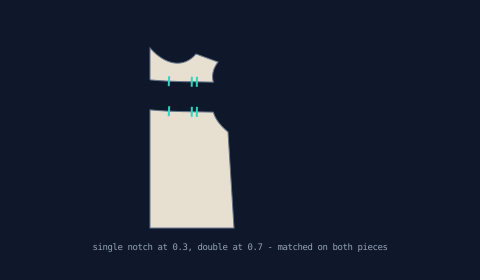
Part 2's registration marks dodged this problem by using partition's
symmetric fractions; notches are asymmetric on purpose (that is how
they encode orientation), so the direction fix stops being optional.
Example 5 — The pattern sheet
The deliverable: both pieces laid out side by side — placed by
boundingBox(), tops aligned, no piece order assumed — with stitch
lines dashed, every piece's cutting line offset in red (curves and
all), notches matched across the join seam, a grainline arrow down
each piece, and computed names. "Cut 1 on fold" is real pattern
language, and the fold is the z edge from Example 1.
//-- The finished pattern sheet: yoke and body laid out side by side via
//-- their bounding boxes, each with its cutting line (offset), stitch
//-- line, join-seam notches, grainline arrow, and name.

define ViewBox(0, 0, 480, 240);

let bg = PathLayer('bg') #{
  fill: #0f172a;
  stroke: none;
};
layer('bg').apply {
  rect(0, 0, 480, 240);
}

let scene = GroupLayer('scene') #{};
let panel = PathLayer('panel') #{
  fill: #e7dfd0;
  stroke: #64748b;
  stroke-width: 1.1;
  stroke-dasharray: 4 3;
};
let allowance = PathLayer('allowance') #{
  stroke: #ef4444;
  stroke-width: 1.5;
  fill: none;
};
let notches = PathLayer('notches') #{
  stroke: #2dd4bf;
  stroke-width: 2;
  fill: none;
};
let grain = PathLayer('grain') #{
  stroke: #64748b;
  stroke-width: 1.4;
  fill: none;
};
let names = TextLayer('names') #{
  font-family: monospace;
  font-size: 9;
  fill: #94a3b8;
  text-anchor: middle;
};
let title = TextLayer('title') #{
  font-family: monospace;
  font-size: 10;
  fill: #94a3b8;
  text-anchor: middle;
  letter-spacing: 3;
};
scene.append(panel,
    allowance,
    notches,
    grain,
    names,
    title);

let bodice = @{
  c 16 18 34 20 46 6 as segment('neck');
  l 22 8 as segment('shoulder');
  c -12 16 -2 30 10 40 as segment('armhole');
  l 6 96 as segment('side');
  h -84 as segment('hem');
  z
};
let yokeKnife = @{
  m -15 30
  c 40 6 70 2 110 6
};
let pieces = bodice.cut(yokeKnife);

fn tick(seam, fraction) {
  let seamStart = seam.get(0);
  let seamEnd = seam.get(1);
  let t = calc(seamStart.x > seamEnd.x ? 1 - fraction : fraction);
  let tickPoint = seam.get(t);
  let tickNormal = seam.normal(t);
  M calc(tickPoint.x - cos(tickNormal.angle) * 5) calc(tickPoint.y - sin(tickNormal.angle) * 5)
  L calc(tickPoint.x + cos(tickNormal.angle) * 5) calc(tickPoint.y + sin(tickNormal.angle) * 5)
}

for (piece in pieces) {
  // Lay pieces out by bounding box: yoke on the left, body on the right,
  // tops aligned — no knowledge of piece order required.
  let bounds = piece.boundingBox();
  // Identity comes from the labels, never from coordinates: whoever
  // kept the neckline is the yoke.
  let isYoke = calc(piece.segmentAll('neck').length > 0 ? 1 : 0);
  let targetX = calc(isYoke == 1 ? 90 : 270);
  let placeX = calc(targetX - bounds.x);
  let placeY = calc(64 - bounds.y);
  let placed = piece.project(placeX, placeY);
  panel.apply {
    placed.draw();
  }
  // Every piece gets its cutting line — curves and all.
  let allow = placed.offset(7);
  allowance.apply {
    allow.draw();
  }
  notches.apply {
    for (seam in placed.segmentAll('cut')) {
      tick(seam, 0.3);
      tick(seam, 0.66);
      tick(seam, 0.74);
    }
  }
  // Grainline: a double-headed vertical arrow at the piece's center.
  let placedBounds = placed.boundingBox();
  let grainX = calc(placedBounds.x + placedBounds.width / 2);
  let grainY = calc(placedBounds.y + placedBounds.height / 2);
  let grainHalf = calc(max(16, placedBounds.height * 0.28));
  grain.apply {
    M grainX calc(grainY - grainHalf)
    L grainX calc(grainY + grainHalf)
    M calc(grainX - 4) calc(grainY - grainHalf + 6)
    L grainX calc(grainY - grainHalf)
    L calc(grainX + 4) calc(grainY - grainHalf + 6)
    M calc(grainX - 4) calc(grainY + grainHalf - 6)
    L grainX calc(grainY + grainHalf)
    L calc(grainX + 4) calc(grainY + grainHalf - 6)
  }
  names.apply {
    text(calc(placedBounds.x + placedBounds.width / 2), calc(placedBounds.y + placedBounds.height + 24))`${isYoke == 1 ? 'YOKE - cut 1 on fold' : 'BODY - cut 1 on fold'}`;
  }
}

title.apply {
  text(240, 32)`HALF-BODICE PATTERN`;
}
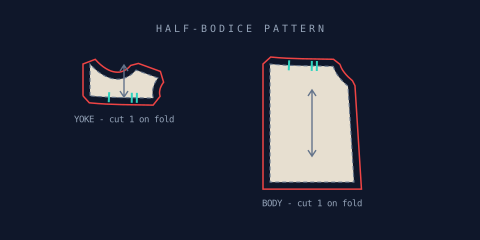
Every annotation on this sheet is derived: move the yoke line, deepen the neck, or widen the hem, and the sheet re-annotates itself on the next compile. That is the payoff of edges with names sewn in.
What this project taught the language
This series doubles as a working friction log (part 1 explains the convention) — this section records what building the pattern sheets got fixed.
The panel labels' idioms made it into the manual. The pattern
sheets in Examples 2 and 5 lean on two spellings this post used
before the docs admitted they existed: string ternaries —
`${count > 1 ? 'pieces' : 'piece'}` inside interpolation, and in
style values — and plain reassignment inside if branches for
multi-step choices. Both were always real; they are now
documented, because a
feature you can only learn by reading someone else's sample isn't
finished.
Seam allowances exposed an offset bug — and got parallel curves
fixed properly. The first draft of this post could not put an
allowance on the yoke: offset(7) produced a spiked, distorted ring
around it, and Example 5 shipped with the yoke bare and a caveat in
the intro. Tracing it revealed two defects, neither the one we
guessed. At the sharp corner where the fold line enters the neck
curve, the miter join — the extended corner point — grew to almost
three times the offset distance and was folded into the neck curve's
own coordinates, warping the curve body. And curve offsetting merely
translated control points, so a deep scoop's offset midsection sat at
the wrong distance even without a bad corner.
The fix restructured how offset() builds its result: every segment
is offset with its own normals, join geometry lives between
segments (a sharp corner now gets a bevel — a short straight edge
across the tip — or an arc with
offset(d, { join: 'round' }) — instead of deforming its neighbor),
and curves subdivide and re-fit as true parallel curves. The
offset docs
carry the new join contract. For this post, the payoff is the sheet
above: both pieces ringed, the neck scoop's allowance a constant
seven units along its whole length, no caveat required.
// before: the yoke's allowance came out spiked and distorted —
// the sheet shipped without it
let allow = placed.offset(7);      // body panel only, by guard

// after: every piece gets its cutting line, curves and all
let allow = placed.offset(7);      // any piece — or
let round = placed.offset(7, { join: 'round' });
A lesson worth keeping from the diagnosis: the bug we logged — "the offset flips to the wrong side" — was not the bug that existed. Direction was always correct; the joins were at fault. Friction logs earn their keep, but each entry deserves a fresh trace before it becomes a fix.
The pattern sheet also exposed a placement trap — and got
projected values a real draw(). An early draft of Example 5 drew
each piece with placed.drawTo(placed.startPoint.x, placed.startPoint.y) — "draw yourself where you are" — and every
annotation landed 63 units away from its piece. The cause: a cut
piece's projected startPoint is its frame origin, not its first
command, so the innocent-looking re-anchor silently shifted the piece
by its own local offset (seam runs, where the two coincide, worked
fine — which is what made it treacherous). Projected values now have
draw(), which
anchors on the first command by definition; the sheet above uses it,
and the drawTo anchor contract is documented where it can't surprise
the next person.
// before: correct for seam runs, silently wrong for cut pieces
placed.drawTo(placed.startPoint.x, placed.startPoint.y);

// after: correct for both, and says what it means
placed.draw();
Epilogue: the trap itself is now gone at the root. startPoint
had been hardcoded to the frame origin since the language's first
commit — the original spec comment even described the correct
behavior, unimplemented. It now reports the first inked point on
every value, get(0) always agrees with it, and
drawTo anchors
the ink at its target — so even the "before" line above, the one that
misplaced this pattern sheet, draws correctly today. draw() remains
the idiomatic spelling.
Where to go next
- Stained glass — the series finale: labels from both operands of a boolean, and seams as the artwork itself.
- Papercraft and Jigsaw — parts 1 and 2, where the seam idioms used here were introduced.
- Reference: labels survive derived paths and offset in the docs.