Stained Glass: Seams as Leading, Pieces as Panes
Part 4 of 4 in The Cutting Room — projects that put cut() and
segment labels to work together.
Series: The Cutting Room
- Papercraft — cut lines, fold lines, and glue tabs from one plate
- Jigsaw — wavy knives, piece identity, and a scattered puzzle
- Garment patterns — named edges, seam allowances, and notches
- Stained glass (this post) — tinted panes, leading, and a rose window
Prerequisites:
PathBlock.cut()and segment labels. The boolean operations post helps for Example 4, and part 1's seam-stroking idiom is assumed throughout.
What it does
In every project so far, the seams were annotation — fold here, align
there. Stained glass inverts that: the seams are the picture. Lead
came is nothing but the network of joints between panes, which means a
stained-glass window is segmentAll('cut'), stroked wide, over pieces
that have been filled with color. The finale also brings in the last
label superpower this series has not used yet: boolean results keep
the labels of both operands, so a frame made by difference() still
answers for the outer shape's names and the opening's.
Why you'd use it
Because "decorate every joint" is a one-loop job when joints are queryable, and an evening of coordinate surgery when they are not. The whole aesthetic rests on the idiom from part 1 — this time as the main event rather than the annotation:
for (seam in placed.segmentAll('cut')) {
  seam.draw();    // stroked wide, this IS the leading
}
Example 1 — Seams as the artwork
A glass disc, four straight knives through the center, eight panes. The leading between panes is the seam group stroked at width 5 in the background color — no leading was drawn as such; it is the cut, made visible.
//-- Seams as the artwork: a glass disc cut by four radial knives becomes
//-- eight panes, and stroking every healed seam wide draws the lead came
//-- between them — the decoration IS the seam group.

define ViewBox(0, 0, 480, 250);

let bg = PathLayer('bg') #{
  fill: #0f172a;
  stroke: none;
};
layer('bg').apply {
  rect(0, 0, 480, 250);
}

let scene = GroupLayer('scene') #{};
let panes = PathLayer('panes') #{
  fill: #38bdf8;
  stroke: none;
};
let leading = PathLayer('leading') #{
  stroke: #0f172a;
  stroke-width: 5;
  fill: none;
  stroke-linecap: round;
};
let labels = TextLayer('labels') #{
  font-family: monospace;
  font-size: 9;
  fill: #94a3b8;
  text-anchor: middle;
};
scene.append(panes, leading, labels);

let disc = @{
  circle(0, 0, 88);
};
// Four straight knives through the center, 45 degrees apart.
let knifeReach = 104;
// Four straight knives through the center, 45 degrees apart — built in
// a loop and handed to cut() as an array.
let knives = [];
for (k in 0..3) {
  let knifeAngle = calc(k * PI() / 4);
  let dirX = cos(knifeAngle);
  let dirY = sin(knifeAngle);
  knives.push(@{
    m calc(0 - knifeReach * dirX) calc(0 - knifeReach * dirY)
    l calc(knifeReach * 2 * dirX) calc(knifeReach * 2 * dirY)
  });
}
let wedges = disc.cut(knives);
let originX = 240;
let originY = 122;

for (wedge in wedges) {
  panes.apply {
    M originX originY wedge.draw()
  }
  let placed = wedge.project(originX, originY);
  leading.apply {
    for (seam in placed.segmentAll('cut')) {
      seam.draw();
    }
  }
}

labels.apply {
  text(240, 232)`eight panes, one loop - the leading is segmentAll('cut'), stroked wide`;
}
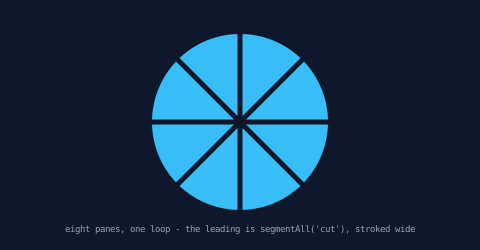
Compare part 1's Example 1, where the same query produced a thin amber highlight. Same seams, same loop — the meaning of a seam is entirely in how you draw it.
Example 2 — Your own geometry joins the came
The seam group takes volunteers. cut itself is reserved — the
language stamps it on healed seams and won't let you author it, so
your geometry can never fuse silently into the seams — but
cut.<name> is the explicit opt-in: a label that says, out loud, "this
edge belongs with the seams." Name the disc's rim
as segment('cut.rim') and the one came loop picks it up with zero
extra code, because the umbrella query segmentAll('cut') answers the
whole namespace. Left disc: rim labeled 'rim', and the glass meets
the stone bare. Right disc: rim labeled 'cut.rim', full came — and
still addressable on its own as segmentAll('cut.rim') when the rim
needs its own pass, or arc by arc as segmentAll('cut.rim:atomic') via
query pseudo-selectors.
(See label names for the rules.)
Note the symmetry with part 1, which approached the same namespace from
the other side: there you labeled the knife and the cut. prefix
appeared automatically on the seams it healed — sub-labels to
distinguish seams from each other. Here you write cut. yourself on
your own geometry — an opt-in to join them. Two directions, one
namespace, one umbrella query.
//-- The seam group takes volunteers: 'cut.<name>' is the explicit opt-in
//-- that joins your own geometry to the came. Left: rim labeled 'rim' —
//-- a bare edge the seam loop ignores. Right: rim labeled 'cut.rim' —
//-- same loop, full came, and the rim stays addressable by name.

define ViewBox(0, 0, 480, 260);

let bg = PathLayer('bg') #{
  fill: #0f172a;
  stroke: none;
};
layer('bg').apply {
  rect(0, 0, 480, 260);
}

let scene = GroupLayer('scene') #{};
let stone = PathLayer('stone') #{
  fill: #64748b;
  stroke: none;
};
let panes = PathLayer('panes') #{
  fill: #a78bfa;
  stroke: none;
};
let leading = PathLayer('leading') #{
  stroke: #0f172a;
  stroke-width: 5;
  fill: none;
  stroke-linecap: round;
};
let labels = TextLayer('labels') #{
  font-family: monospace;
  font-size: 9;
  fill: #94a3b8;
  text-anchor: middle;
};
scene.append(stone, panes, leading, labels);

// A stone surround behind both discs so the dark came reads against it.
stone.apply {
  circle(128, 112, 82);
  circle(352, 112, 82);
}

// The same disc twice — only the rim's label differs. An as-clause on
// a stdlib call names everything the call draws, so one label covers
// the whole circle.
let discA = @{
  circle(0, 0, 70) as segment('rim');
};
let discB = @{
  circle(0, 0, 70) as segment('cut.rim');
};
let knives = @{
  m -85 0
  l 170 0
  m -85 -85
  l 0 170
};

fn cameWindow(disc, centerX, centerY) {
  let pieces = disc.cut(knives);
  for (piece in pieces) {
    panes.apply {
      M centerX centerY piece.draw()
    }
    let placed = piece.project(centerX, centerY);
    // One decoration loop, both windows: stroke the 'cut' group wide.
    leading.apply {
      for (seam in placed.segmentAll('cut')) {
        seam.draw();
      }
    }
  }
}

cameWindow(discA, 128, 112);
cameWindow(discB, 352, 112);

labels.apply {
  text(128, 226)`rim labeled 'rim' - bare edge`;
  text(352, 226)`rim labeled 'cut.rim' - it joins the came`;
}
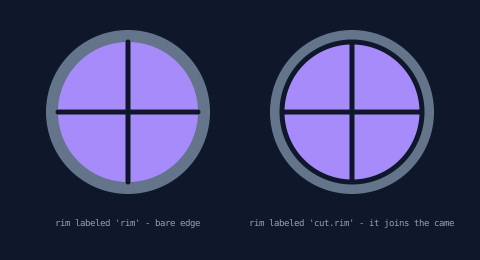
Note the labeling shortcut, too: an as clause on a stdlib call like
circle() names everything the call draws, so one clause labels the
whole rim — no need to author the arcs by hand.
Example 3 — Tinted panes
The picture emerges. Pieces are full PathBlocks, so coloring them is layer routing: four glass layers with jewel-tone fills, pieces dealt round-robin, came stroked over the top. (The same routing pattern the cutting post used for its shattered glyph.)
//-- The picture emerges: the same eight panes, each routed to one of
//-- four glass layers — jewel tints round-robin — with the came stroked
//-- on top. Pieces are full PathBlocks, so styling them is layer routing.

define ViewBox(0, 0, 480, 250);

let bg = PathLayer('bg') #{
  fill: #0f172a;
  stroke: none;
};
layer('bg').apply {
  rect(0, 0, 480, 250);
}

let scene = GroupLayer('scene') #{};
let glass0 = PathLayer('glass0') #{
  fill: #38bdf8;
  stroke: none;
};
let glass1 = PathLayer('glass1') #{
  fill: #a78bfa;
  stroke: none;
};
let glass2 = PathLayer('glass2') #{
  fill: #2dd4bf;
  stroke: none;
};
let glass3 = PathLayer('glass3') #{
  fill: #fbbf24;
  stroke: none;
};
let leading = PathLayer('leading') #{
  stroke: #0f172a;
  stroke-width: 5;
  fill: none;
  stroke-linecap: round;
};
let labels = TextLayer('labels') #{
  font-family: monospace;
  font-size: 9;
  fill: #94a3b8;
  text-anchor: middle;
};
scene.append(glass0,
    glass1,
    glass2,
    glass3,
    leading,
    labels);

let disc = @{
  circle(0, 0, 88);
};
let knifeReach = 104;
// Four straight knives through the center, 45 degrees apart — built in
// a loop and handed to cut() as an array.
let knives = [];
for (k in 0..3) {
  let knifeAngle = calc(k * PI() / 4);
  let dirX = cos(knifeAngle);
  let dirY = sin(knifeAngle);
  knives.push(@{
    m calc(0 - knifeReach * dirX) calc(0 - knifeReach * dirY)
    l calc(knifeReach * 2 * dirX) calc(knifeReach * 2 * dirY)
  });
}
let wedges = disc.cut(knives);
let originX = 240;
let originY = 122;

for ([wedge, i] in wedges) {
  // Deal the jewel tones round-robin by computed layer name.
  layer(`glass${i % 4}`).apply {
    M originX originY wedge.draw()
  }
  let placed = wedge.project(originX, originY);
  leading.apply {
    for (seam in placed.segmentAll('cut')) {
      seam.draw();
    }
  }
}

labels.apply {
  text(240, 232)`four glass layers, pieces routed round-robin - came on top`;
}
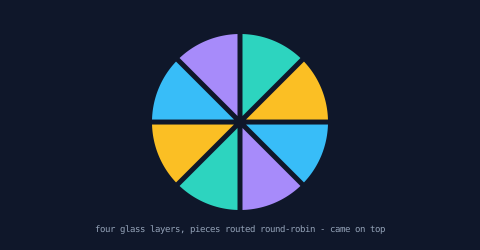
Routing by index is the bluntest instrument — part 2 routed by label
(rim or not), and part 3 by name. Pick the classifier that matches
the design; the mechanism is the same apply block either way.
Example 4 — The frame keeps both names
Boolean results carry labels from both operands. This window frame
is outer.difference(opening) — the outer square's bottom edge brought
'sill', the opening's two side edges brought 'light', and the frame
answers for both names. Then a diagonal cut splits the frame, and
each half still answers for whatever it kept: the lower half holds
most of the sill, the upper half a shorter stretch of it, and each
keeps one of the opening's sides.
//-- Labels from both operands coexist: a frame made by difference keeps
//-- the outer square's 'sill' AND the inner square's 'light' — and after
//-- a diagonal cut, both halves still answer for both names.

define ViewBox(0, 0, 480, 260);

let bg = PathLayer('bg') #{
  fill: #0f172a;
  stroke: none;
};
layer('bg').apply {
  rect(0, 0, 480, 260);
}

let scene = GroupLayer('scene') #{};
let frame = PathLayer('frame') #{
  fill: #e7dfd0;
  stroke: #0f172a;
  stroke-width: 1.5;
};
let sillRun = PathLayer('sill-run') #{
  stroke: #f59e0b;
  stroke-width: 3.5;
  fill: none;
  stroke-linecap: round;
};
let lightRun = PathLayer('light-run') #{
  stroke: #2dd4bf;
  stroke-width: 3.5;
  fill: none;
  stroke-linecap: round;
};
let legendSill = TextLayer('legend-sill') #{
  font-family: monospace;
  font-size: 9;
  fill: #f59e0b;
};
let legendLight = TextLayer('legend-light') #{
  font-family: monospace;
  font-size: 9;
  fill: #2dd4bf;
};
scene.append(frame,
    sillRun,
    lightRun,
    legendSill,
    legendLight);

let outer = @{
  h 170
  v 150
  h -170 as segment('sill');
  z
};
let opening = @{
  h 110
  v 90 as segment('light');
  h -110
  v -90 as segment('light');
  z
};
let ring = outer.project(155, 40).difference(opening.project(185, 70));
let knife = @{
  m 150 25
  l 160 180
};
let halves = ring.cut(knife);

for (half in halves) {
  // Open the cut along the diagonal: a ±10 nudge perpendicular to it.
  // draw() keeps each half's own placement, so the nudge is all the
  // move there is.
  let bounds = half.boundingBox();
  let side = calc(bounds.x + bounds.width / 2 < 240 ? -10 : 10);
  // Cut pieces come back projected, already placed in the ring, so the nudge
  // has to move them from where they are rather than seat the pen first.
  let at = half.startPoint;
  let placed = half.toPathBlock().project(calc(at.x + side), calc(at.y - side));
  frame.apply { placed.draw(); }
  sillRun.apply {
    for (run in placed.segmentAll('sill')) {
      run.draw();
    }
  }
  lightRun.apply {
    for (run in placed.segmentAll('light')) {
      run.draw();
    }
  }
}

legendSill.apply {
  text(352, 110)`'sill' = bottom edge`;
}
legendLight.apply {
  text(352, 128)`'light' = the sides`;
}
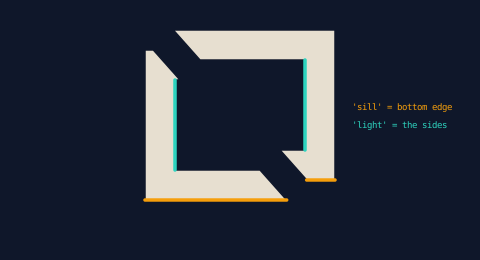
This is the compositional guarantee the whole series stands on: labels survive chains of operations — draft, subtract, cut — not just single steps.
Example 5 — The rose window
The finale composes everything. The knives are built in a loop —
eight spokes pushed onto an array, plus a closed ring knife (a cookie
cutter) — and the whole set goes to one cut([...]) call, which
stamps out the golden center medallion and slices the surrounding
ring into eight panes. The spokes stop short of the ring, leaving the
medallion whole. Then:
- the medallion is found by classification — it is the piece that kept none of the rim label (part 2's trick, part 3's workflow);
- the panes are tinted by layer routing (Example 3's deal, spelled
layer(`glass${i % 3}`)— amber sits out of the rotation because it belongs to the medallion); - the came strokes seams and rim in one loop — the rim opted into
the seam group with
cut.rim(Example 2's trick), so the umbrella query covers both; - the solder dots sit at every seam's
startPointandendPoint, where real joints get soldered (on the medallion's closed boundary the two coincide — one dot, drawn twice, harmlessly).
//-- The rose window: a cookie-cutter ring knife stamps out the center
//-- medallion while eight spokes (stopping short of it) slice the ring
//-- into panes. Rim labels sort medallion from ring; the came and solder
//-- dots are all seam queries.

define ViewBox(0, 0, 480, 320);

let bg = PathLayer('bg') #{
  fill: #0f172a;
  stroke: none;
};
layer('bg').apply {
  rect(0, 0, 480, 320);
}

let scene = GroupLayer('scene') #{};
let stone = PathLayer('stone') #{
  fill: #1e293b;
  stroke: #334155;
  stroke-width: 2;
};
let glass0 = PathLayer('glass0') #{
  fill: #38bdf8;
  stroke: none;
};
let glass1 = PathLayer('glass1') #{
  fill: #a78bfa;
  stroke: none;
};
let glass2 = PathLayer('glass2') #{
  fill: #2dd4bf;
  stroke: none;
};
let medallion = PathLayer('medallion') #{
  fill: #fbbf24;
  stroke: none;
};
let leading = PathLayer('leading') #{
  stroke: #0f172a;
  stroke-width: 4.5;
  fill: none;
  stroke-linecap: round;
};
let solder = PathLayer('solder') #{
  fill: #cbd5e1;
  stroke: none;
};
let title = TextLayer('title') #{
  font-family: monospace;
  font-size: 10;
  fill: #94a3b8;
  text-anchor: middle;
  letter-spacing: 3;
};
scene.append(stone,
    glass0,
    glass1,
    glass2,
    medallion,
    leading,
    solder,
    title);

// The glass disc — the as-clause on circle() labels the whole rim,
// and the cut.rim opt-in joins it to the seam group (Example 2's
// trick), so ONE came loop strokes seams and rim together.
let disc = @{
  circle(0, 0, 92) as segment('cut.rim');
};
// Eight spokes from r=36 out past the rim — one knife per spoke, built
// in a loop — plus a ring knife that stamps out the medallion. The
// whole set goes to cut() as an array; the spokes stop short of the
// ring so the medallion stays whole.
let knives = [];
for (k in 0..7) {
  let spokeAngle = calc(k * PI() / 4);
  let dirX = cos(spokeAngle);
  let dirY = sin(spokeAngle);
  knives.push(@{
    m calc(36 * dirX) calc(36 * dirY)
    l calc(76 * dirX) calc(76 * dirY)
  });
}
knives.push(@{
  circle(0, 0, 36);
});
let panes = disc.cut(knives);
let originX = 240;
let originY = 158;

stone.apply {
  circle(originX, originY, 112);
}

for ([piece, i] in panes) {
  let placed = piece.project(originX, originY);
  // The medallion is the piece that kept none of the rim.
  if (placed.segmentAll('cut.rim').length > 0) {
    // Deal the three glass tones round-robin by computed layer name —
    // the fourth jewel tone, amber, is reserved for the medallion.
    layer(`glass${i % 3}`).apply {
      M originX originY piece.draw()
    }
  } else {
    medallion.apply {
      M originX originY piece.draw()
    }
  }
  // Came on every seam AND the opted-in rim — one umbrella query.
  leading.apply {
    for (seam in placed.segmentAll('cut')) {
      seam.draw();
    }
  }
  // Solder dots where seams start and end.
  solder.apply {
    for (seam in placed.segmentAll('cut')) {
      circle(seam.startPoint.x, seam.startPoint.y, 2.2);
      circle(seam.endPoint.x, seam.endPoint.y, 2.2);
    }
  }
}

title.apply {
  text(240, 34)`ROSE WINDOW`;
}
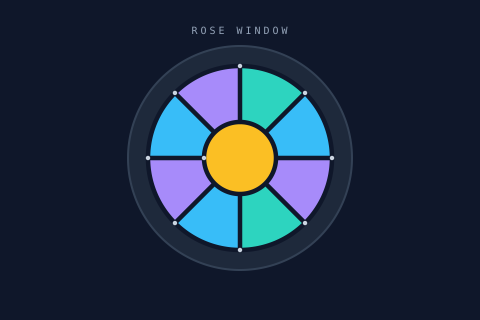
Every technique in it was introduced as a bare mechanism somewhere in these four posts. That is the shape of the whole series: the seams know where they are, the pieces know what they kept, and everything else is a loop.
What this project taught the language
This series doubles as a working friction log (part 1 explains the
convention). The leading loop above originally read
seam.drawTo(seam.startPoint.x, seam.startPoint.y) — projected values
have since grown an in-place draw(), and every came stroke in this
post got one line simpler. Part 1's closing section tells the story;
the garment post's tells its darker sibling — the same expression once
silently misplaced whole cut pieces — along with the epilogue where
that hazard was fixed at the root.
(The came loops in this post keep their per-piece form deliberately —
each pane declaring its own boundary is the teaching. When you want
each physical seam once instead — solder budgets, fold lines —
pieces.seams() now exists; part 1's closing section shows it.)
The rose window's knives became a loop. The first version of
Example 5 hand-chained eight spokes in one cutter block — sixteen
lines of relative-move arithmetic between stroke endpoints, the same
pattern that caused two authoring bugs elsewhere in the series.
cut() now accepts an array of
cutters, so the
spokes are pushed onto a list in a for loop and handed over in one
call — knife geometry you can parameterize. Change 0..7 to 0..11
and the window grows four panes.
// before: one block, every m computed from the previous stroke's end
m calc(36 * cos45 - 112) calc(36 * cos45)
l calc(76 * cos45) calc(76 * cos45)
// ...six more chained pairs

// after: one knife per spoke, built in a loop
for (k in 0..7) {
  let spokeAngle = calc(k * PI() / 4);
  knives.push(@{
    m calc(36 * cos(spokeAngle)) calc(36 * sin(spokeAngle))
    l calc(76 * cos(spokeAngle)) calc(76 * sin(spokeAngle))
  });
}
let panes = disc.cut(knives);
Example 2's trick became a contract. The rim-joins-the-came
demo originally leaned on an accident: cut was an ordinary label, so
naming your own geometry 'cut' happened to merge it with the seams —
silently, and with no way back out. Working the friction log turned
the accident into a named rule:
bare 'cut' is now reserved (authoring it is a compile error), and
cut.<name> is the explicit opt-in the sample now uses. Same render,
byte for byte — but the rim reads as a decision instead of a
coincidence, and segmentAll('cut.rim') can still address it alone.
Where to go next
- Start over with Papercraft if you arrived here first — the idioms build in order.
- Cutting Paths — the full
cut()rules: cookie cutters, donuts, open subjects, snapping. - Boolean operations — union, difference, intersection, xor, and now with label carriage.
- Reference: labels survive derived paths and cutting paths in the docs.