Beyond CSS: Conic Gradients with WebGPU Rendering
CSS has conic-gradient(). SVG does not. This is not an oversight — the SVG spec simply never included angular gradients. If you want a color wheel, a gauge, or a pie chart rendered as an SVG gradient, you are out of luck. You can fake it with dozens of wedge-shaped paths, or you can embed a rasterized image and lose the vector benefits.
Pathogen takes a different approach. ConicGradient is a first-class gradient type that compiles to a base64-encoded <pattern> element. The rasterization happens at compile time via WebGPU (or Canvas 2D as a fallback), producing a pixel-perfect image embedded directly in the SVG. The author writes gradient code. The viewer sees a standard SVG.
The Color Wheel
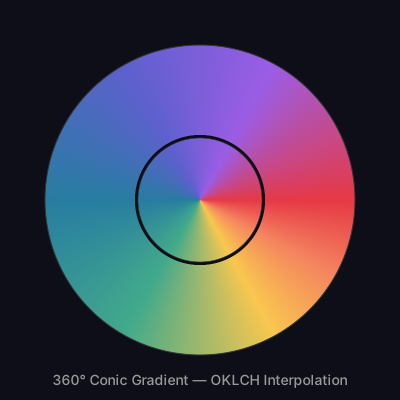
The simplest conic gradient is a full 360-degree sweep. ConicGradient takes an ID and a center point in absolute coordinates (not objectBoundingBox — conic gradients are rasterized at a fixed resolution, so pixel coordinates make more sense).
let wheel = ConicGradient('wheel', 200, 200) {|g|
  g.stop(0,    Color('#e63946'));
  g.stop(0.17, Color('#f9c74f'));
  g.stop(0.33, Color('#43aa8b'));
  g.stop(0.50, Color('#277da1'));
  g.stop(0.67, Color('#5e60ce'));
  g.stop(0.83, Color('#9b5de5'));
  g.stop(1,    Color('#e63946'));
};
wheel.interpolation = 'oklch';
Stops at 0 and 1 should match to avoid a hard seam at the join. With OKLCH interpolation enabled, the transitions stay vibrant across the entire hue wheel — no desaturated dead zones between complementary colors.
The color wheel below uses innerRadius to create a donut effect and .inherit() to create a smaller inner disc with a different fill mode. One gradient definition, two visual treatments.
// viewBox="0 0 400 400"
// Color Wheel — Classic 360° Conic Gradient
// The "hello world" of conic gradients: a full rainbow sweep

// --- Gradients ---

let wheel_outer = ConicGradient('wheel-outer', 200, 200) {|g|
  g.stop(0,      Color('#e63946'));
  g.stop(0.08,   Color('#f4845f'));
  g.stop(0.17,   Color('#f9c74f'));
  g.stop(0.33,   Color('#43aa8b'));
  g.stop(0.50,   Color('#277da1'));
  g.stop(0.67,   Color('#5e60ce'));
  g.stop(0.83,   Color('#9b5de5'));
  g.stop(1,      Color('#e63946'));
};
wheel_outer.innerRadius = 65;
wheel_outer.innerFill = 'transparent';
wheel_outer.interpolation = 'oklch';

let wheel_inner = wheel_outer.inherit('wheel-inner');
wheel_inner.innerRadius = 0;
wheel_inner.innerFill = 'center';

// --- Background ---

let bg = PathLayer('bg') ${ fill: #0e0e18; stroke: none; };
bg.apply { rect(0, 0, 400, 400) }

// --- Outer ring (donut) ---

let ring = PathLayer('ring') ${ fill: wheel_outer; stroke: none; };
ring.apply { circle(200, 200, 155); closePath() }

// --- Inner disc ---

let disc = PathLayer('disc') ${ fill: wheel_inner; stroke: none; };
disc.apply { circle(200, 200, 62); closePath() }

// --- Subtle frame ---

let frame = PathLayer('frame') ${ fill: none; stroke: #333; stroke-width: 1; };
frame.apply { circle(200, 200, 155); closePath() }

let inner_frame = PathLayer('inner-frame') ${ fill: none; stroke: #333; stroke-width: 0.5; };
inner_frame.apply { circle(200, 200, 62); closePath() }

// --- Title ---

let title = TextLayer('title') ${
  font-family: system-ui, sans-serif;
  font-size: 14;
  fill: #999;
  text-anchor: middle;
};
title.apply {
  text(200, 385)`360° Conic Gradient — OKLCH Interpolation`
}

// --- Scene ---

let scene = GroupLayer('scene') ${};
scene.append(bg, ring, disc, frame, inner_frame, title)
Partial Sweeps
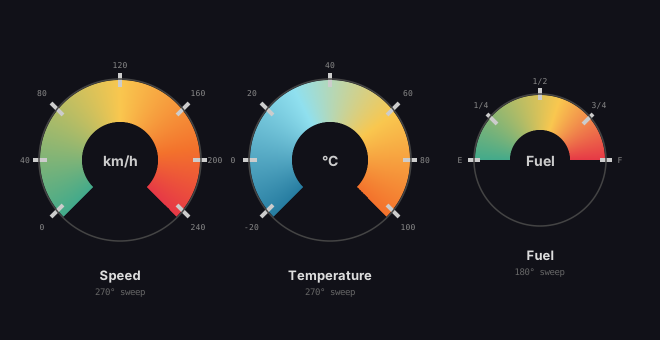
Not every conic gradient needs to go all the way around. The from and to properties define the angular range of the sweep, in degrees. A gauge that covers 270 degrees (from 135 to 405) leaves a gap at the bottom — a natural fit for speedometers, progress rings, and dial indicators.
let gauge = ConicGradient('speed', 120, 150) {|g|
  g.stop(0,   Color('#43aa8b'));
  g.stop(0.5, Color('#f9c74f'));
  g.stop(1,   Color('#e63946'));
};
gauge.from = 135deg;
gauge.to = 405deg;
gauge.innerRadius = 38;
gauge.innerFill = 'center';
The from and to values use degree syntax. Values above 360 are valid — 405deg is equivalent to 45deg but makes the intent clear: a 270-degree arc that wraps past the top. The dashboard below shows three gauges with different angular ranges and inner radii.
// viewBox="0 0 660 340"
// Gauge Dashboard — Partial Sweeps + innerRadius
// Three gauges using conic gradients as speedometer-style UI

// --- Gauge gradients ---
// Using spread='transparent' so the gap area (bottom) stays empty

let speed_grad = ConicGradient('speed', 120, 160) {|g|
  g.stop(0,    Color('#43aa8b'));
  g.stop(0.5,  Color('#f9c74f'));
  g.stop(0.8,  Color('#f3722c'));
  g.stop(1,    Color('#e63946'));
};
speed_grad.from = 135deg;
speed_grad.to = 405deg;
speed_grad.innerRadius = 38;
speed_grad.innerFill = 'transparent';
speed_grad.spread = 'transparent';
speed_grad.interpolation = 'oklch';

let temp_grad = ConicGradient('temp', 330, 160) {|g|
  g.stop(0,    Color('#277da1'));
  g.stop(0.4,  Color('#90e0ef'));
  g.stop(0.7,  Color('#f9c74f'));
  g.stop(1,    Color('#f3722c'));
};
temp_grad.from = 135deg;
temp_grad.to = 405deg;
temp_grad.innerRadius = 38;
temp_grad.innerFill = 'transparent';
temp_grad.spread = 'transparent';
temp_grad.interpolation = 'oklch';

let fuel_grad = ConicGradient('fuel', 540, 160) {|g|
  g.stop(0,    Color('#43aa8b'));
  g.stop(0.6,  Color('#f9c74f'));
  g.stop(1,    Color('#e63946'));
};
fuel_grad.from = 180deg;
fuel_grad.to = 360deg;
fuel_grad.innerRadius = 30;
fuel_grad.innerFill = 'transparent';
fuel_grad.spread = 'transparent';

// --- Background ---

let bg = PathLayer('bg') ${ fill: #111118; stroke: none; };
bg.apply { rect(0, 0, 660, 340) }

// --- Gauge faces ---

let g1 = PathLayer('g1') ${ fill: speed_grad; stroke: none; };
g1.apply { circle(120, 160, 80); closePath() }

let g2 = PathLayer('g2') ${ fill: temp_grad; stroke: none; };
g2.apply { circle(330, 160, 80); closePath() }

let g3 = PathLayer('g3') ${ fill: fuel_grad; stroke: none; };
g3.apply { circle(540, 160, 65); closePath() }

// --- Gauge rims ---

let rims = PathLayer('rims') ${ fill: none; stroke: #444; stroke-width: 1.5; };
rims.apply {
  circle(120, 160, 81); closePath()
  circle(330, 160, 81); closePath()
  circle(540, 160, 66); closePath()
}

// --- Tick marks for Speed gauge (135° to 405°, 270° sweep) ---
// 7 ticks from 0 to max, evenly spaced along the 270° arc
// Angles: 135, 180, 225, 270, 315, 360, 405 degrees

let speed_ticks = PathLayer('speed-ticks') ${ fill: none; stroke: #ccc; stroke-width: 4; };
speed_ticks.apply {
  // 135° (bottom-left) — 0 km/h
  line(51, 217, 63, 205)
  // 180° (left) — 40 km/h
  line(33, 160, 47, 160)
  // 225° (top-left) — 80 km/h
  line(51, 103, 63, 115)
  // 270° (top) — 120 km/h
  line(120, 73, 120, 87)
  // 315° (top-right) — 160 km/h
  line(189, 103, 177, 115)
  // 360° (right) — 200 km/h
  line(207, 160, 193, 160)
  // 405° (bottom-right) — 240 km/h
  line(189, 217, 177, 205)
}

// --- Tick marks for Temp gauge (135° to 405°, 270° sweep) ---

let temp_ticks = PathLayer('temp-ticks') ${ fill: none; stroke: #ccc; stroke-width: 4; };
temp_ticks.apply {
  // 135° — -20°C
  line(261, 217, 273, 205)
  // 180° — 0°C
  line(243, 160, 257, 160)
  // 225° — 20°C
  line(261, 103, 273, 115)
  // 270° — 40°C
  line(330, 73, 330, 87)
  // 315° — 60°C
  line(399, 103, 387, 115)
  // 360° — 80°C
  line(417, 160, 403, 160)
  // 405° — 100°C
  line(399, 217, 387, 205)
}

// --- Tick marks for Fuel gauge (180° to 360°, 180° sweep) ---

let fuel_ticks = PathLayer('fuel-ticks') ${ fill: none; stroke: #ccc; stroke-width: 4; };
fuel_ticks.apply {
  // 180° (left) — E
  line(468, 160, 480, 160)
  // 225° — 1/4
  line(487, 114, 497, 124)
  // 270° (top) — 1/2
  line(540, 88, 540, 100)
  // 315° — 3/4
  line(593, 114, 583, 124)
  // 360° (right) — F
  line(612, 160, 600, 160)
}

// --- Speed tick labels ---

let speed_vals = TextLayer('speed-vals') ${
  font-family: monospace;
  font-size: 8;
  fill: #888;
  text-anchor: middle;
};
speed_vals.apply {
  text(42, 230)`0`
  text(25, 163)`40`
  text(42, 96)`80`
  text(120, 68)`120`
  text(198, 96)`160`
  text(215, 163)`200`
  text(198, 230)`240`
}

// --- Temp tick labels ---

let temp_vals = TextLayer('temp-vals') ${
  font-family: monospace;
  font-size: 8;
  fill: #888;
  text-anchor: middle;
};
temp_vals.apply {
  text(252, 230)`-20`
  text(233, 163)`0`
  text(252, 96)`20`
  text(330, 68)`40`
  text(408, 96)`60`
  text(425, 163)`80`
  text(408, 230)`100`
}

// --- Fuel tick labels ---

let fuel_vals = TextLayer('fuel-vals') ${
  font-family: monospace;
  font-size: 8;
  fill: #888;
  text-anchor: middle;
};
fuel_vals.apply {
  text(460, 163)`E`
  text(481, 108)`1/4`
  text(540, 84)`1/2`
  text(599, 108)`3/4`
  text(620, 163)`F`
}

// --- Gauge titles ---

let labels = TextLayer('labels') ${
  font-family: system-ui, sans-serif;
  font-size: 14;
  fill: #ccc;
  text-anchor: middle;
  font-weight: bold;
};
labels.apply {
  text(120, 166)`km/h`
  text(330, 166)`°C`
  text(540, 166)`Fuel`
}

let titles = TextLayer('titles') ${
  font-family: system-ui, sans-serif;
  font-size: 13;
  fill: #ddd;
  text-anchor: middle;
  font-weight: bold;
};
titles.apply {
  text(120, 280)`Speed`
  text(330, 280)`Temperature`
  text(540, 260)`Fuel`
}

let subtitle = TextLayer('subtitle') ${
  font-family: monospace;
  font-size: 9;
  fill: #666;
  text-anchor: middle;
};
subtitle.apply {
  text(120, 295)`270° sweep`
  text(330, 295)`270° sweep`
  text(540, 275)`180° sweep`
}

// --- Scene ---

let speed_group = GroupLayer('speed-gauge') ${};
speed_group.append(g1, speed_ticks)

let temp_group = GroupLayer('temp-gauge') ${};
temp_group.append(g2, temp_ticks)

let fuel_group = GroupLayer('fuel-gauge') ${};
fuel_group.append(g3, fuel_ticks)

let scene = GroupLayer('scene') ${};
scene.append(bg, speed_group, temp_group, fuel_group, rims, speed_vals, temp_vals, fuel_vals, labels, titles, subtitle)
Direction: CW and CCW
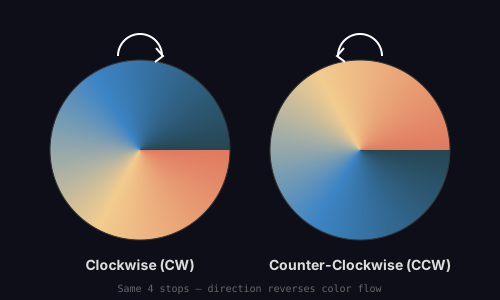
By default, conic gradients sweep clockwise. Setting .direction = 'ccw' reverses the sweep direction. The color stops stay in the same order, but the angular progression runs counter-clockwise. This is useful when mirroring UI elements or creating paired visual effects.
let grad = ConicGradient('grad', 200, 200) {|g|
  g.stop(0,    Color('#e07a5f'));
  g.stop(0.33, Color('#f2cc8f'));
  g.stop(0.66, Color('#3d85c6'));
  g.stop(1,    Color('#264653'));
};
grad.direction = 'ccw';
// viewBox="0 0 500 300"
// Direction Comparison — CW vs CCW
// Same gradient, two directions: showing how direction reverses color flow

// --- Gradients ---

let cw_grad = ConicGradient('cw-grad', 140, 150) {|g|
  g.stop(0,    Color('#e07a5f'));
  g.stop(0.33, Color('#f2cc8f'));
  g.stop(0.66, Color('#3d85c6'));
  g.stop(1,    Color('#264653'));
};
cw_grad.direction = 'cw';
cw_grad.interpolation = 'oklch';

let ccw_grad = ConicGradient('ccw-grad', 360, 150) {|g|
  g.stop(0,    Color('#e07a5f'));
  g.stop(0.33, Color('#f2cc8f'));
  g.stop(0.66, Color('#3d85c6'));
  g.stop(1,    Color('#264653'));
};
ccw_grad.direction = 'ccw';
ccw_grad.interpolation = 'oklch';

// --- Background ---

let bg = PathLayer('bg') ${ fill: #0e0e18; stroke: none; };
bg.apply { rect(0, 0, 500, 300) }

// --- Gradient circles ---

let cw_circle = PathLayer('cw-circle') ${ fill: cw_grad; stroke: #333; stroke-width: 1; };
cw_circle.apply { circle(140, 150, 90); closePath() }

let ccw_circle = PathLayer('ccw-circle') ${ fill: ccw_grad; stroke: #333; stroke-width: 1; };
ccw_circle.apply { circle(360, 150, 90); closePath() }

// --- Direction arrows (curved sweep arcs with arrowheads) ---

// CW: curved arrow sweeping clockwise from top
let cw_arrow = PathLayer('cw-arrow') ${ fill: none; stroke: #ffffffaa; stroke-width: 2; };
cw_arrow.apply {
  // Arc sweeping CW from ~top-left to ~top-right
  M 118 56 A 20 20 0 0 1 162 56
  // Arrowhead at end
  M 156 48 L 163 56 L 155 62
}

// CCW: curved arrow sweeping counter-clockwise from top
let ccw_arrow = PathLayer('ccw-arrow') ${ fill: none; stroke: #ffffffaa; stroke-width: 2; };
ccw_arrow.apply {
  // Arc sweeping CCW from ~top-right to ~top-left
  M 382 56 A 20 20 0 0 0 338 56
  // Arrowhead at end
  M 344 48 L 337 56 L 345 62
}

// --- Labels ---

let labels = TextLayer('labels') ${
  font-family: system-ui, sans-serif;
  font-size: 14;
  fill: #ddd;
  text-anchor: middle;
  font-weight: bold;
};
labels.apply {
  text(140, 270)`Clockwise (CW)`
  text(360, 270)`Counter-Clockwise (CCW)`
}

let note = TextLayer('note') ${
  font-family: monospace;
  font-size: 10;
  fill: #666;
  text-anchor: middle;
};
note.apply {
  text(250, 292)`Same 4 stops — direction reverses color flow`
}

// --- Scene ---

let left = GroupLayer('left') ${};
left.append(cw_circle, cw_arrow)

let right = GroupLayer('right') ${};
right.append(ccw_circle, ccw_arrow)

let scene = GroupLayer('scene') ${};
scene.append(bg, left, right, labels, note)
Inner Radius and Fill Modes
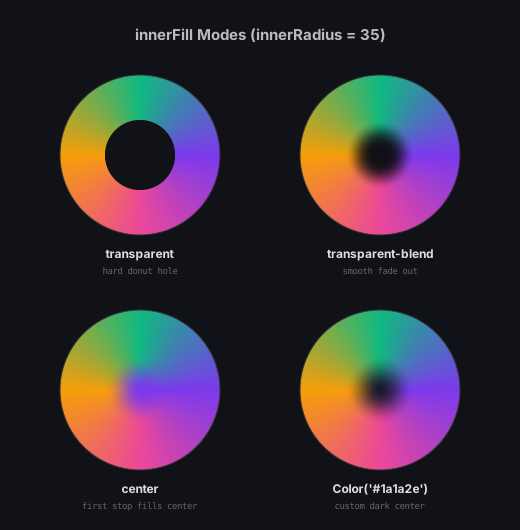
The innerRadius property carves out a hole in the center of the gradient, creating a donut shape. What fills that hole is controlled by innerFill, which supports four modes:
- transparent: A hard cutout. The area inside the inner radius is fully transparent.
- transparent-blend: A smooth fade from the gradient edge to full transparency at the center.
- center: The first color stop extends inward, filling the center with a solid disc.
- Color(...): A custom color fills the center.
let grad = ConicGradient('grad', 200, 200) {|g|
  g.stop(0, Color('#7c3aed'));
  g.stop(1, Color('#7c3aed'));
};
grad.innerRadius = 35;
grad.innerFill = 'transparent-blend';
// viewBox="0 0 520 530"
// Inner Radius & Fill Modes — 2×2 Grid
// The 4 innerFill modes with the same base gradient

// --- Grid layout (wider spacing to avoid label overlap) ---

let cx1 = 140;
let cy1 = 155;
let cx2 = 380;
let cy2 = 155;
let cx3 = 140;
let cy3 = 390;
let cx4 = 380;
let cy4 = 390;
let r = 80;

// --- Gradient variants ---

let g1 = ConicGradient('g-transparent', cx1, cy1) {|g|
  g.stop(0,    Color('#7c3aed'));
  g.stop(0.25, Color('#ec4899'));
  g.stop(0.5,  Color('#f59e0b'));
  g.stop(0.75, Color('#10b981'));
  g.stop(1,    Color('#7c3aed'));
};
g1.innerRadius = 35;
g1.innerFill = 'transparent';
g1.interpolation = 'oklch';

let g2 = ConicGradient('g-trans-blend', cx2, cy2) {|g|
  g.stop(0,    Color('#7c3aed'));
  g.stop(0.25, Color('#ec4899'));
  g.stop(0.5,  Color('#f59e0b'));
  g.stop(0.75, Color('#10b981'));
  g.stop(1,    Color('#7c3aed'));
};
g2.innerRadius = 35;
g2.innerFill = 'transparent-blend';
g2.interpolation = 'oklch';

let g3 = ConicGradient('g-center', cx3, cy3) {|g|
  g.stop(0,    Color('#7c3aed'));
  g.stop(0.25, Color('#ec4899'));
  g.stop(0.5,  Color('#f59e0b'));
  g.stop(0.75, Color('#10b981'));
  g.stop(1,    Color('#7c3aed'));
};
g3.innerRadius = 35;
g3.innerFill = 'center';
g3.interpolation = 'oklch';

let g4 = ConicGradient('g-custom', cx4, cy4) {|g|
  g.stop(0,    Color('#7c3aed'));
  g.stop(0.25, Color('#ec4899'));
  g.stop(0.5,  Color('#f59e0b'));
  g.stop(0.75, Color('#10b981'));
  g.stop(1,    Color('#7c3aed'));
};
g4.innerRadius = 35;
g4.innerFill = Color('#1a1a2e');
g4.interpolation = 'oklch';

// --- Background ---

let bg = PathLayer('bg') ${ fill: #111118; stroke: none; };
bg.apply { rect(0, 0, 520, 530) }

// --- Circles ---

let c1 = PathLayer('c1') ${ fill: g1; stroke: #333; stroke-width: 1; };
c1.apply { circle(cx1, cy1, r); closePath() }

let c2 = PathLayer('c2') ${ fill: g2; stroke: #333; stroke-width: 1; };
c2.apply { circle(cx2, cy2, r); closePath() }

let c3 = PathLayer('c3') ${ fill: g3; stroke: #333; stroke-width: 1; };
c3.apply { circle(cx3, cy3, r); closePath() }

let c4 = PathLayer('c4') ${ fill: g4; stroke: #333; stroke-width: 1; };
c4.apply { circle(cx4, cy4, r); closePath() }

// --- Labels ---

let labels = TextLayer('labels') ${
  font-family: system-ui, sans-serif;
  font-size: 12;
  fill: #ddd;
  text-anchor: middle;
  font-weight: bold;
};
labels.apply {
  text(cx1, 258)`transparent`
  text(cx2, 258)`transparent-blend`
  text(cx3, 493)`center`
  text(cx4, 493)`Color('#1a1a2e')`
}

let desc = TextLayer('desc') ${
  font-family: monospace;
  font-size: 9;
  fill: #666;
  text-anchor: middle;
};
desc.apply {
  text(cx1, 274)`hard donut hole`
  text(cx2, 274)`smooth fade out`
  text(cx3, 509)`first stop fills center`
  text(cx4, 509)`custom dark center`
}

let title = TextLayer('title') ${
  font-family: system-ui, sans-serif;
  font-size: 15;
  fill: #bbb;
  text-anchor: middle;
  font-weight: bold;
};
title.apply {
  text(260, 40)`innerFill Modes (innerRadius = 35)`
}

// --- Scene ---

let top_row = GroupLayer('top-row') ${};
top_row.append(c1, c2)

let bottom_row = GroupLayer('bottom-row') ${};
bottom_row.append(c3, c4)

let scene = GroupLayer('scene') ${};
scene.append(bg, top_row, bottom_row, labels, desc, title)
OKLCH on Conics
OKLCH interpolation matters even more on conic gradients than on linear ones. A full-sweep color wheel interpolated in sRGB produces muddy bands wherever complementary colors meet. In OKLCH, the transitions trace a perceptually uniform arc through the hue wheel, maintaining chroma and lightness throughout.
The comparison below renders the same color pairs as both sRGB and OKLCH conic gradients. The sRGB versions show visible desaturation at the midpoints. The OKLCH versions maintain vivid color throughout the full rotation.
// viewBox="0 0 600 540"
// OKLCH vs sRGB Interpolation on Conic Gradients
// Perceptual difference: muddy sRGB midpoints vs vibrant OKLCH transitions

// --- Pair 1: Blue ↔ Yellow ---

let srgb_by = ConicGradient('srgb-by', 160, 165) {|g|
  g.stop(0,   Color('#2563eb'));
  g.stop(0.5, Color('#eab308'));
  g.stop(1,   Color('#2563eb'));
};

let oklch_by = ConicGradient('oklch-by', 440, 165) {|g|
  g.stop(0,   Color('#2563eb'));
  g.stop(0.5, Color('#eab308'));
  g.stop(1,   Color('#2563eb'));
};
oklch_by.interpolation = 'oklch';

// --- Pair 2: Red ↔ Cyan ---

let srgb_rc = ConicGradient('srgb-rc', 160, 400) {|g|
  g.stop(0,   Color('#dc2626'));
  g.stop(0.5, Color('#06b6d4'));
  g.stop(1,   Color('#dc2626'));
};

let oklch_rc = ConicGradient('oklch-rc', 440, 400) {|g|
  g.stop(0,   Color('#dc2626'));
  g.stop(0.5, Color('#06b6d4'));
  g.stop(1,   Color('#dc2626'));
};
oklch_rc.interpolation = 'oklch';

// --- Background ---

let bg = PathLayer('bg') ${ fill: #111118; stroke: none; };
bg.apply { rect(0, 0, 600, 540) }

// --- Gradient circles ---

let by_s = PathLayer('by-srgb') ${ fill: srgb_by; stroke: #333; stroke-width: 1; };
by_s.apply { circle(160, 165, 85); closePath() }

let by_o = PathLayer('by-oklch') ${ fill: oklch_by; stroke: #333; stroke-width: 1; };
by_o.apply { circle(440, 165, 85); closePath() }

let rc_s = PathLayer('rc-srgb') ${ fill: srgb_rc; stroke: #333; stroke-width: 1; };
rc_s.apply { circle(160, 400, 85); closePath() }

let rc_o = PathLayer('rc-oklch') ${ fill: oklch_rc; stroke: #333; stroke-width: 1; };
rc_o.apply { circle(440, 400, 85); closePath() }

// --- Column headers ---

let headers = TextLayer('headers') ${
  font-family: system-ui, sans-serif;
  font-size: 16;
  fill: #ccc;
  text-anchor: middle;
  font-weight: bold;
};
headers.apply {
  text(160, 40)`sRGB`
  text(440, 40)`OKLCH`
}

// --- Row labels ---

let row_labels = TextLayer('row-labels') ${
  font-family: monospace;
  font-size: 11;
  fill: #888;
  text-anchor: middle;
};
row_labels.apply {
  text(300, 165)`Blue ↔ Yellow`
  text(300, 400)`Red ↔ Cyan`
}

// --- Annotations ---

let notes = TextLayer('notes') ${
  font-family: monospace;
  font-size: 9;
  fill: #555;
  text-anchor: middle;
};
notes.apply {
  text(160, 272)`muddy gray midpoint`
  text(440, 272)`vibrant green/teal`
  text(160, 507)`desaturated brown`
  text(440, 507)`rich magenta arc`
}

let footer = TextLayer('footer') ${
  font-family: monospace;
  font-size: 9;
  fill: #444;
  text-anchor: middle;
};
footer.apply {
  text(300, 530)`Same color stops — interpolation mode changes everything`
}

// --- Scene ---

let top_row = GroupLayer('top-row') ${};
top_row.append(by_s, by_o)

let bottom_row = GroupLayer('bottom-row') ${};
bottom_row.append(rc_s, rc_o)

let scene = GroupLayer('scene') ${};
scene.append(bg, top_row, bottom_row, headers, row_labels, notes, footer)
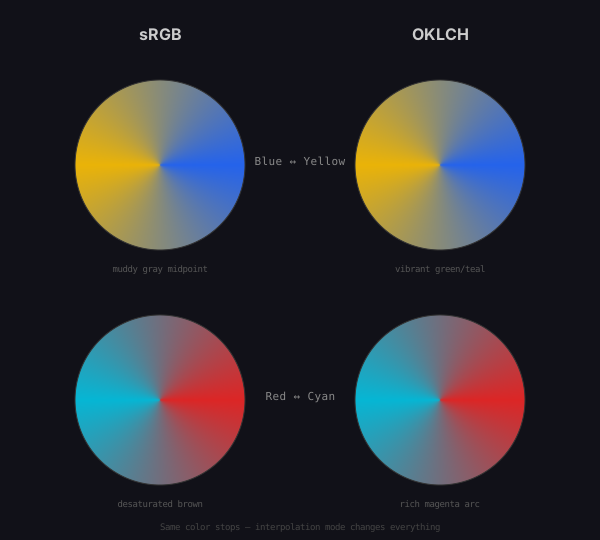
Conic gradients also support the same spreadMethod options as linear and radial gradients. When using a partial sweep, reflect and repeat can produce interesting patterns in the gap region. The conic-spread-modes sample explores this.
How It Renders
Conic gradients cannot be expressed as native SVG elements. Instead, Pathogen rasterizes them at compile time and embeds the result as a base64-encoded PNG inside a <pattern> element. The rendering pipeline has three tiers:
WebGPU: When available (playground,
--render-gpuCLI flag), a fragment shader computes per-pixel colors. This is fast and produces the highest quality output with correct OKLCH interpolation.Canvas 2D: When WebGPU is unavailable, a Canvas 2D fallback renders the gradient using the native
createConicGradient()API with manual stop processing.Wedge paths: The CLI's default mode generates a series of thin wedge-shaped
<path>elements, each filled with a solid color sampled from the gradient. This requires no browser environment but produces larger SVG output.
In all three cases, the author writes the same ConicGradient code. The rendering path is an implementation detail — the compiled SVG looks identical regardless of which pipeline produced it.
What Comes Next
Conic gradients fill a gap in SVG's rendering model. But there are gradient types that no web standard has ever supported: grid-based mesh gradients and scatter-based freeform gradients. In the next post, we implement both.