Mesh and Freeform: Gradients That SVG Forgot
The SVG2 draft spec included a <meshGradient> element. It described a grid of color patches with bilinear interpolation — the kind of gradient that tools like Adobe Illustrator have supported for decades. The spec was never finalized. No browser implemented it. The feature was quietly dropped.
Pathogen brings it back, along with a second model that was never even proposed: freeform gradients where color points are placed at arbitrary positions and blended using inverse-distance weighting. Both types are GPU-rendered at compile time, producing base64-encoded <pattern> elements identical to conic gradients.
MeshGradient: The Grid Model
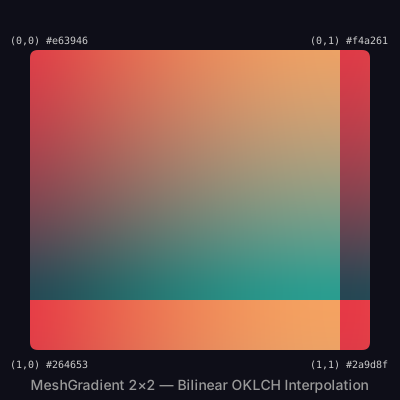
A MeshGradient defines a rectangular grid of control points, each with an assigned color. Between the points, colors are interpolated bilinearly — smoothly blending across rows and columns. The constructor takes an ID, pixel dimensions, and the grid size:
let mesh = MeshGradient('corners', 400, 400, 2, 2) {|g|
  g.getPoint(0, 0).color = Color('#e63946');
  g.getPoint(0, 1).color = Color('#f4a261');
  g.getPoint(1, 0).color = Color('#264653');
  g.getPoint(1, 1).color = Color('#2a9d8f');
};
mesh.interpolation = 'oklch';
A 2x2 grid is the simplest case — four corners, each a different color, with smooth blending across the surface. The result looks like what you might get from a CSS four-corner gradient, except it is rendered as a high-resolution image embedded in SVG.
// viewBox="0 0 400 400"
// Mesh Basics — 2×2 Corner Colors
// The simplest mesh gradient: four corners, bilinear interpolation

// --- Gradient ---

let mesh = MeshGradient('corners', 400, 400, 2, 2) {|g|
  g.getPoint(0, 0).color = Color('#e63946');
  g.getPoint(0, 1).color = Color('#f4a261');
  g.getPoint(1, 0).color = Color('#264653');
  g.getPoint(1, 1).color = Color('#2a9d8f');
};
mesh.interpolation = 'oklch';

// --- Background ---

let bg = PathLayer('bg') ${ fill: #0e0e18; stroke: none; };
bg.apply { rect(0, 0, 400, 400) }

// --- Mesh fill ---

let patch = PathLayer('patch') ${ fill: mesh; stroke: none; };
patch.apply { roundRect(30, 50, 340, 300, 8) }

// --- Corner labels ---

let labels = TextLayer('labels') ${
  font-family: monospace;
  font-size: 10;
  fill: #ccc;
  text-anchor: middle;
};
labels.apply {
  text(50, 44)`(0,0) #e63946`
  text(350, 44)`(0,1) #f4a261`
  text(50, 368)`(1,0) #264653`
  text(350, 368)`(1,1) #2a9d8f`
}

let title = TextLayer('title') ${
  font-family: system-ui, sans-serif;
  font-size: 14;
  fill: #999;
  text-anchor: middle;
};
title.apply {
  text(200, 390)`MeshGradient 2×2 — Bilinear OKLCH Interpolation`
}

// --- Scene ---

let scene = GroupLayer('scene') ${};
scene.append(bg, patch, labels, title)
Working with the Grid
Larger grids give more control. A 3x3 grid has 9 control points, allowing you to define a center color distinct from the edges. The getPoint(row, col) method returns a point object whose .color property you set.
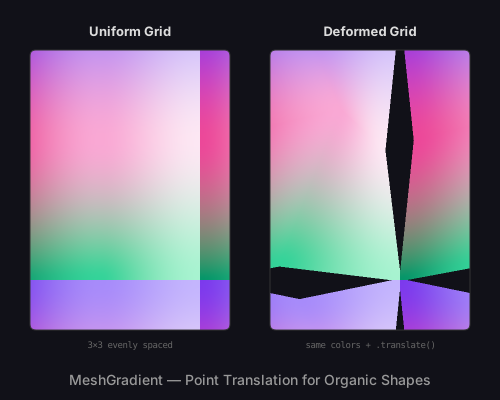
Beyond color assignment, mesh points support .translate(dx, dy) to shift their position away from the uniform grid. This breaks the regularity, creating organic warps and distortions. The bilinear interpolation follows the deformed grid, producing gradient shapes that would be impossible with uniform blending.
let deformed = MeshGradient('deformed', 200, 280, 3, 3) {|g|
  g.getPoint(0, 0).color = Color('#7c3aed');
  // ... assign all 9 colors ...

  g.getPoint(1, 1).translate(40, -30);  // shift center
  g.getPoint(0, 1).translate(0, 20);    // warp top edge
};
// viewBox="0 0 500 400"
// Mesh Deformation — Translated Control Points
// Side-by-side: uniform grid vs deformed grid with .translate()

// --- Left: uniform 3×3 mesh ---

let uniform = MeshGradient('uniform', 200, 280, 3, 3) {|g|
  g.getPoint(0, 0).color = Color('#7c3aed');
  g.getPoint(0, 1).color = Color('#a78bfa');
  g.getPoint(0, 2).color = Color('#c4b5fd');
  g.getPoint(1, 0).color = Color('#ec4899');
  g.getPoint(1, 1).color = Color('#f9a8d4');
  g.getPoint(1, 2).color = Color('#fce7f3');
  g.getPoint(2, 0).color = Color('#059669');
  g.getPoint(2, 1).color = Color('#34d399');
  g.getPoint(2, 2).color = Color('#a7f3d0');
};
uniform.interpolation = 'oklch';

// --- Right: same colors, deformed grid ---

let deformed = MeshGradient('deformed', 200, 280, 3, 3) {|g|
  g.getPoint(0, 0).color = Color('#7c3aed');
  g.getPoint(0, 1).color = Color('#a78bfa');
  g.getPoint(0, 2).color = Color('#c4b5fd');
  g.getPoint(1, 0).color = Color('#ec4899');
  g.getPoint(1, 1).color = Color('#f9a8d4');
  g.getPoint(1, 2).color = Color('#fce7f3');
  g.getPoint(2, 0).color = Color('#059669');
  g.getPoint(2, 1).color = Color('#34d399');
  g.getPoint(2, 2).color = Color('#a7f3d0');

  // Shift center point dramatically
  g.getPoint(1, 1).translate(40, -30);
  // Warp edges
  g.getPoint(0, 1).translate(0, 20);
  g.getPoint(2, 1).translate(-20, -15);
  g.getPoint(1, 0).translate(15, 0);
  g.getPoint(1, 2).translate(-15, 10);
};
deformed.interpolation = 'oklch';

// --- Background ---

let bg = PathLayer('bg') ${ fill: #111118; stroke: none; };
bg.apply { rect(0, 0, 500, 400) }

// --- Mesh fills ---

let left = PathLayer('left') ${ fill: uniform; stroke: #333; stroke-width: 1; };
left.apply { roundRect(30, 50, 200, 280, 6) }

let right = PathLayer('right') ${ fill: deformed; stroke: #333; stroke-width: 1; };
right.apply { roundRect(270, 50, 200, 280, 6) }

// --- Labels ---

let labels = TextLayer('labels') ${
  font-family: system-ui, sans-serif;
  font-size: 13;
  fill: #ddd;
  text-anchor: middle;
  font-weight: bold;
};
labels.apply {
  text(130, 36)`Uniform Grid`
  text(370, 36)`Deformed Grid`
}

let desc = TextLayer('desc') ${
  font-family: monospace;
  font-size: 9;
  fill: #666;
  text-anchor: middle;
};
desc.apply {
  text(130, 348)`3×3 evenly spaced`
  text(370, 348)`same colors + .translate()`
}

let title = TextLayer('title') ${
  font-family: system-ui, sans-serif;
  font-size: 14;
  fill: #999;
  text-anchor: middle;
};
title.apply {
  text(250, 385)`MeshGradient — Point Translation for Organic Shapes`
}

// --- Scene ---

let left_group = GroupLayer('left-group') ${};
left_group.append(left)

let right_group = GroupLayer('right-group') ${};
right_group.append(right)

let scene = GroupLayer('scene') ${};
scene.append(bg, left_group, right_group, labels, desc, title)
The getRow(n) method returns all points in a row, useful for applying consistent colors across a horizontal band. For more complex scenes, higher-resolution grids (4x4, 5x5) with translated points can simulate terrain, fabric folds, or atmospheric effects. The mesh-landscape sample demonstrates a 4x3 grid producing a stylized landscape.
FreeformGradient: The Scatter Model
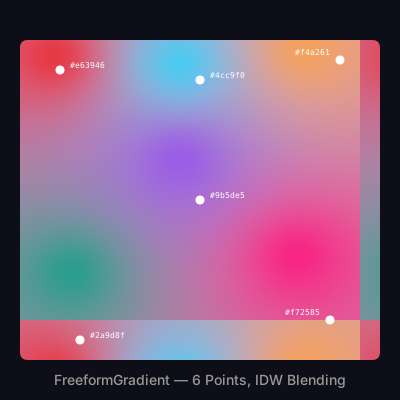
Where MeshGradient constrains colors to a grid, FreeformGradient places them anywhere. You specify color points at arbitrary pixel coordinates, and the renderer blends them using inverse-distance weighting (IDW). Each pixel's color is a weighted average of all points, with closer points contributing more.
let nebula = FreeformGradient('nebula', 400, 400) {|g|
  g.point(60,  70,  Color('#e63946'));
  g.point(340, 60,  Color('#f4a261'));
  g.point(200, 200, Color('#9b5de5'));
  g.point(80,  340, Color('#2a9d8f'));
  g.point(330, 320, Color('#f72585'));
  g.point(200, 80,  Color('#4cc9f0'));
};
nebula.falloff = 2.0;
nebula.interpolation = 'oklch';
The g.point(x, y, color) method places a color source at absolute coordinates. Six points with OKLCH interpolation produce a smooth nebula-like color field. The small dots in the demo below mark where each color point is placed.
// viewBox="0 0 400 400"
// Freeform Scatter — Inverse-Distance Blending
// Color points placed freely; IDW interpolation creates smooth fields

// --- Gradient ---

let nebula = FreeformGradient('nebula', 400, 400) {|g|
  g.point(60,  70,  Color('#e63946'));
  g.point(340, 60,  Color('#f4a261'));
  g.point(200, 200, Color('#9b5de5'));
  g.point(80,  340, Color('#2a9d8f'));
  g.point(330, 320, Color('#f72585'));
  g.point(200, 80,  Color('#4cc9f0'));
};
nebula.falloff = 2.0;
nebula.interpolation = 'oklch';

// --- Background ---

let bg = PathLayer('bg') ${ fill: #0e0e18; stroke: none; };
bg.apply { rect(0, 0, 400, 400) }

// --- Fill ---

let field = PathLayer('field') ${ fill: nebula; stroke: none; };
field.apply { roundRect(20, 40, 360, 320, 8) }

// --- Point markers ---

let dots = PathLayer('dots') ${ fill: #ffffff88; stroke: #fff; stroke-width: 1; };
dots.apply {
  circle(60,  70,  4); closePath()
  circle(340, 60,  4); closePath()
  circle(200, 200, 4); closePath()
  circle(80,  340, 4); closePath()
  circle(330, 320, 4); closePath()
  circle(200, 80,  4); closePath()
}

// --- Labels ---

let point_labels = TextLayer('point-labels') ${
  font-family: monospace;
  font-size: 8;
  fill: #ffffffaa;
  text-anchor: start;
};
point_labels.apply {
  text(70,  68)`#e63946`
  text(295, 55)`#f4a261`
  text(210, 198)`#9b5de5`
  text(90,  338)`#2a9d8f`
  text(285, 315)`#f72585`
  text(210, 78)`#4cc9f0`
}

let title = TextLayer('title') ${
  font-family: system-ui, sans-serif;
  font-size: 14;
  fill: #999;
  text-anchor: middle;
};
title.apply {
  text(200, 385)`FreeformGradient — 6 Points, IDW Blending`
}

// --- Scene ---

let scene = GroupLayer('scene') ${};
scene.append(bg, field, dots, point_labels, title)
Controlling Falloff
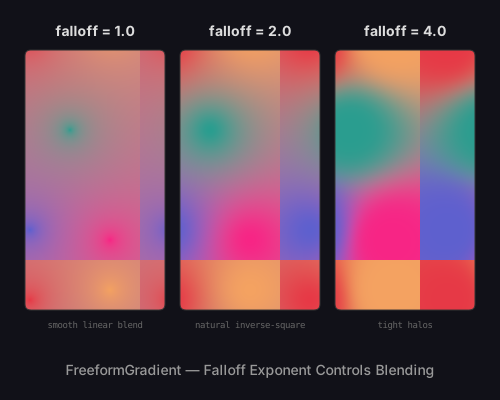
The .falloff property is an exponent that controls how quickly a point's influence decreases with distance. It defaults to 2.0 (inverse-square), which produces natural-looking blending. Lower values create smoother, more uniform blends. Higher values create tight halos around each point with sharper boundaries.
- falloff = 1.0: Linear falloff. Colors blend gradually across the entire surface. Each point's influence extends far, producing a uniformly mixed result.
- falloff = 2.0: Inverse-square. The natural default. Points dominate their local neighborhood but still blend at medium distances.
- falloff = 4.0: Tight halos. Each point's color is concentrated in a small region, with rapid transitions between adjacent points.
// viewBox="0 0 500 400"
// Falloff Comparison — Same Points, Different Exponents
// How the falloff parameter controls color blending sharpness

// --- Three freeform gradients with different falloff ---

let grad_1 = FreeformGradient('fall-1', 140, 260) {|g|
  g.point(30,  40,  Color('#e63946'));
  g.point(110, 30,  Color('#f4a261'));
  g.point(70,  130, Color('#2a9d8f'));
  g.point(30,  230, Color('#5e60ce'));
  g.point(110, 240, Color('#f72585'));
};
grad_1.falloff = 1.0;
grad_1.interpolation = 'oklch';

let grad_2 = FreeformGradient('fall-2', 140, 260) {|g|
  g.point(30,  40,  Color('#e63946'));
  g.point(110, 30,  Color('#f4a261'));
  g.point(70,  130, Color('#2a9d8f'));
  g.point(30,  230, Color('#5e60ce'));
  g.point(110, 240, Color('#f72585'));
};
grad_2.falloff = 2.0;
grad_2.interpolation = 'oklch';

let grad_4 = FreeformGradient('fall-4', 140, 260) {|g|
  g.point(30,  40,  Color('#e63946'));
  g.point(110, 30,  Color('#f4a261'));
  g.point(70,  130, Color('#2a9d8f'));
  g.point(30,  230, Color('#5e60ce'));
  g.point(110, 240, Color('#f72585'));
};
grad_4.falloff = 4.0;
grad_4.interpolation = 'oklch';

// --- Background ---

let bg = PathLayer('bg') ${ fill: #111118; stroke: none; };
bg.apply { rect(0, 0, 500, 400) }

// --- Fills ---

let f1 = PathLayer('f1') ${ fill: grad_1; stroke: #333; stroke-width: 1; };
f1.apply { roundRect(25, 50, 140, 260, 6) }

let f2 = PathLayer('f2') ${ fill: grad_2; stroke: #333; stroke-width: 1; };
f2.apply { roundRect(180, 50, 140, 260, 6) }

let f3 = PathLayer('f3') ${ fill: grad_4; stroke: #333; stroke-width: 1; };
f3.apply { roundRect(335, 50, 140, 260, 6) }

// --- Labels ---

let labels = TextLayer('labels') ${
  font-family: system-ui, sans-serif;
  font-size: 14;
  fill: #ddd;
  text-anchor: middle;
  font-weight: bold;
};
labels.apply {
  text(95,  36)`falloff = 1.0`
  text(250, 36)`falloff = 2.0`
  text(405, 36)`falloff = 4.0`
}

let desc = TextLayer('desc') ${
  font-family: monospace;
  font-size: 9;
  fill: #666;
  text-anchor: middle;
};
desc.apply {
  text(95,  328)`smooth linear blend`
  text(250, 328)`natural inverse-square`
  text(405, 328)`tight halos`
}

let title = TextLayer('title') ${
  font-family: system-ui, sans-serif;
  font-size: 14;
  fill: #999;
  text-anchor: middle;
};
title.apply {
  text(250, 375)`FreeformGradient — Falloff Exponent Controls Blending`
}

// --- Scene ---

let scene = GroupLayer('scene') ${};
scene.append(bg, f1, f2, f3, labels, desc, title)
Mesh vs Freeform
The two gradient types serve different design needs. MeshGradient excels at structured, predictable blending — backgrounds, UI surfaces, and any case where you want precise control over the transition boundaries. FreeformGradient is better for organic, painterly effects — glows, nebulae, abstract art.
The comparison below places the same nine colors using both methods. The mesh version (left) uses a 3x3 grid with bilinear interpolation, producing clean diagonal transitions. The freeform version (right) uses the same colors at similar positions with IDW blending, producing rounder, more diffuse regions.
// viewBox="0 0 500 400"
// Mesh vs Freeform — Side-by-Side Comparison
// Same palette, two interpolation models: grid vs scatter

// --- Palette ---

let c_rose   = Color('#e63946');
let c_amber  = Color('#f4a261');
let c_teal   = Color('#2a9d8f');
let c_navy   = Color('#264653');
let c_purple = Color('#7c3aed');

// --- MeshGradient: 3×3 structured grid ---

let mesh = MeshGradient('mesh', 200, 280, 3, 3) {|g|
  // Top row
  g.getPoint(0, 0).color = c_rose;
  g.getPoint(0, 1).color = c_amber;
  g.getPoint(0, 2).color = c_purple;
  // Middle row
  g.getPoint(1, 0).color = c_amber;
  g.getPoint(1, 1).color = c_teal;
  g.getPoint(1, 2).color = c_rose;
  // Bottom row
  g.getPoint(2, 0).color = c_navy;
  g.getPoint(2, 1).color = c_purple;
  g.getPoint(2, 2).color = c_teal;
};
mesh.interpolation = 'oklch';

// --- FreeformGradient: same colors at similar positions ---

let freeform = FreeformGradient('freeform', 200, 280) {|g|
  g.point(10,  10,  c_rose);
  g.point(100, 10,  c_amber);
  g.point(190, 10,  c_purple);
  g.point(10,  140, c_amber);
  g.point(100, 140, c_teal);
  g.point(190, 140, c_rose);
  g.point(10,  270, c_navy);
  g.point(100, 270, c_purple);
  g.point(190, 270, c_teal);
};
freeform.falloff = 2.0;
freeform.interpolation = 'oklch';

// --- Background ---

let bg = PathLayer('bg') ${ fill: #111118; stroke: none; };
bg.apply { rect(0, 0, 500, 400) }

// --- Fills ---

let mesh_fill = PathLayer('mesh-fill') ${ fill: mesh; stroke: #333; stroke-width: 1; };
mesh_fill.apply { roundRect(30, 50, 200, 280, 6) }

let ff_fill = PathLayer('ff-fill') ${ fill: freeform; stroke: #333; stroke-width: 1; };
ff_fill.apply { roundRect(270, 50, 200, 280, 6) }

// --- Labels ---

let labels = TextLayer('labels') ${
  font-family: system-ui, sans-serif;
  font-size: 14;
  fill: #ddd;
  text-anchor: middle;
  font-weight: bold;
};
labels.apply {
  text(130, 36)`MeshGradient`
  text(370, 36)`FreeformGradient`
}

let desc = TextLayer('desc') ${
  font-family: monospace;
  font-size: 9;
  fill: #666;
  text-anchor: middle;
};
desc.apply {
  text(130, 348)`bilinear patch interpolation`
  text(370, 348)`inverse-distance weighting`
}

let title = TextLayer('title') ${
  font-family: system-ui, sans-serif;
  font-size: 13;
  fill: #999;
  text-anchor: middle;
};
title.apply {
  text(250, 385)`Same 9 Colors — Two Interpolation Models`
}

// --- Scene ---

let left_group = GroupLayer('left-group') ${};
left_group.append(mesh_fill)

let right_group = GroupLayer('right-group') ${};
right_group.append(ff_fill)

let scene = GroupLayer('scene') ${};
scene.append(bg, left_group, right_group, labels, desc, title)
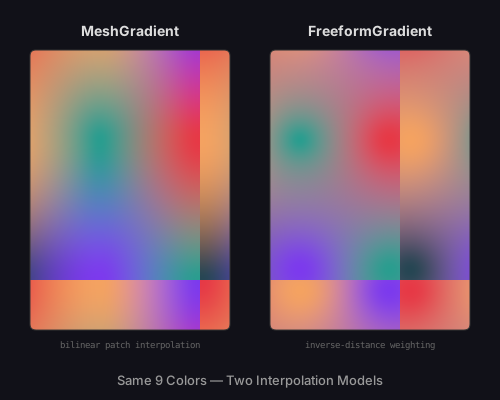
In practice, the choice depends on the visual you are after. Mesh gradients give you the regularity of a grid with optional deformation for organic touches. Freeform gradients give you complete spatial freedom at the cost of less predictable boundaries. Both are tools in the same system — you can use them in the same Pathogen source file, assign them to different layers, and compose them freely.
Rendering Pipeline
Mesh and freeform gradients use the same GPU rendering pipeline as conic gradients. In the playground and when using --render-gpu in the CLI, a WebGPU compute shader processes each gradient:
- MeshGradient: A bilinear interpolation shader that maps each output pixel to the enclosing grid cell, computes the local UV coordinates, and blends the four corner colors.
- FreeformGradient: An IDW shader that evaluates the weighted contribution of every color point for each output pixel, with the falloff exponent controlling the distance curve.
Both shaders support OKLCH interpolation natively — the blending happens in OKLCH space when enabled, then converts to sRGB for the final output image. The result is embedded as a base64 PNG in a <pattern> element, identical to the conic gradient output.
When WebGPU is unavailable, a Canvas 2D fallback renders the gradient at reduced resolution (4x downscale) and upsamples with bilinear filtering. The visual quality is slightly lower but the output is functionally identical.
What Comes Next
Linear, radial, conic, mesh, and freeform gradients all share a common pattern: colors are placed at geometric positions (along a line, around a circle, at grid intersections, at scattered points) and interpolated between them. The next post introduces a fundamentally different model — topological gradients, where colors follow the contours of arbitrary path shapes using signed distance fields and Laplace solvers.