Topological Gradients: Painting with Signed Distance Fields
Every gradient type we have covered so far places colors at geometric positions — along a line, around a circle, at grid intersections, at scattered points. The geometry is abstract: coordinates in a normalized space that the renderer interpolates between.
What if the color stops were not positions, but shapes? What if a gradient followed the contour of a path — radiating outward from an organic curve instead of a straight line? This is what TopoGradient does. It takes closed paths at specified elevations and uses signed distance fields to blend between them, producing topographic map-like gradients where the color follows the shape of the terrain.
Contours as Color Stops
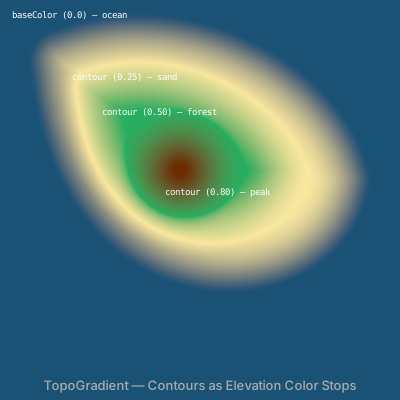
A TopoGradient replaces the linear stop list with a set of contour definitions. Each contour is a closed path placed at an elevation between 0 and 1. The baseColor fills elevation 0 (the "sea level"), and contours define higher-elevation regions with their own colors.
let outer = @{
  m 0 0
  c 120 -50 260 30 280 120
  c -20 120 -260 130 -280 -120
  z
};

let topo = TopoGradient('terrain', 400, 400) {|g|
  g.contour(outer.project(60, 60), 0.25, Color('#f9e79f'))
  g.contour(mid.project(90, 90),   0.5,  Color('#27ae60'))
  g.contour(peak.project(180, 170), 0.8, Color('#6e2c00'))
};
topo.baseColor = Color('#1a5276');
topo.easing = 'smoothstep';
topo.interpolation = 'oklch';
Contour paths are defined as path variables using the @{ ... } syntax and positioned using .project(x, y). The .contour() method takes three arguments: a projected path, an elevation scalar, and a Color. The path must be closed (ending with z).
The elevation value determines where this contour sits in the gradient's range. At elevation 0.0, the baseColor applies. At 0.25, the first contour's color takes over. Between contours, the renderer interpolates based on the signed distance from each contour boundary.
// viewBox="0 0 400 400"
// Topo Basics — Contour-as-Color-Stop
// The core concept: closed paths at elevations create terrain-like gradients

// --- Contour shapes ---

let outer = @{
  m 0 0
  c 120 -50 260 30 280 120
  c -20 120 -260 130 -280 -120
  z
};

let mid = @{
  m 0 0
  c 80 -30 170 20 190 80
  c -20 80 -180 90 -190 -80
  z
};

let peak = @{ circle(0, 0, 35); closePath() };

// --- Gradient ---

let topo = TopoGradient('terrain', 400, 400) {|g|
  g.contour(outer.project(60, 60), 0.25, Color('#f9e79f'))
  g.contour(mid.project(90, 90), 0.5,  Color('#27ae60'))
  g.contour(peak.project(180, 170), 0.8, Color('#6e2c00'))
};
topo.baseColor = Color('#1a5276');
topo.easing = 'smoothstep';
topo.interpolation = 'oklch';

// --- Layers ---

let bg = PathLayer('bg') ${ fill: topo; stroke: none; };
bg.apply { rect(0, 0, 400, 400) }

// --- Labels ---

let labels = TextLayer('labels') ${
  font-family: monospace;
  font-size: 9;
  fill: #ffffffaa;
  text-anchor: start;
};
labels.apply {
  text(12, 18)`baseColor (0.0) — ocean`
  text(72, 80)`contour (0.25) — sand`
  text(102, 115)`contour (0.50) — forest`
  text(165, 195)`contour (0.80) — peak`
}

let title = TextLayer('title') ${
  font-family: system-ui, sans-serif;
  font-size: 13;
  fill: #aaa;
  text-anchor: middle;
};
title.apply {
  text(200, 390)`TopoGradient — Contours as Elevation Color Stops`
}

// --- Scene ---

let scene = GroupLayer('scene') ${};
scene.append(bg, labels, title)
Multiple Peaks
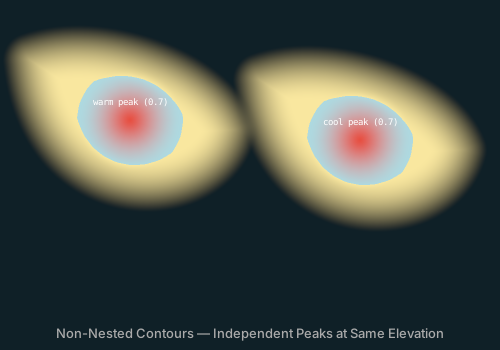
Contours do not need to be nested. Two separate closed paths at the same elevation create independent features — like two islands in an ocean. The distance field solver treats each contour independently, producing smooth gradients around each shape that merge naturally in the shared base region.
let topo = TopoGradient('twins', 500, 350) {|g|
  // Left peak — warm tones
  g.contour(island.project(30, 60),  0.3, Color('#f9e79f'))
  g.contour(summit.project(130, 120), 0.7, Color('#e74c3c'))

  // Right peak — cool tones
  g.contour(island.project(260, 80),  0.3, Color('#aed9e0'))
  g.contour(summit.project(360, 140), 0.7, Color('#5e60ce'))
};
The twin peaks below use the same base shape (an organic blob) projected to two different positions. Each peak has its own color palette — warm tones on the left, cool on the right — but shares the same dark ocean base color.
// viewBox="0 0 500 350"
// Twin Peaks — Non-Nested Contours
// Separate contours at the same elevation create independent features

// --- Shared shapes ---

let island = @{
  m 0 0
  c 70 -25 180 15 200 70
  c -20 80 -185 85 -200 -70
  z
};

let summit = @{ circle(0, 0, 25); closePath() };

// --- Gradient with two separate peaks ---

let topo = TopoGradient('twins', 500, 350) {|g|
  // Left peak — warm tones
  g.contour(island.project(30, 60), 0.3, Color('#f9e79f'))
  g.contour(summit.project(130, 120), 0.7, Color('#e74c3c'))

  // Right peak — cool tones (same elevation = separate feature)
  g.contour(island.project(260, 80), 0.3, Color('#aed9e0'))
  g.contour(summit.project(360, 140), 0.7, Color('#5e60ce'))
};
topo.baseColor = Color('#0f2027');
topo.easing = 'smoothstep';
topo.interpolation = 'oklch';

// --- Layers ---

let bg = PathLayer('bg') ${ fill: topo; stroke: none; };
bg.apply { rect(0, 0, 500, 350) }

// --- Labels ---

let labels = TextLayer('labels') ${
  font-family: monospace;
  font-size: 9;
  fill: #ffffff88;
  text-anchor: middle;
};
labels.apply {
  text(130, 105)`warm peak (0.7)`
  text(360, 125)`cool peak (0.7)`
}

let title = TextLayer('title') ${
  font-family: system-ui, sans-serif;
  font-size: 13;
  fill: #aaa;
  text-anchor: middle;
};
title.apply {
  text(250, 338)`Non-Nested Contours — Independent Peaks at Same Elevation`
}

// --- Scene ---

let scene = GroupLayer('scene') ${};
scene.append(bg, labels, title)
Distance vs Laplace
TopoGradient supports two solver methods that control how elevation is computed between contours.
Distance (SDF)
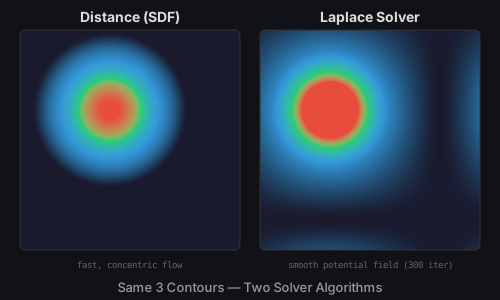
The default method. For each pixel, the renderer computes the signed distance to every contour boundary and maps the result to an elevation value. This produces concentric gradient bands that follow the exact shape of each contour, like the rings of a topographic map.
Distance solving is fast (O(pixels * contour_segments)) and produces predictable results. The bands are always parallel to the contour boundaries. This is the right choice when you want a clean, cartographic look.
Laplace Solver
The Laplace method treats contour elevations as boundary conditions and solves Laplace's equation using Jacobi iteration. The result is a smooth potential field — like temperature distribution on a surface where each contour is held at a fixed value.
Where the distance method produces sharp, contour-following bands, the Laplace solver produces organic, flowing transitions that smooth out geometric details. It also handles concave shapes and intersecting contours more naturally.
topo.method = 'laplace';
topo.iterations = 300;
The iterations property controls convergence (default 200, max 2000). Higher values produce smoother results at the cost of render time. For most cases, 200-400 iterations are sufficient.
// viewBox="0 0 500 300"
// Method Comparison — Distance (SDF) vs Laplace Solver
// Same contours, two solver algorithms: different blending behavior

// --- Shared contour shapes ---

let ring = @{ circle(0, 0, 60); closePath() };
let inner = @{ circle(0, 0, 25); closePath() };

// --- Distance method (left) ---

let topo_d = TopoGradient('dist', 220, 220) {|g|
  g.contour(ring.project(110, 110), 0.3, Color('#3498db'))
  g.contour(ring.scale(0.6, 0.6).project(110, 110), 0.6, Color('#2ecc71'))
  g.contour(inner.project(110, 110), 0.85, Color('#e74c3c'))
};
topo_d.method = 'distance';
topo_d.baseColor = Color('#1a1a2e');
topo_d.easing = 'smoothstep';

// --- Laplace method (right) ---

let topo_l = TopoGradient('lapl', 220, 220) {|g|
  g.contour(ring.project(110, 110), 0.3, Color('#3498db'))
  g.contour(ring.scale(0.6, 0.6).project(110, 110), 0.6, Color('#2ecc71'))
  g.contour(inner.project(110, 110), 0.85, Color('#e74c3c'))
};
topo_l.method = 'laplace';
topo_l.iterations = 300;
topo_l.baseColor = Color('#1a1a2e');
topo_l.easing = 'smoothstep';

// --- Background ---

let bg = PathLayer('bg') ${ fill: #111118; stroke: none; };
bg.apply { rect(0, 0, 500, 300) }

// --- Fills ---

let left = PathLayer('left') ${ fill: topo_d; stroke: #333; stroke-width: 1; };
left.apply { roundRect(20, 30, 220, 220, 6) }

let right = PathLayer('right') ${ fill: topo_l; stroke: #333; stroke-width: 1; };
right.apply { roundRect(260, 30, 220, 220, 6) }

// --- Labels ---

let labels = TextLayer('labels') ${
  font-family: system-ui, sans-serif;
  font-size: 14;
  fill: #ddd;
  text-anchor: middle;
  font-weight: bold;
};
labels.apply {
  text(130, 22)`Distance (SDF)`
  text(370, 22)`Laplace Solver`
}

let desc = TextLayer('desc') ${
  font-family: monospace;
  font-size: 9;
  fill: #666;
  text-anchor: middle;
};
desc.apply {
  text(130, 268)`fast, concentric flow`
  text(370, 268)`smooth potential field (300 iter)`
}

let title = TextLayer('title') ${
  font-family: system-ui, sans-serif;
  font-size: 13;
  fill: #999;
  text-anchor: middle;
};
title.apply {
  text(250, 292)`Same 3 Contours — Two Solver Algorithms`
}

// --- Scene ---

let left_group = GroupLayer('left-group') ${};
left_group.append(left)

let right_group = GroupLayer('right-group') ${};
right_group.append(right)

let scene = GroupLayer('scene') ${};
scene.append(bg, left_group, right_group, labels, desc, title)
Easing
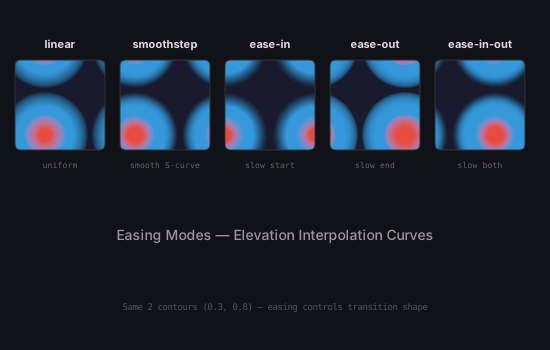
The .easing property controls how elevation values are interpolated between contours. Five modes are available:
- linear: Uniform transition. Equal distance produces equal color change.
- smoothstep: An S-curve that eases in and out. The most natural-looking default.
- ease-in: Slow start, fast finish. Color change accelerates toward higher elevations.
- ease-out: Fast start, slow finish. Color change decelerates toward higher elevations.
- ease-in-out: Slow start and finish, fast middle. A more pronounced S-curve than smoothstep.
Easing is applied after the solver computes the raw elevation — it remaps the value through the chosen curve before looking up the color. This means the same contour geometry produces different visual densities depending on the easing mode.
// viewBox="0 0 550 350"
// Easing Modes — 5 Elevation Interpolation Curves
// How easing changes the visual transition between contours

// --- Shared contour shapes (sized for 400×400 gradient) ---

let ring = @{ circle(0, 0, 160); closePath() };
let core = @{ circle(0, 0, 60); closePath() };

// --- Five gradients at proper resolution ---

let t1 = TopoGradient('ease-0', 400, 400) {|g|
  g.contour(ring.project(200, 200), 0.3, Color('#3498db'))
  g.contour(core.project(200, 200), 0.8, Color('#e74c3c'))
};
t1.baseColor = Color('#1a1a2e');
t1.easing = 'linear';
t1.interpolation = 'oklch';

let t2 = TopoGradient('ease-1', 400, 400) {|g|
  g.contour(ring.project(200, 200), 0.3, Color('#3498db'))
  g.contour(core.project(200, 200), 0.8, Color('#e74c3c'))
};
t2.baseColor = Color('#1a1a2e');
t2.easing = 'smoothstep';
t2.interpolation = 'oklch';

let t3 = TopoGradient('ease-2', 400, 400) {|g|
  g.contour(ring.project(200, 200), 0.3, Color('#3498db'))
  g.contour(core.project(200, 200), 0.8, Color('#e74c3c'))
};
t3.baseColor = Color('#1a1a2e');
t3.easing = 'ease-in';
t3.interpolation = 'oklch';

let t4 = TopoGradient('ease-3', 400, 400) {|g|
  g.contour(ring.project(200, 200), 0.3, Color('#3498db'))
  g.contour(core.project(200, 200), 0.8, Color('#e74c3c'))
};
t4.baseColor = Color('#1a1a2e');
t4.easing = 'ease-out';
t4.interpolation = 'oklch';

let t5 = TopoGradient('ease-4', 400, 400) {|g|
  g.contour(ring.project(200, 200), 0.3, Color('#3498db'))
  g.contour(core.project(200, 200), 0.8, Color('#e74c3c'))
};
t5.baseColor = Color('#1a1a2e');
t5.easing = 'ease-in-out';
t5.interpolation = 'oklch';

// --- Background ---

let bg = PathLayer('bg') ${ fill: #111118; stroke: none; };
bg.apply { rect(0, 0, 550, 350) }

// --- Fills ---

let p1 = PathLayer('p1') ${ fill: t1; stroke: #333; stroke-width: 1; };
p1.apply { roundRect(15, 60, 90, 90, 6) }

let p2 = PathLayer('p2') ${ fill: t2; stroke: #333; stroke-width: 1; };
p2.apply { roundRect(120, 60, 90, 90, 6) }

let p3 = PathLayer('p3') ${ fill: t3; stroke: #333; stroke-width: 1; };
p3.apply { roundRect(225, 60, 90, 90, 6) }

let p4 = PathLayer('p4') ${ fill: t4; stroke: #333; stroke-width: 1; };
p4.apply { roundRect(330, 60, 90, 90, 6) }

let p5 = PathLayer('p5') ${ fill: t5; stroke: #333; stroke-width: 1; };
p5.apply { roundRect(435, 60, 90, 90, 6) }

// --- Labels ---

let labels = TextLayer('labels') ${
  font-family: system-ui, sans-serif;
  font-size: 11;
  fill: #ddd;
  text-anchor: middle;
  font-weight: bold;
};
labels.apply {
  text(60, 48)`linear`
  text(165, 48)`smoothstep`
  text(270, 48)`ease-in`
  text(375, 48)`ease-out`
  text(480, 48)`ease-in-out`
}

let desc = TextLayer('desc') ${
  font-family: monospace;
  font-size: 8;
  fill: #666;
  text-anchor: middle;
};
desc.apply {
  text(60, 168)`uniform`
  text(165, 168)`smooth S-curve`
  text(270, 168)`slow start`
  text(375, 168)`slow end`
  text(480, 168)`slow both`
}

let title = TextLayer('title') ${
  font-family: system-ui, sans-serif;
  font-size: 14;
  fill: #999;
  text-anchor: middle;
};
title.apply {
  text(275, 240)`Easing Modes — Elevation Interpolation Curves`
}

let note = TextLayer('note') ${
  font-family: monospace;
  font-size: 9;
  fill: #555;
  text-anchor: middle;
};
note.apply {
  text(275, 310)`Same 2 contours (0.3, 0.8) — easing controls transition shape`
}

// --- Scene ---

let scene = GroupLayer('scene') ${};
scene.append(bg, p1, p2, p3, p4, p5, labels, desc, title, note)
The easing-organic sample demonstrates these curves on more complex contour shapes, where the visual difference is even more pronounced.
Terrain Map
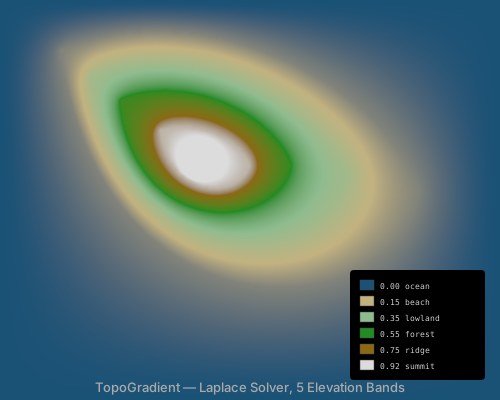
With five elevation bands and the Laplace solver, TopoGradient can produce convincing terrain maps. Each contour represents a different geographic feature — ocean, beach, lowland, forest, ridge, summit — with colors chosen to match cartographic conventions.
The sample below nests five contour shapes, each slightly smaller than the last, at increasing elevations. The Laplace solver (400 iterations) produces the smooth, flowing transitions between bands. An embedded legend labels each elevation.
// viewBox="0 0 500 400"
// Terrain Map — Island with Nested Elevation Bands
// Classic topographic map aesthetic with 5 elevation levels

// --- Contour shapes (organic coastline) ---

let coast = @{
  m 0 0
  c 140 -60 320 30 360 140
  c -20 140 -320 160 -360 -140
  z
};

let lowland = @{
  m 0 0
  c 100 -40 220 20 260 100
  c -20 100 -230 110 -260 -100
  z
};

let highland = @{
  m 0 0
  c 70 -25 150 15 170 65
  c -15 65 -155 75 -170 -65
  z
};

let ridge = @{
  m 0 0
  c 35 -12 80 8 90 35
  c -8 35 -82 37 -90 -35
  z
};

let summit = @{ circle(0, 0, 18); closePath() };

// --- Gradient ---

let topo = TopoGradient('island', 500, 400) {|g|
  g.contour(coast.project(60, 50), 0.15, Color('#c2b280'))
  g.contour(lowland.project(90, 75), 0.35, Color('#8fbc8f'))
  g.contour(highland.project(120, 100), 0.55, Color('#228b22'))
  g.contour(ridge.project(160, 130), 0.75, Color('#8b6914'))
  g.contour(summit.project(200, 160), 0.92, Color('#dcdcdc'))
};
topo.baseColor = Color('#1a5276');
topo.easing = 'smoothstep';
topo.method = 'laplace';
topo.iterations = 400;
topo.interpolation = 'oklch';

// --- Layers ---

let bg = PathLayer('bg') ${ fill: topo; stroke: none; };
bg.apply { rect(0, 0, 500, 400) }

// --- Elevation legend ---

let legend_bg = PathLayer('legend-bg') ${ fill: #00000066; stroke: none; };
legend_bg.apply { roundRect(350, 270, 135, 110, 4) }

let s1 = PathLayer('s1') ${ fill: #1a5276; stroke: #444; stroke-width: 0.5; };
s1.apply { rect(360, 280, 14, 10) }
let s2 = PathLayer('s2') ${ fill: #c2b280; stroke: #444; stroke-width: 0.5; };
s2.apply { rect(360, 296, 14, 10) }
let s3 = PathLayer('s3') ${ fill: #8fbc8f; stroke: #444; stroke-width: 0.5; };
s3.apply { rect(360, 312, 14, 10) }
let s4 = PathLayer('s4') ${ fill: #228b22; stroke: #444; stroke-width: 0.5; };
s4.apply { rect(360, 328, 14, 10) }
let s5 = PathLayer('s5') ${ fill: #8b6914; stroke: #444; stroke-width: 0.5; };
s5.apply { rect(360, 344, 14, 10) }
let s6 = PathLayer('s6') ${ fill: #dcdcdc; stroke: #444; stroke-width: 0.5; };
s6.apply { rect(360, 360, 14, 10) }

let legend = TextLayer('legend') ${
  font-family: monospace;
  font-size: 8;
  fill: #ccc;
  text-anchor: start;
};
legend.apply {
  text(380, 289)`0.00 ocean`
  text(380, 305)`0.15 beach`
  text(380, 321)`0.35 lowland`
  text(380, 337)`0.55 forest`
  text(380, 353)`0.75 ridge`
  text(380, 369)`0.92 summit`
}

let title = TextLayer('title') ${
  font-family: system-ui, sans-serif;
  font-size: 13;
  fill: #aaa;
  text-anchor: middle;
};
title.apply {
  text(250, 392)`TopoGradient — Laplace Solver, 5 Elevation Bands`
}

// --- Scene ---

let legend_group = GroupLayer('legend-group') ${};
legend_group.append(legend_bg, s1, s2, s3, s4, s5, s6, legend)

let scene = GroupLayer('scene') ${};
scene.append(bg, legend_group, title)
Artistic Composition
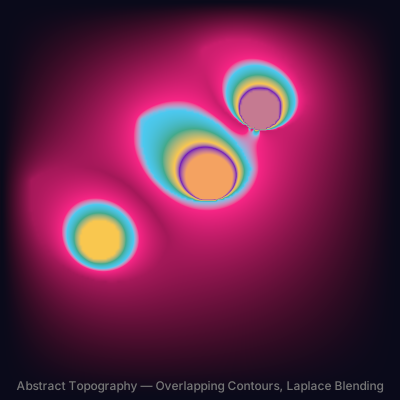
TopoGradient is not limited to cartography. When contours overlap, the solver blends their influence regions, creating complex color fields that emerge from simple shape definitions. Overlapping blobs at different elevations produce layered, painterly effects.
The abstract composition below uses six contours — two warm clusters, two cool clusters, and a center overlap — with the Laplace solver and ease-in-out easing. The three contour groups interact where their influence regions meet, producing a result that looks hand-painted but is fully defined by code.
// viewBox="0 0 400 400"
// Abstract Topo — Artistic Contour Composition
// Multiple overlapping shapes creating an abstract topographic artwork

// --- Organic contour shapes ---

let blob1 = @{
  m 0 0
  c 60 -40 120 10 140 60
  c -10 70 -150 60 -140 -60
  z
};

let blob2 = @{
  m 0 0
  c 50 -30 100 5 110 50
  c -10 50 -105 45 -110 -50
  z
};

let dot = @{ circle(0, 0, 20); closePath() };

// --- Gradient with overlapping regions ---

let topo = TopoGradient('abstract', 400, 400) {|g|
  // Lower-left cluster — warm
  g.contour(blob1.project(30, 180), 0.2, Color('#f72585'))
  g.contour(dot.project(100, 240), 0.5, Color('#f9c74f'))

  // Upper-right cluster — cool
  g.contour(blob2.project(200, 50), 0.25, Color('#4cc9f0'))
  g.contour(dot.project(260, 110), 0.6, Color('#7209b7'))

  // Center overlap — creates interesting blending
  g.contour(blob1.scale(0.8, 0.8).project(140, 120), 0.35, Color('#43aa8b'))
  g.contour(dot.project(210, 180), 0.75, Color('#f4a261'))
};
topo.baseColor = Color('#0a0a1a');
topo.easing = 'ease-in-out';
topo.method = 'laplace';
topo.iterations = 250;
topo.interpolation = 'oklch';

// --- Layers ---

let bg = PathLayer('bg') ${ fill: topo; stroke: none; };
bg.apply { rect(0, 0, 400, 400) }

let title = TextLayer('title') ${
  font-family: system-ui, sans-serif;
  font-size: 12;
  fill: #777;
  text-anchor: middle;
};
title.apply {
  text(200, 390)`Abstract Topography — Overlapping Contours, Laplace Blending`
}

// --- Scene ---

let scene = GroupLayer('scene') ${};
scene.append(bg, title)
Geometric Contours
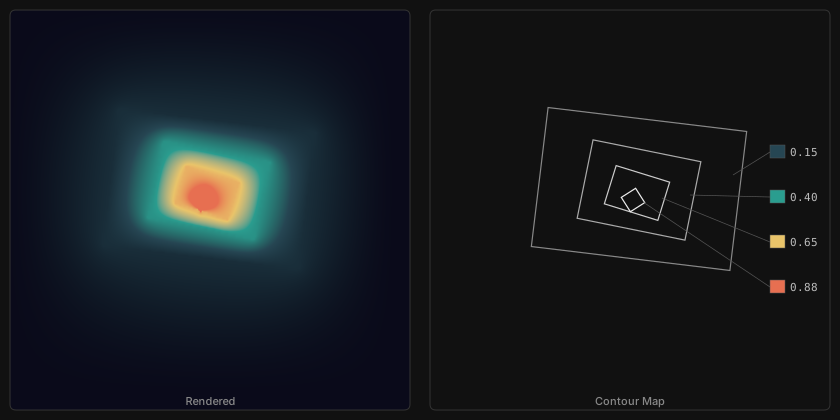
When contour shapes are angular rather than organic, the results change character. Nested rotated rectangles produce sharp ridgelines and faceted valleys — the Laplace solver smooths the transitions between angular boundaries while preserving the geometric feel. The schematic on the right shows each contour outline with its elevation value and color, so you can trace how the gradient follows the shape geometry.
// viewBox="0 0 840 420"
// Nested Rectangles — Annotated Schematic
// Left: rendered gradient, Right: contour map with paint chips + elevation labels

// --- Base rectangle shapes (centered at origin) ---
// Sized so each inner shape fully nests inside the outer after rotation

let big_rect = @{
  m -100 -70
  l 200 0
  l 0 140
  l -200 0
  z
};

let med_rect = @{
  m -55 -40
  l 110 0
  l 0 80
  l -110 0
  z
};

let sm_rect = @{
  m -28 -20
  l 56 0
  l 0 40
  l -56 0
  z
};

let diamond = @{
  m 0 -12
  l 12 12
  l -12 12
  l -12 -12
  z
};

// --- Rotate each at gentle increments for nesting ---

let r1 = big_rect.rotateAtVertexIndex(0, 0.12);
let r2 = med_rect.rotateAtVertexIndex(0, 0.20);
let r3 = sm_rect.rotateAtVertexIndex(0, 0.30);
let r4 = diamond.rotateAtVertexIndex(0, 0.22);

// --- Gradient ---
// Projections computed to center all shapes at (200, 200)

let topo = TopoGradient('rects', 400, 400) {|g|
  g.contour(r1.project(209, 189), 0.15, Color('#264653'))
  g.contour(r2.project(209, 190), 0.4, Color('#2a9d8f'))
  g.contour(r3.project(207, 193), 0.65, Color('#e9c46a'))
  g.contour(r4.project(203, 200), 0.88, Color('#e76f51'))
};
topo.baseColor = Color('#0a0a1a');
topo.easing = 'smoothstep';
topo.method = 'laplace';
topo.iterations = 300;
topo.interpolation = 'oklch';

// ========== LEFT PANEL: Rendered Gradient ==========

let bg = PathLayer('bg') ${ fill: #111; stroke: none; };
bg.apply { rect(0, 0, 840, 420) }

let left_fill = PathLayer('left-fill') ${ fill: topo; stroke: #333; stroke-width: 1; };
left_fill.apply { roundRect(10, 10, 400, 400, 6) }

// ========== RIGHT PANEL: Contour Schematic ==========

let schema_border = PathLayer('schema-border') ${ fill: none; stroke: #333; stroke-width: 1; };
schema_border.apply { roundRect(430, 10, 400, 400, 6) }

// Schematic: same shapes drawn at +430 x offset (center ≈ 630, 200)
// M positions mirror the gradient projections offset into right panel

let outline1 = PathLayer('outline1') ${ fill: none; stroke: #888; stroke-width: 1.2; };
outline1.apply { M 639 189 r1.draw() }

let outline2 = PathLayer('outline2') ${ fill: none; stroke: #aaa; stroke-width: 1.2; };
outline2.apply { M 639 190 r2.draw() }

let outline3 = PathLayer('outline3') ${ fill: none; stroke: #ccc; stroke-width: 1.2; };
outline3.apply { M 637 193 r3.draw() }

let outline4 = PathLayer('outline4') ${ fill: none; stroke: #eee; stroke-width: 1.2; };
outline4.apply { M 633 200 r4.draw() }

// --- Paint chips (25% larger: 15x13) + elevation labels ---

let chip1 = PathLayer('chip1') ${ fill: #264653; stroke: #555; stroke-width: 0.5; };
chip1.apply { rect(770, 145, 15, 13) }

let chip2 = PathLayer('chip2') ${ fill: #2a9d8f; stroke: #555; stroke-width: 0.5; };
chip2.apply { rect(770, 190, 15, 13) }

let chip3 = PathLayer('chip3') ${ fill: #e9c46a; stroke: #555; stroke-width: 0.5; };
chip3.apply { rect(770, 235, 15, 13) }

let chip4 = PathLayer('chip4') ${ fill: #e76f51; stroke: #555; stroke-width: 0.5; };
chip4.apply { rect(770, 280, 15, 13) }

let elev_labels = TextLayer('elev-labels') ${
  font-family: monospace;
  font-size: 11;
  fill: #bbb;
  text-anchor: start;
};
elev_labels.apply {
  text(790, 156)`0.15`
  text(790, 201)`0.40`
  text(790, 246)`0.65`
  text(790, 291)`0.88`
}

// --- Leader lines (from chip left edge to shape right edge) ---
// Endpoints computed from rotated vertex positions in schematic space

let leaders = PathLayer('leaders') ${ fill: none; stroke: #555; stroke-width: 0.7; };
leaders.apply {
  M 770 152 l -37 23
  M 770 197 l -80 -2
  M 770 242 l -108 -44
  M 770 287 l -127 -85
}

// --- Panel labels ---

let panel_labels = TextLayer('panel-labels') ${
  font-family: system-ui, sans-serif;
  font-size: 11;
  fill: #888;
  text-anchor: middle;
};
panel_labels.apply {
  text(210, 405)`Rendered`
  text(630, 405)`Contour Map`
}

// --- Scene ---

let scene = GroupLayer('scene') ${};
scene.append(bg, left_fill, schema_border, outline1, outline2, outline3, outline4, chip1, chip2, chip3, chip4, elev_labels, leaders, panel_labels)
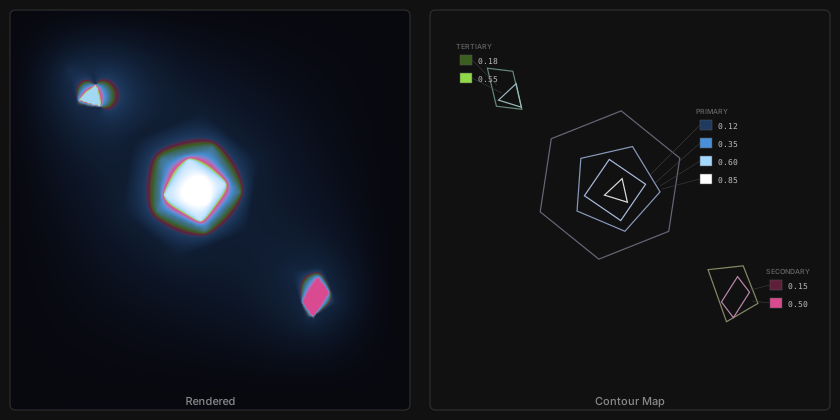
Multi-cluster polygonal contours create crystal-like formations. Three separate shape clusters — a central blue faceted core, a magenta wedge in the lower right, and a green shard in the upper left — compete for influence across the canvas. Where their distance fields overlap, the Laplace solver blends them into smooth transitions that emerge from purely angular geometry.
// viewBox="0 0 840 420"
// Crystal Formation — Annotated Schematic
// Left: rendered gradient, Right: contour map with paint chips + elevation labels

// --- Base shapes ---

let hex = @{
  m 0 -75
  l 65 38
  l 0 74
  l -65 38
  l -65 -38
  l 0 -74
  z
};

let pent = @{
  m 0 -45
  l 43 31
  l -17 50
  l -52 0
  l -17 -50
  z
};

let sq = @{
  m -22 -22
  l 44 0
  l 0 44
  l -44 0
  z
};

let tri = @{
  m 0 -14
  l 12 21
  l -24 0
  z
};

// --- Secondary cluster shapes ---

let wedge = @{
  m -15 -30
  l 35 5
  l 5 40
  l -35 10
  z
};

let shard = @{
  m -8 -20
  l 18 8
  l -2 30
  l -18 -8
  z
};

// --- Rotate for angular variety ---

let hex_r = hex.rotateAtVertexIndex(0, 0.15);
let pent_r = pent.rotateAtVertexIndex(0, 0.4);
let sq_r = sq.rotateAtVertexIndex(0, 0.6);
let tri_r = tri.rotateAtVertexIndex(0, 0.3);
let wedge_r = wedge.rotateAtVertexIndex(0, -0.25);
let shard_r = shard.rotateAtVertexIndex(0, 0.5);
let shard_r2 = shard.rotateAtVertexIndex(0, -0.3);

// --- Gradient: multi-cluster crystal ---

let topo = TopoGradient('crystal', 400, 400) {|g|
  // Primary cluster — center (blue facets)
  g.contour(hex_r.project(190, 185), 0.12, Color('#1e3a5f'))
  g.contour(pent_r.project(195, 188), 0.35, Color('#4a90d9'))
  g.contour(sq_r.project(195, 190), 0.6, Color('#a5d8ff'))
  g.contour(tri_r.project(198, 192), 0.85, Color('#ffffff'))

  // Secondary cluster — lower right (magenta)
  g.contour(wedge_r.project(310, 295), 0.15, Color('#5f1e3a'))
  g.contour(shard_r.project(315, 298), 0.5, Color('#d94a90'))

  // Tertiary shard — upper left (green)
  g.contour(shard_r2.scale(1.3, 1.3).project(85, 90), 0.18, Color('#3a5f1e'))
  g.contour(tri_r.project(92, 97), 0.55, Color('#90d94a'))
};
topo.baseColor = Color('#08080f');
topo.easing = 'ease-in-out';
topo.method = 'laplace';
topo.iterations = 300;
topo.interpolation = 'oklch';

// ========== LEFT PANEL: Rendered Gradient ==========

let bg = PathLayer('bg') ${ fill: #111; stroke: none; };
bg.apply { rect(0, 0, 840, 420) }

let left_fill = PathLayer('left-fill') ${ fill: topo; stroke: #333; stroke-width: 1; };
left_fill.apply { roundRect(10, 10, 400, 400, 6) }

// ========== RIGHT PANEL: Contour Schematic ==========

let schema_border = PathLayer('schema-border') ${ fill: none; stroke: #333; stroke-width: 1; };
schema_border.apply { roundRect(430, 10, 400, 400, 6) }

// Schematic offset: +420 to x for all projections
// Primary cluster: hex(190,185)→(610,185), pent(195,188)→(615,188), sq(195,190)→(615,190), tri(198,192)→(618,192)
// Secondary: wedge(310,295)→(730,295), shard(315,298)→(735,298)
// Tertiary: shard_r2(85,90)→(505,90), tri(92,97)→(512,97)

// --- Primary cluster outlines (center, blue) ---

let o_hex = PathLayer('o-hex') ${ fill: none; stroke: #667; stroke-width: 1.2; };
o_hex.apply { M 610 185 hex_r.draw() }

let o_pent = PathLayer('o-pent') ${ fill: none; stroke: #8899bb; stroke-width: 1.2; };
o_pent.apply { M 615 188 pent_r.draw() }

let o_sq = PathLayer('o-sq') ${ fill: none; stroke: #aabbdd; stroke-width: 1.2; };
o_sq.apply { M 615 190 sq_r.draw() }

let o_tri = PathLayer('o-tri') ${ fill: none; stroke: #ddd; stroke-width: 1.2; };
o_tri.apply { M 618 192 tri_r.draw() }

// --- Secondary cluster outlines (lower right, magenta) ---

let o_wedge = PathLayer('o-wedge') ${ fill: none; stroke: #886; stroke-width: 1.2; };
o_wedge.apply { M 730 295 wedge_r.draw() }

let o_shard = PathLayer('o-shard') ${ fill: none; stroke: #bb88aa; stroke-width: 1.2; };
o_shard.apply { M 735 298 shard_r.draw() }

// --- Tertiary cluster outlines (upper left, green) ---

let o_shard2 = PathLayer('o-shard2') ${ fill: none; stroke: #687; stroke-width: 1.2; };
o_shard2.apply { M 505 90 shard_r2.scale(1.3, 1.3).draw() }

let o_tri2 = PathLayer('o-tri2') ${ fill: none; stroke: #9bb; stroke-width: 1.2; };
o_tri2.apply { M 512 97 tri_r.draw() }

// --- Paint chips + labels: Primary cluster (right of center) ---

let cp1 = PathLayer('cp1') ${ fill: #1e3a5f; stroke: #555; stroke-width: 0.5; };
cp1.apply { rect(700, 120, 12, 10) }
let cp2 = PathLayer('cp2') ${ fill: #4a90d9; stroke: #555; stroke-width: 0.5; };
cp2.apply { rect(700, 138, 12, 10) }
let cp3 = PathLayer('cp3') ${ fill: #a5d8ff; stroke: #555; stroke-width: 0.5; };
cp3.apply { rect(700, 156, 12, 10) }
let cp4 = PathLayer('cp4') ${ fill: #ffffff; stroke: #555; stroke-width: 0.5; };
cp4.apply { rect(700, 174, 12, 10) }

// --- Paint chips + labels: Secondary cluster ---

let cs1 = PathLayer('cs1') ${ fill: #5f1e3a; stroke: #555; stroke-width: 0.5; };
cs1.apply { rect(770, 280, 12, 10) }
let cs2 = PathLayer('cs2') ${ fill: #d94a90; stroke: #555; stroke-width: 0.5; };
cs2.apply { rect(770, 298, 12, 10) }

// --- Paint chips + labels: Tertiary cluster ---

let ct1 = PathLayer('ct1') ${ fill: #3a5f1e; stroke: #555; stroke-width: 0.5; };
ct1.apply { rect(460, 55, 12, 10) }
let ct2 = PathLayer('ct2') ${ fill: #90d94a; stroke: #555; stroke-width: 0.5; };
ct2.apply { rect(460, 73, 12, 10) }

// --- Elevation labels ---

let elev_primary = TextLayer('elev-primary') ${
  font-family: monospace;
  font-size: 8;
  fill: #bbb;
  text-anchor: start;
};
elev_primary.apply {
  text(718, 129)`0.12`
  text(718, 147)`0.35`
  text(718, 165)`0.60`
  text(718, 183)`0.85`
}

let elev_secondary = TextLayer('elev-secondary') ${
  font-family: monospace;
  font-size: 8;
  fill: #bbb;
  text-anchor: start;
};
elev_secondary.apply {
  text(788, 289)`0.15`
  text(788, 307)`0.50`
}

let elev_tertiary = TextLayer('elev-tertiary') ${
  font-family: monospace;
  font-size: 8;
  fill: #bbb;
  text-anchor: start;
};
elev_tertiary.apply {
  text(478, 64)`0.18`
  text(478, 82)`0.55`
}

// --- Leader lines ---

let leaders = PathLayer('leaders') ${ fill: none; stroke: #444; stroke-width: 0.5; };
leaders.apply {
  // Primary cluster leaders (from chips to center area)
  M 700 125 l -50 50
  M 700 143 l -45 40
  M 700 161 l -40 25
  M 700 179 l -38 10
  // Secondary cluster leaders
  M 770 285 l -20 5
  M 770 303 l -18 -2
  // Tertiary cluster leaders
  M 472 60 l 25 25
  M 472 78 l 30 15
}

// --- Cluster labels ---

let cluster_labels = TextLayer('cluster-labels') ${
  font-family: system-ui, sans-serif;
  font-size: 7;
  fill: #666;
  text-anchor: start;
};
cluster_labels.apply {
  text(696, 114)`PRIMARY`
  text(766, 274)`SECONDARY`
  text(456, 49)`TERTIARY`
}

// --- Panel labels ---

let panel_labels = TextLayer('panel-labels') ${
  font-family: system-ui, sans-serif;
  font-size: 11;
  fill: #888;
  text-anchor: middle;
};
panel_labels.apply {
  text(210, 405)`Rendered`
  text(630, 405)`Contour Map`
}

// --- Scene ---

let scene = GroupLayer('scene') ${};
scene.append(bg, left_fill, schema_border, o_hex, o_pent, o_sq, o_tri, o_wedge, o_shard, o_shard2, o_tri2, cp1, cp2, cp3, cp4, cs1, cs2, ct1, ct2, elev_primary, elev_secondary, elev_tertiary, leaders, cluster_labels, panel_labels)
Organic Methods Compared
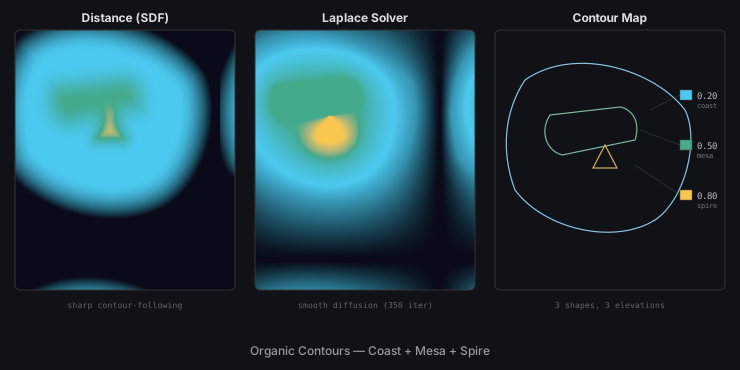
The method choice matters most with complex organic contours. The same three shapes — a sweeping coastline curve, a flat-topped mesa, and a sharp triangular spire — produce markedly different results under the two solvers. Distance (SDF) creates concentric bands that follow every curve and corner exactly. The Laplace solver diffuses those boundaries into flowing transitions, softening the mesa's flat top and the spire's sharp point into a continuous potential field.
// viewBox="0 0 740 370"
// Method Comparison — Organic + Annotated Schematic
// Left: distance SDF, Center: Laplace solver, Right: contour map

// --- Organic shapes (shared across all 3 panels) ---

let coast = @{
  m 0 0
  c 50 -35 130 -10 160 30
  c 15 30 0 90 -30 110
  c -40 25 -110 10 -140 -30
  c -15 -40 -10 -80 10 -110
  z
};

let mesa = @{
  m 0 0
  l 70 -8
  c 15 3 20 18 15 33
  l -73 15
  c -17 -5 -22 -25 -12 -40
  z
};

let spire = @{
  m 0 -15
  l 12 23
  l -24 0
  z
};

// --- Distance method (left panel) ---

let topo_d = TopoGradient('dist-org', 220, 260) {|g|
  g.contour(coast.project(30, 50), 0.2, Color('#4cc9f0'))
  g.contour(mesa.project(55, 85), 0.5, Color('#43aa8b'))
  g.contour(spire.project(110, 130), 0.8, Color('#f9c74f'))
};
topo_d.method = 'distance';
topo_d.baseColor = Color('#0a0a1a');
topo_d.easing = 'smoothstep';
topo_d.interpolation = 'oklch';

// --- Laplace method (center panel) ---

let topo_l = TopoGradient('lapl-org', 220, 260) {|g|
  g.contour(coast.project(30, 50), 0.2, Color('#4cc9f0'))
  g.contour(mesa.project(55, 85), 0.5, Color('#43aa8b'))
  g.contour(spire.project(110, 130), 0.8, Color('#f9c74f'))
};
topo_l.method = 'laplace';
topo_l.iterations = 350;
topo_l.baseColor = Color('#0a0a1a');
topo_l.easing = 'smoothstep';
topo_l.interpolation = 'oklch';

// ========== BACKGROUND ==========

let bg = PathLayer('bg') ${ fill: #111118; stroke: none; };
bg.apply { rect(0, 0, 740, 370) }

// ========== LEFT PANEL: Distance ==========

let left = PathLayer('left') ${ fill: topo_d; stroke: #333; stroke-width: 1; };
left.apply { roundRect(15, 30, 220, 260, 6) }

// ========== CENTER PANEL: Laplace ==========

let center = PathLayer('center') ${ fill: topo_l; stroke: #333; stroke-width: 1; };
center.apply { roundRect(255, 30, 220, 260, 6) }

// ========== RIGHT PANEL: Contour Schematic ==========

let schema_border = PathLayer('schema-border') ${ fill: none; stroke: #333; stroke-width: 1; };
schema_border.apply { roundRect(495, 30, 230, 260, 6) }

// Contour outlines — offset shapes into schematic panel
// Original projections: coast(30,50), mesa(55,85), spire(110,130)
// Schematic panel starts at x=495, so shape origin ≈ 495+30=525 for coast

let o_coast = PathLayer('o-coast') ${ fill: none; stroke: #8bc4e0; stroke-width: 1.2; };
o_coast.apply { M 525 80 coast.draw() }

let o_mesa = PathLayer('o-mesa') ${ fill: none; stroke: #7bb89a; stroke-width: 1.2; };
o_mesa.apply { M 550 115 mesa.draw() }

let o_spire = PathLayer('o-spire') ${ fill: none; stroke: #d4b060; stroke-width: 1.2; };
o_spire.apply { M 605 160 spire.draw() }

// --- Paint chips ---

let chip_coast = PathLayer('chip-coast') ${ fill: #4cc9f0; stroke: #555; stroke-width: 0.5; };
chip_coast.apply { rect(680, 90, 12, 10) }

let chip_mesa = PathLayer('chip-mesa') ${ fill: #43aa8b; stroke: #555; stroke-width: 0.5; };
chip_mesa.apply { rect(680, 140, 12, 10) }

let chip_spire = PathLayer('chip-spire') ${ fill: #f9c74f; stroke: #555; stroke-width: 0.5; };
chip_spire.apply { rect(680, 190, 12, 10) }

// --- Elevation labels ---

let elev_labels = TextLayer('elev-labels') ${
  font-family: monospace;
  font-size: 9;
  fill: #bbb;
  text-anchor: start;
};
elev_labels.apply {
  text(697, 99)`0.20`
  text(697, 149)`0.50`
  text(697, 199)`0.80`
}

// --- Shape name labels ---

let shape_labels = TextLayer('shape-labels') ${
  font-family: monospace;
  font-size: 7;
  fill: #777;
  text-anchor: start;
};
shape_labels.apply {
  text(697, 108)`coast`
  text(697, 158)`mesa`
  text(697, 208)`spire`
}

// --- Leader lines ---

let leaders = PathLayer('leaders') ${ fill: none; stroke: #444; stroke-width: 0.5; };
leaders.apply {
  M 680 95 l -30 15
  M 680 145 l -40 -15
  M 680 195 l -45 -30
}

// --- Panel header labels ---

let headers = TextLayer('headers') ${
  font-family: system-ui, sans-serif;
  font-size: 12;
  fill: #ddd;
  text-anchor: middle;
  font-weight: bold;
};
headers.apply {
  text(125, 22)`Distance (SDF)`
  text(365, 22)`Laplace Solver`
  text(610, 22)`Contour Map`
}

// --- Panel descriptions ---

let desc = TextLayer('desc') ${
  font-family: monospace;
  font-size: 8;
  fill: #666;
  text-anchor: middle;
};
desc.apply {
  text(125, 308)`sharp contour-following`
  text(365, 308)`smooth diffusion (350 iter)`
  text(610, 308)`3 shapes, 3 elevations`
}

// --- Bottom title ---

let title = TextLayer('title') ${
  font-family: system-ui, sans-serif;
  font-size: 12;
  fill: #999;
  text-anchor: middle;
};
title.apply {
  text(370, 355)`Organic Contours — Coast + Mesa + Spire`
}

// --- Scene ---

let left_group = GroupLayer('left-group') ${};
left_group.append(left)

let center_group = GroupLayer('center-group') ${};
center_group.append(center)

let scene = GroupLayer('scene') ${};
scene.append(bg, left_group, center_group, schema_border, o_coast, o_mesa, o_spire, chip_coast, chip_mesa, chip_spire, elev_labels, shape_labels, leaders, headers, desc, title)
What Comes Next
This is the sixth gradient type in Pathogen's system — linear, radial, conic, mesh, freeform, and topological. In the final post of this series, we step back and look at the infrastructure that makes it all work: GroupLayer for scene composition, the CLI's --render-gpu flag for headless GPU rendering, the mini-workspace component that powers these interactive demos, and the build pipeline that turns .pathogen source files into the blog you are reading now.