Building the Gradient Pipeline: From Compiler to Blog
This post is about the posts. Every interactive demo in this gradient series — the color wheels, mesh grids, terrain maps, abstract compositions — follows the same path from source code to your screen. A .pathogen file is compiled to an SVG with embedded base64 images, wrapped in a <mini-workspace> component, and served as part of a static blog that works with or without JavaScript.
Understanding this pipeline explains why the system works the way it does, and where each layer of abstraction earns its keep.
The Pipeline
The compilation pipeline has five stages. Source code enters on the left. An interactive blog embed exits on the right.
// viewBox="0 0 700 250"
// Pipeline Flow — Source to Blog
// Visual flowchart showing the Pathogen gradient compilation pipeline

// --- Background ---

let bg_grad = LinearGradient('bg-g', 0, 0, 0, 1) {|g|
  g.stop(0, Color('#0a0a14'))
  g.stop(1, Color('#12121f'))
};

let bg = PathLayer('bg') ${ fill: bg_grad; stroke: none; };
bg.apply { rect(0, 0, 700, 250) }

// --- Stage boxes (5 pipeline stages) ---

let box1 = PathLayer('box1') ${ fill: #1a3a3a; stroke: #2a9d8f; stroke-width: 1.5; };
box1.apply { roundRect(15, 60, 115, 55, 6) }

let box2 = PathLayer('box2') ${ fill: #2a1a4a; stroke: #7c3aed; stroke-width: 1.5; };
box2.apply { roundRect(160, 60, 115, 55, 6) }

let box3 = PathLayer('box3') ${ fill: #4a1a2a; stroke: #f72585; stroke-width: 1.5; };
box3.apply { roundRect(305, 60, 115, 55, 6) }

let box4 = PathLayer('box4') ${ fill: #3a3a1a; stroke: #e9c46a; stroke-width: 1.5; };
box4.apply { roundRect(450, 60, 115, 55, 6) }

let box5 = PathLayer('box5') ${ fill: #1a2a4a; stroke: #4361ee; stroke-width: 1.5; };
box5.apply { roundRect(595, 60, 90, 55, 6) }

// --- Arrow lines ---

let arrows = PathLayer('arrows') ${ fill: none; stroke: #555; stroke-width: 1.5; };
arrows.apply {
  M 130 87 L 157 87
  M 275 87 L 302 87
  M 420 87 L 447 87
  M 565 87 L 592 87
}

// --- Arrow heads ---

let heads = PathLayer('heads') ${ fill: #555; stroke: none; };
heads.apply {
  M 155 82 L 160 87 L 155 92 Z
  M 300 82 L 305 87 L 300 92 Z
  M 445 82 L 450 87 L 445 92 Z
  M 590 82 L 595 87 L 590 92 Z
}

// --- Box labels ---

let box_labels = TextLayer('box-labels') ${
  font-family: system-ui, sans-serif;
  font-size: 10;
  fill: #eee;
  text-anchor: middle;
  font-weight: bold;
};
box_labels.apply {
  text(72, 84)`.pathogen`
  text(72, 96)`Source`
  text(217, 90)`Compiler`
  text(362, 84)`GPU`
  text(362, 96)`Renderer`
  text(507, 84)`SVG +`
  text(507, 96)`base64`
  text(640, 90)`Blog`
}

// --- Detail labels below each box ---

let details = TextLayer('details') ${
  font-family: monospace;
  font-size: 7;
  fill: #666;
  text-anchor: middle;
};
details.apply {
  text(72, 130)`variables`
  text(72, 140)`expressions`
  text(72, 150)`layers`
  text(217, 130)`AST → eval`
  text(217, 140)`GroupLayer`
  text(217, 150)`gradients`
  text(362, 130)`WebGPU`
  text(362, 140)`Canvas 2D`
  text(362, 150)`fallback`
  text(507, 130)`<pattern>`
  text(507, 140)`<image>`
  text(507, 150)`data URLs`
  text(640, 130)`mini-`
  text(640, 140)`workspace`
  text(640, 150)`component`
}

// --- Title ---

let title = TextLayer('title') ${
  font-family: system-ui, sans-serif;
  font-size: 14;
  fill: #888;
  text-anchor: middle;
};
title.apply {
  text(350, 200)`The Gradient Compilation Pipeline`
}

let subtitle = TextLayer('subtitle') ${
  font-family: monospace;
  font-size: 9;
  fill: #555;
  text-anchor: middle;
};
subtitle.apply {
  text(350, 218)`from .pathogen source to interactive blog embed`
}

// --- Scene ---

let scene = GroupLayer('scene') ${};
scene.append(bg, box1, box2, box3, box4, box5, arrows, heads, box_labels, details, title, subtitle)
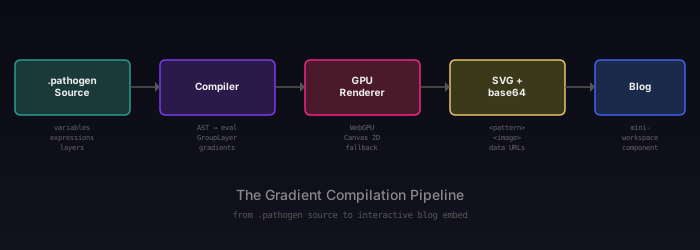
.pathogen source: Variables, expressions, gradient definitions, layer assignments, GroupLayer composition. This is what the author writes.
Compiler: Parses the source into an AST, evaluates expressions, resolves variable bindings, processes gradient initializer blocks, builds the layer tree. The output is a structured
LayerOutput[]array with gradient definitions, path data, and text content.GPU renderer: For gradient types that require rasterization (conic, mesh, freeform, topological), a WebGPU shader (or Canvas 2D fallback) renders the gradient to a pixel buffer at the specified resolution. The result is encoded as a base64 PNG.
SVG + base64: The compiler emits a complete SVG document. Native gradients (
<linearGradient>,<radialGradient>) are SVG elements. GPU-rendered gradients become<pattern>elements containing<image>elements with base64 data URLs.Blog: The blog build script reads
.pathogensource and pre-compiled.svgpairs, encodes the source as a base64 attribute, and embeds both in a<mini-workspace>custom element.
GroupLayer
The demos in this series use GroupLayer extensively for scene composition. GroupLayer maps to SVG's <g> element — it groups child layers into a logical unit that can be positioned, styled, and nested.
let card = GroupLayer('card-1') ${
  translate-x: 20;
  translate-y: 25;
};
card.append(fill_layer, label_layer, tag_layer)
The translate-x, translate-y, rotate, and scale convenience properties in the style block compile to a transform attribute on the <g> element. This is simpler than writing raw transform: translate(20, 25) and composes correctly when multiple transforms are needed (the order is always translate, rotate, scale).
The .append() method adds child layers to the group. Children render in append order. When a layer is appended to a new group, it is automatically removed from any previous group — no duplicate references.
// viewBox="0 0 600 320"
// GroupLayer Cards — Organizational Power
// Three gradient panels positioned with GroupLayer translate convenience property

// --- Gradients ---

let warm = LinearGradient('warm', 0, 0, 1, 1) {|g|
  g.stop(0, Color('#ff6b6b'))
  g.stop(0.5, Color('#feca57'))
  g.stop(1, Color('#48dbfb'))
};
warm.interpolation = 'oklch';

let cool = RadialGradient('cool', 0.5, 0.45, 0.55) {|g|
  g.stop(0, Color('#ff9ff3'))
  g.stop(0.6, Color('#a29bfe'))
  g.stop(1, Color('#2d1b69'))
};

let blob1 = @{
  m 0 0
  c 60 -40 120 10 140 60
  c -10 70 -150 60 -140 -60
  z
};
let blob2 = @{
  m 0 0
  c 50 -30 100 5 110 50
  c -10 50 -105 45 -110 -50
  z
};
let dot = @{ circle(0, 0, 8); closePath() };

let topo_fill = TopoGradient('topo-card', 170, 140) {|g|
  g.contour(blob1.scale(0.4, 0.4).project(12, 55), 0.2, Color('#f72585'))
  g.contour(dot.project(42, 78), 0.5, Color('#f9c74f'))
  g.contour(blob2.scale(0.4, 0.4).project(80, 15), 0.25, Color('#4cc9f0'))
  g.contour(dot.project(108, 38), 0.6, Color('#7209b7'))
  g.contour(blob1.scale(0.3, 0.3).project(55, 40), 0.35, Color('#43aa8b'))
  g.contour(dot.project(85, 60), 0.75, Color('#f4a261'))
};
topo_fill.baseColor = Color('#0a0a1a');
topo_fill.easing = 'ease-in-out';
topo_fill.method = 'laplace';
topo_fill.iterations = 250;
topo_fill.interpolation = 'oklch';

// --- Background ---

let bg = PathLayer('bg') ${ fill: #0e0e18; stroke: none; };
bg.apply { rect(0, 0, 600, 320) }

// --- Card 1: Linear (left) ---

let card1 = GroupLayer('card-1') ${
  translate-x: 20;
  translate-y: 25;
};

let c1_fill = PathLayer('c1-fill') ${ fill: warm; stroke: #444; stroke-width: 1; };
c1_fill.apply { roundRect(0, 0, 170, 140, 8) }

let c1_label = TextLayer('c1-label') ${
  font-family: system-ui, sans-serif;
  font-size: 11;
  fill: #ddd;
  text-anchor: middle;
  font-weight: bold;
};
c1_label.apply { text(85, 160)`LinearGradient` }

let c1_tag = TextLayer('c1-tag') ${
  font-family: monospace;
  font-size: 8;
  fill: #666;
  text-anchor: middle;
};
c1_tag.apply { text(85, 174)`native SVG element` }

card1.append(c1_fill, c1_label, c1_tag)

// --- Card 2: Radial (center) ---

let card2 = GroupLayer('card-2') ${
  translate-x: 215;
  translate-y: 25;
};

let c2_fill = PathLayer('c2-fill') ${ fill: cool; stroke: #444; stroke-width: 1; };
c2_fill.apply { roundRect(0, 0, 170, 140, 8) }

let c2_label = TextLayer('c2-label') ${
  font-family: system-ui, sans-serif;
  font-size: 11;
  fill: #ddd;
  text-anchor: middle;
  font-weight: bold;
};
c2_label.apply { text(85, 160)`RadialGradient` }

let c2_tag = TextLayer('c2-tag') ${
  font-family: monospace;
  font-size: 8;
  fill: #666;
  text-anchor: middle;
};
c2_tag.apply { text(85, 174)`native SVG element` }

card2.append(c2_fill, c2_label, c2_tag)

// --- Card 3: Topo (right) ---

let card3 = GroupLayer('card-3') ${
  translate-x: 410;
  translate-y: 25;
};

let c3_fill = PathLayer('c3-fill') ${ fill: topo_fill; stroke: #444; stroke-width: 1; };
c3_fill.apply { roundRect(0, 0, 170, 140, 8) }

let c3_label = TextLayer('c3-label') ${
  font-family: system-ui, sans-serif;
  font-size: 11;
  fill: #ddd;
  text-anchor: middle;
  font-weight: bold;
};
c3_label.apply { text(85, 160)`TopoGradient` }

let c3_tag = TextLayer('c3-tag') ${
  font-family: monospace;
  font-size: 8;
  fill: #666;
  text-anchor: middle;
};
c3_tag.apply { text(85, 174)`GPU rendered (base64)` }

card3.append(c3_fill, c3_label, c3_tag)

// --- Title ---

let title = TextLayer('title') ${
  font-family: system-ui, sans-serif;
  font-size: 14;
  fill: #999;
  text-anchor: middle;
};
title.apply {
  text(300, 265)`GroupLayer — Card Layout with translate`
}

let subtitle = TextLayer('subtitle') ${
  font-family: monospace;
  font-size: 9;
  fill: #555;
  text-anchor: middle;
};
subtitle.apply {
  text(300, 282)`each card is a GroupLayer with translate-x / translate-y`
}

// --- Scene ---

let scene = GroupLayer('scene') ${};
scene.append(bg, card1, card2, card3, title, subtitle)
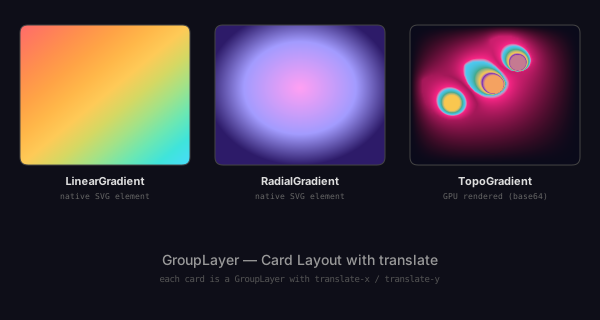
Notice that the three cards use three different gradient rendering strategies. The LinearGradient card compiles to a native SVG element. The RadialGradient card does the same. The TopoGradient card is GPU-rendered to a base64 image. All three are composed in the same GroupLayer tree — the rendering strategy is transparent to the scene composition layer.
CLI --render-gpu
The Pathogen CLI compiles .pathogen files to SVG from the command line. By default, it uses string-based SVG generation — fast, no dependencies, but limited to native gradient types. GPU-rendered gradients (conic, mesh, freeform, topo) fall back to simplified representations.
The --render-gpu flag enables headless GPU rendering via Puppeteer. The CLI launches a headless Chrome instance, loads the playground's rendering pipeline, and captures the GPU output as base64 images. This produces the same pixel-perfect results as the interactive playground.
npx pathogen compile input.pathogen -o output.svg --render-gpu
GPU rendering auto-detects whether the source uses any GPU gradient types. If the source only contains linear and radial gradients, no browser is launched — the fast path handles everything. This makes --render-gpu safe to use unconditionally.
Mini-Workspace Component
The <mini-workspace> custom element powers every demo in this blog series. It is a progressive enhancement component — the static HTML build includes syntax-highlighted code and a pre-rendered SVG image, so the post works without JavaScript. When JS loads, the component upgrades to an interactive experience:
- Code panel: A CodeMirror editor (loaded on demand from CDN) with Pathogen syntax highlighting. Read-only, but scrollable and searchable.
- SVG preview: The pre-compiled SVG rendered as an
<img>element. - Code toggle: Show or hide the code panel. Demos marked with
code-openstart with code visible. - Open in Playground: Encodes the source into a URL and opens the full playground editor, where you can modify the code and see live results.
The embed syntax in markdown is a single HTML tag:
<mini-workspace src="samples/post1/linear-basics.pathogen"
                caption="Description of the demo"
                code-open></mini-workspace>
The blog build script (scripts/build-blog.ts) processes these tags during compilation. It reads the .pathogen source file, base64-encodes it into a code-data attribute, finds the paired .svg file, and embeds it as a fallback <img>. The result is a self-contained HTML block that works in both the SPA and the static SEO pages.
Blog Build Pipeline
The blog build script produces two outputs from each markdown file:
SPA content (
playground/utils/blog-content.js): A JavaScript module exporting ablogIndexarray (title, slug, date, description) and apostsobject mapping slugs to full HTML content. The playground's blog reader component loads this module and renders posts client-side.Static HTML (
website/blog-static/): Fully rendered HTML pages with inline CSS, syntax highlighting, and navigation. These are served by the Cloudflare Pages worker for SEO crawlers and work in any browser without JavaScript.
The processMiniWorkspaceTags() function handles the <mini-workspace> transformation — reading source files, encoding content, embedding SVG fallbacks, and generating syntax-highlighted code blocks. It runs during both SPA and static builds, producing identical embedded content.
npm run build:blog    # Compile all posts
npm run build:website # Full site build (includes blog)
npm run dev:website   # Build + serve at localhost:3000
All Six Types
The gallery below shows all six gradient types in a single Pathogen source file. The top row — Linear, Radial, Conic — spans the range from native SVG to GPU-rendered. The bottom row — Mesh, Freeform, Topo — represents gradient models that have never existed in any web standard.
// viewBox="0 0 580 400"
// Gradient Gallery — All Six Types
// A complete overview of every gradient type in the Pathogen language

// --- Linear ---

let g_lin = LinearGradient('lin', 0, 0, 1, 1) {|g|
  g.stop(0, Color('#ff6b6b'))
  g.stop(0.5, Color('#feca57'))
  g.stop(1, Color('#48dbfb'))
};
g_lin.interpolation = 'oklch';

// --- Radial ---

let g_rad = RadialGradient('rad', 0.5, 0.45, 0.55) {|g|
  g.stop(0, Color('#ff9ff3'))
  g.stop(0.6, Color('#a29bfe'))
  g.stop(1, Color('#2d1b69'))
};

// --- Conic ---

let g_con = ConicGradient('con', 480, 80) {|g|
  g.stop(0, Color('#e74c3c'))
  g.stop(0.33, Color('#f1c40f'))
  g.stop(0.66, Color('#3498db'))
  g.stop(1, Color('#e74c3c'))
};

// --- Mesh ---

let g_mesh = MeshGradient('mesh', 160, 120, 2, 2) {|g|
  g.getPoint(0, 0).color = Color('#e74c3c');
  g.getPoint(0, 1).color = Color('#f1c40f');
  g.getPoint(1, 0).color = Color('#3498db');
  g.getPoint(1, 1).color = Color('#2ecc71');
};

// --- Freeform ---

let g_free = FreeformGradient('free', 160, 120) {|g|
  g.point(25, 25, Color('#e74c3c'))
  g.point(135, 20, Color('#f1c40f'))
  g.point(80, 100, Color('#3498db'))
  g.point(20, 95, Color('#2ecc71'))
  g.point(140, 85, Color('#9b59b6'))
};

// --- Topo (abstract overlapping contours) ---

let blob1 = @{
  m 0 0
  c 60 -40 120 10 140 60
  c -10 70 -150 60 -140 -60
  z
};
let blob2 = @{
  m 0 0
  c 50 -30 100 5 110 50
  c -10 50 -105 45 -110 -50
  z
};
let tdot = @{ circle(0, 0, 8); closePath() };

let g_topo = TopoGradient('topo', 160, 120) {|g|
  g.contour(blob1.scale(0.38, 0.38).project(10, 45), 0.2, Color('#f72585'))
  g.contour(tdot.project(38, 68), 0.5, Color('#f9c74f'))
  g.contour(blob2.scale(0.38, 0.38).project(75, 12), 0.25, Color('#4cc9f0'))
  g.contour(tdot.project(100, 32), 0.6, Color('#7209b7'))
  g.contour(blob1.scale(0.28, 0.28).project(50, 35), 0.35, Color('#43aa8b'))
  g.contour(tdot.project(78, 55), 0.75, Color('#f4a261'))
};
g_topo.baseColor = Color('#0a0a1a');
g_topo.easing = 'ease-in-out';
g_topo.method = 'laplace';
g_topo.iterations = 250;
g_topo.interpolation = 'oklch';

// --- Background ---

let bg = PathLayer('bg') ${ fill: #0e0e18; stroke: none; };
bg.apply { rect(0, 0, 580, 400) }

// --- Panels (2 rows × 3 columns) ---

let p1 = PathLayer('p-lin') ${ fill: g_lin; stroke: #444; stroke-width: 1; };
p1.apply { roundRect(20, 20, 160, 120, 6) }

let p2 = PathLayer('p-rad') ${ fill: g_rad; stroke: #444; stroke-width: 1; };
p2.apply { roundRect(210, 20, 160, 120, 6) }

let p3 = PathLayer('p-con') ${ fill: g_con; stroke: #444; stroke-width: 1; };
p3.apply { roundRect(400, 20, 160, 120, 6) }

let p4 = PathLayer('p-mesh') ${ fill: g_mesh; stroke: #444; stroke-width: 1; };
p4.apply { roundRect(20, 210, 160, 120, 6) }

let p5 = PathLayer('p-free') ${ fill: g_free; stroke: #444; stroke-width: 1; };
p5.apply { roundRect(210, 210, 160, 120, 6) }

let p6 = PathLayer('p-topo') ${ fill: g_topo; stroke: #444; stroke-width: 1; };
p6.apply { roundRect(400, 210, 160, 120, 6) }

// --- Labels ---

let names = TextLayer('names') ${
  font-family: system-ui, sans-serif;
  font-size: 11;
  fill: #ddd;
  text-anchor: middle;
  font-weight: bold;
};
names.apply {
  text(100, 155)`Linear`
  text(290, 155)`Radial`
  text(480, 155)`Conic`
  text(100, 345)`Mesh`
  text(290, 345)`Freeform`
  text(480, 345)`Topo`
}

let tags = TextLayer('tags') ${
  font-family: monospace;
  font-size: 8;
  fill: #666;
  text-anchor: middle;
};
tags.apply {
  text(100, 168)`native SVG`
  text(290, 168)`native SVG`
  text(480, 168)`GPU rendered`
  text(100, 358)`GPU rendered`
  text(290, 358)`GPU rendered`
  text(480, 358)`GPU rendered`
}

// --- Title ---

let title = TextLayer('title') ${
  font-family: system-ui, sans-serif;
  font-size: 13;
  fill: #999;
  text-anchor: middle;
};
title.apply {
  text(290, 390)`The Pathogen Gradient System — Six Types, One Language`
}

// --- Scene ---

let scene = GroupLayer('scene') ${};
scene.append(bg, p1, p2, p3, p4, p5, p6, names, tags, title)
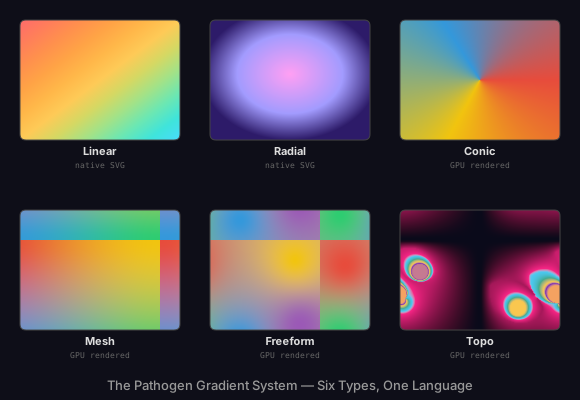
Each type is covered in detail in the preceding posts:
- Linear and Radial — native SVG elements with OKLCH interpolation, spread methods, and inheritance
- Conic — angular sweeps with WebGPU rendering, partial arcs, inner radius, and fill modes
- Mesh and Freeform — grid-based and scatter-based color fields with GPU-accelerated bilinear and IDW blending
- Topological — contour-based gradients using signed distance fields and Laplace solvers
Closing
The gradient system is built in layers. At the bottom, Color and OKLCH give us a perceptually uniform foundation. Above that, six gradient types cover the full range from standard SVG primitives to novel GPU-rendered models. GroupLayer and the layer system compose these gradients into scenes. The compiler turns it all into portable SVG. The rendering pipeline ensures every gradient looks the same whether it runs in a WebGPU shader or a headless Chrome instance.
Each layer does one thing. The source language does not know about rendering. The renderer does not know about blog embeds. The blog build does not know about GPU shaders. This separation is what makes the system tractable — each piece can be understood, tested, and modified independently.
The result is a language where you can write let g = TopoGradient(...) and have it appear as an interactive demo in a blog post. Every layer in between is infrastructure that earns its complexity by staying out of the way.