Painting with Math: Linear and Radial Gradients in Pathogen
SVG has had <linearGradient> and <radialGradient> since the 1.1 spec. They work. They are also tedious to write by hand, impossible to compose, and stuck interpolating through sRGB. Pathogen treats gradients as first-class objects — define them with code, inherit from them, assign them to layers, and let the compiler emit the correct SVG elements.
This post builds up from a single linear gradient to a full themed palette using inheritance and OKLCH color interpolation. Every demo below is interactive — click "Open in Playground" to experiment with the source.
The Gradient Model
A LinearGradient maps color stops onto a line defined by two points in objectBoundingBox coordinates. The coordinate space is normalized: (0, 0) is the top-left of the bounding box, (1, 1) is the bottom-right. This means a gradient defined once works at any scale — it stretches to fit whatever shape you fill with it.
let sky = LinearGradient('sky', 0, 0, 0, 1) {|g|
  g.stop(0,    Color('#0d1b2a'));
  g.stop(0.45, Color('#1b4965'));
  g.stop(0.75, Color('#c56b5a'));
  g.stop(1,    Color('#f4a261'));
};
The constructor takes an ID string and four coordinates: x1, y1, x2, y2. Color stops are added inside the initialization block using g.stop(position, color), where position is a value between 0 and 1. Once defined, assign the gradient to a layer's fill property:
let sky_layer = PathLayer('sky-fill') ${ fill: sky; stroke: none; };
sky_layer.apply { rect(0, 0, 400, 300) }
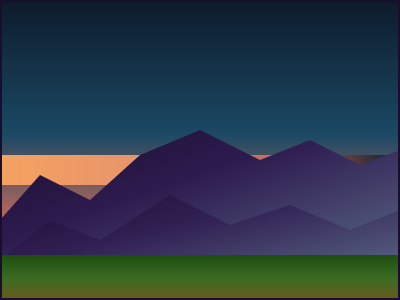
The landscape below uses four linear gradients — a vertical sky, a diagonal mountain range, a horizontal sun streak, and a vertical ground fill — layered with Pathogen's GroupLayer to compose the scene.
// viewBox="0 0 400 300"
// Linear Gradient Basics — Layered Landscape
// Demonstrates vertical, diagonal, and horizontal linear gradients

// --- Gradients ---

let sky_grad = LinearGradient('sky', 0, 0, 0, 1) {|g|
  g.stop(0,    Color('#0d1b2a'));
  g.stop(0.45, Color('#1b4965'));
  g.stop(0.75, Color('#c56b5a'));
  g.stop(0.9,  Color('#e8946b'));
  g.stop(1,    Color('#f4a261'));
};

let mtn_grad = LinearGradient('mountains', 0, 0, 0.8, 1) {|g|
  g.stop(0,   Color('#1a0e2e'));
  g.stop(0.4, Color('#2d1b4e'));
  g.stop(1,   Color('#5c6b8a'));
};

let ground_grad = LinearGradient('ground', 0, 0, 0, 1) {|g|
  g.stop(0,   Color('#1e4d0f'));
  g.stop(0.5, Color('#3a6b22'));
  g.stop(1,   Color('#6b5a1e'));
};

let sun_grad = LinearGradient('sunstreak', 0, 0, 1, 0) {|g|
  g.stop(0,    Color('#f4a261'));
  g.stop(0.35, Color('#e8946b'));
  g.stop(0.7,  Color('#c56b5a'));
  g.stop(1,    Color('#0d1b2a'));
};

// --- Layers ---

let sky = PathLayer('sky-fill') ${ fill: sky_grad; stroke: none; };
sky.apply { rect(0, 0, 400, 300) }

let sun = PathLayer('sun-streak') ${ fill: sun_grad; stroke: none; };
sun.apply { rect(0, 155, 400, 30) }

let far_mtns = PathLayer('far-mountains') ${ fill: mtn_grad; stroke: none; };
far_mtns.apply {
  M 0 220
  L 40 175 L 90 200 L 140 155 L 200 130
  L 260 160 L 310 140 L 360 165 L 400 150
  L 400 300 L 0 300 Z
}

let near_mtns = PathLayer('near-mountains') ${ fill: mtn_grad; stroke: none; opacity: 0.7; };
near_mtns.apply {
  M 0 260
  L 50 220 L 100 240 L 170 195 L 230 225
  L 290 205 L 350 230 L 400 210
  L 400 300 L 0 300 Z
}

let ground = PathLayer('ground-fill') ${ fill: ground_grad; stroke: none; };
ground.apply { rect(0, 255, 400, 45) }

let frame = PathLayer('frame') ${ fill: none; stroke: #1a0e2e; stroke-width: 4; };
frame.apply { rect(0, 0, 400, 300) }

// --- Scene Organization ---

let scene = GroupLayer('scene') ${};
scene.append(sky, sun, far_mtns, near_mtns, ground, frame)
Gradient Direction
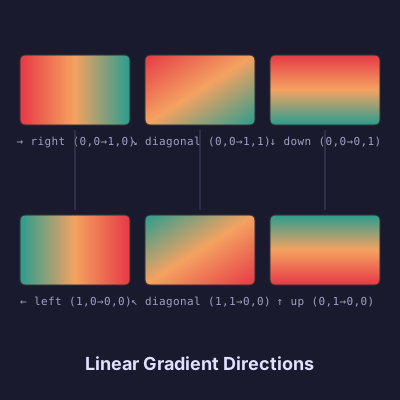
The x1, y1 → x2, y2 coordinates control the gradient's angle. A vertical gradient uses (0, 0, 0, 1). A horizontal one uses (0, 0, 1, 0). Diagonals use any combination. Reversing the coordinates reverses the color flow — (1, 0, 0, 0) runs right to left.
There is no angle property. The two-point model is more flexible: you can offset the start or end to create gradients that begin or end partway through an element, or run along arbitrary diagonals. The six swatches below show the same three color stops at six different directions.
// viewBox="0 0 400 400"
// Angle Fan — Linear Gradient Direction Showcase
// Same gradient stops at 6 different angles, arranged in a fan

// --- Shared color palette ---

let c1 = Color('#e63946');
let c2 = Color('#f4a261');
let c3 = Color('#2a9d8f');

// --- Six gradients at different directions ---

let g0 = LinearGradient('g-right', 0, 0, 1, 0) {|g|
  g.stop(0, c1); g.stop(0.5, c2); g.stop(1, c3);
};

let g60 = LinearGradient('g-down-right', 0, 0, 1, 1) {|g|
  g.stop(0, c1); g.stop(0.5, c2); g.stop(1, c3);
};

let g90 = LinearGradient('g-down', 0, 0, 0, 1) {|g|
  g.stop(0, c1); g.stop(0.5, c2); g.stop(1, c3);
};

let g180 = LinearGradient('g-left', 1, 0, 0, 0) {|g|
  g.stop(0, c1); g.stop(0.5, c2); g.stop(1, c3);
};

let g240 = LinearGradient('g-up-left', 1, 1, 0, 0) {|g|
  g.stop(0, c1); g.stop(0.5, c2); g.stop(1, c3);
};

let g270 = LinearGradient('g-up', 0, 1, 0, 0) {|g|
  g.stop(0, c1); g.stop(0.5, c2); g.stop(1, c3);
};

// --- Background ---

let bg = PathLayer('bg') ${ fill: #1a1a2e; stroke: none; };
bg.apply { rect(0, 0, 400, 400) }

// --- Swatch grid: 3 columns × 2 rows ---

let sw1 = PathLayer('swatch-right') ${ fill: g0; stroke: #333; stroke-width: 1; };
sw1.apply { roundRect(20, 55, 110, 70, 6) }

let sw2 = PathLayer('swatch-down-right') ${ fill: g60; stroke: #333; stroke-width: 1; };
sw2.apply { roundRect(145, 55, 110, 70, 6) }

let sw3 = PathLayer('swatch-down') ${ fill: g90; stroke: #333; stroke-width: 1; };
sw3.apply { roundRect(270, 55, 110, 70, 6) }

let sw4 = PathLayer('swatch-left') ${ fill: g180; stroke: #333; stroke-width: 1; };
sw4.apply { roundRect(20, 215, 110, 70, 6) }

let sw5 = PathLayer('swatch-up-left') ${ fill: g240; stroke: #333; stroke-width: 1; };
sw5.apply { roundRect(145, 215, 110, 70, 6) }

let sw6 = PathLayer('swatch-up') ${ fill: g270; stroke: #333; stroke-width: 1; };
sw6.apply { roundRect(270, 215, 110, 70, 6) }

// --- Direction labels ---

let labels = TextLayer('labels') ${
  font-family: monospace;
  font-size: 11;
  fill: #a0a0c0;
  text-anchor: middle;
};
labels.apply {
  text(75, 145)`→ right (0,0→1,0)`
  text(200, 145)`↘ diagonal (0,0→1,1)`
  text(325, 145)`↓ down (0,0→0,1)`
  text(75, 305)`← left (1,0→0,0)`
  text(200, 305)`↖ diagonal (1,1→0,0)`
  text(325, 305)`↑ up (0,1→0,0)`
}

// --- Title ---

let title = TextLayer('title') ${
  font-family: system-ui, sans-serif;
  font-size: 18;
  fill: #e0e0ff;
  text-anchor: middle;
  font-weight: bold;
};
title.apply {
  text(200, 370)`Linear Gradient Directions`
}

// --- Central connector ---

let connector = PathLayer('connector') ${ fill: none; stroke: #444466; stroke-width: 1; };
connector.apply {
  M 75 130 L 75 210
  M 200 130 L 200 210
  M 325 130 L 325 210
}

// --- Scene ---

let fan = GroupLayer('fan') ${};
fan.append(bg, sw1, sw2, sw3, sw4, sw5, sw6, labels, title, connector)
RadialGradient
RadialGradient works the same way, but radiates outward from a center point. The constructor takes (id, cx, cy, r), where cx and cy are the center coordinates (again in objectBoundingBox space) and r is the radius as a fraction of the bounding box.
let glow = RadialGradient('glow', 0.5, 0.5, 0.6) {|g|
  g.stop(0,   Color('#f4a261'));
  g.stop(0.4, Color('#c56b5a'));
  g.stop(1,   Color('#0d1b2a'));
};
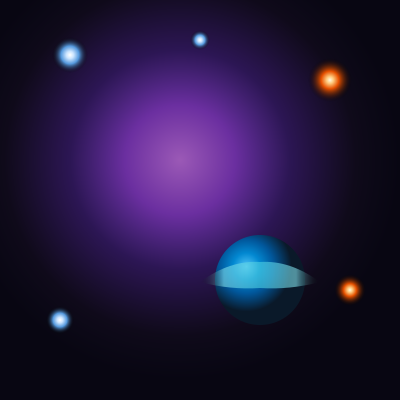
Radial gradients are natural fits for glows, spotlights, and vignettes. The scene below composes four radial gradients — a nebula background, two star types, and a planet with an off-center highlight — to build a cosmic scene entirely from radial falloffs and transparent stops.
// viewBox="0 0 400 400"
// Radial Gradient Glow — Cosmic Scene
// Demonstrates radial gradients for light sources, glows, and shading

// --- Gradients ---

let nebula_grad = RadialGradient('nebula', 0.45, 0.4, 0.55) {|g|
  g.stop(0,    Color('#9b59b6'));
  g.stop(0.25, Color('#6b2fa0'));
  g.stop(0.5,  Color('#2c1654'));
  g.stop(0.8,  Color('#0f0a1a'));
  g.stop(1,    Color('#080612'));
};
nebula_grad.interpolation = 'oklch';

let star_grad = RadialGradient('star-core', 0.5, 0.5, 0.5) {|g|
  g.stop(0,   Color('#ffffff'));
  g.stop(0.2, Color('#cce5ff'));
  g.stop(0.5, Color('#5599dd'));
  g.stop(1,   Color('#00000000'));
};

let warm_star = RadialGradient('warm-star', 0.5, 0.5, 0.5) {|g|
  g.stop(0,   Color('#fff8e1'));
  g.stop(0.15, Color('#ffcc80'));
  g.stop(0.4, Color('#e65100'));
  g.stop(1,   Color('#00000000'));
};

let planet_grad = RadialGradient('planet', 0.35, 0.35, 0.5) {|g|
  g.stop(0,   Color('#4fc3f7'));
  g.stop(0.3, Color('#0288d1'));
  g.stop(0.6, Color('#01579b'));
  g.stop(1,   Color('#0a1929'));
};

let ring_grad = LinearGradient('ring', 0, 0, 1, 0) {|g|
  g.stop(0,    Color('#00000000'));
  g.stop(0.2,  Color('#80deea'));
  g.stop(0.5,  Color('#4dd0e1'));
  g.stop(0.8,  Color('#80deea'));
  g.stop(1,    Color('#00000000'));
};

// --- Background and Nebula ---

let bg = PathLayer('bg') ${ fill: #080612; stroke: none; };
bg.apply { rect(0, 0, 400, 400) }

let nebula = PathLayer('nebula-layer') ${ fill: nebula_grad; stroke: none; };
nebula.apply { rect(0, 0, 400, 400) }

// --- Stars ---

let s1 = PathLayer('s1') ${ fill: star_grad; stroke: none; };
s1.apply { circle(70, 55, 18); closePath() }

let s2 = PathLayer('s2') ${ fill: warm_star; stroke: none; };
s2.apply { circle(330, 80, 22); closePath() }

let s3 = PathLayer('s3') ${ fill: star_grad; stroke: none; };
s3.apply { circle(60, 320, 14); closePath() }

let s4 = PathLayer('s4') ${ fill: warm_star; stroke: none; };
s4.apply { circle(350, 290, 16); closePath() }

let s5 = PathLayer('s5') ${ fill: star_grad; stroke: none; };
s5.apply { circle(200, 40, 10); closePath() }

let stars = GroupLayer('stars') ${};
stars.append(s1, s2, s3, s4, s5)

// --- Planet with Ring ---

let planet_body = PathLayer('planet-body') ${ fill: planet_grad; stroke: none; };
planet_body.apply { circle(260, 280, 45); closePath() }

let planet_ring = PathLayer('planet-ring') ${ fill: ring_grad; stroke: none; opacity: 0.6; };
planet_ring.apply {
  M 200 282 Q 230 260 260 262 Q 290 260 320 282
  Q 290 290 260 288 Q 230 290 200 282 Z
}

let planet = GroupLayer('planet') ${};
planet.append(planet_body, planet_ring)

// --- Scene ---

let scene = GroupLayer('scene') ${};
scene.append(bg, nebula, stars, planet)
Focal Points
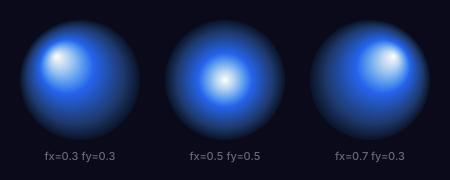
The basic constructor centers the gradient's falloff at (cx, cy). But RadialGradient also accepts two extra arguments — fx and fy — that shift the focal point away from the geometric center. The gradient still fills the same circle, but the highlight moves, creating the illusion of directional light on a 3D surface.
// Same radius, different highlight positions
let sphere = RadialGradient('s', 0.5, 0.5, 0.5, 0.3, 0.3) {|g|
  g.stop(0,   Color('#ffffff'));
  g.stop(0.5, Color('#2563eb'));
  g.stop(1,   Color('#0a1428'));
};
The three spheres below use identical color stops. Only fx and fy differ — the highlight shifts from top-left to center to top-right.
// viewBox="0 0 450 180"
// Focal Point Spheres — Same stops, different fx/fy positions
// Demonstrates how RadialGradient's focal point shifts the highlight

// --- Shared background ---

let bg = PathLayer('bg') ${ fill: #0a0a1a; stroke: none; };
bg.apply { rect(0, 0, 450, 180) }

// --- Sphere gradients with different focal points ---

let sphere1_grad = RadialGradient('sphere1', 0.5, 0.5, 0.5, 0.3, 0.3) {|g|
  g.stop(0,    Color('#ffffff'));
  g.stop(0.15, Color('#b8d4f0'));
  g.stop(0.45, Color('#2563eb'));
  g.stop(0.8,  Color('#1e3a6e'));
  g.stop(1,    Color('#0a1428'));
};
sphere1_grad.interpolation = 'oklch';

let sphere2_grad = RadialGradient('sphere2', 0.5, 0.5, 0.5, 0.5, 0.5) {|g|
  g.stop(0,    Color('#ffffff'));
  g.stop(0.15, Color('#b8d4f0'));
  g.stop(0.45, Color('#2563eb'));
  g.stop(0.8,  Color('#1e3a6e'));
  g.stop(1,    Color('#0a1428'));
};
sphere2_grad.interpolation = 'oklch';

let sphere3_grad = RadialGradient('sphere3', 0.5, 0.5, 0.5, 0.7, 0.3) {|g|
  g.stop(0,    Color('#ffffff'));
  g.stop(0.15, Color('#b8d4f0'));
  g.stop(0.45, Color('#2563eb'));
  g.stop(0.8,  Color('#1e3a6e'));
  g.stop(1,    Color('#0a1428'));
};
sphere3_grad.interpolation = 'oklch';

// --- Sphere layers ---

let s1 = PathLayer('s1') ${ fill: sphere1_grad; stroke: none; };
s1.apply { circle(80, 80, 60); closePath() }

let s2 = PathLayer('s2') ${ fill: sphere2_grad; stroke: none; };
s2.apply { circle(225, 80, 60); closePath() }

let s3 = PathLayer('s3') ${ fill: sphere3_grad; stroke: none; };
s3.apply { circle(370, 80, 60); closePath() }

// --- Labels ---

let labels = TextLayer('labels') ${
  font-family: system-ui, sans-serif;
  font-size: 11;
  fill: #667;
  text-anchor: middle;
};
labels.apply {
  text(80, 160)`fx=0.3  fy=0.3`
  text(225, 160)`fx=0.5  fy=0.5`
  text(370, 160)`fx=0.7  fy=0.3`
}

// --- Scene ---

let scene = GroupLayer('scene') ${};
scene.append(bg, s1, s2, s3, labels)
OKLCH Interpolation
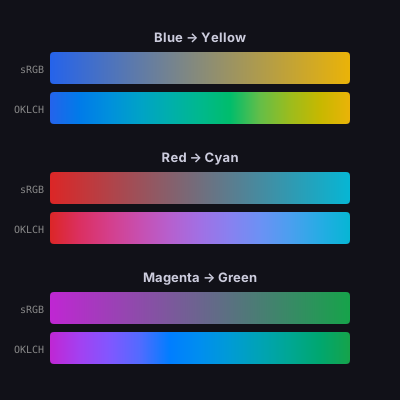
By default, SVG gradients interpolate in sRGB. This is the web platform default, and it produces muddy midpoints when transitioning between colors that are far apart on the hue wheel. Blue to yellow passes through gray. Red to cyan desaturates through brown.
OKLCH interpolation solves this. OKLCH (Okay Lightness, Chroma, Hue) is a perceptually uniform color space where interpolation follows a natural arc through the hue wheel instead of cutting through the middle of the RGB cube. Setting .interpolation = 'oklch' on any gradient enables this.
let grad = LinearGradient('grad', 0, 0, 1, 0) {|g|
  g.stop(0, Color('#2563eb'));
  g.stop(1, Color('#eab308'));
};
grad.interpolation = 'oklch';
The comparison below shows three color pairs — blue/yellow, red/cyan, magenta/green — in both sRGB and OKLCH. The difference is dramatic: sRGB midpoints are desaturated and dull, while OKLCH transitions stay vibrant and chromatic.
// viewBox="0 0 400 400"
// OKLCH vs sRGB Interpolation — Side-by-Side Comparison
// Same color stops, dramatically different midpoints

// --- Pair 1: Blue → Yellow (the classic example) ---

let srgb_blue_yellow = LinearGradient('srgb-by', 0, 0, 1, 0) {|g|
  g.stop(0, Color('#2563eb'));
  g.stop(1, Color('#eab308'));
};

let oklch_blue_yellow = LinearGradient('oklch-by', 0, 0, 1, 0) {|g|
  g.stop(0, Color('#2563eb'));
  g.stop(1, Color('#eab308'));
};
oklch_blue_yellow.interpolation = 'oklch';

// --- Pair 2: Red → Cyan ---

let srgb_red_cyan = LinearGradient('srgb-rc', 0, 0, 1, 0) {|g|
  g.stop(0, Color('#dc2626'));
  g.stop(1, Color('#06b6d4'));
};

let oklch_red_cyan = LinearGradient('oklch-rc', 0, 0, 1, 0) {|g|
  g.stop(0, Color('#dc2626'));
  g.stop(1, Color('#06b6d4'));
};
oklch_red_cyan.interpolation = 'oklch';

// --- Pair 3: Magenta → Green ---

let srgb_mag_green = LinearGradient('srgb-mg', 0, 0, 1, 0) {|g|
  g.stop(0, Color('#c026d3'));
  g.stop(1, Color('#16a34a'));
};

let oklch_mag_green = LinearGradient('oklch-mg', 0, 0, 1, 0) {|g|
  g.stop(0, Color('#c026d3'));
  g.stop(1, Color('#16a34a'));
};
oklch_mag_green.interpolation = 'oklch';

// --- Background ---

let bg = PathLayer('bg') ${ fill: #111118; stroke: none; };
bg.apply { rect(0, 0, 400, 400) }

// --- Gradient bars ---

let bar_w = 300;
let bar_h = 32;
let x0 = 50;

// Pair 1
let by_srgb = PathLayer('by-srgb') ${ fill: srgb_blue_yellow; stroke: none; };
by_srgb.apply { roundRect(x0, 52, bar_w, bar_h, 4) }

let by_oklch = PathLayer('by-oklch') ${ fill: oklch_blue_yellow; stroke: none; };
by_oklch.apply { roundRect(x0, 92, bar_w, bar_h, 4) }

// Pair 2
let rc_srgb = PathLayer('rc-srgb') ${ fill: srgb_red_cyan; stroke: none; };
rc_srgb.apply { roundRect(x0, 172, bar_w, bar_h, 4) }

let rc_oklch = PathLayer('rc-oklch') ${ fill: oklch_red_cyan; stroke: none; };
rc_oklch.apply { roundRect(x0, 212, bar_w, bar_h, 4) }

// Pair 3
let mg_srgb = PathLayer('mg-srgb') ${ fill: srgb_mag_green; stroke: none; };
mg_srgb.apply { roundRect(x0, 292, bar_w, bar_h, 4) }

let mg_oklch = PathLayer('mg-oklch') ${ fill: oklch_mag_green; stroke: none; };
mg_oklch.apply { roundRect(x0, 332, bar_w, bar_h, 4) }

// --- Labels ---

let mode_labels = TextLayer('mode-labels') ${
  font-family: monospace;
  font-size: 10;
  fill: #888;
  text-anchor: end;
};
mode_labels.apply {
  text(44, 73)`sRGB`
  text(44, 113)`OKLCH`
  text(44, 193)`sRGB`
  text(44, 233)`OKLCH`
  text(44, 313)`sRGB`
  text(44, 353)`OKLCH`
}

let pair_labels = TextLayer('pair-labels') ${
  font-family: system-ui, sans-serif;
  font-size: 13;
  fill: #ccccdd;
  text-anchor: middle;
  font-weight: bold;
};
pair_labels.apply {
  text(200, 42)`Blue → Yellow`
  text(200, 162)`Red → Cyan`
  text(200, 282)`Magenta → Green`
}

// --- Scene ---

let comparison = GroupLayer('comparison') ${};
comparison.append(bg, by_srgb, by_oklch, rc_srgb, rc_oklch, mg_srgb, mg_oklch, mode_labels, pair_labels)
Spread Methods
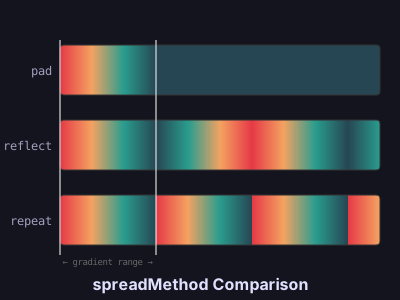
When a gradient covers less than the full bounding box, the spreadMethod property controls what happens outside the defined range. SVG supports three modes:
- pad: The last stop color extends to fill the remaining space. This is the default.
- reflect: The gradient reverses direction and plays back, creating a mirror effect.
- repeat: The gradient tiles, repeating its pattern continuously.
let grad = LinearGradient('grad', 0, 0, 0.3, 0) {|g|
  g.stop(0,    Color('#e63946'));
  g.stop(0.33, Color('#f4a261'));
  g.stop(0.66, Color('#2a9d8f'));
  g.stop(1,    Color('#264653'));
};
grad.spreadMethod = 'reflect';
The three strips below use the same gradient that covers only the first 30% of each element. The vertical lines mark the gradient's defined range. Beyond that boundary, each spread method produces a different visual pattern.
// viewBox="0 0 400 300"
// Spread Modes — Pad / Reflect / Repeat
// Same narrow gradient, three different spread behaviors

// --- Base gradient (covers 0 to 0.3 of the element) ---

let pad_grad = LinearGradient('pad-grad', 0, 0, 0.3, 0) {|g|
  g.stop(0,    Color('#e63946'));
  g.stop(0.33, Color('#f4a261'));
  g.stop(0.66, Color('#2a9d8f'));
  g.stop(1,    Color('#264653'));
};
pad_grad.spreadMethod = 'pad';

let reflect_grad = LinearGradient('reflect-grad', 0, 0, 0.3, 0) {|g|
  g.stop(0,    Color('#e63946'));
  g.stop(0.33, Color('#f4a261'));
  g.stop(0.66, Color('#2a9d8f'));
  g.stop(1,    Color('#264653'));
};
reflect_grad.spreadMethod = 'reflect';

let repeat_grad = LinearGradient('repeat-grad', 0, 0, 0.3, 0) {|g|
  g.stop(0,    Color('#e63946'));
  g.stop(0.33, Color('#f4a261'));
  g.stop(0.66, Color('#2a9d8f'));
  g.stop(1,    Color('#264653'));
};
repeat_grad.spreadMethod = 'repeat';

// --- Background ---

let bg = PathLayer('bg') ${ fill: #14141e; stroke: none; };
bg.apply { rect(0, 0, 400, 300) }

// --- Gradient strips ---

let strip_pad = PathLayer('strip-pad') ${ fill: pad_grad; stroke: #333; stroke-width: 1; };
strip_pad.apply { roundRect(60, 45, 320, 50, 4) }

let strip_reflect = PathLayer('strip-reflect') ${ fill: reflect_grad; stroke: #333; stroke-width: 1; };
strip_reflect.apply { roundRect(60, 120, 320, 50, 4) }

let strip_repeat = PathLayer('strip-repeat') ${ fill: repeat_grad; stroke: #333; stroke-width: 1; };
strip_repeat.apply { roundRect(60, 195, 320, 50, 4) }

// --- Range indicator (shows the 0–30% region) ---

let indicator = PathLayer('range-indicator') ${ fill: none; stroke: #ffffff44; stroke-width: 1; };
indicator.apply {
  M 60 40 L 60 255
  M 156 40 L 156 255
}

let range_label = TextLayer('range-label') ${
  font-family: monospace;
  font-size: 9;
  fill: #666;
  text-anchor: middle;
};
range_label.apply {
  text(108, 265)`← gradient range →`
}

// --- Labels ---

let labels = TextLayer('labels') ${
  font-family: monospace;
  font-size: 12;
  fill: #a0a0c0;
  text-anchor: end;
};
labels.apply {
  text(52, 75)`pad`
  text(52, 150)`reflect`
  text(52, 225)`repeat`
}

// --- Title ---

let title = TextLayer('title') ${
  font-family: system-ui, sans-serif;
  font-size: 16;
  fill: #e0e0ff;
  text-anchor: middle;
  font-weight: bold;
};
title.apply {
  text(200, 290)`spreadMethod Comparison`
}

// --- Scene ---

let scene = GroupLayer('scene') ${};
scene.append(bg, strip_pad, strip_reflect, strip_repeat, indicator, range_label, labels, title)
Gradient Inheritance
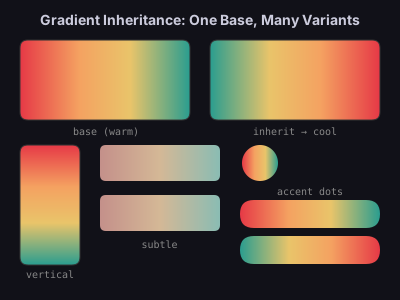
When you need variations of a gradient — reversed, rotated, desaturated — copying and modifying the stop list is fragile. Pathogen's .inherit() method creates a new gradient that shares the parent's stop definitions but can override any property.
let base = LinearGradient('warm-base', 0, 0, 1, 0) {|g|
  g.stop(0,    Color('#e63946'));
  g.stop(0.35, Color('#f4a261'));
  g.stop(0.65, Color('#e9c46a'));
  g.stop(1,    Color('#2a9d8f'));
};

let cool = base.inherit('cool-variant');
cool.gradientTransform = 'rotate(180, 0.5, 0.5)';

let vertical = base.inherit('vertical-variant');
vertical.gradientTransform = 'rotate(90, 0.5, 0.5)';
One base gradient, three variants. Change the base and all inherited gradients update. This is the foundation of a themeable gradient system — define your palette once, derive everything else.
// viewBox="0 0 400 300"
// Gradient Inheritance — Themed UI Palette
// One base gradient spawns variants via inherit()

// --- Base gradient: warm sunset palette ---

let base = LinearGradient('warm-base', 0, 0, 1, 0) {|g|
  g.stop(0,    Color('#e63946'));
  g.stop(0.35, Color('#f4a261'));
  g.stop(0.65, Color('#e9c46a'));
  g.stop(1,    Color('#2a9d8f'));
};

// --- Inherited variants ---

let cool = base.inherit('cool-variant');
cool.gradientTransform = 'rotate(180, 0.5, 0.5)';

let vertical = base.inherit('vertical-variant');
vertical.gradientTransform = 'rotate(90, 0.5, 0.5)';

let subtle = LinearGradient('subtle-variant', 0, 0, 1, 0) {|g|
  g.stop(0,   Color('#c4908a'));
  g.stop(0.5, Color('#d4b896'));
  g.stop(1,   Color('#8abcb3'));
};

// --- Background ---

let bg = PathLayer('bg') ${ fill: #111118; stroke: none; };
bg.apply { rect(0, 0, 400, 300) }

// --- Base showcase (large card) ---

let base_card = PathLayer('base-card') ${ fill: base; stroke: #333; stroke-width: 1; };
base_card.apply { roundRect(20, 40, 170, 80, 8) }

let cool_card = PathLayer('cool-card') ${ fill: cool; stroke: #333; stroke-width: 1; };
cool_card.apply { roundRect(210, 40, 170, 80, 8) }

// --- Vertical variant: tall sidebar ---

let vert_bar = PathLayer('vert-bar') ${ fill: vertical; stroke: #333; stroke-width: 1; };
vert_bar.apply { roundRect(20, 145, 60, 120, 8) }

// --- Subtle variant: UI elements ---

let btn1 = PathLayer('btn1') ${ fill: subtle; stroke: none; };
btn1.apply { roundRect(100, 145, 120, 36, 6) }

let btn2 = PathLayer('btn2') ${ fill: subtle; stroke: none; };
btn2.apply { roundRect(100, 195, 120, 36, 6) }

// --- Small accent circles using base ---

let dot1 = PathLayer('dot1') ${ fill: base; stroke: none; };
dot1.apply { circle(260, 163, 18); closePath() }

let dot2 = PathLayer('dot2') ${ fill: cool; stroke: none; };
dot2.apply { circle(310, 163, 18); closePath() }

let dot3 = PathLayer('dot3') ${ fill: vertical; stroke: none; };
dot3.apply { circle(360, 163, 18); closePath() }

// --- Pill shapes with inherited gradient ---

let pill1 = PathLayer('pill1') ${ fill: base; stroke: none; };
pill1.apply { roundRect(240, 200, 140, 28, 14) }

let pill2 = PathLayer('pill2') ${ fill: cool; stroke: none; };
pill2.apply { roundRect(240, 236, 140, 28, 14) }

// --- Labels ---

let labels = TextLayer('labels') ${
  font-family: monospace;
  font-size: 10;
  fill: #888;
  text-anchor: middle;
};
labels.apply {
  text(105, 135)`base (warm)`
  text(295, 135)`inherit → cool`
  text(50, 278)`vertical`
  text(160, 248)`subtle`
  text(310, 195)`accent dots`
}

let title = TextLayer('title') ${
  font-family: system-ui, sans-serif;
  font-size: 14;
  fill: #ccccdd;
  text-anchor: middle;
  font-weight: bold;
};
title.apply {
  text(200, 25)`Gradient Inheritance: One Base, Many Variants`
}

// --- Scene ---

let palette = GroupLayer('palette') ${};
palette.append(bg, base_card, cool_card, vert_bar, btn1, btn2, dot1, dot2, dot3, pill1, pill2, labels, title)
CSS Variable Reactivity
Pathogen's gradients compose naturally with the reactive color system. When gradient stops reference CSS custom properties, the compiled SVG responds to runtime changes — swap a theme variable and every gradient updates instantly.
The demo below puts three overlapping radial glows on a dark background. Each glow's center color is bound to a CSS variable (--light-a, --light-b, --light-c) — use the color pickers to remix the scene in real time.
// viewBox="0 0 400 300"
// Reactive Radial Lights — CSSVar-driven overlapping glows
// Drag the color pickers to recolor three radial light sources

// --- Reactive light colors ---

let light_a = Color(CSSVar('--light-a', '#f4a261'));
let light_b = Color(CSSVar('--light-b', '#2563eb'));
let light_c = Color(CSSVar('--light-c', '#e63946'));

// --- Radial gradients: center color fades to transparent ---

let glow_a = RadialGradient('glow-a', 0.5, 0.5, 0.5) {|g|
  g.stop(0,   light_a);
  g.stop(0.4, light_a.alpha(0.6));
  g.stop(1,   light_a.alpha(0));
};
glow_a.interpolation = 'oklch';

let glow_b = RadialGradient('glow-b', 0.5, 0.5, 0.5) {|g|
  g.stop(0,   light_b);
  g.stop(0.4, light_b.alpha(0.6));
  g.stop(1,   light_b.alpha(0));
};
glow_b.interpolation = 'oklch';

let glow_c = RadialGradient('glow-c', 0.5, 0.5, 0.5) {|g|
  g.stop(0,   light_c);
  g.stop(0.4, light_c.alpha(0.6));
  g.stop(1,   light_c.alpha(0));
};
glow_c.interpolation = 'oklch';

// --- Background ---

let bg = PathLayer('bg') ${ fill: #0a0a1a; stroke: none; };
bg.apply { rect(0, 0, 400, 300) }

// --- Light circles (overlapping for color mixing) ---

let la = PathLayer('light-a') ${ fill: glow_a; stroke: none; opacity: 0.8; };
la.apply { circle(140, 120, 130); closePath() }

let lb = PathLayer('light-b') ${ fill: glow_b; stroke: none; opacity: 0.8; };
lb.apply { circle(280, 110, 130); closePath() }

let lc = PathLayer('light-c') ${ fill: glow_c; stroke: none; opacity: 0.8; };
lc.apply { circle(200, 220, 130); closePath() }

// --- Scene ---

let scene = GroupLayer('scene') ${};
scene.append(bg, la, lb, lc)

This is the payoff of treating gradients as first-class objects: they participate in the same variable binding, OKLCH manipulation, and reactive update system as every other part of the language.
What Comes Next
Linear and radial gradients map directly to SVG elements — the compiler emits <linearGradient> and <radialGradient> and the browser handles rendering. But SVG has no <conicGradient>. In the next post, we build one from scratch using WebGPU shaders and rasterized <pattern> elements.