Smooth Curves Made Simple: Chained Bézier Splines in Pathogen
Drawing a single cubic Bézier in SVG is straightforward: C x1 y1 x2 y2 x y. Drawing a chain of them that flows smoothly from one segment to the next is not. Each join point needs its incoming and outgoing control points to be collinear — lined up on the same tangent line — or the curve develops a visible kink. Get one control point wrong and the whole shape looks broken.
Here's the kind of thing you'd write by hand for a three-segment smooth curve — six control point coordinates per segment, each carefully calculated to maintain tangent continuity at the joins:
M 50 150
C 115.8 144.9  120 54.5  180 50
C 233.1 45.9  255 137.5  320 140
C 367.6 141.7  410.9 72.6  470 70
In practice, getting those control points right means calculating sines and cosines, enforcing collinearity constraints, and adjusting handles by trial and error. Pathogen's new spline functions replace all of that with a declarative description of what you actually care about — waypoints, tangent angles, and handle lengths:
cubicSpline([
  { x: 50, y: 150, angle: -20deg, exit: 70 },
  { x: 180, y: 50,  angle: 15deg,  entry: 60, exit: 55 },
  { x: 320, y: 140, angle: -30deg, entry: 65, exit: 55 },
  { x: 455, y: 65,  angle: 10deg,  entry: 60 }
])
Four waypoints, guaranteed smooth, and the intent is readable. The compiler handles all control point placement — you describe where the curve should go and how it should enter and leave each waypoint.
Whether you're building animation paths, smooth data visualization curves, decorative borders, or logo outlines, chained Bézier splines turn what was tedious manual calculation into a declarative, readable specification.
Three functions cover different tradeoffs between control and convenience:
cubicSpline— explicit angles at every point, full art-direction controlquadSpline— only the first angle is explicit, the rest are derived geometrically; produces quadratic Bézier segments (fewer degrees of freedom than cubic, but simpler to specify)clippedQuadSpline— adds eccentricity dampening to control how much curves bulge
cubicSpline: Explicit Tangent Control
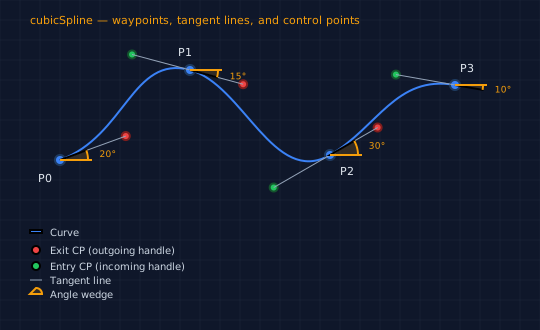
cubicSpline takes an array of points, each specifying its position, tangent angle, and handle distances.
Angles follow SVG's coordinate conventions: 0 is rightward, and positive angles rotate clockwise (toward the positive y-axis, which points downward in SVG). Use the deg suffix for degrees.
| Property | Type | Required | Description |
|---|---|---|---|
x |
number | yes | X coordinate |
y |
number | yes | Y coordinate |
angle |
number | yes | Tangent direction (radians; use deg suffix for degrees) |
exit |
number | yes (except last point) | Distance forward along tangent to outgoing CP |
entry |
number | yes (except first point) | Distance backward along tangent to incoming CP |
The anatomy diagram below shows how these properties map to the geometry. Blue dots are the on-curve waypoints. Red circles are exit control points (placed exit distance forward along the tangent). Green circles are entry control points (placed entry distance backward). Orange arcs show the tangent angle at each point.
// viewBox="0 0 540 330"
// cubicSpline anatomy — control points, tangent lines, angle arcs

// --- Background ---
let bg = PathLayer('bg') ${ fill: #0f172a; stroke: none; };
bg.apply { rect(0, 0, 540, 330) }

let grid = PathLayer('grid') ${ stroke: #1e293b; stroke-width: 0.5; fill: none; };
grid.apply {
  for (i in 0..16) { M 0 calc(i * 20) h 540 }
  for (j in 0..27) { M calc(j * 20) 0 v 330 }
}

// Angle wedge: draws a filled wedge from 0° to angle with label
fn angleWedge(cx, cy, radius, angle) {
  let ex = calc(cx + radius * cos(angle));
  let ey = calc(cy + radius * sin(angle));
  let sweep = calc(max(sign(angle), 0));
  // Wedge fill
  layer('angle-fills').apply {
    M cx cy
    L calc(cx + radius) cy
    A radius radius 0 0 sweep ex ey
    Z
  }
  // Arc stroke
  layer('angle-arcs').apply {
    M calc(cx + radius) cy
    A radius radius 0 0 sweep ex ey
  }
  // Baseline tick (0° reference)
  layer('angle-ticks').apply {
    M cx cy L calc(cx + radius + 4) cy
  }
  // Angle label
  let labelR = calc(radius + 12);
  let midAngle = calc(angle / 2);
  let lx = calc(cx + labelR * cos(midAngle));
  let ly = calc(cy + labelR * sin(midAngle));
  layer('angle-labels').apply {
    text(lx, calc(ly + 4))`${round(abs(angle) * 180 / PI())}°`
  }
}

let pts = [
  { x: 60,  y: 160, angle: -20deg, exit: 70 },
  { x: 190, y: 70,  angle: 15deg,  entry: 60, exit: 55 },
  { x: 330, y: 155, angle: -30deg, entry: 65, exit: 55 },
  { x: 455, y: 85,  angle: 10deg,  entry: 60 }
];

// === Diagram group ===
define GroupLayer('diagram') ${ translate-x: 0; translate-y: 0; }

// Title
define TextLayer('title') ${ font-size: 11; fill: #f59e0b; font-family: system-ui, sans-serif }
layer('diagram').append(layer('title'));
layer('title').apply { text(30, 24)`cubicSpline — waypoints, tangent lines, and control points` }

// The curve
define PathLayer('curve') ${ fill: none; stroke: #3b82f6; stroke-width: 3 }
layer('diagram').append(layer('curve'));
layer('curve').apply { cubicSpline(pts) }

// On-curve points
define PathLayer('anchors') ${ fill: #3b82f6; stroke: #1e3a5f; stroke-width: 1.5 }
layer('diagram').append(layer('anchors'));
layer('anchors').apply {
  for ([p, i] in pts) { circle(p.x, p.y, 5) }
}

// Control points and tangent lines
define PathLayer('cp-exit') ${ fill: #ef4444; stroke: #7f1d1d; stroke-width: 1 }
define PathLayer('cp-entry') ${ fill: #22c55e; stroke: #14532d; stroke-width: 1 }
define PathLayer('tangent') ${ fill: none; stroke: #94a3b8; stroke-width: 1; stroke-dasharray: 4 3 }
layer('diagram').append(layer('cp-exit'), layer('cp-entry'), layer('tangent'));

let n = calc(pts.length - 1);
for (i in 1..n) {
  let prev = pts[calc(i - 1)];
  let curr = pts[i];
  let c1x = calc(prev.x + prev.exit * cos(prev.angle));
  let c1y = calc(prev.y + prev.exit * sin(prev.angle));
  let c2x = calc(curr.x - curr.entry * cos(curr.angle));
  let c2y = calc(curr.y - curr.entry * sin(curr.angle));

  layer('cp-exit').apply { circle(c1x, c1y, 4) }
  layer('cp-entry').apply { circle(c2x, c2y, 4) }
  layer('tangent').apply {
    M prev.x prev.y L c1x c1y
    M curr.x curr.y L c2x c2y
  }
}

// Angle visualization layers
define PathLayer('angle-fills') ${ fill: rgba(245, 158, 11, 0.15); stroke: none }
define PathLayer('angle-arcs') ${ fill: none; stroke: #f59e0b; stroke-width: 1.5 }
define PathLayer('angle-ticks') ${ fill: none; stroke: #f59e0b; stroke-width: 0.8 }
define TextLayer('angle-labels') ${ font-size: 9; fill: #f59e0b; font-family: system-ui, sans-serif }
layer('diagram').append(layer('angle-fills'), layer('angle-arcs'), layer('angle-ticks'), layer('angle-labels'));

for ([p, i] in pts) { angleWedge(p.x, p.y, 28, p.angle) }

// Point labels
define TextLayer('labels') ${ font-size: 11; fill: #e2e8f0; font-family: system-ui, sans-serif }
layer('diagram').append(layer('labels'));
layer('labels').apply {
  text(38, 182)`P0`
  text(178, 56)`P1`
  text(340, 175)`P2`
  text(460, 72)`P3`
}

// === Legend group ===
define GroupLayer('legend-group') ${ translate-x: 30; translate-y: 230; }

define PathLayer('sw-curve') ${ fill: #3b82f6; stroke: none }
define PathLayer('sw-exit') ${ fill: #ef4444; stroke: none }
define PathLayer('sw-entry') ${ fill: #22c55e; stroke: none }
define PathLayer('sw-tangent') ${ fill: none; stroke: #94a3b8; stroke-width: 1; stroke-dasharray: 4 3 }
define PathLayer('sw-angle') ${ fill: rgba(245, 158, 11, 0.15); stroke: #f59e0b; stroke-width: 1 }
layer('legend-group').append(layer('sw-curve'), layer('sw-exit'), layer('sw-entry'), layer('sw-tangent'), layer('sw-angle'));

layer('sw-curve').apply { rect(0, 0, 12, 3) }
layer('sw-exit').apply { circle(6, 20, 4) }
layer('sw-entry').apply { circle(6, 36, 4) }
layer('sw-tangent').apply { M 0 50 L 12 50 }
layer('sw-angle').apply {
  M 0 64 L 12 64 A 6 6 0 0 0 6 58 Z
}

define TextLayer('legend-text') ${ font-size: 10; fill: #cbd5e1; font-family: system-ui, sans-serif }
layer('legend-group').append(layer('legend-text'));
layer('legend-text').apply {
  text(20, 6)`Curve`
  text(20, 24)`Exit CP (outgoing handle)`
  text(20, 40)`Entry CP (incoming handle)`
  text(20, 54)`Tangent line`
  text(20, 68)`Angle wedge`
}
Why It's Smooth: G1 Continuity
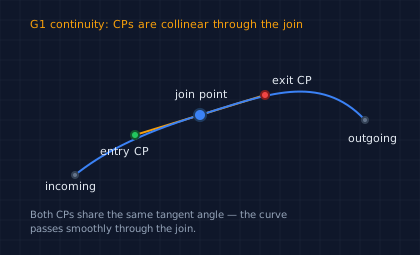
The smoothness guarantee comes from a simple geometric constraint: at every join point, the exit control point of the outgoing segment and the entry control point of the incoming segment lie on the same line — the tangent line defined by angle. Because both control points are collinear through the join, the curve's direction doesn't change abruptly.
// viewBox="0 0 420 255"
// G1 continuity at a join point — collinear control points

// --- Background ---
let bg = PathLayer('bg') ${ fill: #0f172a; stroke: none; };
bg.apply { rect(0, 0, 420, 255) }

let grid = PathLayer('grid') ${ stroke: #1e293b; stroke-width: 0.5; fill: none; };
grid.apply {
  for (i in 0..12) { M 0 calc(i * 20) h 420 }
  for (j in 0..21) { M calc(j * 20) 0 v 255 }
}

// === Diagram group ===
define GroupLayer('diagram') ${ translate-x: 0; translate-y: 0; }

// Title — top, clear of geometry
define TextLayer('title') ${ font-size: 11; fill: #f59e0b; font-family: system-ui, sans-serif }
layer('diagram').append(layer('title'));
layer('title').apply {
  text(30, 28)`G1 continuity: CPs are collinear through the join`
}

let joinPt = { x: 200, y: 115 };
let cpIn   = { x: 135, y: 135 };
let cpOut  = { x: 265, y: 95 };

// Collinear line through CPs
define PathLayer('g1-line') ${ fill: none; stroke: #f59e0b; stroke-width: 1.5 }
layer('diagram').append(layer('g1-line'));
layer('g1-line').apply {
  M cpIn.x cpIn.y L cpOut.x cpOut.y
}

// Incoming and outgoing curve segments
define PathLayer('curves') ${ fill: none; stroke: #3b82f6; stroke-width: 2.5 }
layer('diagram').append(layer('curves'));
layer('curves').apply {
  M 75 175 C 100 155 cpIn.x cpIn.y joinPt.x joinPt.y
  M joinPt.x joinPt.y C cpOut.x cpOut.y 320 72 365 120
}

// Join point
define PathLayer('anchor') ${ fill: #3b82f6; stroke: #1e3a5f; stroke-width: 1.5 }
layer('diagram').append(layer('anchor'));
layer('anchor').apply { circle(joinPt.x, joinPt.y, 6) }

// Control points
define PathLayer('cp-entry') ${ fill: #22c55e; stroke: #14532d; stroke-width: 1 }
define PathLayer('cp-exit') ${ fill: #ef4444; stroke: #7f1d1d; stroke-width: 1 }
layer('diagram').append(layer('cp-entry'), layer('cp-exit'));
layer('cp-entry').apply { circle(cpIn.x, cpIn.y, 4) }
layer('cp-exit').apply { circle(cpOut.x, cpOut.y, 4) }

// Endpoint markers
define PathLayer('endpoints') ${ fill: #64748b; stroke: #334155; stroke-width: 1 }
layer('diagram').append(layer('endpoints'));
layer('endpoints').apply {
  circle(75, 175, 3)
  circle(365, 120, 3)
}

// Labels — positioned with clearance from geometry
define TextLayer('labels') ${ font-size: 11; fill: #e2e8f0; font-family: system-ui, sans-serif }
layer('diagram').append(layer('labels'));
layer('labels').apply {
  text(175, 98)`join point`
  text(100, 155)`entry CP`
  text(272, 84)`exit CP`
  text(45, 190)`incoming`
  text(348, 142)`outgoing`
}

// Explanation — two shorter lines with safe margins
define TextLayer('note') ${ font-size: 10; fill: #94a3b8; font-family: system-ui, sans-serif }
layer('diagram').append(layer('note'));
layer('note').apply {
  text(30, 218)`Both CPs share the same tangent angle — the curve`
  text(30, 232)`passes smoothly through the join.`
}
Examples
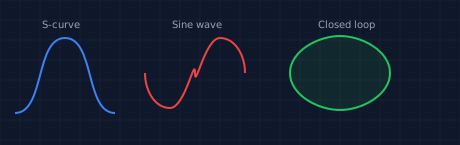
Three cubicSpline curves: a two-segment S-curve, a five-point sine wave approximation, and a closed loop where the first and last points coincide.
// viewBox="0 0 460 145"
// Three cubicSpline examples: S-curve, sine wave, closed loop

// --- Background ---
let bg = PathLayer('bg') ${ fill: #0f172a; stroke: none; };
bg.apply { rect(0, 0, 460, 145) }

let grid = PathLayer('grid') ${ stroke: #1e293b; stroke-width: 0.5; fill: none; };
grid.apply {
  for (i in 0..7) { M 0 calc(i * 20) h 460 }
  for (j in 0..23) { M calc(j * 20) 0 v 145 }
}

// === Layout group ===
define GroupLayer('layout') ${ translate-x: 0; translate-y: 0; }

// --- S-curve group ---
define GroupLayer('s-curve-group') ${ translate-x: 15; translate-y: 8; }
layer('layout').append(layer('s-curve-group'));

define TextLayer('s-label') ${ font-size: 10; fill: #94a3b8; font-family: system-ui, sans-serif }
layer('s-curve-group').append(layer('s-label'));
layer('s-label').apply { text(27, 20)`S-curve` }

define PathLayer('s-curve') ${ fill: none; stroke: #3b82f6; stroke-width: 2.5 }
layer('s-curve-group').append(layer('s-curve'));
layer('s-curve').apply {
  cubicSpline([
    { x: 0,  y: 105, angle: 0, exit: 30 },
    { x: 50, y: 30,  angle: 0, entry: 30, exit: 30 },
    { x: 100, y: 105, angle: 0, entry: 30 }
  ])
}

// --- Sine wave group ---
define GroupLayer('sine-group') ${ translate-x: 145; translate-y: 8; }
layer('layout').append(layer('sine-group'));

define TextLayer('sine-label') ${ font-size: 10; fill: #94a3b8; font-family: system-ui, sans-serif }
layer('sine-group').append(layer('sine-label'));
layer('sine-label').apply { text(27, 20)`Sine wave` }

define PathLayer('sine') ${ fill: none; stroke: #ef4444; stroke-width: 2.5 }
layer('sine-group').append(layer('sine'));
layer('sine').apply {
  cubicSpline([
    { x: 0,  y: 65,  angle: 90deg, exit: 18 },
    { x: 25, y: 100, angle: 0,     entry: 15, exit: 15 },
    { x: 50, y: 65,  angle: 90deg, entry: 18, exit: 18 },
    { x: 75, y: 30,  angle: 0,     entry: 15, exit: 15 },
    { x: 100, y: 65,  angle: 90deg, entry: 18 }
  ])
}

// --- Closed loop group ---
define GroupLayer('loop-group') ${ translate-x: 280; translate-y: 8; }
layer('layout').append(layer('loop-group'));

define TextLayer('loop-label') ${ font-size: 10; fill: #94a3b8; font-family: system-ui, sans-serif }
layer('loop-group').append(layer('loop-label'));
layer('loop-label').apply { text(38, 20)`Closed loop` }

define PathLayer('loop') ${ fill: rgba(34, 197, 94, 0.1); stroke: #22c55e; stroke-width: 2.5 }
layer('loop-group').append(layer('loop'));
layer('loop').apply {
  cubicSpline([
    { x: 60, y: 28,  angle: 0,      exit: 22 },
    { x: 110, y: 65,  angle: 90deg,  entry: 22, exit: 22 },
    { x: 60, y: 102, angle: 180deg, entry: 22, exit: 22 },
    { x: 10, y: 65,  angle: -90deg, entry: 22, exit: 22 },
    { x: 60, y: 28,  angle: 0,      entry: 22 }
  ])
}
A single-point array emits only a move command. Two or more points are needed to produce curve segments.
quadSpline: Implicit Angles
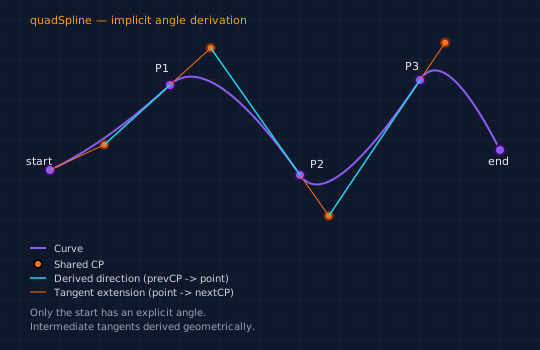
If specifying an angle at every point feels like too much control, quadSpline derives intermediate tangents automatically. Only the start point needs an explicit angle — at each subsequent point, the tangent direction is inferred from the geometry: it points from the previous control point through the current waypoint. You don't need to think about the math — the curves just flow naturally from one segment to the next.
| Argument | Properties | Description |
|---|---|---|
start |
{ x, y, angle, exit } |
First point with explicit angle |
points |
[{ x, y, exit }, ...] |
Intermediate waypoints (angle derived) |
end |
{ x, y } |
Final waypoint |
quadSpline(
  { x: 50, y: 140, angle: -30deg, exit: 65 },   // start: explicit angle
  [
    { x: 170, y: 50,  exit: 60 },                // intermediates: angle derived
    { x: 300, y: 150, exit: 55 },
    { x: 420, y: 45,  exit: 50 }
  ],
  { x: 500, y: 120 }                              // end: no angle needed
)
// viewBox="0 0 540 350"
// quadSpline anatomy — implicit angle derivation from previous CP

// --- Background ---
let bg = PathLayer('bg') ${ fill: #0f172a; stroke: none; };
bg.apply { rect(0, 0, 540, 350) }

let grid = PathLayer('grid') ${ stroke: #1e293b; stroke-width: 0.5; fill: none; };
grid.apply {
  for (i in 0..17) { M 0 calc(i * 20) h 540 }
  for (j in 0..27) { M calc(j * 20) 0 v 350 }
}

let startPt = { x: 50, y: 170, angle: -25deg, exit: 60 };
let midPts = [
  { x: 170, y: 85,  exit: 55 },
  { x: 300, y: 175, exit: 50 },
  { x: 420, y: 80,  exit: 45 }
];
let endPt = { x: 500, y: 150 };

// === Diagram group ===
define GroupLayer('diagram') ${ translate-x: 0; translate-y: 0; }

// Title
define TextLayer('title') ${ font-size: 11; fill: #f59e0b; font-family: system-ui, sans-serif }
layer('diagram').append(layer('title'));
layer('title').apply { text(30, 24)`quadSpline — implicit angle derivation` }

// The curve
define PathLayer('curve') ${ fill: none; stroke: #8b5cf6; stroke-width: 3 }
layer('diagram').append(layer('curve'));
layer('curve').apply { quadSpline(startPt, midPts, endPt) }

// On-curve points
define PathLayer('anchors') ${ fill: #8b5cf6; stroke: #3b0764; stroke-width: 1.5 }
layer('diagram').append(layer('anchors'));
layer('anchors').apply {
  circle(startPt.x, startPt.y, 5)
  for ([p, i] in midPts) { circle(p.x, p.y, 5) }
  circle(endPt.x, endPt.y, 5)
}

// Recompute CPs for visualization
define PathLayer('shared-cp') ${ fill: #f97316; stroke: #7c2d12; stroke-width: 1 }
define PathLayer('tangent-line') ${ fill: none; stroke: #f97316; stroke-width: 1; stroke-dasharray: 5 3 }
define PathLayer('derived-dir') ${ fill: none; stroke: #22d3ee; stroke-width: 1.5; stroke-dasharray: 3 2 }
layer('diagram').append(layer('shared-cp'), layer('tangent-line'), layer('derived-dir'));

// First CP from explicit angle
let cp0x = calc(startPt.x + startPt.exit * cos(startPt.angle));
let cp0y = calc(startPt.y + startPt.exit * sin(startPt.angle));

layer('shared-cp').apply { circle(cp0x, cp0y, 4) }
layer('tangent-line').apply { M startPt.x startPt.y L cp0x cp0y }

// Subsequent CPs from derived angles
let prevCPx = cp0x;
let prevCPy = cp0y;
for ([pt, idx] in midPts) {
  let angle = calc(atan2(pt.y - prevCPy, pt.x - prevCPx));
  let newCPx = calc(pt.x + pt.exit * cos(angle));
  let newCPy = calc(pt.y + pt.exit * sin(angle));

  // Derived direction: prevCP -> pt (cyan dashed)
  layer('derived-dir').apply { M prevCPx prevCPy L pt.x pt.y }
  // Tangent extension: pt -> newCP (orange dashed)
  layer('tangent-line').apply { M pt.x pt.y L newCPx newCPy }
  // Shared CP marker
  layer('shared-cp').apply { circle(newCPx, newCPy, 4) }

  prevCPx = newCPx;
  prevCPy = newCPy;
}

// Labels — positioned with clearance
define TextLayer('labels') ${ font-size: 11; fill: #e2e8f0; font-family: system-ui, sans-serif }
layer('diagram').append(layer('labels'));
layer('labels').apply {
  text(26, 165)`start`
  text(155, 72)`P1`
  text(310, 168)`P2`
  text(405, 70)`P3`
  text(488, 165)`end`
}

// === Legend group ===
define GroupLayer('legend-group') ${ translate-x: 30; translate-y: 248; }

define PathLayer('lg-curve') ${ fill: none; stroke: #8b5cf6; stroke-width: 2.5 }
define PathLayer('lg-cp') ${ fill: #f97316; stroke: none }
define PathLayer('lg-dir') ${ fill: none; stroke: #22d3ee; stroke-width: 1.5; stroke-dasharray: 3 2 }
define PathLayer('lg-tan') ${ fill: none; stroke: #f97316; stroke-width: 1; stroke-dasharray: 5 3 }
layer('legend-group').append(layer('lg-curve'), layer('lg-cp'), layer('lg-dir'), layer('lg-tan'));

layer('lg-curve').apply { M 0 0 L 16 0 }
layer('lg-cp').apply { circle(8, 16, 4) }
layer('lg-dir').apply { M 0 30 L 16 30 }
layer('lg-tan').apply { M 0 44 L 16 44 }

define TextLayer('legend') ${ font-size: 10; fill: #cbd5e1; font-family: system-ui, sans-serif }
layer('legend-group').append(layer('legend'));
layer('legend').apply {
  text(24, 4)`Curve`
  text(24, 20)`Shared CP`
  text(24, 34)`Derived direction (prevCP -> point)`
  text(24, 48)`Tangent extension (point -> nextCP)`
}

define TextLayer('note') ${ font-size: 10; fill: #94a3b8; font-family: system-ui, sans-serif }
layer('legend-group').append(layer('note'));
layer('note').apply {
  text(0, 68)`Only the start has an explicit angle.`
  text(0, 82)`Intermediate tangents derived geometrically.`
}
The signature is different from cubicSpline: start and end are separate arguments, with an array of intermediates between them. This reflects the asymmetry — only the start carries an explicit angle.
// viewBox="0 0 460 145"
// Three quadSpline examples: simple arc, flowing curve, zigzag

// --- Background ---
let bg = PathLayer('bg') ${ fill: #0f172a; stroke: none; };
bg.apply { rect(0, 0, 460, 145) }

let grid = PathLayer('grid') ${ stroke: #1e293b; stroke-width: 0.5; fill: none; };
grid.apply {
  for (i in 0..7) { M 0 calc(i * 20) h 460 }
  for (j in 0..23) { M calc(j * 20) 0 v 145 }
}

// === Layout group ===
define GroupLayer('layout') ${ translate-x: 0; translate-y: 0; }

// --- Simple arc group ---
define GroupLayer('arc-group') ${ translate-x: 15; translate-y: 8; }
layer('layout').append(layer('arc-group'));

define TextLayer('arc-label') ${ font-size: 10; fill: #94a3b8; font-family: system-ui, sans-serif }
layer('arc-group').append(layer('arc-label'));
layer('arc-label').apply { text(23, 20)`Simple arc` }

define PathLayer('arc') ${ fill: none; stroke: #3b82f6; stroke-width: 2.5 }
layer('arc-group').append(layer('arc'));
layer('arc').apply {
  quadSpline(
    { x: 0, y: 100, angle: -30deg, exit: 40 },
    [],
    { x: 100, y: 100 }
  )
}

// --- Flowing curve group ---
define GroupLayer('flow-group') ${ translate-x: 145; translate-y: 8; }
layer('layout').append(layer('flow-group'));

define TextLayer('flow-label') ${ font-size: 10; fill: #94a3b8; font-family: system-ui, sans-serif }
layer('flow-group').append(layer('flow-label'));
layer('flow-label').apply { text(40, 20)`Flowing curve` }

define PathLayer('flowing') ${ fill: none; stroke: #ef4444; stroke-width: 2.5 }
layer('flow-group').append(layer('flowing'));
layer('flowing').apply {
  quadSpline(
    { x: 0,   y: 100, angle: -45deg, exit: 28 },
    [
      { x: 30,  y: 35, exit: 25 },
      { x: 70,  y: 80, exit: 28 },
      { x: 100, y: 35, exit: 25 }
    ],
    { x: 140, y: 100 }
  )
}

// --- Zigzag group ---
define GroupLayer('zig-group') ${ translate-x: 310; translate-y: 8; }
layer('layout').append(layer('zig-group'));

define TextLayer('zig-label') ${ font-size: 10; fill: #94a3b8; font-family: system-ui, sans-serif }
layer('zig-group').append(layer('zig-label'));
layer('zig-label').apply { text(30, 20)`Zigzag` }

define PathLayer('zigzag') ${ fill: none; stroke: #22c55e; stroke-width: 2.5 }
layer('zig-group').append(layer('zigzag'));
layer('zigzag').apply {
  quadSpline(
    { x: 0,   y: 100, angle: -60deg, exit: 25 },
    [
      { x: 30,  y: 35, exit: 25 },
      { x: 60,  y: 100, exit: 25 },
      { x: 90,  y: 35, exit: 25 }
    ],
    { x: 120, y: 100 }
  )
}
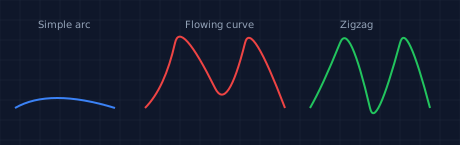
When to choose quadSpline over cubicSpline: When you want smooth curves but don't need per-point angle control. quadSpline is less to specify and produces naturally flowing shapes. Because it generates quadratic Bézier segments (which have one control point per segment instead of two), the curves have fewer degrees of freedom — great for organic, flowing lines but less precise for art-directed shapes. Use cubicSpline when you need exact control at every waypoint.
clippedQuadSpline: Controlling Eccentricity
Quadratic curves can sometimes bulge more than you want — the implicit shared control point sits far from the curve, pulling it outward. Eccentricity here refers to how much the curve deviates from the straight line between waypoints: more eccentric curves bulge further away from the baseline.
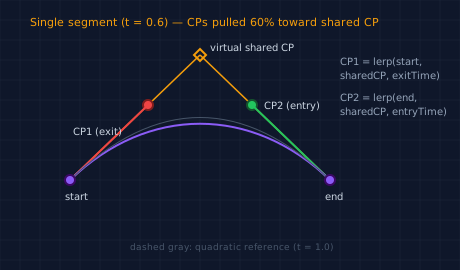
clippedQuadSpline solves this by adding exitTime and entryTime parameters that control how far the actual control points are placed along the arm toward the virtual shared CP. The placement uses linear interpolation (lerp) — lerp(start, sharedCP, t) returns a point partway between the endpoint and the virtual CP, where t is the fraction of the distance to travel.
| Argument | Properties | Description |
|---|---|---|
start |
{ x, y, angle, exit, exitTime } |
First point with time fraction |
points |
[{ x, y, exit, exitTime, entryTime }, ...] |
Intermediates with time fractions |
end |
{ x, y, entryTime } |
Final waypoint with time fraction |
clippedQuadSpline(
  { x: 50, y: 150, angle: -40deg, exit: 80, exitTime: 0.5 },
  [{ x: 180, y: 30, exit: 70, exitTime: 0.5, entryTime: 0.5 }],
  { x: 310, y: 150, entryTime: 0.5 }
)
The time values range from 0 to 1:
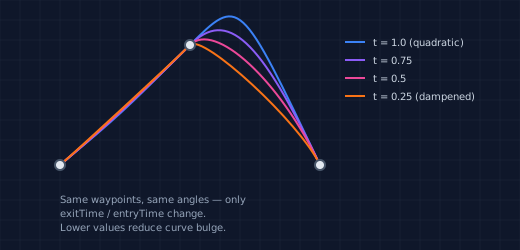
- t = 1.0 — control points at the virtual shared position (equivalent to quadratic, maximum bulge)
- t = 0.5 — control points halfway along the arm (moderate dampening)
- t = 0 — control points at the endpoints (straight lines, no curve)
// viewBox="0 0 460 270"
// clippedQuadSpline anatomy — virtual shared CP and lerped actual CPs

// --- Background ---
let bg = PathLayer('bg') ${ fill: #0f172a; stroke: none; };
bg.apply { rect(0, 0, 460, 270) }

let grid = PathLayer('grid') ${ stroke: #1e293b; stroke-width: 0.5; fill: none; };
grid.apply {
  for (i in 0..13) { M 0 calc(i * 20) h 460 }
  for (j in 0..23) { M calc(j * 20) 0 v 270 }
}

// Title — top, clear of geometry
define TextLayer('title') ${ font-size: 11; fill: #f59e0b; font-family: system-ui, sans-serif }
layer('title').apply {
  text(30, 26)`Single segment (t = 0.6) — CPs pulled 60% toward shared CP`
}

// === Diagram group ===
define GroupLayer('diagram') ${ translate-x: 0; translate-y: 0; }

let sx = 70;
let sy = 180;
let ex = 330;
let ey = 180;
let sharedX = 200;
let sharedY = 55;
let t = 0.6;

let cp1x = calc(lerp(sx, sharedX, t));
let cp1y = calc(lerp(sy, sharedY, t));
let cp2x = calc(lerp(ex, sharedX, t));
let cp2y = calc(lerp(ey, sharedY, t));

// Arms from endpoints to virtual shared CP
define PathLayer('arms') ${ fill: none; stroke: #f59e0b; stroke-width: 1.5; stroke-dasharray: 3 3 }
layer('diagram').append(layer('arms'));
layer('arms').apply {
  M sx sy L sharedX sharedY
  M ex ey L sharedX sharedY
}

// Virtual shared CP diamond
define PathLayer('virtual') ${ fill: none; stroke: #f59e0b; stroke-width: 1.5 }
layer('diagram').append(layer('virtual'));
layer('virtual').apply {
  M sharedX calc(sharedY - 6)
  L calc(sharedX + 6) sharedY
  L sharedX calc(sharedY + 6)
  L calc(sharedX - 6) sharedY Z
}

// Actual CPs (lerped)
define PathLayer('cp1') ${ fill: #ef4444; stroke: #7f1d1d; stroke-width: 1 }
define PathLayer('cp2') ${ fill: #22c55e; stroke: #14532d; stroke-width: 1 }
layer('diagram').append(layer('cp1'), layer('cp2'));
layer('cp1').apply { circle(cp1x, cp1y, 5) }
layer('cp2').apply { circle(cp2x, cp2y, 5) }

// Lines from endpoints to actual CPs
define PathLayer('cp1-arm') ${ fill: none; stroke: #ef4444; stroke-width: 1.5 }
define PathLayer('cp2-arm') ${ fill: none; stroke: #22c55e; stroke-width: 1.5 }
layer('diagram').append(layer('cp1-arm'), layer('cp2-arm'));
layer('cp1-arm').apply { M sx sy L cp1x cp1y }
layer('cp2-arm').apply { M ex ey L cp2x cp2y }

// The resulting cubic curve
define PathLayer('curve') ${ fill: none; stroke: #8b5cf6; stroke-width: 3 }
layer('diagram').append(layer('curve'));
layer('curve').apply { M sx sy C cp1x cp1y cp2x cp2y ex ey }

// Quadratic reference (t=1.0)
define PathLayer('quad-ref') ${ fill: none; stroke: #475569; stroke-width: 1; stroke-dasharray: 4 4 }
layer('diagram').append(layer('quad-ref'));
layer('quad-ref').apply { M sx sy Q sharedX sharedY ex ey }

// Endpoints
define PathLayer('endpoints') ${ fill: #8b5cf6; stroke: #3b0764; stroke-width: 1.5 }
layer('diagram').append(layer('endpoints'));
layer('endpoints').apply {
  circle(sx, sy, 5)
  circle(ex, ey, 5)
}

// Labels — positioned with clearance from geometry
define TextLayer('labels') ${ font-size: 10; fill: #cbd5e1; font-family: system-ui, sans-serif }
layer('diagram').append(layer('labels'));
layer('labels').apply {
  text(calc(sharedX + 10), calc(sharedY - 4))`virtual shared CP`
  text(calc(cp1x - 75), calc(cp1y + 30))`CP1 (exit)`
  text(calc(cp2x + 12), calc(cp2y + 4))`CP2 (entry)`
  text(calc(sx - 5), calc(sy + 20))`start`
  text(calc(ex - 5), calc(ey + 20))`end`
}

// === Formula group — right side ===
define GroupLayer('formula-group') ${ translate-x: 340; translate-y: 55; }

define TextLayer('formula') ${ font-size: 10; fill: #94a3b8; font-family: monospace }
layer('formula-group').append(layer('formula'));
layer('formula').apply {
  text(0, 10)`CP1 = lerp(start,`
  text(0, 24)`  sharedCP, exitTime)`
  text(0, 46)`CP2 = lerp(end,`
  text(0, 60)`  sharedCP, entryTime)`
}

// Reference note — bottom with safe margin
define TextLayer('ref-note') ${ font-size: 9; fill: #475569; font-family: system-ui, sans-serif }
layer('ref-note').apply {
  text(130, 250)`dashed gray: quadratic reference (t = 1.0)`
}
The effect is dramatic when overlaid. Same waypoints, same angles — only the time values change:
// viewBox="0 0 520 250"
// clippedQuadSpline eccentricity comparison — same geometry, different time values

// --- Background ---
let bg = PathLayer('bg') ${ fill: #0f172a; stroke: none; };
bg.apply { rect(0, 0, 520, 250) }

let grid = PathLayer('grid') ${ stroke: #1e293b; stroke-width: 0.5; fill: none; };
grid.apply {
  for (i in 0..12) { M 0 calc(i * 20) h 520 }
  for (j in 0..26) { M calc(j * 20) 0 v 250 }
}

// === Diagram group ===
define GroupLayer('diagram') ${ translate-x: 0; translate-y: 0; }

let sAngle = -40deg;
let sExit = 80;

// t = 1.0 (full quadratic — most eccentric)
define PathLayer('t100') ${ fill: none; stroke: #3b82f6; stroke-width: 2.5 }
layer('t100').apply {
  clippedQuadSpline(
    { x: 60, y: 165, angle: sAngle, exit: sExit, exitTime: 1.0 },
    [{ x: 190, y: 45, exit: 70, exitTime: 1.0, entryTime: 1.0 }],
    { x: 320, y: 165, entryTime: 1.0 }
  )
}

// t = 0.75
define PathLayer('t075') ${ fill: none; stroke: #8b5cf6; stroke-width: 2 }
layer('t075').apply {
  clippedQuadSpline(
    { x: 60, y: 165, angle: sAngle, exit: sExit, exitTime: 0.75 },
    [{ x: 190, y: 45, exit: 70, exitTime: 0.75, entryTime: 0.75 }],
    { x: 320, y: 165, entryTime: 0.75 }
  )
}

// t = 0.5
define PathLayer('t050') ${ fill: none; stroke: #ec4899; stroke-width: 2 }
layer('t050').apply {
  clippedQuadSpline(
    { x: 60, y: 165, angle: sAngle, exit: sExit, exitTime: 0.5 },
    [{ x: 190, y: 45, exit: 70, exitTime: 0.5, entryTime: 0.5 }],
    { x: 320, y: 165, entryTime: 0.5 }
  )
}

// t = 0.25
define PathLayer('t025') ${ fill: none; stroke: #f97316; stroke-width: 2 }
layer('t025').apply {
  clippedQuadSpline(
    { x: 60, y: 165, angle: sAngle, exit: sExit, exitTime: 0.25 },
    [{ x: 190, y: 45, exit: 70, exitTime: 0.25, entryTime: 0.25 }],
    { x: 320, y: 165, entryTime: 0.25 }
  )
}

// On-curve points
define PathLayer('pts') ${ fill: #e2e8f0; stroke: #475569; stroke-width: 1.5 }
layer('diagram').append(layer('t100'), layer('t075'), layer('t050'), layer('t025'), layer('pts'));
layer('pts').apply {
  circle(60, 165, 5)
  circle(190, 45, 5)
  circle(320, 165, 5)
}

// === Legend group ===
define GroupLayer('legend-group') ${ translate-x: 345; translate-y: 42; }

define PathLayer('lg1') ${ fill: none; stroke: #3b82f6; stroke-width: 2.5 }
define PathLayer('lg2') ${ fill: none; stroke: #8b5cf6; stroke-width: 2 }
define PathLayer('lg3') ${ fill: none; stroke: #ec4899; stroke-width: 2 }
define PathLayer('lg4') ${ fill: none; stroke: #f97316; stroke-width: 2 }
layer('legend-group').append(layer('lg1'), layer('lg2'), layer('lg3'), layer('lg4'));

layer('lg1').apply { M 0 0 L 20 0 }
layer('lg2').apply { M 0 18 L 20 18 }
layer('lg3').apply { M 0 36 L 20 36 }
layer('lg4').apply { M 0 54 L 20 54 }

define TextLayer('legend') ${ font-size: 10; fill: #cbd5e1; font-family: system-ui, sans-serif }
layer('legend-group').append(layer('legend'));
layer('legend').apply {
  text(28, 4)`t = 1.0 (quadratic)`
  text(28, 22)`t = 0.75`
  text(28, 40)`t = 0.5`
  text(28, 58)`t = 0.25 (dampened)`
}

define TextLayer('note') ${ font-size: 10; fill: #94a3b8; font-family: system-ui, sans-serif }
layer('note').apply {
  text(60, 203)`Same waypoints, same angles — only`
  text(60, 217)`exitTime / entryTime change.`
  text(60, 231)`Lower values reduce curve bulge.`
}
Unlike quadSpline (which emits q commands), clippedQuadSpline emits c (cubic) commands because splitting the shared CP into two independent CPs requires cubic Béziers. This is transparent to the user — the output is still a valid SVG path.
When to choose clippedQuadSpline: When you want the convenience of implicit angles (like quadSpline) but need to control how much the curve bulges at each segment. It's particularly useful for decorative borders, data visualization curves, and any shape where uniform curvature matters more than maximum expressiveness.
All three spline functions emit relative commands, so they compose naturally with path blocks and transforms. They also pair well with heading() and turn() for establishing tangent context before tangent-dependent functions. Try editing any of the examples above in the Pathogen playground — adjust angles, handle lengths, and time values to see how the curves respond.