Clean Tangent Control: heading() and turn() in Pathogen
Pathogen's tangent-dependent functions — tangentLine and tangentArc — continue drawing in the direction established by the previous command. But what if there is no previous command? After an M (moveTo), the pen has a position but no heading. Calling tangentArc right after M would fail because there's no direction to continue from.
The old workaround was a dummy segment:
M 50 100
h 0.01            // invisible line to set heading rightward
tangentArc(20, 90deg)
This sets the heading, but the 0.01px offset accumulates. When you close a path with z, it draws a line back to (50.01, 100) instead of (50, 100) — a tiny but visible artifact.
heading(angle)
heading(angle) sets the tangent direction without emitting any command or moving the cursor. No offset, no artifact:
M 50 100
heading(0)           // set heading rightward — nothing drawn
tangentArc(20, 90deg) // works immediately
Angles follow SVG's coordinate conventions: 0 is rightward, positive angles rotate clockwise (downward in SVG's y-down coordinate system). Use the deg suffix for degrees.
turn(delta)
turn(delta) rotates the current heading by a relative amount. It requires an existing heading — either from heading() or from a prior drawing command:
M 50 100
heading(0)          // start rightward
turn(90deg)         // now downward
tangentLine(30)     // draws 30px down
Negative deltas turn counter-clockwise. Multiple turn() calls accumulate:
heading(0)
turn(45deg)         // 45°
turn(45deg)         // 90°
tangentLine(20)     // draws at 90°
Shapes Without Dummy Segments
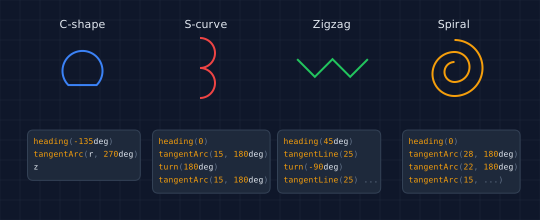
The demo below shows four shapes built entirely with heading, turn, tangentLine, and tangentArc — no dummy segments needed. Each shape includes the code used to construct it.
// viewBox="0 0 540 220"
// heading() and turn() — tangent context without path commands

// --- Background ---
let bg = PathLayer('bg') ${ fill: #0f172a; stroke: none; };
bg.apply { rect(0, 0, 540, 220) }

let grid = PathLayer('grid') ${ stroke: #1e293b; stroke-width: 0.5; fill: none; };
grid.apply {
  for (i in 0..11) { M 0 calc(i * 20) h 540 }
  for (j in 0..27) { M calc(j * 20) 0 v 220 }
}

let r = 20;
let colWidth = 125;
let shapeRowY = 68;
let codeRowY = 130;
let labelY = 28;

// === Layout group ===
define GroupLayer('layout') ${ translate-x: 0; translate-y: 0; }

// --- Build each shape as a PathBlock, center via boundingBox ---

// C-shape
let cBlock = @{
  heading(-135deg)
  tangentArc(r, 270deg)
  z
};
let cBB = cBlock.boundingBox();

// S-curve (smaller radius to fit vertically)
let sR = 15;
let sBlock = @{
  heading(0)
  tangentArc(sR, 180deg)
  turn(180deg)
  tangentArc(sR, 180deg)
};
let sBB = sBlock.boundingBox();

// Zigzag
let zBlock = @{
  heading(45deg)
  tangentLine(25)
  turn(-90deg)
  tangentLine(25)
  turn(90deg)
  tangentLine(25)
  turn(-90deg)
  tangentLine(25)
};
let zBB = zBlock.boundingBox();

// Spiral
let spBlock = @{
  heading(0)
  tangentArc(28, 180deg)
  tangentArc(22, 180deg)
  tangentArc(15, 180deg)
  tangentArc(10, 180deg)
};
let spBB = spBlock.boundingBox();

// Shape configs: [pathblock, boundingbox, label, color, column_center_x]
let shapes = [
  { pb: cBlock,  bb: cBB,  label: "C-shape", col: #3b82f6 },
  { pb: sBlock,  bb: sBB,  label: "S-curve", col: #ef4444 },
  { pb: zBlock,  bb: zBB,  label: "Zigzag",  col: #22c55e },
  { pb: spBlock, bb: spBB, label: "Spiral",  col: #f59e0b }
];

let codeTexts = [
  &{ text(0, 0)`heading(-135deg)
tangentArc(r, 270deg)
z` },
  &{ text(0, 0)`heading(0)
tangentArc(15, 180deg)
turn(180deg)
tangentArc(15, 180deg)` },
  &{ text(0, 0)`heading(45deg)
tangentLine(25)
turn(-90deg)
tangentLine(25) ...` },
  &{ text(0, 0)`heading(0)
tangentArc(28, 180deg)
tangentArc(22, 180deg)
tangentArc(15, ...)` }
];

let snippetNames = ["c-code", "s-code", "z-code", "sp-code"];

for ([shape, idx] in shapes) {
  let cx = calc(20 + colWidth / 2 + idx * colWidth);

  // --- Group for this example ---
  let gName = `g${idx}`;
  define GroupLayer(gName) ${ translate-x: 0; translate-y: 0; }
  layer('layout').append(layer(gName));

  // --- Label ---
  let tlName = `l${idx}`;
  define TextLayer(tlName) ${ font-size: 11; fill: #e2e8f0; font-family: system-ui, sans-serif }
  layer(gName).append(layer(tlName));
  let labelX = calc(cx - shape.label.length * 3.3);
  layer(tlName).apply { text(labelX, labelY)`${shape.label}` }

  // --- Shape: centered at (cx, shapeRowY) using boundingBox ---
  let drawX = calc(cx - shape.bb.x - shape.bb.width / 2);
  let drawY = calc(shapeRowY - shape.bb.y - shape.bb.height / 2);
  let plName = `p${idx}`;
  define PathLayer(plName) ${ fill: none; stroke: shape.col; stroke-width: 2.5 }
  layer(gName).append(layer(plName));
  layer(plName).apply { shape.pb.drawTo(drawX, drawY) }

  // --- Code snippet ---
  let snippet = codeTexts[idx].toCodeSnippetBlock(snippetNames[idx], 8, 6);
  // Center the snippet horizontally under the shape
  let snippetBB = snippet.ctx.transform;
  snippet << ${ translate-x: calc(cx - 55); translate-y: codeRowY; };
  layer(gName).append(snippet);
}
Building Regular Polygons
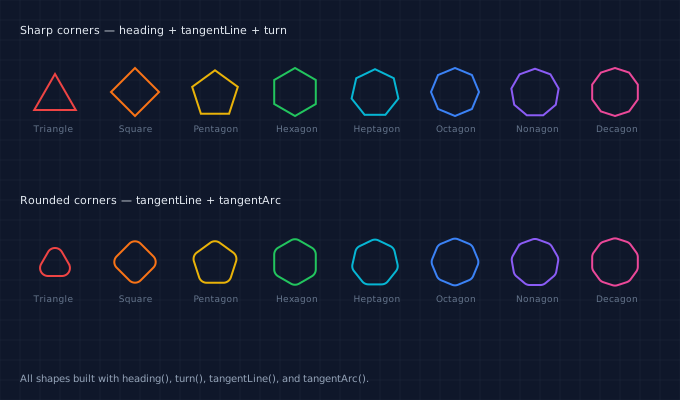
heading, turn, and tangentLine are all you need to draw any regular polygon. Set an initial heading at half the exterior angle (this orients the first edge so the polygon sits upright), then loop: draw a side with tangentLine, turn by the exterior angle. Replace tangentLine with tangentArc on the turns and the corners become rounded:
fn sharpPoly(sides, sideLen) {
  let ext = calc(360 / sides);
  heading(calc(ext / 2 * PI() / 180))
  for (i in 0..sides) {
    tangentLine(sideLen)
    turn(calc(ext * PI() / 180))
  }
}

fn roundedPoly(sides, sideLen, r) {
  let ext = calc(360 / sides);
  let straight = calc(sideLen - 2 * r * tan(ext / 2 * PI() / 180));
  heading(calc(ext / 2 * PI() / 180))
  for (i in 0..sides) {
    tangentLine(straight)
    tangentArc(r, calc(ext * PI() / 180))
  }
}
The showcase below draws triangles through decagons — eight polygons in each row, sharp and rounded. One function, one loop, any number of sides.
// viewBox="0 0 680 400"
// Regular polygons via heading + turn + tangentLine/tangentArc

// --- Background ---
let bg = PathLayer('bg') ${ fill: #0f172a; stroke: none; };
bg.apply { rect(0, 0, 680, 400) }

let grid = PathLayer('grid') ${ stroke: #1e293b; stroke-width: 0.5; fill: none; };
grid.apply {
  for (i in 0..20) { M 0 calc(i * 20) h 680 }
  for (j in 0..34) { M calc(j * 20) 0 v 400 }
}

let r = 24;

// Build sharp polygon as PathBlock
fn sharpPolyBlock(sides) {
  let extRad = calc(2 * PI() / sides);
  let sideLen = calc(2 * r * sin(extRad / 2));
  let headAngle = calc(extRad / 2);
  heading(headAngle)
  for (i in 0..sides) {
    tangentLine(sideLen)
    turn(extRad)
  }
}

// Build rounded polygon as PathBlock
fn roundedPolyBlock(sides, cornerRadius) {
  let extRad = calc(2 * PI() / sides);
  let sideLen = calc(2 * r * sin(extRad / 2));
  let arcOffset = calc(cornerRadius * tan(extRad / 2));
  let straight = calc(sideLen - 2 * arcOffset);
  let headAngle = calc(extRad / 2);
  heading(headAngle)
  let last = calc(sides - 1);
  tangentLine(straight)
  for (i in 1..last) {
    tangentArc(cornerRadius, extRad)
    tangentLine(straight)
  }
  tangentArc(cornerRadius, extRad)
  z
}

let colors = [#ef4444, #f97316, #eab308, #22c55e, #06b6d4, #3b82f6, #8b5cf6, #ec4899];

let names = [
  "Triangle", "Square", "Pentagon", "Hexagon",
  "Heptagon", "Octagon", "Nonagon", "Decagon"
];

let sides = [3, 4, 5, 6, 7, 8, 9, 10];
let spacing = 80;

// === Row 1: Sharp polygons ===
define GroupLayer('sharp-row') ${ translate-x: 0; translate-y: 20; }

define TextLayer('r1-title') ${ font-size: 11; fill: #e2e8f0; font-family: system-ui, sans-serif }
layer('sharp-row').append(layer('r1-title'));
layer('r1-title').apply { text(20, 14)`Sharp corners — heading + tangentLine + turn` }

for (idx in 0..7) {
  let n = sides[idx];
  let col = colors[idx];
  let name = names[idx];

  // Create PathBlock and query its bounds
  let pb = @{ sharpPolyBlock(n) };
  let bb = pb.boundingBox();
  let cx = calc(55 + idx * spacing);

  // Center the shape: drawTo places origin at (x, y), so offset by -bounds center
  let drawX = calc(cx - bb.x - bb.width / 2);
  let drawY = calc(72 - bb.y - bb.height / 2);

  let gName = `sg${n}`;
  define GroupLayer(gName) ${ translate-x: 0; translate-y: 0; }
  layer('sharp-row').append(layer(gName));

  let lName = `s${n}`;
  define PathLayer(lName) ${ fill: none; stroke: col; stroke-width: 2 }
  layer(gName).append(layer(lName));
  layer(lName).apply { pb.drawTo(drawX, drawY) }

  // Center label under the shape
  let labelX = calc(cx - name.length * 2.7);
  let tlName = `s${n}-l`;
  define TextLayer(tlName) ${ font-size: 9; fill: #64748b; font-family: system-ui, sans-serif }
  layer(gName).append(layer(tlName));
  layer(tlName).apply { text(labelX, 112)`${name}` }
}

// === Row 2: Rounded polygons ===
define GroupLayer('round-row') ${ translate-x: 0; translate-y: 190; }

define TextLayer('r2-title') ${ font-size: 11; fill: #e2e8f0; font-family: system-ui, sans-serif }
layer('round-row').append(layer('r2-title'));
layer('r2-title').apply { text(20, 14)`Rounded corners — tangentLine + tangentArc` }

for (idx in 0..7) {
  let n = sides[idx];
  let col = colors[idx];
  let cr = calc(min(r * 0.35, 8));
  let name = names[idx];

  let pb = @{ roundedPolyBlock(n, cr) };
  let bb = pb.boundingBox();
  let cx = calc(55 + idx * spacing);

  let drawX = calc(cx - bb.x - bb.width / 2);
  let drawY = calc(72 - bb.y - bb.height / 2);

  let gName = `rg${n}`;
  define GroupLayer(gName) ${ translate-x: 0; translate-y: 0; }
  layer('round-row').append(layer(gName));

  let lName = `r${n}`;
  define PathLayer(lName) ${ fill: none; stroke: col; stroke-width: 2 }
  layer(gName).append(layer(lName));
  layer(lName).apply { pb.drawTo(drawX, drawY) }

  let labelX = calc(cx - name.length * 2.7);
  let tlName = `r${n}-l`;
  define TextLayer(tlName) ${ font-size: 9; fill: #64748b; font-family: system-ui, sans-serif }
  layer(gName).append(layer(tlName));
  layer(tlName).apply { text(labelX, 112)`${name}` }
}

// --- Caption ---
define TextLayer('caption') ${ font-size: 10; fill: #94a3b8; font-family: system-ui, sans-serif }
layer('caption').apply {
  text(20, 382)`All shapes built with heading(), turn(), tangentLine(), and tangentArc().`
}
Clean PathBlock Closure
heading() is especially valuable inside path blocks. The z command draws a line back to the subpath start — and with h 0.01, that start is offset by 0.01px. With heading(), the start is exact:
// With h 0.01 — z closes to (0.01, 0), leaving a gap
let old = @{
  h 0.01
  tangentArc(20, 270deg)
  z
};

// With heading — z closes cleanly to (0, 0)
let clean = @{
  heading(0)
  tangentArc(20, 270deg)
  z
};
Reading the Current Heading
The current heading is available via ctx.heading — a read-only property that returns the tangent angle in radians, or undefined after an M (since moves don't establish direction):
M 0 0  L 50 0
log(ctx.heading)   // 0 (rightward)
heading(90deg)
log(ctx.heading)   // 1.5708 (π/2, downward)
M 200 200
log(ctx.heading)   // undefined (M clears heading)
Any drawing command that establishes a direction — L, H, V, C, S, Q, T, A, Z, and stdlib path functions — sets the heading automatically. heading() and turn() let you set it explicitly when no drawing command has run yet.
Together, these two functions eliminate the dummy-segment workaround, enable clean z closure in path blocks, and unlock procedural shape construction — from simple arcs to regular polygons with any number of sides. They pair naturally with tangentLine and tangentArc to build complex shapes from simple, composable operations.
For more on tangent-dependent functions, see the stdlib reference. For path blocks, see the PathBlock introduction. For multi-segment smooth curves that benefit from heading(), see the chained Bézier splines post.