PathBlocks: Reusable Shape Primitives in Pathogen
Part 1 of 4 in our series on PathBlock extensions.
Series: PathBlock Extensions
- Introduction to PathBlocks (this post)
- Exploring Parametric Sampling
- Fillets and Chamfers
- Boolean Operations
If you build parametric SVGs, icon systems, or generative art, you've felt the friction: repeating the same shapes at different positions means copy-pasting <path> elements, tweaking d attributes, adjusting coordinates. PathBlocks solve this by capturing relative path commands as first-class values that you can draw, position, transform, and compose.
What Is a PathBlock?
A PathBlock is a reusable fragment of SVG path commands. You define one with the @{ ... } syntax, and the commands inside are stored as relative offsets from an implicit (0, 0) origin. The block doesn't draw anything on its own — it's a template waiting to be placed.
let arrow = @{
  h 40
  l -10 -8
  l 0 5
  h -30
  v 6
  h 30
  l 0 5
  l 10 -8
};
This captures a small arrow shape. The commands are relative (h, l, v), so they describe the shape's geometry without committing to a position. See the full PathBlock syntax documentation for details.
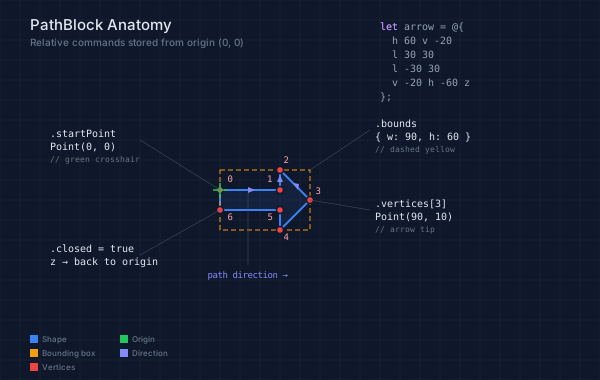
The anatomy diagram below shows a PathBlock's structure: the green crosshair marks the (0, 0) origin, red dots mark .vertices, the dashed yellow rectangle shows .bounds, and the purple arrows indicate path direction.
// viewBox="0 0 600 380"
// PathBlock Anatomy — visual guide to structure and properties

let arrow = @{
  h 60
  v -20
  l 30 30
  l -30 30
  v -20
  h -60
  z
};

// --- Background ---

let bg = PathLayer('bg') ${ fill: Color('#0f172a'); stroke: none; };
bg.apply { rect(0, 0, 600, 380) }

let grid = PathLayer('grid') ${
  stroke: Color('#1e293b');
  stroke-width: 0.5;
  fill: none;
};
grid.apply {
  for (i in 0..19) {
    M 0 calc(i * 20)
    h 600
  }
  for (j in 0..30) {
    M calc(j * 20) 0
    v 380
  }
}

// --- Shape ---

let shape = PathLayer('shape') ${
  fill: Color('#3b82f618');
  stroke: Color('#3b82f6');
  stroke-width: 2;
};

// Arrow at (220, 190): vertices at
// V0(220,190) V1(280,190) V2(280,170) V3(310,200)
// V4(280,230) V5(280,210) V6(220,210)
shape.apply {
  arrow.drawTo(220, 190)
}

// --- Bounding box overlay ---

let bbox = PathLayer('bbox') ${
  fill: none;
  stroke: Color('#f59e0b');
  stroke-width: 1;
  stroke-dasharray: "5 3";
};
bbox.apply {
  // BBox: x=220, y=170, w=90, h=60
  rect(220, 170, 90, 60)
}

// --- Vertex dots ---

let vdots = PathLayer('vdots') ${
  fill: Color('#ef4444');
  stroke: Color('#0f172a');
  stroke-width: 1.5;
};
vdots.apply {
  circle(220, 190, 3.5)
  circle(280, 190, 3.5)
  circle(280, 170, 3.5)
  circle(310, 200, 3.5)
  circle(280, 230, 3.5)
  circle(280, 210, 3.5)
  circle(220, 210, 3.5)
}

// --- Origin crosshair ---

let origin_mark = PathLayer('origin-mark') ${
  stroke: Color('#22c55e');
  stroke-width: 1.5;
  fill: none;
};
origin_mark.apply {
  M 213 190 h 14
  M 220 183 v 14
}

// --- Direction indicators along edges ---

let dir_arrows = PathLayer('dir-arrows') ${
  fill: Color('#818cf8');
  stroke: none;
};
dir_arrows.apply {
  // Along h 60 edge — midpoint (250, 190), pointing right
  M 248 187 l 7 3 l -7 3 z
  // Along v -20 edge — midpoint (280, 180), pointing up
  M 277 182 l 3 -7 l 3 7 z
  // Along l 30 30 to tip — midpoint (295, 185), pointing down-right
  M 293 183 l 6 1 l -1 6 z
}

// --- Leader lines ---

let leaders = PathLayer('leaders') ${
  fill: none;
  stroke: Color('#475569');
  stroke-width: 0.5;
};
leaders.apply {
  // Origin → label
  M 220 190 L 140 140
  // BBox corner → label
  M 310 170 L 370 130
  // Tip vertex → label
  M 310 200 L 370 210
  // Close → label
  M 220 210 L 140 255
  // Direction → label
  M 248 193 L 248 265
}

// --- Vertex index labels ---

let vidx = TextLayer('vidx') ${
  font-family: monospace;
  font-size: 9;
  fill: Color('#fca5a5');
  text-anchor: middle;
};
vidx.apply {
  text(230, 182)`0`
  text(270, 182)`1`
  text(286, 163)`2`
  text(318, 194)`3`
  text(286, 240)`4`
  text(270, 220)`5`
  text(230, 220)`6`
}

// --- Property callouts ---

let props = TextLayer('props') ${
  font-family: monospace;
  font-size: 10;
  fill: Color('#e2e8f0');
  text-anchor: start;
};
props.apply {
  text(50, 137)`.startPoint`
  text(50, 150)`Point(0, 0)`
  text(375, 127)`.bounds`
  text(375, 140)`{ w: 90, h: 60 }`
  text(375, 207)`.vertices[3]`
  text(375, 220)`Point(90, 10)`
  text(50, 252)`.closed = true`
  text(50, 265)`z → back to origin`
}

// --- Subdued property type labels ---

let type_labels = TextLayer('types') ${
  font-family: monospace;
  font-size: 8;
  fill: Color('#64748b');
  text-anchor: start;
};
type_labels.apply {
  text(50, 162)`// green crosshair`
  text(375, 152)`// dashed yellow`
  text(375, 232)`// arrow tip`
}

// --- Direction label ---

let dir_label = TextLayer('dir-label') ${
  font-family: monospace;
  font-size: 9;
  fill: Color('#818cf8');
  text-anchor: middle;
};
dir_label.apply {
  text(248, 278)`path direction →`
}

// --- Code block (top-left) ---

let code = TextLayer('code') ${
  font-family: monospace;
  font-size: 10;
  fill: Color('#94a3b8');
  text-anchor: start;
};
code.apply {
  text(380, 30)`let arrow = @{`
  text(392, 44)`h 60  v -20`
  text(392, 58)`l 30 30`
  text(392, 72)`l -30 30`
  text(392, 86)`v -20  h -60  z`
  text(380, 100)`};`
}

// --- Syntax highlight: keywords ---

let kw = TextLayer('kw') ${
  font-family: monospace;
  font-size: 10;
  fill: Color('#c084fc');
  text-anchor: start;
};
kw.apply {
  text(380, 30)`let`
}

// --- Title ---

let title = TextLayer('title') ${
  font-family: system-ui, sans-serif;
  font-size: 15;
  fill: Color('#e2e8f0');
  text-anchor: start;
};
title.apply {
  text(30, 30)`PathBlock Anatomy`
}

let subtitle = TextLayer('subtitle') ${
  font-family: system-ui, sans-serif;
  font-size: 10;
  fill: Color('#64748b');
  text-anchor: start;
};
subtitle.apply {
  text(30, 46)`Relative commands stored from origin (0, 0)`
}

// --- Legend ---

let leg = TextLayer('legend') ${
  font-family: system-ui, sans-serif;
  font-size: 8;
  fill: Color('#64748b');
  text-anchor: start;
};

let leg_s = PathLayer('leg-s') ${ fill: Color('#3b82f6'); stroke: none; };
let leg_b = PathLayer('leg-b') ${ fill: Color('#f59e0b'); stroke: none; };
let leg_v = PathLayer('leg-v') ${ fill: Color('#ef4444'); stroke: none; };
let leg_o = PathLayer('leg-o') ${ fill: Color('#22c55e'); stroke: none; };
let leg_d = PathLayer('leg-d') ${ fill: Color('#818cf8'); stroke: none; };

leg_s.apply { rect(30, 335, 8, 8) }
leg_b.apply { rect(30, 349, 8, 8) }
leg_v.apply { rect(30, 363, 8, 8) }
leg_o.apply { rect(120, 335, 8, 8) }
leg_d.apply { rect(120, 349, 8, 8) }

leg.apply {
  text(42, 342)`Shape`
  text(42, 356)`Bounding box`
  text(42, 370)`Vertices`
  text(132, 342)`Origin`
  text(132, 356)`Direction`
}
Drawing and Positioning
There are two ways to draw a PathBlock: the manual approach and the convenience method.
Manual: M + .draw()
Position the cursor with an M command, then call .draw() to emit the relative commands:
M 60 70
arrow.draw()
This is flexible — you control the cursor — but it's two statements for one shape. See Drawing a Path Block in the documentation.
Convenience: .drawTo(x, y)
The drawTo() method combines positioning and drawing in a single call:
arrow.drawTo(60, 70)
It emits M 60 70 followed by the PathBlock's commands, and returns a ProjectedPath value you can use for further operations (sampling, transforms, boolean ops). This is the preferred approach for most use cases.
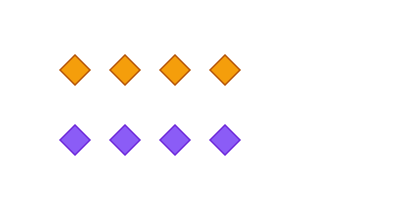
The demo below shows both approaches — manual on top, drawTo on the bottom. Same shapes, same positions, less ceremony with drawTo.
// viewBox="0 0 400 200"
// drawTo() vs manual M + draw()

let diamond = @{
  l 15 15
  l 15 -15
  l -15 -15
  z
};

let manual = PathLayer('manual') ${
  fill: Color('#f59e0b');
  stroke: Color('#b45309');
  stroke-width: 1.5;
};

let drawto = PathLayer('drawto') ${
  fill: Color('#8b5cf6');
  stroke: Color('#6d28d9');
  stroke-width: 1.5;
};

let label = PathLayer('label') ${
  fill: none;
  stroke: Color('#64748b');
  stroke-width: 1;
  stroke-dasharray: "3 2";
};

// Manual approach: M then draw
manual.apply {
  for (i in 0..3) {
    M calc(60 + i * 50) 70
    diamond.draw()
  }
}

// drawTo approach: single call
drawto.apply {
  for (i in 0..3) {
    diamond.drawTo(calc(60 + i * 50), 140)
  }
}
Reuse and Repetition
The real power of PathBlocks shows when you draw the same shape many times. Combine drawTo() with control flow to generate patterns:
let dot = @{ a 3 3 0 1 1 6 0  a 3 3 0 1 1 -6 0 };

for (i in 0..5) {
  for (j in 0..5) {
    dot.drawTo(calc(20 + i * 15), calc(20 + j * 15))
  }
}
PathBlocks are first-class values — you can store them in variables, pass them around, and use them wherever a value is expected.
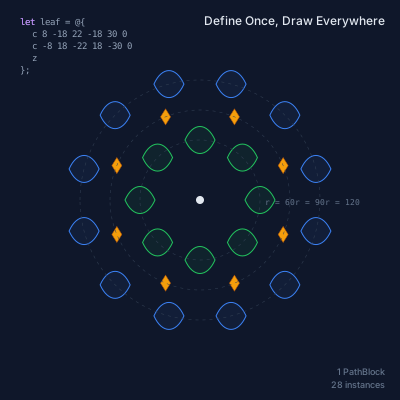
Below, a single leaf-shaped PathBlock (defined with two cubic Béziers) is drawn 28 times in radial rings — 8 in an inner ring, 12 in an outer ring, plus 8 diamond accents. One definition, many instances.
// viewBox="0 0 400 400"
// PathBlock reuse — define once, create patterns

// A leaf-like motif
let leaf = @{
  c 8 -18 22 -18 30 0
  c -8 18 -22 18 -30 0
  z
};

// A small diamond accent
let gem = @{
  l 5 8
  l 5 -8
  l -5 -8
  z
};

// --- Background ---

let bg = PathLayer('bg') ${ fill: Color('#0f172a'); stroke: none; };
bg.apply { rect(0, 0, 400, 400) }

// --- Radial leaf pattern (center) ---

let leaves = PathLayer('leaves') ${
  fill: Color('#22c55e12');
  stroke: Color('#22c55e');
  stroke-width: 1;
};

let leaves2 = PathLayer('leaves2') ${
  fill: Color('#3b82f612');
  stroke: Color('#3b82f6');
  stroke-width: 1;
};

// Inner ring — 8 leaves
leaves.apply {
  for (i in 0..8) {
    let angle = calc(i * 0.7854);
    let cx = calc(200 + cos(angle) * 60);
    let cy = calc(200 + sin(angle) * 60);
    leaf.drawTo(calc(cx - 15), cy)
  }
}

// Outer ring — 12 leaves, offset rotation
leaves2.apply {
  for (i in 0..12) {
    let angle = calc(i * 0.5236 + 0.2618);
    let cx = calc(200 + cos(angle) * 120);
    let cy = calc(200 + sin(angle) * 120);
    leaf.drawTo(calc(cx - 15), cy)
  }
}

// --- Diamond accents ---

let gems = PathLayer('gems') ${
  fill: Color('#f59e0b');
  stroke: Color('#b45309');
  stroke-width: 0.5;
};
gems.apply {
  for (i in 0..8) {
    let angle = calc(i * 0.7854 + 0.3927);
    let gx = calc(200 + cos(angle) * 90 - 5);
    let gy = calc(200 + sin(angle) * 90);
    gem.drawTo(gx, gy)
  }
}

// --- Center dot ---

let center = PathLayer('center') ${
  fill: Color('#e2e8f0');
  stroke: none;
};
center.apply {
  circle(200, 200, 4)
}

// --- Construction circles ---

let guides = PathLayer('guides') ${
  stroke: Color('#334155');
  stroke-width: 0.5;
  stroke-dasharray: "3 4";
  fill: none;
};
guides.apply {
  circle(200, 200, 60)
  circle(200, 200, 90)
  circle(200, 200, 120)
}

// --- Annotations ---

let labels = TextLayer('labels') ${
  font-family: monospace;
  font-size: 8;
  fill: Color('#64748b');
  text-anchor: start;
};
labels.apply {
  text(265, 205)`r = 60`
  text(295, 205)`r = 90`
  text(325, 205)`r = 120`
}

// --- Code annotation ---

let code = TextLayer('code') ${
  font-family: monospace;
  font-size: 9;
  fill: Color('#94a3b8');
  text-anchor: start;
};
code.apply {
  text(20, 25)`let leaf = @{`
  text(32, 37)`c 8 -18 22 -18 30 0`
  text(32, 49)`c -8 18 -22 18 -30 0`
  text(32, 61)`z`
  text(20, 73)`};`
}

let kw = TextLayer('kw') ${
  font-family: monospace;
  font-size: 9;
  fill: Color('#c084fc');
  text-anchor: start;
};
kw.apply {
  text(20, 25)`let`
}

// --- Stats ---

let stats = TextLayer('stats') ${
  font-family: system-ui, sans-serif;
  font-size: 9;
  fill: Color('#64748b');
  text-anchor: end;
};
stats.apply {
  text(385, 375)`1 PathBlock`
  text(385, 388)`28 instances`
}

// --- Title ---

let title = TextLayer('title') ${
  font-family: system-ui, sans-serif;
  font-size: 12;
  fill: Color('#e2e8f0');
  text-anchor: end;
};
title.apply {
  text(385, 25)`Define Once, Draw Everywhere`
}
A Practical Example
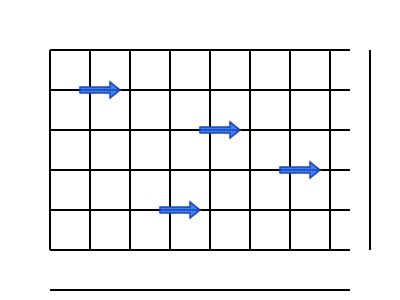
Here's a grid built from two simple PathBlocks — a horizontal line and a vertical line — repeated with loops. The PathBlock captures the shape; the loop handles placement.
// viewBox="0 0 400 300"
// PathBlock basics — define, draw, reuse

let arrow = @{
  h 40
  l -10 -8
  l 0 5
  h -30
  v 6
  h 30
  l 0 5
  l 10 -8
};

let arrows = PathLayer('arrows') ${
  fill: Color('#3b82f6');
  stroke: Color('#1e40af');
  stroke-width: 1.5;
};

let bg = PathLayer('bg') ${
  stroke: Color('#94a3b8');
  stroke-width: 1;
  fill: none;
  stroke-dasharray: "4 3";
};

// Draw the grid
for (i in 0..6) {
  M 50 calc(50 + i * 40)
  h 300
}
for (j in 0..8) {
  M calc(50 + j * 40) 50
  v 200
}

// Reuse the arrow at different positions
arrows.apply {
  arrow.drawTo(80, 90)
  arrow.drawTo(200, 130)
  arrow.drawTo(160, 210)
  arrow.drawTo(280, 170)
}
PathBlock Properties
Every PathBlock carries metadata about its geometry. The Properties section covers all of them:
.startPoint/.endPoint— where the shape begins and ends.vertices— all junction points as an array of Points.length— total arc length.bounds— axis-aligned bounding box ({ x, y, width, height })
These properties make PathBlocks queryable — you can inspect a shape's geometry before deciding how to draw or transform it.
Projection
Drawing places a shape into the SVG output. But sometimes you need to work with a positioned shape without drawing it — for example, to query its geometry or use it in a boolean operation. That's what .project(x, y) is for.
.project() returns a ProjectedPath — the same commands, but offset to absolute coordinates at (x, y). The PathBlock itself stays unchanged; the ProjectedPath is a positioned view of it:
let box = @{ h 50 v 50 h -50 z };
let proj = box.project(100, 100);
log(proj.get(0.5));  // Point at midpoint of positioned path
Think of it as "place the shape here, but don't draw it yet." ProjectedPaths support all the same operations as PathBlocks — sampling, fillets, chamfers, booleans — but in absolute coordinates. You'll see .project() used heavily in the rest of this series whenever shapes need to interact with each other spatially.
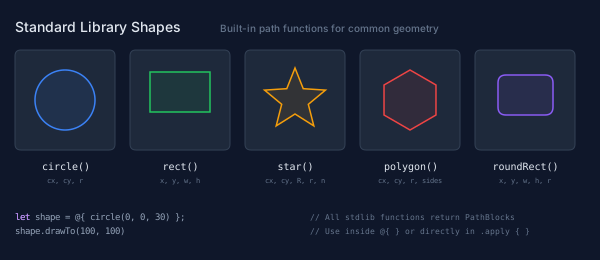
Standard Library Shapes
Pathogen's standard library provides ready-made PathBlocks for common shapes:
let c = @{ circle(0, 0, 30) };
let r = @{ rect(0, 0, 60, 40) };
let s = @{ star(0, 0, 25, 12, 5) };
These return PathBlocks, so all the same methods — .draw(), .drawTo(), .project(), transforms — work on them.
// viewBox="0 0 600 260"
// Standard library shape gallery

// --- Background ---

let bg = PathLayer('bg') ${ fill: Color('#0f172a'); stroke: none; };
bg.apply { rect(0, 0, 600, 260) }

// --- Grid cells ---

let cells = PathLayer('cells') ${
  fill: Color('#1e293b');
  stroke: Color('#334155');
  stroke-width: 1;
};
cells.apply {
  roundRect(15, 50, 100, 100, 6)
  roundRect(130, 50, 100, 100, 6)
  roundRect(245, 50, 100, 100, 6)
  roundRect(360, 50, 100, 100, 6)
  roundRect(475, 50, 100, 100, 6)
}

// --- Shapes ---

let s1 = PathLayer('s-circle') ${
  fill: Color('#3b82f618');
  stroke: Color('#3b82f6');
  stroke-width: 1.5;
};
s1.apply { circle(65, 100, 30) }

let s2 = PathLayer('s-rect') ${
  fill: Color('#22c55e18');
  stroke: Color('#22c55e');
  stroke-width: 1.5;
};
s2.apply { rect(150, 72, 60, 40) }

let s3 = PathLayer('s-star') ${
  fill: Color('#f59e0b18');
  stroke: Color('#f59e0b');
  stroke-width: 1.5;
};
s3.apply { star(295, 100, 32, 14, 5) }

let s4 = PathLayer('s-polygon') ${
  fill: Color('#ef444418');
  stroke: Color('#ef4444');
  stroke-width: 1.5;
};
s4.apply { polygon(410, 100, 30, 6) }

let s5 = PathLayer('s-roundrect') ${
  fill: Color('#8b5cf618');
  stroke: Color('#8b5cf6');
  stroke-width: 1.5;
};
s5.apply { roundRect(498, 75, 55, 40, 8) }

// --- Shape names ---

let names = TextLayer('names') ${
  font-family: monospace;
  font-size: 10;
  fill: Color('#e2e8f0');
  text-anchor: middle;
};
names.apply {
  text(65, 170)`circle()`
  text(180, 170)`rect()`
  text(295, 170)`star()`
  text(410, 170)`polygon()`
  text(525, 170)`roundRect()`
}

// --- Signatures ---

let sigs = TextLayer('sigs') ${
  font-family: monospace;
  font-size: 7;
  fill: Color('#64748b');
  text-anchor: middle;
};
sigs.apply {
  text(65, 183)`cx, cy, r`
  text(180, 183)`x, y, w, h`
  text(295, 183)`cx, cy, R, r, n`
  text(410, 183)`cx, cy, r, sides`
  text(525, 183)`x, y, w, h, r`
}

// --- Usage example ---

let usage = TextLayer('usage') ${
  font-family: monospace;
  font-size: 9;
  fill: Color('#94a3b8');
  text-anchor: start;
};
usage.apply {
  text(15, 220)`let shape = @{ circle(0, 0, 30) };`
  text(15, 234)`shape.drawTo(100, 100)`
}

let usage_kw = TextLayer('usage-kw') ${
  font-family: monospace;
  font-size: 9;
  fill: Color('#c084fc');
  text-anchor: start;
};
usage_kw.apply {
  text(15, 220)`let`
}

let usage_note = TextLayer('usage-note') ${
  font-family: monospace;
  font-size: 8;
  fill: Color('#64748b');
  text-anchor: start;
};
usage_note.apply {
  text(310, 220)`// All stdlib functions return PathBlocks`
  text(310, 234)`// Use inside @{ } or directly in .apply { }`
}

// --- Title ---

let title = TextLayer('title') ${
  font-family: system-ui, sans-serif;
  font-size: 14;
  fill: Color('#e2e8f0');
  text-anchor: start;
};
title.apply {
  text(15, 32)`Standard Library Shapes`
}

let subtitle = TextLayer('subtitle') ${
  font-family: system-ui, sans-serif;
  font-size: 10;
  fill: Color('#64748b');
  text-anchor: start;
};
subtitle.apply {
  text(220, 32)`Built-in path functions for common geometry`
}
What's Next
PathBlocks are the foundation for everything that follows. In the next post, we'll explore parametric sampling — querying points, tangents, and normals along a path to place elements precisely along curves. After that, fillets and chamfers show how to round and cut corners, and boolean operations combine shapes using union, difference, intersection, and xor.
Try it yourself in the Pathogen playground — paste any of the examples above and see the SVG output live.