Fillets and Chamfers: Rounding and Cutting Corners
Part 3 of 4 in our series on PathBlock extensions.
Series: PathBlock Extensions
- Introduction to PathBlocks
- Exploring Parametric Sampling
- Fillets and Chamfers (this post)
- Boolean Operations
Sharp corners are the default in SVG paths. Every junction between two line segments creates a hard vertex. Chamfers and fillets transform these corners — chamfers cut them with straight lines, fillets round them with arcs. Both operations work on PathBlocks and return new PathBlocks, so you can chain them with other transforms.
When should you reach for a chamfer vs. a fillet? Chamfers produce a machined, technical look — think hardware enclosures, PCB traces, or geometric badges. Fillets produce organic, smooth corners — rounded UI elements, product forms, or anything that needs to feel softer. The choice is aesthetic: same trim-and-replace infrastructure, different visual character.
Chamfers
A chamfer replaces a corner vertex with a straight line. The incoming and outgoing edges are trimmed by a distance, and a line segment connects the two trim points. The result is a beveled corner.
Symmetric Chamfer
The simplest form trims equal amounts from both edges at every corner:
let box = @{ h 70 v 70 h -70 z };
let beveled = box.chamfer(10);
beveled.drawTo(20, 20)
Asymmetric Chamfer
Pass two distances to trim different amounts on the incoming and outgoing edges — chamfer(d1, d2):
let asym = box.chamfer(5, 25);
asym.drawTo(20, 20)
Per-Vertex Chamfer
chamferAtVertex(index, distance) targets a single corner. The index comes from the PathBlock's .vertices array:
let box = @{ h 70 v 70 h -70 z };
// vertices: (0,0), (70,0), (70,70), (0,70)
let oneCorner = box.chamferAtVertex(1, 15);
You can chain chamferAtVertex calls to selectively bevel specific corners with different distances.
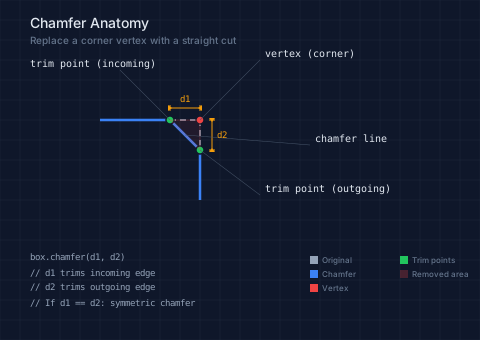
The anatomy diagram below shows the geometric construction: the red dot is the original vertex, green dots are the trim points at distance d along each edge, and the blue line connects them. The yellow dimension arrows show d1 (incoming) and d2 (outgoing) trim distances.
// viewBox="0 0 480 340"
// Chamfer anatomy — geometric construction at a single corner

// A right-angle corner
let corner = @{ h 100 v 80 };

// --- Background ---

let bg = PathLayer('bg') ${ fill: Color('#0f172a'); stroke: none; };
bg.apply { rect(0, 0, 480, 340) }

let grid = PathLayer('grid') ${
  stroke: Color('#1e293b');
  stroke-width: 0.5;
  fill: none;
};
grid.apply {
  for (i in 0..17) {
    M 0 calc(i * 20)
    h 480
  }
  for (j in 0..24) {
    M calc(j * 20) 0
    v 340
  }
}

// --- Original corner (dashed) ---

let original = PathLayer('original') ${
  stroke: Color('#94a3b8');
  stroke-width: 1.5;
  stroke-dasharray: "6 4";
  fill: none;
};
// Corner vertex at (200, 120), incoming from (100, 120), outgoing to (200, 200)
original.apply {
  M 100 120 h 100
  M 200 120 v 80
}

// --- Chamfer line (result) ---

let chamfer_line = PathLayer('chamfer') ${
  stroke: Color('#3b82f6');
  stroke-width: 2.5;
  fill: none;
};
// d=30: trim 30px from each edge
// Trim point on incoming: (170, 120) — 30px before vertex
// Trim point on outgoing: (200, 150) — 30px after vertex
chamfer_line.apply {
  M 100 120 L 170 120
  L 200 150
  L 200 200
}

// --- Vertex dot ---

let vertex_dot = PathLayer('vertex-dot') ${
  fill: Color('#ef4444');
  stroke: Color('#0f172a');
  stroke-width: 1.5;
};
vertex_dot.apply {
  circle(200, 120, 4)
}

// --- Trim points ---

let trim_dots = PathLayer('trim-dots') ${
  fill: Color('#22c55e');
  stroke: Color('#0f172a');
  stroke-width: 1.5;
};
trim_dots.apply {
  circle(170, 120, 4)
  circle(200, 150, 4)
}

// --- Dimension lines ---

let dims = PathLayer('dims') ${
  stroke: Color('#f59e0b');
  stroke-width: 1;
  fill: none;
};
dims.apply {
  // d1 dimension (incoming trim distance)
  M 170 108 h 30
  M 170 105 v 6
  M 200 105 v 6

  // d2 dimension (outgoing trim distance)
  M 212 120 v 30
  M 209 120 h 6
  M 209 150 h 6
}

// --- Dimension arrows ---

let dim_arrows = PathLayer('dim-arrows') ${
  fill: Color('#f59e0b');
  stroke: none;
};
dim_arrows.apply {
  // d1 arrows
  M 172 108 l -4 -3 l 0 6 z
  M 198 108 l 4 -3 l 0 6 z
  // d2 arrows
  M 212 122 l -3 -4 l 6 0 z
  M 212 148 l -3 4 l 6 0 z
}

// --- Removed corner (hatched area) ---

let removed = PathLayer('removed') ${
  fill: Color('#ef444415');
  stroke: Color('#ef444440');
  stroke-width: 1;
};
removed.apply {
  M 170 120 L 200 120 L 200 150 z
}

// --- Leader lines ---

let leaders = PathLayer('leaders') ${
  stroke: Color('#475569');
  stroke-width: 0.5;
  fill: none;
};
leaders.apply {
  M 200 120 L 260 60
  M 170 120 L 120 70
  M 200 150 L 260 195
  M 185 135 L 310 145
}

// --- Labels ---

let labels = TextLayer('labels') ${
  font-family: monospace;
  font-size: 10;
  fill: Color('#e2e8f0');
  text-anchor: start;
};
labels.apply {
  text(265, 57)`vertex (corner)`
  text(265, 192)`trim point (outgoing)`
  text(315, 142)`chamfer line`
}

let labels_left = TextLayer('labels-left') ${
  font-family: monospace;
  font-size: 10;
  fill: Color('#e2e8f0');
  text-anchor: start;
};
labels_left.apply {
  text(30, 67)`trim point (incoming)`
}

// --- Dimension labels ---

let dim_labels = TextLayer('dim-labels') ${
  font-family: monospace;
  font-size: 9;
  fill: Color('#f59e0b');
  text-anchor: middle;
};
dim_labels.apply {
  text(185, 102)`d1`
  text(222, 138)`d2`
}

// --- Code ---

let code = TextLayer('code') ${
  font-family: monospace;
  font-size: 9;
  fill: Color('#94a3b8');
  text-anchor: start;
};
code.apply {
  text(30, 260)`box.chamfer(d1, d2)`
  text(30, 276)`// d1 trims incoming edge`
  text(30, 290)`// d2 trims outgoing edge`
  text(30, 306)`// If d1 == d2: symmetric chamfer`
}

let kw = TextLayer('kw') ${
  font-family: monospace;
  font-size: 8;
  fill: Color('#64748b');
  text-anchor: start;
};

// --- Legend ---

let leg = TextLayer('legend') ${
  font-family: system-ui, sans-serif;
  font-size: 8;
  fill: Color('#64748b');
  text-anchor: start;
};

let leg_o = PathLayer('leg-orig') ${ fill: Color('#94a3b8'); stroke: none; };
let leg_c = PathLayer('leg-cham') ${ fill: Color('#3b82f6'); stroke: none; };
let leg_v = PathLayer('leg-vert') ${ fill: Color('#ef4444'); stroke: none; };
let leg_t = PathLayer('leg-trim') ${ fill: Color('#22c55e'); stroke: none; };
let leg_r = PathLayer('leg-rem') ${ fill: Color('#ef444440'); stroke: none; };

leg_o.apply { rect(310, 256, 8, 8) }
leg_c.apply { rect(310, 270, 8, 8) }
leg_v.apply { rect(310, 284, 8, 8) }
leg_t.apply { rect(400, 256, 8, 8) }
leg_r.apply { rect(400, 270, 8, 8) }

leg.apply {
  text(322, 263)`Original`
  text(322, 277)`Chamfer`
  text(322, 291)`Vertex`
  text(412, 263)`Trim points`
  text(412, 277)`Removed area`
}

// --- Title ---

let title = TextLayer('title') ${
  font-family: system-ui, sans-serif;
  font-size: 14;
  fill: Color('#e2e8f0');
  text-anchor: start;
};
title.apply {
  text(30, 28)`Chamfer Anatomy`
}

let subtitle = TextLayer('subtitle') ${
  font-family: system-ui, sans-serif;
  font-size: 10;
  fill: Color('#64748b');
  text-anchor: start;
};
subtitle.apply {
  text(30, 44)`Replace a corner vertex with a straight cut`
}
// viewBox="0 0 560 300"
// Chamfer gallery — symmetric, asymmetric, per-vertex

let box = @{ h 70 v 70 h -70 z };

// --- Background ---

let bg = PathLayer('bg') ${ fill: Color('#0f172a'); stroke: none; };
bg.apply { rect(0, 0, 560, 300) }

// --- Original outlines ---

let original = PathLayer('original') ${
  stroke: Color('#94a3b840');
  stroke-width: 1;
  stroke-dasharray: "4 3";
  fill: none;
};

original.apply {
  box.drawTo(30, 60)
  box.drawTo(140, 60)
  box.drawTo(250, 60)
  box.drawTo(360, 60)
  box.drawTo(470, 60)
}

// --- Chamfered shapes ---

let chamfered = PathLayer('chamfered') ${
  stroke: Color('#3b82f6');
  stroke-width: 2;
  fill: Color('#3b82f615');
};

chamfered.apply {
  // Symmetric 5px
  let c1 = box.chamfer(5);
  c1.drawTo(30, 60)

  // Symmetric 15px
  let c2 = box.chamfer(15);
  c2.drawTo(140, 60)

  // Symmetric 30px
  let c3 = box.chamfer(30);
  c3.drawTo(250, 60)

  // Asymmetric 5/25
  let c4 = box.chamfer(5, 25);
  c4.drawTo(360, 60)

  // Single vertex
  let c5 = box.chamferAtVertex(1, 20);
  c5.drawTo(470, 60)
}

// --- Labels ---

let names = TextLayer('names') ${
  font-family: monospace;
  font-size: 9;
  fill: Color('#e2e8f0');
  text-anchor: middle;
};
names.apply {
  text(65, 152)`chamfer(5)`
  text(175, 152)`chamfer(15)`
  text(285, 152)`chamfer(30)`
  text(395, 152)`chamfer(5, 25)`
  text(505, 152)`chamferAt`
  text(505, 164)`Vertex(1, 20)`
}

let desc = TextLayer('desc') ${
  font-family: system-ui, sans-serif;
  font-size: 8;
  fill: Color('#64748b');
  text-anchor: middle;
};
desc.apply {
  text(65, 176)`small symmetric`
  text(175, 176)`medium symmetric`
  text(285, 176)`large symmetric`
  text(395, 176)`asymmetric`
  text(505, 176)`single corner`
}

// --- Code ---

let code = TextLayer('code') ${
  font-family: monospace;
  font-size: 9;
  fill: Color('#94a3b8');
  text-anchor: start;
};
code.apply {
  text(30, 220)`let box = @{ h 70 v 70 h -70 z };`
  text(30, 236)`let beveled = box.chamfer(15);`
  text(30, 252)`beveled.drawTo(x, y)`
}

let kw = TextLayer('kw') ${
  font-family: monospace;
  font-size: 9;
  fill: Color('#c084fc');
  text-anchor: start;
};
kw.apply {
  text(30, 220)`let`
  text(30, 236)`let`
}

// --- Title ---

let title = TextLayer('title') ${
  font-family: system-ui, sans-serif;
  font-size: 13;
  fill: Color('#e2e8f0');
  text-anchor: start;
};
title.apply {
  text(30, 32)`Chamfer Gallery`
}

let subtitle = TextLayer('subtitle') ${
  font-family: system-ui, sans-serif;
  font-size: 9;
  fill: Color('#64748b');
  text-anchor: start;
};
subtitle.apply {
  text(175, 32)`Five chamfer modes on a 70×70 square`
}
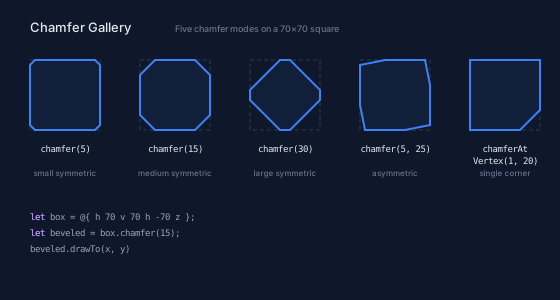
The dashed outlines show the original 70×70 box. Each chamfered version demonstrates a different configuration: small symmetric (8px), large symmetric (20px), asymmetric (5px/25px), single vertex (index 1), and two-vertex chaining.
Fillets
A fillet replaces a corner with a circular arc tangent to both edges. The trim distance is calculated from the radius and the half-angle between the edges:
trimDistance = radius / tan(halfAngle)
This ensures the arc is tangent to both edges at the trim points. The sweep direction is determined by the cross product of the edge vectors.
Important: Fillets currently work at line-line junctions only. At curve junctions (where a curve meets a line, or two curves meet), the fillet is skipped and a warning is logged. This covers the vast majority of practical cases — rectangles, polygons, stars, and polylines are all line-line. See the documentation for details.
All Corners
fillet(radius) rounds every corner:
let box = @{ h 70 v 70 h -70 z };
let rounded = box.fillet(10);
rounded.drawTo(20, 20)
Per-Vertex
filletAtVertex(index, radius) rounds a single corner:
let oneRound = box.filletAtVertex(1, 20);
oneRound.drawTo(20, 20)
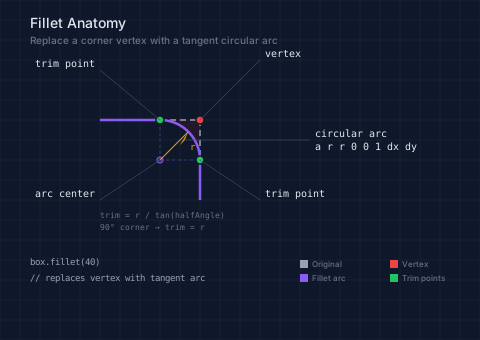
The fillet anatomy diagram shows how a circular arc is constructed at a 90° corner. The arc center (at distance r from both edges) and the trim formula trim = r / tan(halfAngle) are labeled. For a right angle, trim = r.
// viewBox="0 0 480 340"
// Fillet anatomy — circular arc construction at a corner

// --- Background ---

let bg = PathLayer('bg') ${ fill: Color('#0f172a'); stroke: none; };
bg.apply { rect(0, 0, 480, 340) }

let grid = PathLayer('grid') ${
  stroke: Color('#1e293b');
  stroke-width: 0.5;
  fill: none;
};
grid.apply {
  for (i in 0..17) {
    M 0 calc(i * 20)
    h 480
  }
  for (j in 0..24) {
    M calc(j * 20) 0
    v 340
  }
}

// --- Original corner (dashed) ---

let original = PathLayer('original') ${
  stroke: Color('#94a3b8');
  stroke-width: 1.5;
  stroke-dasharray: "6 4";
  fill: none;
};
// Corner at (200, 120), incoming horizontal, outgoing vertical
original.apply {
  M 100 120 h 100
  M 200 120 v 80
}

// --- Fillet arc + trimmed edges (result) ---

let fillet = PathLayer('fillet') ${
  stroke: Color('#8b5cf6');
  stroke-width: 2.5;
  fill: none;
};
// r=40: trim distance = 40 (90° corner, tan(45°) = 1, so trim = r)
// Trim incoming at (160, 120), trim outgoing at (200, 160)
// Arc center at (160, 160) — offset by r from both edges
fillet.apply {
  M 100 120 L 160 120
  a 40 40 0 0 1 40 40
  L 200 200
}

// --- Arc center ---

let center_dot = PathLayer('center-dot') ${
  fill: Color('#8b5cf640');
  stroke: Color('#8b5cf6');
  stroke-width: 1;
};
center_dot.apply {
  circle(160, 160, 3)
}

// --- Radius lines (from center to trim points) ---

let radii = PathLayer('radii') ${
  stroke: Color('#8b5cf660');
  stroke-width: 1;
  stroke-dasharray: "3 3";
  fill: none;
};
radii.apply {
  M 160 160 L 160 120
  M 160 160 L 200 160
}

// --- Vertex dot ---

let vertex = PathLayer('vertex') ${
  fill: Color('#ef4444');
  stroke: Color('#0f172a');
  stroke-width: 1.5;
};
vertex.apply {
  circle(200, 120, 4)
}

// --- Trim points ---

let trim_dots = PathLayer('trim-dots') ${
  fill: Color('#22c55e');
  stroke: Color('#0f172a');
  stroke-width: 1.5;
};
trim_dots.apply {
  circle(160, 120, 4)
  circle(200, 160, 4)
}

// --- Removed corner area ---

let removed = PathLayer('removed') ${
  fill: Color('#ef444412');
  stroke: none;
};
removed.apply {
  M 160 120 L 200 120 L 200 160
  a 40 40 0 0 0 -40 -40
  z
}

// --- Radius dimension ---

let r_dim = PathLayer('r-dim') ${
  stroke: Color('#f59e0b');
  stroke-width: 1;
  fill: none;
};
r_dim.apply {
  // Radius line from center toward upper-right (along 45° between edges)
  M 160 160 L calc(160 + 28) calc(160 - 28)
}

let r_arrow = PathLayer('r-arrow') ${
  fill: Color('#f59e0b');
  stroke: none;
};
r_arrow.apply {
  // Arrowhead at end of radius line, pointing along 45° direction (up-right)
  M calc(160 + 28) calc(160 - 28)
  l calc(-0.707 * 8 + 0.707 * 3.5) calc(0.707 * 8 + 0.707 * 3.5)
  l calc(-0.707 * 7) calc(0.707 * 7)
  z
}

// --- Leader lines ---

let leaders = PathLayer('leaders') ${
  stroke: Color('#475569');
  stroke-width: 0.5;
  fill: none;
};
leaders.apply {
  M 200 120 L 260 60
  M 160 120 L 100 70
  M 200 160 L 260 200
  M 160 160 L 100 200
  M 180 140 L 310 140
}

// --- Labels ---

let labels = TextLayer('labels') ${
  font-family: monospace;
  font-size: 10;
  fill: Color('#e2e8f0');
  text-anchor: start;
};
labels.apply {
  text(265, 57)`vertex`
  text(265, 197)`trim point`
  text(315, 137)`circular arc`
  text(315, 150)`a r r 0 0 1 dx dy`
}

let labels_left = TextLayer('labels-left') ${
  font-family: monospace;
  font-size: 10;
  fill: Color('#e2e8f0');
  text-anchor: end;
};
labels_left.apply {
  text(95, 67)`trim point`
  text(95, 197)`arc center`
}

// --- Radius label ---

let r_label = TextLayer('r-label') ${
  font-family: monospace;
  font-size: 9;
  fill: Color('#f59e0b');
  text-anchor: start;
};
r_label.apply {
  text(190, 150)`r`
}

// --- Geometry note ---

let geo = TextLayer('geo') ${
  font-family: monospace;
  font-size: 8;
  fill: Color('#64748b');
  text-anchor: start;
};
geo.apply {
  text(100, 218)`trim = r / tan(halfAngle)`
  text(100, 230)`90° corner → trim = r`
}

// --- Code ---

let code = TextLayer('code') ${
  font-family: monospace;
  font-size: 9;
  fill: Color('#94a3b8');
  text-anchor: start;
};
code.apply {
  text(30, 265)`box.fillet(40)`
  text(30, 281)`// replaces vertex with tangent arc`
}

// --- Legend ---

let leg = TextLayer('legend') ${
  font-family: system-ui, sans-serif;
  font-size: 8;
  fill: Color('#64748b');
  text-anchor: start;
};

let leg_o = PathLayer('leg-o') ${ fill: Color('#94a3b8'); stroke: none; };
let leg_f = PathLayer('leg-f') ${ fill: Color('#8b5cf6'); stroke: none; };
let leg_v = PathLayer('leg-v') ${ fill: Color('#ef4444'); stroke: none; };
let leg_t = PathLayer('leg-t') ${ fill: Color('#22c55e'); stroke: none; };

leg_o.apply { rect(300, 260, 8, 8) }
leg_f.apply { rect(300, 274, 8, 8) }
leg_v.apply { rect(390, 260, 8, 8) }
leg_t.apply { rect(390, 274, 8, 8) }

leg.apply {
  text(312, 267)`Original`
  text(312, 281)`Fillet arc`
  text(402, 267)`Vertex`
  text(402, 281)`Trim points`
}

// --- Title ---

let title = TextLayer('title') ${
  font-family: system-ui, sans-serif;
  font-size: 14;
  fill: Color('#e2e8f0');
  text-anchor: start;
};
title.apply {
  text(30, 28)`Fillet Anatomy`
}

let subtitle = TextLayer('subtitle') ${
  font-family: system-ui, sans-serif;
  font-size: 10;
  fill: Color('#64748b');
  text-anchor: start;
};
subtitle.apply {
  text(30, 44)`Replace a corner vertex with a tangent circular arc`
}
Elliptical Fillets
Elliptical fillets replace corners with elliptical arcs instead of circular ones. If you've used CSS border-radius with two values (e.g., border-radius: 15px / 8px), you've already seen elliptical fillets in action — they produce the same asymmetric corner rounding. This gives you control over the corner shape's aspect ratio, useful for UI components, pill shapes, and organic forms where a circular arc is too uniform.
Basic Elliptical
ellipticalFillet(rx, ry) uses two radii:
let box = @{ h 70 v 70 h -70 z };
let eFilleted = box.ellipticalFillet(15, 8);
eFilleted.drawTo(20, 20)
With Rotation
ellipticalFillet(rx, ry, rotation) adds an ellipse rotation in radians:
let rotated = box.ellipticalFillet(15, 8, 0.3);
rotated.drawTo(20, 20)
Per-Vertex Variants
ellipticalFilletAtVertex targets individual corners, with an optional rotation parameter.
Adapting to Corner Angles
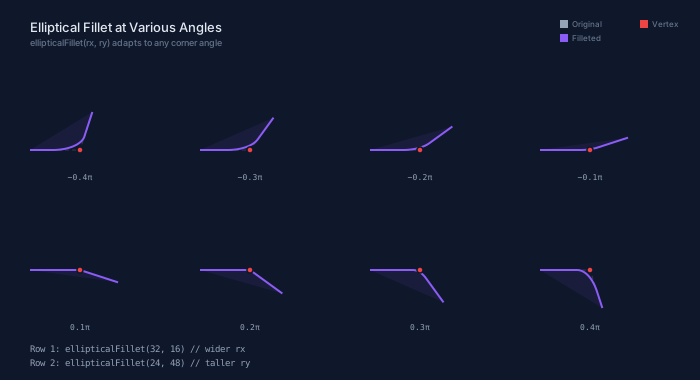
The elliptical fillet computes separate trim distances for each edge based on the tangent parameters of the ellipse. At a 90° corner with ellipticalFillet(rx, ry), the horizontal edges are trimmed by rx and the vertical edges by ry — matching CSS border-radius behavior. The diagram below shows two configurations — ellipticalFillet(32, 16) (wider) and ellipticalFillet(24, 48) (taller) — at eight different corner angles.
// viewBox="0 0 700 380"
// Elliptical fillet at various corner angles — before (dashed) and after (solid)

// --- Background ---

let bg = PathLayer('bg') ${ fill: Color('#0f172a'); stroke: none; };
bg.apply { rect(0, 0, 700, 380) }

// --- Layers ---

let original = PathLayer('original') ${
  stroke: Color('#94a3b840');
  stroke-width: 1;
  stroke-dasharray: "4 3";
  fill: none;
};

let filleted = PathLayer('filleted') ${
  stroke: Color('#8b5cf6');
  stroke-width: 2;
  fill: Color('#8b5cf615');
};

let dots = PathLayer('dots') ${
  fill: Color('#ef4444');
  stroke: Color('#0f172a');
  stroke-width: 1.5;
};

// --- Generate shapes at different angles ---
// Angles: -0.4π, -0.3π, -0.2π, -0.1π, 0.1π, 0.2π, 0.3π, 0.4π

let angles_neg = [-0.4, -0.3, -0.2, -0.1];
let angles_pos = [0.1, 0.2, 0.3, 0.4];

// Row 1: negative angles (acute to right angle, outgoing goes upward)
for (i in 0..3) {
  let angle = calc(angles_neg[i] * 3.14159265);
  let ox = calc(30 + i * 170);
  let oy = 150;
  let shape = @{
    h 50
    l calc(cos(angle) * 40) calc(sin(angle) * 40)
  };

  let ef = shape.ellipticalFillet(32, 16);

  original.apply {
    shape.drawTo(ox, oy)
  }
  filleted.apply {
    ef.drawTo(ox, oy)
  }
  // vertex dot
  dots.apply {
    circle(calc(ox + 50), oy, 3)
  }
}

// Row 2: positive angles (right angle to obtuse, outgoing goes downward)
for (i in 0..3) {
  let angle = calc(angles_pos[i] * 3.14159265);
  let ox = calc(30 + i * 170);
  let oy = 270;
  let shape = @{
    h 50
    l calc(cos(angle) * 40) calc(sin(angle) * 40)
  };

  let ef = shape.ellipticalFillet(24, 48);

  original.apply {
    shape.drawTo(ox, oy)
  }
  filleted.apply {
    ef.drawTo(ox, oy)
  }
  // vertex dot
  dots.apply {
    circle(calc(ox + 50), oy, 3)
  }
}

// --- Angle labels ---

let angle_labels = TextLayer('angle-labels') ${
  font-family: monospace;
  font-size: 8;
  fill: Color('#94a3b8');
  text-anchor: middle;
};
angle_labels.apply {
  // Row 1
  text(80, 180)`−0.4π`
  text(250, 180)`−0.3π`
  text(420, 180)`−0.2π`
  text(590, 180)`−0.1π`
  // Row 2
  text(80, 330)`0.1π`
  text(250, 330)`0.2π`
  text(420, 330)`0.3π`
  text(590, 330)`0.4π`
}

// --- Legend ---

let leg = TextLayer('legend') ${
  font-family: system-ui, sans-serif;
  font-size: 8;
  fill: Color('#64748b');
  text-anchor: start;
};
let leg_o = PathLayer('leg-o') ${ fill: Color('#94a3b8'); stroke: none; };
let leg_f = PathLayer('leg-f') ${ fill: Color('#8b5cf6'); stroke: none; };
let leg_v = PathLayer('leg-v') ${ fill: Color('#ef4444'); stroke: none; };

leg_o.apply { rect(560, 20, 8, 8) }
leg_f.apply { rect(560, 34, 8, 8) }
leg_v.apply { rect(640, 20, 8, 8) }

leg.apply {
  text(572, 27)`Original`
  text(572, 41)`Filleted`
  text(652, 27)`Vertex`
}

// --- Code ---

let code = TextLayer('code') ${
  font-family: monospace;
  font-size: 9;
  fill: Color('#94a3b8');
  text-anchor: start;
};
code.apply {
  text(30, 352)`Row 1: ellipticalFillet(32, 16)  // wider rx`
  text(30, 366)`Row 2: ellipticalFillet(24, 48)  // taller ry`
}

// --- Title ---

let title = TextLayer('title') ${
  font-family: system-ui, sans-serif;
  font-size: 13;
  fill: Color('#e2e8f0');
  text-anchor: start;
};
title.apply {
  text(30, 32)`Elliptical Fillet at Various Angles`
}

let subtitle = TextLayer('subtitle') ${
  font-family: system-ui, sans-serif;
  font-size: 9;
  fill: Color('#64748b');
  text-anchor: start;
};
subtitle.apply {
  text(30, 46)`ellipticalFillet(rx, ry) adapts to any corner angle`
}
// viewBox="0 0 560 300"
// Fillet gallery — circular, elliptical, per-vertex

let box = @{ h 70 v 70 h -70 z };

// --- Background ---

let bg = PathLayer('bg') ${ fill: Color('#0f172a'); stroke: none; };
bg.apply { rect(0, 0, 560, 300) }

// --- Original outlines ---

let original = PathLayer('original') ${
  stroke: Color('#94a3b840');
  stroke-width: 1;
  stroke-dasharray: "4 3";
  fill: none;
};

original.apply {
  box.drawTo(30, 60)
  box.drawTo(140, 60)
  box.drawTo(250, 60)
  box.drawTo(360, 60)
  box.drawTo(470, 60)
}

// --- Filleted shapes ---

let filleted = PathLayer('filleted') ${
  stroke: Color('#8b5cf6');
  stroke-width: 2;
  fill: Color('#8b5cf615');
};

filleted.apply {
  // Small circular
  let f1 = box.fillet(5);
  f1.drawTo(30, 60)

  // Large circular
  let f2 = box.fillet(15);
  f2.drawTo(140, 60)

  // Elliptical
  let f3 = box.ellipticalFillet(15, 8);
  f3.drawTo(250, 60)

  // Single vertex
  let f4 = box.filletAtVertex(1, 25);
  f4.drawTo(360, 60)

  // Elliptical with rotation
  let f5 = box.ellipticalFillet(15, 8, 0.3);
  f5.drawTo(470, 60)
}

// --- Labels ---

let names = TextLayer('names') ${
  font-family: monospace;
  font-size: 9;
  fill: Color('#e2e8f0');
  text-anchor: middle;
};
names.apply {
  text(65, 152)`fillet(5)`
  text(175, 152)`fillet(15)`
  text(285, 152)`elliptical`
  text(285, 164)`Fillet(15, 8)`
  text(395, 152)`filletAt`
  text(395, 164)`Vertex(1, 25)`
  text(505, 152)`elliptical`
  text(505, 164)`Fillet(15,8,.3)`
}

let desc = TextLayer('desc') ${
  font-family: system-ui, sans-serif;
  font-size: 8;
  fill: Color('#64748b');
  text-anchor: middle;
};
desc.apply {
  text(65, 176)`small circular`
  text(175, 176)`large circular`
  text(285, 176)`elliptical arcs`
  text(395, 176)`single corner`
  text(505, 176)`rotated ellipse`
}

// --- Code ---

let code = TextLayer('code') ${
  font-family: monospace;
  font-size: 9;
  fill: Color('#94a3b8');
  text-anchor: start;
};
code.apply {
  text(30, 220)`let box = @{ h 70 v 70 h -70 z };`
  text(30, 236)`let rounded = box.fillet(15);`
  text(30, 252)`rounded.drawTo(x, y)`
}

let kw = TextLayer('kw') ${
  font-family: monospace;
  font-size: 9;
  fill: Color('#c084fc');
  text-anchor: start;
};
kw.apply {
  text(30, 220)`let`
  text(30, 236)`let`
}

// --- Title ---

let title = TextLayer('title') ${
  font-family: system-ui, sans-serif;
  font-size: 13;
  fill: Color('#e2e8f0');
  text-anchor: start;
};
title.apply {
  text(30, 32)`Fillet Gallery`
}

let subtitle = TextLayer('subtitle') ${
  font-family: system-ui, sans-serif;
  font-size: 9;
  fill: Color('#64748b');
  text-anchor: start;
};
subtitle.apply {
  text(155, 32)`Circular, elliptical, per-vertex, and rotated on a 70×70 square`
}
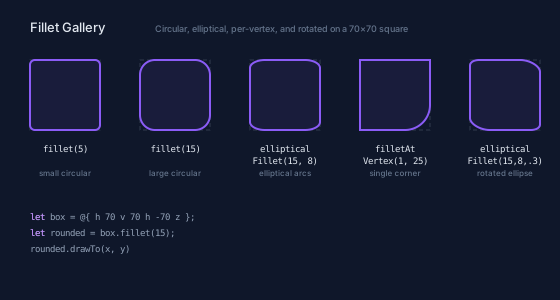
The gallery shows five variations: small circular (r=5), large circular (r=15), elliptical (15×8), single-vertex circular (r=20 at vertex 1), and rotated elliptical (15×8, 0.3 rad).
Edge Cases and Clamping
Both chamfers and fillets handle edge cases gracefully. From the documentation:
- Radius/distance too large: If the trim distance exceeds the available edge length, it's clamped to the edge length and a warning is logged. This prevents the operation from failing on small shapes.
- Out-of-range vertex index: Throws a descriptive error.
- Closed paths: The
zcommand is expanded to an explicit line before the corner operation, then the path is re-closed. This means corners at the closure junction are handled correctly. - Open paths: Corners at both endpoints are skipped (there's no second edge to trim).
Chaining with Other Operations
Because chamfers and fillets return PathBlocks, you can chain them with any other PathBlock method — .draw(), .drawTo(), .project(), parametric sampling, or boolean operations:
let box = @{ h 60 v 40 h -60 z };
let rounded = box.fillet(8);
let pts = rounded.partition(20);
for (p in pts) {
  // Place dots along the rounded rectangle
}
What's Next
The final post in this series covers boolean operations — combining two closed paths using union, difference, intersection, and xor. Since everything returns a PathBlock, you'll see how these operations compose with the fillets and chamfers covered here.