Boolean Operations: Combining Shapes with Union, Difference, Intersection, and XOR
Part 4 of 4 in our series on PathBlock extensions.
Series: PathBlock Extensions
- Introduction to PathBlocks
- Exploring Parametric Sampling
- Fillets and Chamfers
- Boolean Operations (this post)
Boolean operations are the heavy machinery of computational geometry. Given two closed shapes, they answer fundamental questions: what's the combined outline? What's left after subtracting one from the other? Where do they overlap? Pathogen's PathBlock boolean operations bring these capabilities directly into the language.
The Four Operations
All four operations take two closed paths and return a new PathBlock. Both operands must be closed (end with z or have coincident start/end points).
Union
.union(other) combines two paths into their outer boundary — everything covered by either shape:
let a = @{ h 50 v 50 h -50 z };
let b = @{ h 50 v 50 h -50 z };
let combined = a.project(30, 30).union(b.project(55, 55));
Difference
.difference(other) subtracts the second shape from the first — everything in a that is not in b:
let result = a.project(200, 30).difference(b.project(225, 55));
Intersection
.intersection(other) returns only the overlapping region — everything in both shapes:
let overlap = a.project(30, 210).intersection(b.project(55, 235));
XOR
.xor(other) returns the symmetric difference — everything in either shape but not both:
let exclusive = a.project(200, 210).xor(b.project(225, 235));
// viewBox="0 0 580 480"
// Boolean operations — union, difference, intersection, xor
// Each quadrant uses a GroupLayer with translate to avoid compounding projections

let sq = @{ h 50 v 50 h -50 z };

// --- Background ---

let bg = PathLayer('bg') ${ fill: Color('#0f172a'); stroke: none; };
bg.apply { rect(0, 0, 580, 480) }

// ═══════════════════════════════════════
// Union (top-left quadrant)
// ═══════════════════════════════════════

let u_orig = PathLayer('u-orig') ${
  stroke: Color('#94a3b840');
  stroke-width: 1;
  stroke-dasharray: "4 3";
  fill: none;
};
u_orig.apply {
  sq.drawTo(0, 0)
  sq.drawTo(25, 25)
}

let u_result = PathLayer('u-result') ${
  stroke: Color('#3b82f6');
  stroke-width: 2;
  fill: Color('#3b82f618');
};
u_result.apply {
  let u = sq.project(0, 0).union(sq.project(25, 25));
  u.drawTo(0, 0)
}

let u_ab = TextLayer('u-ab') ${
  font-family: system-ui, sans-serif;
  font-size: 9;
  fill: Color('#94a3b8');
  text-anchor: middle;
};
u_ab.apply {
  text(12, 15)`A`
  text(62, 60)`B`
}

let u_op = TextLayer('u-op') ${
  font-family: monospace;
  font-size: 11;
  fill: Color('#e2e8f0');
  text-anchor: start;
};
u_op.apply {
  text(110, 35)`.union(B)`
  text(110, 50)`A ∪ B`
}

let u_desc = TextLayer('u-desc') ${
  font-family: system-ui, sans-serif;
  font-size: 8;
  fill: Color('#64748b');
  text-anchor: start;
};
u_desc.apply {
  text(110, 68)`Combined outline`
}

let g_union = GroupLayer('g-union') ${ translate-x: 50; translate-y: 80; };
g_union.append(u_orig, u_result, u_ab, u_op, u_desc);

// ═══════════════════════════════════════
// Difference (top-right quadrant)
// ═══════════════════════════════════════

let d_orig = PathLayer('d-orig') ${
  stroke: Color('#94a3b840');
  stroke-width: 1;
  stroke-dasharray: "4 3";
  fill: none;
};
d_orig.apply {
  sq.drawTo(0, 0)
  sq.drawTo(25, 25)
}

let d_result = PathLayer('d-result') ${
  stroke: Color('#3b82f6');
  stroke-width: 2;
  fill: Color('#3b82f618');
};
d_result.apply {
  let d = sq.project(0, 0).difference(sq.project(25, 25));
  d.drawTo(0, 0)
}

let d_ab = TextLayer('d-ab') ${
  font-family: system-ui, sans-serif;
  font-size: 9;
  fill: Color('#94a3b8');
  text-anchor: middle;
};
d_ab.apply {
  text(12, 15)`A`
  text(62, 60)`B`
}

let d_op = TextLayer('d-op') ${
  font-family: monospace;
  font-size: 11;
  fill: Color('#e2e8f0');
  text-anchor: start;
};
d_op.apply {
  text(110, 35)`.difference(B)`
  text(110, 50)`A \ B`
}

let d_desc = TextLayer('d-desc') ${
  font-family: system-ui, sans-serif;
  font-size: 8;
  fill: Color('#64748b');
  text-anchor: start;
};
d_desc.apply {
  text(110, 68)`A minus overlap`
}

let g_diff = GroupLayer('g-diff') ${ translate-x: 320; translate-y: 80; };
g_diff.append(d_orig, d_result, d_ab, d_op, d_desc);

// ═══════════════════════════════════════
// Intersection (bottom-left quadrant)
// ═══════════════════════════════════════

let i_orig = PathLayer('i-orig') ${
  stroke: Color('#94a3b840');
  stroke-width: 1;
  stroke-dasharray: "4 3";
  fill: none;
};
i_orig.apply {
  sq.drawTo(0, 0)
  sq.drawTo(25, 25)
}

let i_result = PathLayer('i-result') ${
  stroke: Color('#3b82f6');
  stroke-width: 2;
  fill: Color('#3b82f618');
};
i_result.apply {
  let ix = sq.project(0, 0).intersection(sq.project(25, 25));
  ix.drawTo(0, 0)
}

let i_ab = TextLayer('i-ab') ${
  font-family: system-ui, sans-serif;
  font-size: 9;
  fill: Color('#94a3b8');
  text-anchor: middle;
};
i_ab.apply {
  text(12, 15)`A`
  text(62, 60)`B`
}

let i_op = TextLayer('i-op') ${
  font-family: monospace;
  font-size: 11;
  fill: Color('#e2e8f0');
  text-anchor: start;
};
i_op.apply {
  text(110, 35)`.intersection(B)`
  text(110, 50)`A ∩ B`
}

let i_desc = TextLayer('i-desc') ${
  font-family: system-ui, sans-serif;
  font-size: 8;
  fill: Color('#64748b');
  text-anchor: start;
};
i_desc.apply {
  text(110, 68)`Only overlap`
}

let g_int = GroupLayer('g-int') ${ translate-x: 50; translate-y: 290; };
g_int.append(i_orig, i_result, i_ab, i_op, i_desc);

// ═══════════════════════════════════════
// XOR (bottom-right quadrant)
// ═══════════════════════════════════════

let x_orig = PathLayer('x-orig') ${
  stroke: Color('#94a3b840');
  stroke-width: 1;
  stroke-dasharray: "4 3";
  fill: none;
};
x_orig.apply {
  sq.drawTo(0, 0)
  sq.drawTo(25, 25)
}

let x_result = PathLayer('x-result') ${
  stroke: Color('#3b82f6');
  stroke-width: 2;
  fill: Color('#3b82f618');
};
x_result.apply {
  let xr = sq.project(0, 0).xor(sq.project(25, 25));
  xr.drawTo(0, 0)
}

let x_ab = TextLayer('x-ab') ${
  font-family: system-ui, sans-serif;
  font-size: 9;
  fill: Color('#94a3b8');
  text-anchor: middle;
};
x_ab.apply {
  text(12, 15)`A`
  text(62, 60)`B`
}

let x_op = TextLayer('x-op') ${
  font-family: monospace;
  font-size: 11;
  fill: Color('#e2e8f0');
  text-anchor: start;
};
x_op.apply {
  text(110, 35)`.xor(B)`
  text(110, 50)`A △ B`
}

let x_desc = TextLayer('x-desc') ${
  font-family: system-ui, sans-serif;
  font-size: 8;
  fill: Color('#64748b');
  text-anchor: start;
};
x_desc.apply {
  text(110, 68)`Everything except overlap`
}

let g_xor = GroupLayer('g-xor') ${ translate-x: 320; translate-y: 290; };
g_xor.append(x_orig, x_result, x_ab, x_op, x_desc);

// ═══════════════════════════════════════
// Chrome: dividers, code, title
// ═══════════════════════════════════════

// --- Dividers ---

let dividers = PathLayer('dividers') ${
  stroke: Color('#334155');
  stroke-width: 1;
  stroke-dasharray: "6 4";
  fill: none;
};
dividers.apply {
  M 290 50 v 390
  M 20 255 h 545
}

// --- Code ---

let code = TextLayer('code') ${
  font-family: monospace;
  font-size: 9;
  fill: Color('#94a3b8');
  text-anchor: start;
};
code.apply {
  text(30, 440)`let a = sq.project(0, 0);`
  text(30, 454)`let result = a.union(sq.project(25, 25));`
  text(30, 468)`result.drawTo(0, 0)`
}

let kw = TextLayer('kw') ${
  font-family: monospace;
  font-size: 9;
  fill: Color('#c084fc');
  text-anchor: start;
};
kw.apply {
  text(30, 440)`let`
  text(30, 454)`let`
}

// --- Title ---

let title = TextLayer('title') ${
  font-family: system-ui, sans-serif;
  font-size: 14;
  fill: Color('#e2e8f0');
  text-anchor: start;
};
title.apply {
  text(30, 30)`Boolean Operations`
}

let subtitle = TextLayer('subtitle') ${
  font-family: system-ui, sans-serif;
  font-size: 10;
  fill: Color('#64748b');
  text-anchor: start;
};
subtitle.apply {
  text(30, 46)`Four set operations on overlapping 50×50 squares`
}
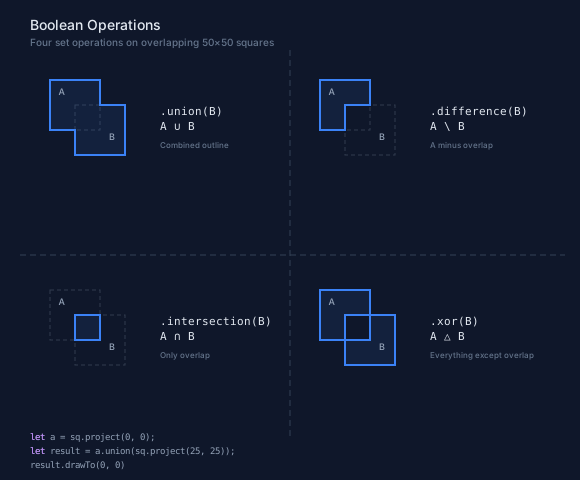
The dashed outlines show the original overlapping squares. The solid blue fills show the boolean result for each operation. Notice how union produces the combined outline, difference cuts out the overlap from the first shape, intersection keeps only the overlap, and xor keeps everything except the overlap.
How It Works
The implementation follows the classical Greiner-Hormann approach adapted for curves: find all intersection points between the two paths, split segments at those points, classify each split segment as "inside" or "outside" the other shape (via winding number), then walk the intersection graph to assemble the result. The traversal rules differ per operation:
| Operation | Include from A | Include from B |
|---|---|---|
| Union | outside B | outside A |
| Intersection | inside B | inside A |
| Difference | outside B | inside A (reversed) |
| XOR | alternating at crossings | alternating at crossings |
Different curve combinations use specialized intersection algorithms — line-line uses a 2×2 linear system, line-cubic uses Cardano's formula, cubic-cubic uses Bezier clipping (Sederberg & Nishita). Bounding box rejection filters out non-intersecting pairs early.
Curve Preservation
A key design goal is that boolean operations preserve original curve types. If the input contains cubic Béziers, the output contains cubic Béziers — not polyline approximations. The intersection finder works directly on the mathematical curve representations, and the split operation uses De Casteljau subdivision (for Béziers) or angular splitting (for arcs).
This matters for output quality. Linearized boolean results look jagged at any zoom level. Curve-preserving results stay smooth.
Requirements
From the documentation:
- Both paths must be closed. Open paths throw an error.
- The
otherargument can be a PathBlock or ProjectedPath. - Multi-component results produce multiple subpaths (
M...z M...z). This happens naturally with XOR and certain difference operations. - Results are PathBlocks normalized to
(0, 0)origin, so they work with all PathBlock methods.
Using with .project()
Boolean operations need absolute coordinates to compute intersections. Use .project(x, y) to position shapes before combining them:
let circle = @{ circle(0, 0, 30) };
let a = circle.project(50, 50);
let b = circle.project(70, 50);
let result = a.union(b);
result.drawTo(0, 0)
The result is a PathBlock at (0, 0) origin. Use .drawTo(x, y) to place it anywhere.
Chaining with Transforms
Since boolean operations return PathBlocks, you can chain them with fillets, chamfers, parametric sampling, or even more boolean operations:
let sq = @{ h 50 v 50 h -50 z };
let combined = sq.project(0, 0).union(sq.project(25, 25));
let rounded = combined.fillet(5);
rounded.drawTo(10, 10)
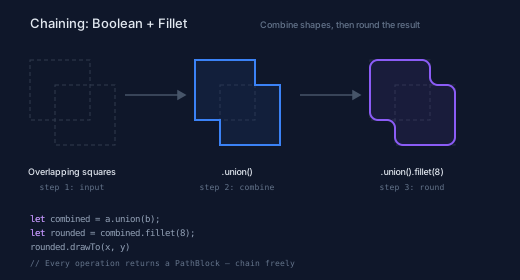
This creates a union of two overlapping squares, then rounds all the corners with a 5px fillet. The composability is the whole point — each operation produces a value that feeds into the next.
The pipeline below shows the three stages: overlapping input squares, the union result, and the union with an 8px fillet applied. Each step returns a PathBlock that feeds into the next.
// viewBox="0 0 520 280"
// Boolean + fillet chaining — compose operations
// Each step uses a GroupLayer with translate to avoid compounding projections

let sq = @{ h 60 v 60 h -60 z };

// --- Background ---

let bg = PathLayer('bg') ${ fill: Color('#0f172a'); stroke: none; };
bg.apply { rect(0, 0, 520, 280) }

// ═══════════════════════════════════════
// Step 1: Two overlapping squares (input)
// ═══════════════════════════════════════

let s1_orig = PathLayer('s1-orig') ${
  stroke: Color('#94a3b840');
  stroke-width: 1;
  stroke-dasharray: "4 3";
  fill: none;
};
s1_orig.apply {
  sq.drawTo(0, 0)
  sq.drawTo(25, 25)
}

let s1_label = TextLayer('s1-label') ${
  font-family: system-ui, sans-serif;
  font-size: 9;
  fill: Color('#e2e8f0');
  text-anchor: middle;
};
s1_label.apply {
  text(42, 115)`Overlapping squares`
}

let s1_num = TextLayer('s1-num') ${
  font-family: monospace;
  font-size: 8;
  fill: Color('#64748b');
  text-anchor: middle;
};
s1_num.apply {
  text(42, 130)`step 1: input`
}

let g_step1 = GroupLayer('g-step1') ${ translate-x: 30; translate-y: 60; };
g_step1.append(s1_orig, s1_label, s1_num);

// ═══════════════════════════════════════
// Step 2: Union result
// ═══════════════════════════════════════

let s2_orig = PathLayer('s2-orig') ${
  stroke: Color('#94a3b830');
  stroke-width: 1;
  stroke-dasharray: "4 3";
  fill: none;
};
s2_orig.apply {
  sq.drawTo(0, 0)
  sq.drawTo(25, 25)
}

let s2_result = PathLayer('s2-result') ${
  stroke: Color('#3b82f6');
  stroke-width: 2;
  fill: Color('#3b82f615');
};
s2_result.apply {
  let u = sq.project(0, 0).union(sq.project(25, 25));
  u.drawTo(0, 0)
}

let s2_label = TextLayer('s2-label') ${
  font-family: system-ui, sans-serif;
  font-size: 9;
  fill: Color('#e2e8f0');
  text-anchor: middle;
};
s2_label.apply {
  text(42, 115)`.union()`
}

let s2_num = TextLayer('s2-num') ${
  font-family: monospace;
  font-size: 8;
  fill: Color('#64748b');
  text-anchor: middle;
};
s2_num.apply {
  text(42, 130)`step 2: combine`
}

let g_step2 = GroupLayer('g-step2') ${ translate-x: 195; translate-y: 60; };
g_step2.append(s2_orig, s2_result, s2_label, s2_num);

// ═══════════════════════════════════════
// Step 3: Union + fillet
// ═══════════════════════════════════════

let s3_orig = PathLayer('s3-orig') ${
  stroke: Color('#94a3b830');
  stroke-width: 1;
  stroke-dasharray: "4 3";
  fill: none;
};
s3_orig.apply {
  sq.drawTo(0, 0)
  sq.drawTo(25, 25)
}

let s3_result = PathLayer('s3-result') ${
  stroke: Color('#8b5cf6');
  stroke-width: 2;
  fill: Color('#8b5cf615');
};
s3_result.apply {
  let u = sq.project(0, 0).union(sq.project(25, 25));
  let rounded = u.fillet(8);
  rounded.drawTo(0, 0)
}

let s3_label = TextLayer('s3-label') ${
  font-family: system-ui, sans-serif;
  font-size: 9;
  fill: Color('#e2e8f0');
  text-anchor: middle;
};
s3_label.apply {
  text(42, 115)`.union().fillet(8)`
}

let s3_num = TextLayer('s3-num') ${
  font-family: monospace;
  font-size: 8;
  fill: Color('#64748b');
  text-anchor: middle;
};
s3_num.apply {
  text(42, 130)`step 3: round`
}

let g_step3 = GroupLayer('g-step3') ${ translate-x: 370; translate-y: 60; };
g_step3.append(s3_orig, s3_result, s3_label, s3_num);

// ═══════════════════════════════════════
// Arrow connectors (absolute positions)
// ═══════════════════════════════════════

let arrows = PathLayer('arrows') ${
  stroke: Color('#475569');
  stroke-width: 1.5;
  fill: Color('#475569');
};
arrows.apply {
  // Arrow 1→2
  M 125 95 h 55
  M 178 91 l 7 4 l -7 4 z
  // Arrow 2→3
  M 300 95 h 55
  M 353 91 l 7 4 l -7 4 z
}

// ═══════════════════════════════════════
// Code block (absolute positions)
// ═══════════════════════════════════════

let code = TextLayer('code') ${
  font-family: monospace;
  font-size: 9;
  fill: Color('#94a3b8');
  text-anchor: start;
};
code.apply {
  text(30, 222)`let combined = a.union(b);`
  text(30, 236)`let rounded = combined.fillet(8);`
  text(30, 250)`rounded.drawTo(x, y)`
}

let kw = TextLayer('kw') ${
  font-family: monospace;
  font-size: 9;
  fill: Color('#c084fc');
  text-anchor: start;
};
kw.apply {
  text(30, 222)`let`
  text(30, 236)`let`
}

let code_note = TextLayer('code-note') ${
  font-family: monospace;
  font-size: 8;
  fill: Color('#64748b');
  text-anchor: start;
};
code_note.apply {
  text(30, 266)`// Every operation returns a PathBlock — chain freely`
}

// --- Title ---

let title = TextLayer('title') ${
  font-family: system-ui, sans-serif;
  font-size: 13;
  fill: Color('#e2e8f0');
  text-anchor: start;
};
title.apply {
  text(30, 28)`Chaining: Boolean + Fillet`
}

let subtitle = TextLayer('subtitle') ${
  font-family: system-ui, sans-serif;
  font-size: 9;
  fill: Color('#64748b');
  text-anchor: start;
};
subtitle.apply {
  text(260, 28)`Combine shapes, then round the result`
}
Standard Library Shapes
Pathogen's standard library provides PathBlock-returning functions for common shapes — circle(), rect(), polygon(), star(), and more. These work directly with boolean operations:
let plate = @{ rect(0, 0, 80, 80) };
let hole = @{ circle(0, 0, 10) };
let d1 = plate.project(0, 0).difference(hole.project(25, 25));
let drilled = d1.project(0, 0).difference(hole.project(55, 55));
drilled.drawTo(0, 0)
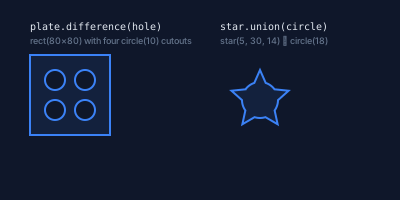
The demo below shows two practical examples: a plate with four drilled holes (chained .difference() calls), and a badge shape created by unioning a star with a circle.
// viewBox="0 0 400 200"
// Standard library shapes with boolean operations

let bg = PathLayer('bg') ${ fill: Color('#0f172a'); stroke: none; };
bg.apply { rect(0, 0, 400, 200) }

// --- Plate with drilled holes ---

let plate = @{ rect(0, 0, 80, 80) };
let hole = @{ circle(0, 0, 10) };

let d1 = plate.project(0, 0).difference(hole.project(25, 25));
let d2 = d1.project(0, 0).difference(hole.project(55, 25));
let d3 = d2.project(0, 0).difference(hole.project(25, 55));
let drilled = d3.project(0, 0).difference(hole.project(55, 55));

let plate_result = PathLayer('plate-result') ${
  stroke: Color('#3b82f6');
  stroke-width: 2;
  fill: Color('#3b82f618');
};
plate_result.apply {
  drilled.drawTo(30, 55)
}

let plate_label = TextLayer('plate-label') ${
  font-family: monospace;
  font-size: 10;
  fill: Color('#e2e8f0');
  text-anchor: start;
};
plate_label.apply {
  text(30, 30)`plate.difference(hole)`
}

let plate_desc = TextLayer('plate-desc') ${
  font-family: system-ui, sans-serif;
  font-size: 9;
  fill: Color('#64748b');
  text-anchor: start;
};
plate_desc.apply {
  text(30, 44)`rect(80×80) with four circle(10) cutouts`
}

// --- Star union circle ---

let st = @{ star(0, 0, 30, 14, 5) };
let circ = @{ circle(0, 0, 18) };

let badge = st.project(0, 0).union(circ.project(0, 0));

let badge_result = PathLayer('badge-result') ${
  stroke: Color('#3b82f6');
  stroke-width: 2;
  fill: Color('#3b82f618');
};
badge_result.apply {
  badge.drawTo(260, 100)
}

let badge_label = TextLayer('badge-label') ${
  font-family: monospace;
  font-size: 10;
  fill: Color('#e2e8f0');
  text-anchor: start;
};
badge_label.apply {
  text(220, 30)`star.union(circle)`
}

let badge_desc = TextLayer('badge-desc') ${
  font-family: system-ui, sans-serif;
  font-size: 9;
  fill: Color('#64748b');
  text-anchor: start;
};
badge_desc.apply {
  text(220, 44)`star(5, 30, 14) ∪ circle(18)`
}
Putting It All Together
This series covered four layers of PathBlock capability — and since every operation returns a PathBlock, they compose freely. Here's the full pipeline in one expression: define shapes, combine them with a boolean operation, round the result with a fillet, then sample points along the filleted outline:
let sq = @{ h 60 v 60 h -60 z };
let combined = sq.project(0, 0).union(sq.project(30, 30));
let rounded = combined.fillet(8);
let pts = rounded.partition(24);
rounded.drawTo(10, 10)
for (p in pts) {
  @{ circle(0, 0, 2) }.drawTo(calc(10 + p.point.x), calc(10 + p.point.y))
}
Define once (PathBlocks), query geometry (parametric sampling), transform corners (fillets and chamfers), combine shapes (boolean operations) — all in a single composable pipeline. The full API reference is in the PathBlocks documentation.
Try it yourself in the Pathogen playground — paste any example from this series and experiment.