Parametric Sampling: Placing Elements Along Curves
Part 2 of 4 in our series on PathBlock extensions.
Series: PathBlock Extensions
- Introduction to PathBlocks
- Exploring Parametric Sampling (this post)
- Fillets and Chamfers
- Boolean Operations
The previous post introduced PathBlocks as reusable shape primitives — define once, draw anywhere. But drawing is just the beginning. Parametric sampling lets you ask questions about a path's geometry: where is the midpoint? What direction is the curve heading at 30% of the way? What's the perpendicular at every quarter mark? These answers let you place elements precisely along arbitrary curves.
The Parameter t
All sampling methods use a parameter t that ranges from 0 (start of path) to 1 (end of path). This isn't the raw parametric value of the underlying Bézier or arc — it's measured by arc length. That means t = 0.5 is always the geometric midpoint of the path, regardless of how the control points are distributed.
This is a critical distinction. A cubic Bézier with uneven control point spacing has a non-uniform speed along its raw parameter. Arc-length parameterization normalizes this so that equal increments of t correspond to equal distances along the curve.
Querying Points
The simplest query is .get(t), which returns the Point at arc-length fraction t:
let curve = @{ c 0 -100 200 -100 200 0 };
let mid = curve.get(0.5);
log(mid);  // Point near the apex of the curve
This works on both PathBlocks (relative coordinates from origin) and ProjectedPaths (absolute coordinates). See Sampling on ProjectedPath for the coordinate behavior.
Tangents and Normals
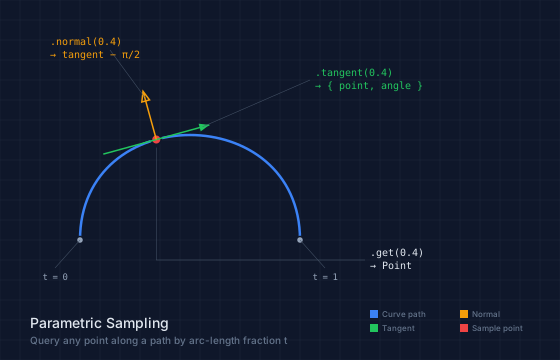
.tangent(t) returns both a point and the direction of travel at that point:
let curve = @{ c 0 -100 200 -100 200 0 };
let tan = curve.tangent(0.0);
log(tan.point);   // Point(0, 0) — start of curve
log(tan.angle);   // angle in radians — direction of travel
.normal(t) returns the left-hand perpendicular — the tangent angle minus π/2. This is useful for placing elements that should point "outward" from the curve:
let n = curve.normal(0.5);
// n.angle is tangent angle - π/2
// Use with cos/sin to offset perpendicular to the curve
The anatomy diagram below visualizes all three queries at t = 0.4 on a cubic Bézier. The red dot is .get(0.4), the green arrow is .tangent(0.4), and the yellow arrow is .normal(0.4) — the left-hand perpendicular.
// viewBox="0 0 560 360"
// Parametric Sampling Anatomy — .get(), .tangent(), .normal() visualized

let curve = @{
  c 0 -140 220 -140 220 0
};

// --- Background ---

let bg = PathLayer('bg') ${ fill: Color('#0f172a'); stroke: none; };
bg.apply { rect(0, 0, 560, 360) }

let grid = PathLayer('grid') ${
  stroke: Color('#1e293b');
  stroke-width: 0.5;
  fill: none;
};
grid.apply {
  for (i in 0..18) {
    M 0 calc(i * 20)
    h 560
  }
  for (j in 0..28) {
    M calc(j * 20) 0
    v 360
  }
}

// --- The curve ---

let path = PathLayer('path') ${
  stroke: Color('#3b82f6');
  stroke-width: 2.5;
  fill: none;
};
path.apply {
  curve.drawTo(80, 240)
}

// --- Get real sampling data at t=0.4 ---

let proj = curve.project(80, 240);
let pt = proj.get(0.4);
let tan = proj.tangent(0.4);
let norm = proj.normal(0.4);

// --- Sample point dot ---

let sample_dot = PathLayer('sample-dot') ${
  fill: Color('#ef4444');
  stroke: Color('#0f172a');
  stroke-width: 2;
};
sample_dot.apply {
  circle(pt.x, pt.y, 5)
}

// --- Tangent line ---

let tangent = PathLayer('tangent') ${
  stroke: Color('#22c55e');
  stroke-width: 1.5;
  fill: none;
};
tangent.apply {
  M calc(pt.x - cos(tan.angle) * 55) calc(pt.y - sin(tan.angle) * 55)
  L calc(pt.x + cos(tan.angle) * 55) calc(pt.y + sin(tan.angle) * 55)
}

// Tangent direction arrow
let tan_arrow = PathLayer('tan-arrow') ${
  fill: Color('#22c55e');
  stroke: none;
};
// Arrow at the positive end of tangent
let tan_end_x = calc(pt.x + cos(tan.angle) * 55);
let tan_end_y = calc(pt.y + sin(tan.angle) * 55);
let tan_perp_x = calc(-sin(tan.angle));
let tan_perp_y = calc(cos(tan.angle));
tan_arrow.apply {
  M tan_end_x tan_end_y
  l calc(-cos(tan.angle) * 10 + tan_perp_x * 4) calc(-sin(tan.angle) * 10 + tan_perp_y * 4)
  l calc(-tan_perp_x * 8) calc(-tan_perp_y * 8)
  z
}

// --- Normal line ---

let normal = PathLayer('normal') ${
  stroke: Color('#f59e0b');
  stroke-width: 1.5;
  fill: none;
};
normal.apply {
  M pt.x pt.y
  L calc(pt.x + cos(norm.angle) * 50) calc(pt.y + sin(norm.angle) * 50)
}

// Normal direction arrow
let norm_end_x = calc(pt.x + cos(norm.angle) * 50);
let norm_end_y = calc(pt.y + sin(norm.angle) * 50);
let norm_perp_x = calc(-sin(norm.angle));
let norm_perp_y = calc(cos(norm.angle));
normal.apply {
  // arrowhead
  M norm_end_x norm_end_y
  l calc(-cos(norm.angle) * 10 + norm_perp_x * 4) calc(-sin(norm.angle) * 10 + norm_perp_y * 4)
  l calc(-norm_perp_x * 8) calc(-norm_perp_y * 8)
  z
}

// --- t=0 and t=1 endpoint markers ---

let endpoints = PathLayer('endpoints') ${
  fill: Color('#94a3b8');
  stroke: Color('#0f172a');
  stroke-width: 1.5;
};
endpoints.apply {
  circle(80, 240, 3.5)
  circle(300, 240, 3.5)
}

// --- Leader lines ---

let leaders = PathLayer('leaders') ${
  fill: none;
  stroke: Color('#475569');
  stroke-width: 0.5;
};
leaders.apply {
  // Tangent label leader
  M calc(pt.x + cos(tan.angle) * 48) calc(pt.y + sin(tan.angle) * 48)
  L 310 80
  // Normal label leader
  M calc(pt.x + cos(norm.angle) * 44) calc(pt.y + sin(norm.angle) * 44)
  L 110 50
  // Sample point leader (below curve)
  M calc(pt.x) calc(pt.y + 8)
  L calc(pt.x) 260
  L 365 260
  // t=0 leader
  M 80 240 L 55 268
  // t=1 leader
  M 300 240 L 325 268
}

// --- Endpoint labels ---

let ep_labels = TextLayer('ep-labels') ${
  font-family: monospace;
  font-size: 9;
  fill: Color('#94a3b8');
  text-anchor: middle;
};
ep_labels.apply {
  text(55, 280)`t = 0`
  text(325, 280)`t = 1`
}

// --- Method callout labels ---

let method_labels = TextLayer('method-labels') ${
  font-family: monospace;
  font-size: 10;
  fill: Color('#e2e8f0');
  text-anchor: start;
};
method_labels.apply {
  text(370, 256)`.get(0.4)`
  text(370, 269)`→ Point`
}

let tangent_label = TextLayer('tangent-label') ${
  font-family: monospace;
  font-size: 10;
  fill: Color('#22c55e');
  text-anchor: start;
};
tangent_label.apply {
  text(315, 76)`.tangent(0.4)`
  text(315, 89)`→ { point, angle }`
}

let normal_label = TextLayer('normal-label') ${
  font-family: monospace;
  font-size: 10;
  fill: Color('#f59e0b');
  text-anchor: start;
};
normal_label.apply {
  text(50, 45)`.normal(0.4)`
  text(50, 58)`→ tangent − π/2`
}

// --- Legend ---

let leg = TextLayer('legend') ${
  font-family: system-ui, sans-serif;
  font-size: 8;
  fill: Color('#64748b');
  text-anchor: start;
};

let leg_c = PathLayer('leg-curve') ${ fill: Color('#3b82f6'); stroke: none; };
let leg_t = PathLayer('leg-tan') ${ fill: Color('#22c55e'); stroke: none; };
let leg_n = PathLayer('leg-norm') ${ fill: Color('#f59e0b'); stroke: none; };
let leg_p = PathLayer('leg-pt') ${ fill: Color('#ef4444'); stroke: none; };

leg_c.apply { rect(370, 310, 8, 8) }
leg_t.apply { rect(370, 324, 8, 8) }
leg_n.apply { rect(460, 310, 8, 8) }
leg_p.apply { rect(460, 324, 8, 8) }

leg.apply {
  text(382, 317)`Curve path`
  text(382, 331)`Tangent`
  text(472, 317)`Normal`
  text(472, 331)`Sample point`
}

// --- Title ---

let title = TextLayer('title') ${
  font-family: system-ui, sans-serif;
  font-size: 14;
  fill: Color('#e2e8f0');
  text-anchor: start;
};
title.apply {
  text(30, 328)`Parametric Sampling`
}

let subtitle = TextLayer('subtitle') ${
  font-family: system-ui, sans-serif;
  font-size: 10;
  fill: Color('#64748b');
  text-anchor: start;
};
subtitle.apply {
  text(30, 344)`Query any point along a path by arc-length fraction t`
}
Sampling Multiple Points
You can sample any number of points by calling .get(t) at specific values. Here's a curve with four markers at the quarter marks:
let curve = @{ c 0 -80 200 -80 200 0 };
curve.drawTo(20, 60)
let proj = curve.project(20, 60);
for (t in [0.25, 0.5, 0.75]) {
  let p = proj.get(t);
  @{ a 3 3 0 1 1 6 0  a 3 3 0 1 1 -6 0 }.drawTo(p.x - 3, p.y)
}
This works but is manual — you pick the t-values yourself. For evenly-spaced distributions, partition() automates this pattern.
Sampling Points Along a Curve
The demo below shows parametric sampling in action. A sine-like curve is defined with two cubic Béziers, then 8 points are placed along it using partition(), and tangent lines are drawn at regular intervals.
// viewBox="0 0 400 300"
// Parametric sampling — placing dots along a curve

let curve = @{
  c 0 -120 200 -120 200 0
  c 0 120 -200 120 -200 0
};

let path = PathLayer('path') ${
  stroke: Color('#3b82f6');
  stroke-width: 2;
  fill: none;
};

let dots = PathLayer('dots') ${
  fill: Color('#ef4444');
  stroke: none;
};

let tangents = PathLayer('tangents') ${
  stroke: Color('#22c55e');
  stroke-width: 1.5;
  fill: none;
};

// Get projection for sampling
let proj = curve.project(50, 150);

// Draw the curve
path.apply {
  curve.drawTo(50, 150)
}

// Sample 8 points along the curve
dots.apply {
  let pts = proj.partition(8);
  for (p in pts) {
    M calc(p.point.x - 4) p.point.y
    a 4 4 0 1 1 8 0
    a 4 4 0 1 1 -8 0
  }
}

// Show tangent lines at a few points
tangents.apply {
  for (i in 0..8) {
    let t = calc(i / 8);
    let tan = proj.tangent(t);
    let len = 20;
    M calc(tan.point.x - cos(tan.angle) * len / 2) calc(tan.point.y - sin(tan.angle) * len / 2)
    l calc(cos(tan.angle) * len) calc(sin(tan.angle) * len)
  }
}
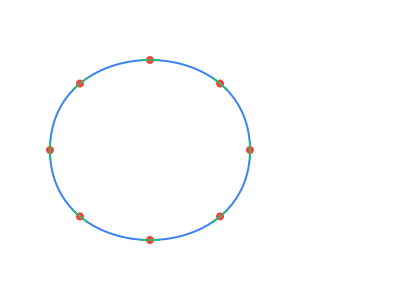
The red dots use partition(8) to divide the curve into 8 equal segments. Each partition point includes .point, .angle, and .t properties. The green tangent lines use tangent(t) at each eighth to show the direction of travel.
Even Distribution with partition(n)
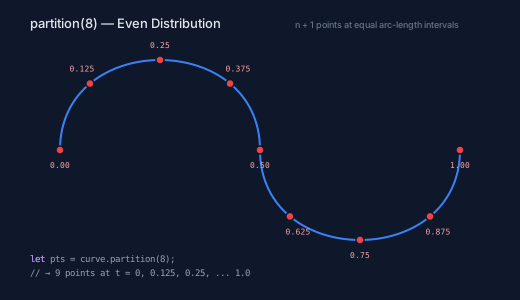
partition(n) is the workhorse for distributing elements along a path. It returns n + 1 oriented points (both endpoints included), evenly spaced by arc length:
let path = @{ h 100 };
let pts = path.partition(4);
// 5 points at t = 0, 0.25, 0.5, 0.75, 1.0
Each oriented point has three properties:
| Property | Type | Description |
|---|---|---|
point |
Point |
Position on the path |
angle |
number |
Tangent angle (radians) |
t |
number |
Arc-length fraction |
The demo below shows partition(8) on an S-curve. Each of the 9 points (fence posts at both ends) is labeled with its t value. Notice the even spacing — the points are equidistant along the curve, not along the x-axis.
// viewBox="0 0 520 300"
// Partition with t-value labels — even arc-length spacing

let curve = @{
  c 0 -120 200 -120 200 0
  c 0 120 200 120 200 0
};

// --- Background ---

let bg = PathLayer('bg') ${ fill: Color('#0f172a'); stroke: none; };
bg.apply { rect(0, 0, 520, 300) }

// --- The curve ---

let path = PathLayer('path') ${
  stroke: Color('#3b82f6');
  stroke-width: 2;
  fill: none;
};
path.apply {
  curve.drawTo(60, 150)
}

// --- Partition points (n=8) using real data ---

let proj = curve.project(60, 150);
let pts = proj.partition(8);

let dots = PathLayer('dots') ${
  fill: Color('#ef4444');
  stroke: Color('#0f172a');
  stroke-width: 1.5;
};
dots.apply {
  for (p in pts) {
    circle(p.point.x, p.point.y, 4)
  }
}

// --- t-value labels (positioned relative to actual points) ---

let tvals = TextLayer('tvals') ${
  font-family: monospace;
  font-size: 8;
  fill: Color('#fca5a5');
  text-anchor: middle;
};

// Label each point with its t value
// Place labels above points on the upper half, below on the lower half
tvals.apply {
  // t=0 (start, left)
  text(pts[0].point.x, calc(pts[0].point.y + 18))`0.00`
  // t=0.125 (going up)
  text(calc(pts[1].point.x - 8), calc(pts[1].point.y - 12))`0.125`
  // t=0.25 (near top)
  text(pts[2].point.x, calc(pts[2].point.y - 12))`0.25`
  // t=0.375 (near top)
  text(calc(pts[3].point.x + 8), calc(pts[3].point.y - 12))`0.375`
  // t=0.5 (middle)
  text(pts[4].point.x, calc(pts[4].point.y + 18))`0.50`
  // t=0.625 (going down)
  text(calc(pts[5].point.x + 8), calc(pts[5].point.y + 18))`0.625`
  // t=0.75 (near bottom)
  text(pts[6].point.x, calc(pts[6].point.y + 18))`0.75`
  // t=0.875 (going up)
  text(calc(pts[7].point.x + 8), calc(pts[7].point.y + 18))`0.875`
  // t=1.0 (end, right)
  text(pts[8].point.x, calc(pts[8].point.y + 18))`1.00`
}

// --- Code ---

let code = TextLayer('code') ${
  font-family: monospace;
  font-size: 9;
  fill: Color('#94a3b8');
  text-anchor: start;
};
code.apply {
  text(30, 262)`let pts = curve.partition(8);`
  text(30, 276)`// → 9 points at t = 0, 0.125, 0.25, ... 1.0`
}

let kw = TextLayer('kw') ${
  font-family: monospace;
  font-size: 9;
  fill: Color('#c084fc');
  text-anchor: start;
};
kw.apply {
  text(30, 262)`let`
}

// --- Title ---

let title = TextLayer('title') ${
  font-family: system-ui, sans-serif;
  font-size: 13;
  fill: Color('#e2e8f0');
  text-anchor: start;
};
title.apply {
  text(30, 28)`partition(8) — Even Distribution`
}

let subtitle = TextLayer('subtitle') ${
  font-family: system-ui, sans-serif;
  font-size: 9;
  fill: Color('#64748b');
  text-anchor: start;
};
subtitle.apply {
  text(295, 28)`n + 1 points at equal arc-length intervals`
}
Building a Fence Along a Curve
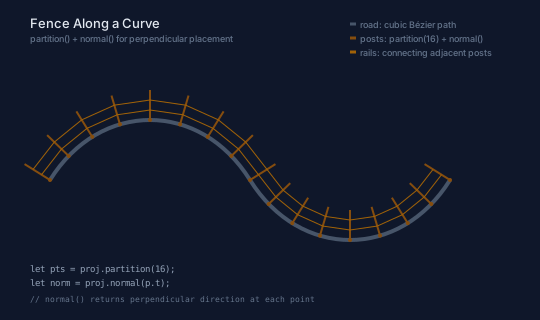
Here's a practical example: fence posts distributed evenly along a winding road. The posts are placed using partition(16), then oriented perpendicular to the road using normal(). Rails connect adjacent posts at 1/3 and 2/3 height.
// viewBox="0 0 540 320"
// partition() — evenly-spaced fence posts along a curved path

let road = @{
  c 50 -80 150 -80 200 0
  c 50 80 150 80 200 0
};

// --- Background ---

let bg = PathLayer('bg') ${ fill: Color('#0f172a'); stroke: none; };
bg.apply { rect(0, 0, 540, 320) }

// --- Layers ---

let roadLayer = PathLayer('road') ${
  stroke: Color('#475569');
  stroke-width: 4;
  fill: none;
};

let posts = PathLayer('posts') ${
  stroke: Color('#854d0e');
  stroke-width: 2;
  fill: none;
};

let rails = PathLayer('rails') ${
  stroke: Color('#a16207');
  stroke-width: 1;
  fill: none;
};

// Get projection for sampling
let proj = road.project(50, 180);
let n = 16;
let pts = proj.partition(n);

// Draw the road
roadLayer.apply {
  road.drawTo(50, 180)
}

// Place fence posts evenly along the road
posts.apply {
  for (p in pts) {
    let norm = proj.normal(p.t);
    M p.point.x p.point.y
    l calc(cos(norm.angle) * 30) calc(sin(norm.angle) * 30)
  }
}

// Connect posts with rails
let nMinus1 = calc(n - 1);
rails.apply {
  for (i in 0..nMinus1) {
    let p1 = pts[i];
    let p2 = pts[calc(i + 1)];
    let n1 = proj.normal(p1.t);
    let n2 = proj.normal(p2.t);
    // Rail at 1/3 height
    M calc(p1.point.x + cos(n1.angle) * 10) calc(p1.point.y + sin(n1.angle) * 10)
    L calc(p2.point.x + cos(n2.angle) * 10) calc(p2.point.y + sin(n2.angle) * 10)
    // Rail at 2/3 height
    M calc(p1.point.x + cos(n1.angle) * 20) calc(p1.point.y + sin(n1.angle) * 20)
    L calc(p2.point.x + cos(n2.angle) * 20) calc(p2.point.y + sin(n2.angle) * 20)
  }
}

// --- Post base dots ---

let base_dots = PathLayer('base-dots') ${
  fill: Color('#854d0e');
  stroke: none;
};
base_dots.apply {
  for (p in pts) {
    circle(p.point.x, p.point.y, 2)
  }
}

// --- Annotations ---

let labels = TextLayer('labels') ${
  font-family: system-ui, sans-serif;
  font-size: 9;
  fill: Color('#64748b');
  text-anchor: start;
};
labels.apply {
  text(360, 28)`road: cubic Bézier path`
  text(360, 42)`posts: partition(16) + normal()`
  text(360, 56)`rails: connecting adjacent posts`
}

let label_dots = PathLayer('label-dots') ${
  fill: none;
  stroke-width: 1.5;
};

let ld1 = PathLayer('ld1') ${ fill: none; stroke: Color('#475569'); stroke-width: 3; };
let ld2 = PathLayer('ld2') ${ fill: none; stroke: Color('#854d0e'); stroke-width: 3; };
let ld3 = PathLayer('ld3') ${ fill: none; stroke: Color('#a16207'); stroke-width: 3; };
ld1.apply { M 350 24 h 6 }
ld2.apply { M 350 38 h 6 }
ld3.apply { M 350 52 h 6 }

// --- Code annotation ---

let code = TextLayer('code') ${
  font-family: monospace;
  font-size: 9;
  fill: Color('#94a3b8');
  text-anchor: start;
};
code.apply {
  text(30, 272)`let pts = proj.partition(16);`
  text(30, 286)`let norm = proj.normal(p.t);`
}

let code_comment = TextLayer('code-comment') ${
  font-family: monospace;
  font-size: 8;
  fill: Color('#64748b');
  text-anchor: start;
};
code_comment.apply {
  text(30, 302)`// normal() returns perpendicular direction at each point`
}

// --- Title ---

let title = TextLayer('title') ${
  font-family: system-ui, sans-serif;
  font-size: 13;
  fill: Color('#e2e8f0');
  text-anchor: start;
};
title.apply {
  text(30, 28)`Fence Along a Curve`
}

let subtitle = TextLayer('subtitle') ${
  font-family: system-ui, sans-serif;
  font-size: 9;
  fill: Color('#64748b');
  text-anchor: start;
};
subtitle.apply {
  text(30, 42)`partition() + normal() for perpendicular placement`
}
The key pattern is:
- Define the base curve (the road)
- Use
.project(x, y)to get a ProjectedPath with absolute coordinates - Call
.partition(n)to get evenly-spaced points - Use
.normal(t)to find the perpendicular direction at each point - Place elements using
cos(angle)andsin(angle)offsets
This pattern works for any curve — Béziers, arcs, polylines, or combinations. The arc-length parameterization ensures even spacing regardless of the curve's complexity.
Curve Support
Sampling works uniformly on every SVG path command type — lines, cubic and quadratic Béziers, and arcs. A path that mixes segment types (say, a line into a cubic into an arc) samples seamlessly across segment boundaries. The arc-length lookup table is built once per path and cached, so repeated sampling calls are efficient. See the Curve Support documentation for implementation details.
What's Next
Sampling tells you about a path's geometry. The next post covers fillets and chamfers — operations that modify the geometry itself by rounding or cutting corners. These use the same trim-and-split infrastructure under the hood: arc-length parameterization to find exact split points along edges.