Building a VS Code Extension for the Pathogen Language
A programming language lives or dies by its developer experience. You can have the most expressive syntax in the world, but if the editor doesn't help you write it — if completions are wrong, errors are confusing, and there's no way to see what you're building — adoption stalls.
This post documents how we built a complete VS Code extension for the Pathogen language, from parser migration through a 10-phase developer experience effort. Whether you're writing Pathogen code and want to understand the tools available to you, or you're building your own language server and want to learn from the implementation, here's what we built and what we learned.
Try it now: The Pathogen playground is available at pedestal.design/pathogen with the same language intelligence described here. The VS Code extension source is in
packages/vscode-pathogen/in the repository.
The roadmap: 10 phases
We organized the work into phases, each delivering a complete, testable improvement. Here's the full arc:
| Phase | What it delivered |
|---|---|
| 1 | Completion type inference — Color, BoundingBox, layer(), stdlib returns, method chaining |
| 2 | Preview panel — live SVG compilation in a VS Code webview |
| 3 | Preview panel — pan/zoom, layer toggles, CSS variable pickers, color palette |
| 4 | Completion type flow — assignment propagation, map/loop param types, object properties |
| 5 | Diagnostic quality — server debouncing, better incomplete-expression messages |
| 6 | Formatting polish — comment preservation, range formatting, on-type formatting |
| 7 | Semantic highlighting — constructors, enums, path commands, enum members |
| 8 | Workspace integration — build tasks, problem matcher, new file templates |
| 9 | Advanced refactoring — extract variable, extract function, inline variable |
| 10 | Inlay hints and code lens — expanded type inference, reference counts |
Each phase was verified end-to-end: build the .vsix, install it, reload VS Code, and test with real user scenarios — incomplete code, mid-expression typing, large files. "Tests pass" was necessary but not sufficient.
The foundation: Lezer migration
Everything starts with the parser. Pathogen originally used Parsimmon, a parser combinator library. Parsimmon is great for getting a language off the ground, but it has a fatal limitation for editor integration: it can't recover from errors. If the user has a syntax error on line 5, Parsimmon stops parsing there. No AST for lines 6–200. No completions, no symbols, no hover information.
We migrated to Lezer, the incremental parser behind CodeMirror 6. Lezer gives us:
- Error recovery: A single missing semicolon doesn't break the entire parse. The parser skips the error and continues, producing a usable tree for the rest of the document.
- Incremental parsing: When the user edits line 50 of a 500-line file, Lezer only re-parses the changed region. This makes diagnostics and completions fast enough for real-time feedback.
- Shared infrastructure: The same grammar powers both the playground's CodeMirror editor and the VS Code extension's language server.
The migration replaced 1,558 lines of Parsimmon code with a 213-line Lezer grammar plus a CST-to-AST converter. The grammar is the single source of truth for Pathogen syntax.
Architecture: Language services as a shared layer
Rather than building VS Code-specific intelligence, we built a language services layer that's editor-agnostic. It exports pure functions that take a TextDocument interface and return plain objects — no VS Code types, no Node.js dependencies, no editor assumptions:
// viewBox="0 0 560 320"

@font "../../../../fonts/Inconsolata/Inconsolata-Regular.ttf"

let bgColor = Color('#f8f9fa');
let boxBg = Color('#ffffff');
let centerBg = Color('#1e293b');
let centerText = Color('#ffffff');
let consumerBg = Color('#f1f5f9');
let borderColor = Color('#cbd5e1');
let arrowColor = Color('#64748b');
let labelColor = Color('#334155');
let sublabelColor = Color('#64748b');
let accentVscode = Color('#0e639c');
let accentPlayground = Color('#10b981');
let accentCli = Color('#f59e0b');

// Background
let bg = PathLayer('bg') ${
  fill: bgColor;
  stroke: none;
};
bg.apply {
  rect(0, 0, 560, 320);
}

// Central box — Language Services
let centerBox = PathLayer('center-box') ${
  fill: centerBg;
  stroke: none;
};
centerBox.apply {
  roundRect(140, 30, 280, 120, 8);
}

let centerLabels = TextLayer('center-labels') ${
  font-family: Inconsolata, monospace;
  fill: centerText;
  text-anchor: middle;
};
centerLabels.apply {
  text(280, 58)`Language Services`;
  text(280, 78)`src/language-services/`;
}

let funcLabels = TextLayer('func-labels') ${
  font-family: Inconsolata, monospace;
  font-size: 10;
  fill: Color('#94a3b8');
  text-anchor: middle;
};
funcLabels.apply {
  text(208, 98)`getCompletions()`;
  text(208, 112)`getDiagnostics()`;
  text(352, 98)`getHoverInfo()`;
  text(352, 112)`formatDocument()`;
  text(280, 128)`... 12 more`;
}

// Arrows
let arrows = PathLayer('arrows') ${
  fill: none;
  stroke: arrowColor;
  stroke-width: 2;
};
arrows.apply {
  // Left arrow (to VS Code)
  M 200 150
  L 108 210
  // Center arrow (to Playground)
  M 280 150
  L 280 210
  // Right arrow (to CLI)
  M 360 150
  L 452 210
}

// Arrowheads
let arrowheads = PathLayer('arrowheads') ${
  fill: arrowColor;
  stroke: none;
};
arrowheads.apply {
  // Left
  M 103 205
  L 113 215
  L 103 215
  Z
  // Center
  M 275 210
  L 285 210
  L 280 218
  Z
  // Right
  M 447 205
  L 457 215
  L 457 205
  Z
}

// Consumer boxes (narrower with gaps between them)
let vscodeBorder = PathLayer('vscode-border') ${
  fill: consumerBg;
  stroke: accentVscode;
  stroke-width: 2;
};
vscodeBorder.apply {
  roundRect(30, 220, 155, 70, 6);
}

let playgroundBorder = PathLayer('playground-border') ${
  fill: consumerBg;
  stroke: accentPlayground;
  stroke-width: 2;
};
playgroundBorder.apply {
  roundRect(202, 220, 155, 70, 6);
}

let cliBorder = PathLayer('cli-border') ${
  fill: consumerBg;
  stroke: accentCli;
  stroke-width: 2;
};
cliBorder.apply {
  roundRect(374, 220, 155, 70, 6);
}

// Consumer labels
let consumerLabels = TextLayer('consumer-labels') ${
  font-family: Inconsolata, monospace;
  font-size: 13;
  fill: labelColor;
  text-anchor: middle;
  font-weight: bold;
};
consumerLabels.apply {
  text(108, 252)`VS Code`;
  text(280, 252)`Playground`;
  text(452, 252)`CLI`;
}

let consumerSubs = TextLayer('consumer-subs') ${
  font-family: Inconsolata, monospace;
  font-size: 10;
  fill: sublabelColor;
  text-anchor: middle;
};
consumerSubs.apply {
  text(108, 270)`(LSP)`;
  text(280, 270)`(browser)`;
  text(452, 270)`(batch)`;
}
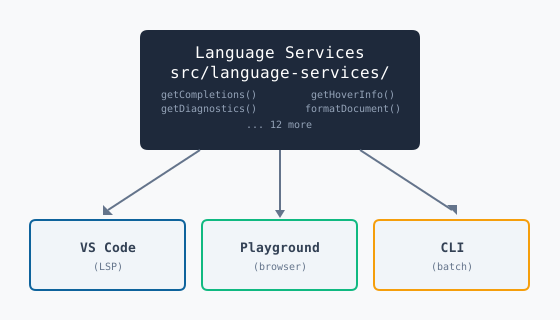
The VS Code extension is a thin adapter: a language server that wraps each function in an LSP handler, and an extension client that starts the server process. The same language intelligence runs in the playground via direct import and in the CLI for batch diagnostics.
Completion intelligence
The completion engine evolved through three phases, each addressing real user frustrations.
Type-aware completions
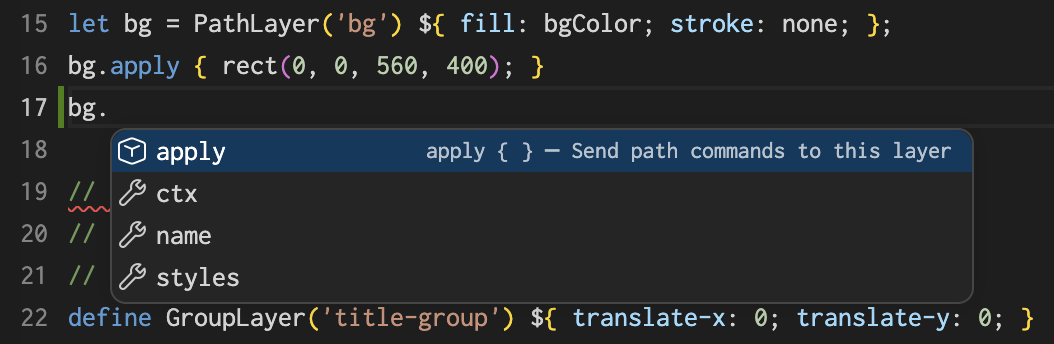
Typing bg. after defining a PathLayer should show apply, name, styles, and ctx. The completion engine uses lightweight regex-based type inference to determine that bg is a PathLayer, then looks up the member set from generated completion data.
This extends to every type in the language. Color('#ff0000'). shows 21 methods and properties — lighten, darken, alpha, hueShift, css, hex, and more. Method return types chain correctly: shape.boundingBox(). shows x, y, width, height.
Generated completion data
Rather than manually maintaining lists of stdlib functions and their signatures, we use ts-morph to extract completion data from TypeScript interface declarations in src/pathogen-api.ts. A generation script produces completion-data.generated.ts with every function signature, type member set, and enum value. When the language API changes, we regenerate with npm run generate:completions — no manual synchronization, and a CI check catches drift.
Type flow analysis
Completions work through variable assignments, callback parameters, and loop destructuring:
let data = [{ x: 60, y: 160, name: "alpha" }];
for ([d, i] in data) {
  d.  // completions: x, y, name
}

data.map() {|item|
  item.  // completions: x, y, name
};
The engine traces the array element type through for loops and .map() callbacks, then extracts property names from the first object literal in the array initializer.
The preview panel
Before the preview panel, Pathogen development required a save-compile-open cycle: edit code in VS Code, run the CLI to generate an SVG, open the file in a browser, and squint at the output to figure out what went wrong. The feedback loop was slow and disjointed.
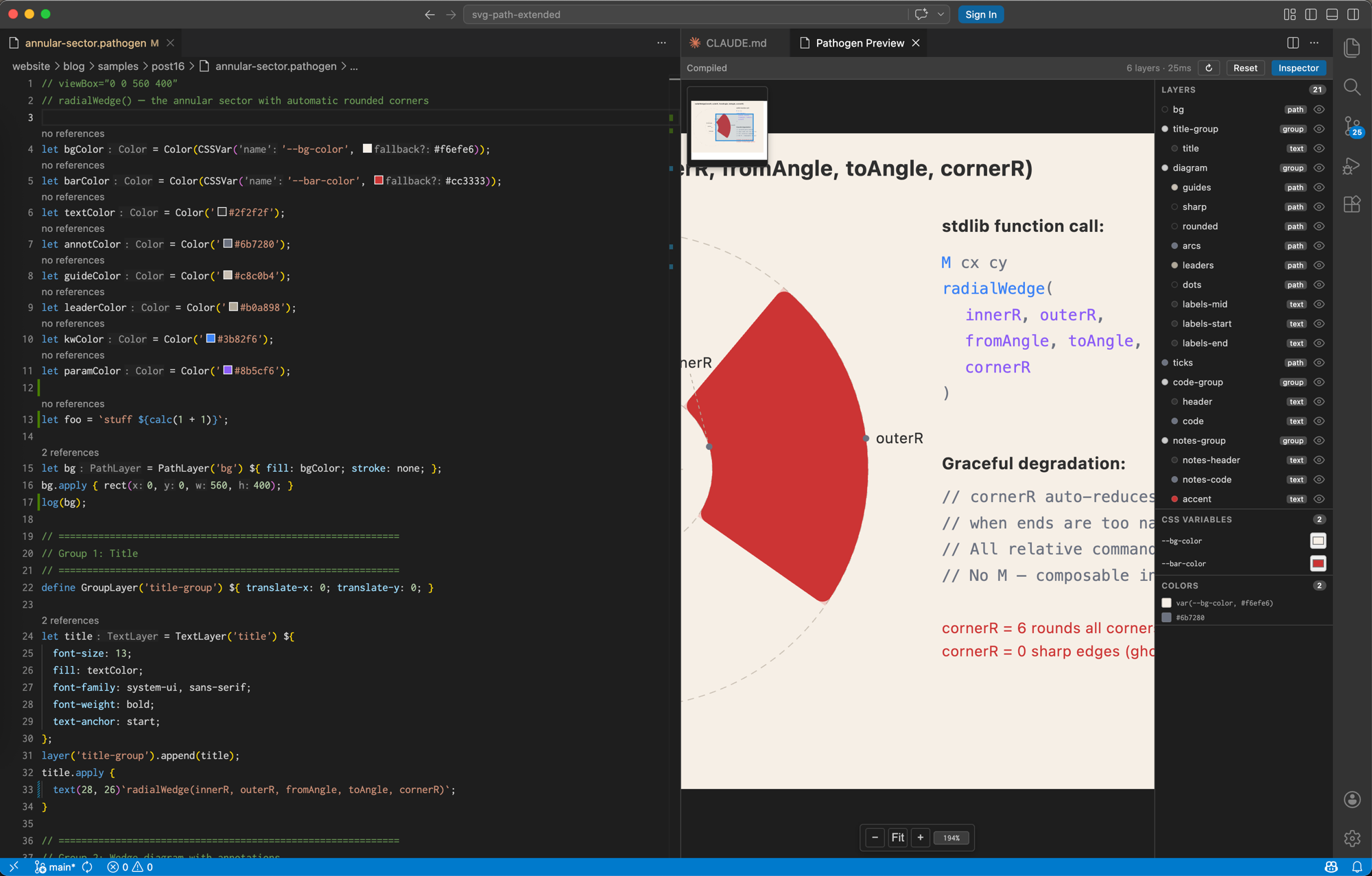
What the user sees now: A live SVG preview that updates as you type, with the same interactive controls as the playground.
Under the hood: The preview panel runs the Pathogen compiler inside a VS Code webview. The extension sends source code via postMessage, the webview compiles it using the bundled IIFE compiler (~1.3 MB), renders the SVG via a shared generateSvg() function, and injects it into the DOM. A 150ms debounce prevents recompilation on every keystroke. Completions resolve in under 50ms; diagnostics publish within 200ms of the last keystroke.
Interactive controls
The preview isn't just a static render — it matches the playground experience:
- Pan and zoom: Click-drag to pan, Cmd+scroll to zoom (0.25x–10x range), with a navigator minimap
- Layer inspector: Toggle layer visibility, see color swatches, navigate GroupLayer hierarchy
- CSS variable pickers: Color picker inputs for every
CSSVar()in the source — changes recompile instantly - Recompile button: Re-rolls
randomRange()values without editing source - Reset button: Restores zoom, pan, layer visibility, and CSS variable overrides
Diagnostics that don't fight the user
A common complaint with editor diagnostics: errors appear while you're still typing, covering the completion popup or flashing red on incomplete expressions. We address this at two levels.
What the user sees: Errors don't appear until you pause typing. If you type bg. and start selecting a completion, no error flashes. If you stop typing for half a second on an incomplete line, you get a helpful message like "Expected property or method name after 'bg.'" instead of a generic "Syntax error."
Under the hood: The language server debounces diagnostic publishing — 200ms by default, 500ms when the user is mid-expression (document ends with ., (, or ,). Error messages are contextual: the diagnostics engine inspects the Lezer error node's parent, siblings, and surrounding text to produce specific messages for 20+ error patterns. When errors occur inside .map() or .reduce() callbacks, the message includes the iteration index and callback line number.
Formatting with opinions
The formatter follows a style guide developed through a 25-question questionnaire where we reformatted real Pathogen code snippets and documented the reasoning. The core philosophy: expand for readability.
Here's what formatting does to a typical style block:
// Before
let bg = PathLayer('bg') ${ fill: #0f172a; stroke: none; };

// After formatting
let bg = PathLayer('bg') ${
  fill: #0f172a;
  stroke: none;
};
Arrays, objects, style blocks, enums, path blocks, and text blocks are always multi-line. One item per line. Trailing commas everywhere.
Key formatter features:
- Comment preservation: Comments survive formatting round-trips — they're preserved in the AST and properly re-indented
- Range formatting: Format a selection, not just the entire document
- On-type formatting: Auto-indent after
{, auto-dedent}
Semantic highlighting
TextMate grammars provide instant syntax coloring, but semantic tokens make it smarter. The language server classifies:
- Constructor types (Color, Point, LinearGradient) — highlighted as types
- Enum names and members (Direction.CW, Easing.Linear) — distinct coloring
- SVG path commands (M, L, C, Z) — highlighted as keywords
- Variables vs parameters vs loop variables — from scope analysis
Every classification set derives from generated completion data rather than hardcoded lists — when the API evolves, highlighting stays in sync automatically.
Refactoring
Three refactoring code actions, available via the lightbulb menu (Cmd+.):
- Extract variable: Select an expression like
calc(i / count * TAU())→ createslet calcResult = calc(i / count * TAU());above and replaces the selection - Extract function: Select a multi-line block → creates an
fndefinition with detected free variables as parameters - Inline variable: Select a variable name → replaces all references with the value and removes the declaration
Inlay hints and code lens
Inlay hints show parameter names at call sites (rect(x: 0, y: 0, w: 400, h: 400)) and inferred types next to variable declarations (let bg : PathLayer). Type inference covers constructors, method return types (boundingBox() → BBox), gradient constructors, and style block literals.
Code lens shows reference counts above declarations — "3 references", "no references" — giving you instant visibility into which variables are used and which are dead code.
The build pipeline
The extension packages into a single .vsix file via npm run build:vscode:install. The build script chains six steps: root library → language server → extension → bundle server with all dependencies → bundle compiler IIFE for the preview webview → package with vsce. The final artifact is ~1.5 MB with all transitive dependencies resolved (Lezer, vscode-languageclient, semver, minimatch, and more).
What we learned
Product excellence over feature count. We built 27 phases of compiler features before realizing the developer experience was broken. Typing bg. showed an error instead of completions. The VS Code extension didn't activate. The preview was a placeholder. Tests passed but users failed. The most important lesson: verify every feature the way a user encounters it — by typing incomplete code, triggering completions mid-expression, and installing the actual .vsix.
No placeholders in shipped code. If a feature isn't ready, don't register the command or expose the UI. A button that shows "not yet implemented" is worse than no button — it teaches users not to trust your extension.
Single source of truth. Every time a language construct is hardcoded in a static list, it drifts from the real API. Constructor names, enum values, path commands, stdlib signatures — all derived from generated data or authoritative sources. This eliminated an entire class of "added a feature but forgot to update the completion engine" bugs.
What's next
The extension now covers the golden set from the VS Code language extension guide: syntax highlighting, diagnostics, completions, hover, definition/references, formatting, rename, code actions, semantic tokens, and inlay hints. Plus a live preview panel that most language extensions don't offer.
Where we're heading:
- Multi-file project support — workspace-level features like
@fontpath resolution, cross-file references, and shared layer libraries. This is the step from "single-file tool" to "project-aware IDE." - Visual debugging — click a point on the SVG and highlight the path command that produced it. Trace a color swatch back to its gradient stop. See bounding boxes overlaid on layers.
- Extension marketplace publishing — making installation a one-click experience instead of building from source.
- Deeper type flow — tracking types through function returns, complex assignment chains, and generic array element types.
The Pathogen language is available at pedestal.design/pathogen, with the same completions, hover, and diagnostics in the browser. The full VS Code extension source lives in packages/vscode-pathogen/ — pull requests welcome.