bump: A Hill You Can Put Anywhere
Part 5 of 7 in our series of stdlib primers — the deterministic hash, noise, and shaping functions.
Series: Stdlib Primers
- hash01 — a random number that never changes its mind
- hash11 — the same dice, rolled between −1 and 1
- hashRange — randomRange with a memory
- smoothstep — the S-curve that turns a cliff into a ramp
- bump (this post) — a hill you can put anywhere
- noise — randomness with a smooth ride
- noise2 — a weather map of smooth randomness
What it does
bump(t, center, spread) is one smooth hill: exactly 1 at the center
you pick, easing down to exactly 0 at a distance of spread on either
side — and flat everywhere it matters. Flat at the peak, and flat where
the feet touch the floor.
The shape is a raised cosine — which just means: take one arch of a cosine wave and lift it so its feet rest on the ground. It's the smoothest hill you can cut from a single wave. Think of it as a tent with rounded everything: rounded peak, rounded feet, no poles poking out.
The load-bearing property is what happens outside the feet: beyond
center ± spread, bump is not "small" — it is exactly zero, arriving
flat. That's what makes bumps composable. Put two hills on the same shelf
and they don't interfere; overlap them and they sum into a bigger
landform with no seams or kinks anywhere.
Two honest footnotes:
spreadmust be positive. A zero spread is a nothing-hill (and exactly at its center the math falls apart into NaN); a negative spread quietly answers 1 everywhere. If a picture unexpectedly goes all-on, check your spread.- Determinism: same everywhere for practical purposes, but
bumpis built on cosine, so it's pinned per browser engine rather than bit-for-bit across all engines the way the hash family is.
Why you'd use it
Anywhere you want "strong here, fading to nothing there" without an
if-statement: a spotlight of emphasis in a row of elements, a swell in a
stroke's width, a peak in a skyline, a pocket of influence in a layout.
And because bumps sum cleanly, they're a vocabulary: tall-narrow,
low-wide, and combinations of them describe surprisingly rich profiles in
one readable expression — profiles that, like everything in this series,
land identically on every recompile. If
smoothstep is the ramp ("off → on"), bump
is the visit ("off → on → off").
Example 1 — Center and spread
The two knobs, plotted. Three hills: two share a center (one with wider feet), and one is simply moved.
//-- The two knobs. Three hills on one axis: same center with a wider
//-- spread, and a moved center. Each peaks at exactly 1 and its feet rest
//-- at exactly 0.

define ViewBox(0, 0, 400, 190);

let plotX = 40;
let plotW = 320;
let plotY = 150;
let plotH = 100;

let scene = GroupLayer('scene') #{};

let axis = PathLayer('axis') #{ stroke: oklch(0.55 0.02 260); stroke-width: 1; fill: none; };
axis.apply {
  M plotX plotY
  L calc(plotX + plotW) plotY
}

fn hill(name, center, spread, hue) {
  //-- fns are dynamically scoped, so `scene` resolves at the call site.
  let mark = PathLayer(`${name}-mark`) #{ stroke: oklch(0.5 0.02 260); stroke-width: 0.75; stroke-dasharray: 3 3; fill: none; };
  scene.append(mark);
  mark.apply {
    M calc(plotX + plotW * center) calc(plotY - plotH - 6)
    L calc(plotX + plotW * center) calc(plotY + 6)
  }
  let c = Color(0.64, 0.15, hue);
  let curve = PathLayer(name) #{ stroke: c; stroke-width: 2; fill: none; };
  scene.append(curve);
  curve.apply {
    M plotX calc(plotY - plotH * bump(0, center, spread))
    for (i in 1..120) {
      let t = i / 120;
      let b = bump(t, center, spread);
      L calc(plotX + plotW * t) calc(plotY - plotH * b)
    }
  }
}

let unitLine = PathLayer('unit-line') #{ stroke: oklch(0.5 0.02 260); stroke-width: 0.75; stroke-dasharray: 2 4; fill: none; };
unitLine.apply {
  M plotX calc(plotY - plotH)
  L calc(plotX + plotW) calc(plotY - plotH)
}

hill('narrow', 0.3, 0.15, 260);
hill('wide', 0.3, 0.28, 200);
hill('moved', 0.75, 0.2, 20);

//-- Legend entries tinted to match their curves.
let legendA = TextLayer('legend-narrow') #{ font-family: system-ui, sans-serif; font-size: 10; fill: oklch(0.7 0.14 260); text-anchor: start; };
legendA.apply { text(40, 27)`bump(t, 0.3, 0.15)` }
let legendB = TextLayer('legend-wide') #{ font-family: system-ui, sans-serif; font-size: 10; fill: oklch(0.7 0.14 200); text-anchor: start; };
legendB.apply { text(160, 27)`bump(t, 0.3, 0.28)` }
let legendC = TextLayer('legend-moved') #{ font-family: system-ui, sans-serif; font-size: 10; fill: oklch(0.7 0.14 20); text-anchor: start; };
legendC.apply { text(280, 27)`bump(t, 0.75, 0.2)` }

let labels = TextLayer('labels') #{
  font-family: system-ui, sans-serif;
  font-size: 10;
  fill: #888;
  text-anchor: start;
};
labels.apply {
  text(40, 172)`0`
  text(348, 172)`1`
  text(366, 54)`1.0`
}

scene.append(axis, unitLine, legendA, legendB, legendC, labels);
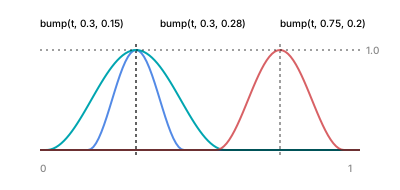
center places the peak; spread is the distance from peak to each foot.
Every hill touches 1 at its dashed line and rests at 0 outside its feet —
not near zero, at zero.
Example 2 — Spotlight a row
The simplest application: attention. Top row — dot size follows one bump, a spotlight at the middle. Bottom row — two bumps added in one expression, two spotlights.
//-- Attention without if-statements. Top row: dot radius follows one
//-- bump -- a spotlight at t = 0.5. Bottom row: TWO bumps summed in one
//-- expression -- two spotlights, and outside their feet the sum
//-- contributes exactly nothing.

define ViewBox(0, 0, 400, 170);

let one = PathLayer('one-spotlight') #{ fill: oklch(0.62 0.16 260); stroke: none; };
one.apply {
  for (i in 0..47) {
    let t = i / 47;
    let b = bump(t, 0.5, 0.25);
    circle(calc(24 + i * 7.4), 55, calc(0.8 + 5.5 * b));
  }
}

let two = PathLayer('two-spotlights') #{ fill: oklch(0.68 0.13 200); stroke: none; };
two.apply {
  for (i in 0..47) {
    let t = i / 47;
    let b = bump(t, 0.3, 0.2) + bump(t, 0.8, 0.15);
    circle(calc(24 + i * 7.4), 125, calc(0.8 + 5.5 * b));
  }
}

let labels = TextLayer('labels') #{
  font-family: system-ui, sans-serif;
  font-size: 10;
  fill: #888;
  text-anchor: start;
};
labels.apply {
  text(24, 26)`bump(t, 0.5, 0.25)`
  text(24, 96)`bump(t, 0.3, 0.2) + bump(t, 0.8, 0.15)`
}
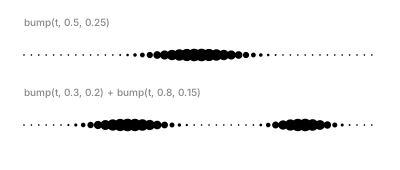
No conditionals, no ranges to check: outside the feet, the bump
contributes exactly nothing (the dots keep their small base radius —
that's the 0.8 + in the expression, not the bump). And the sum in the
bottom row is safe precisely because each bump is zero outside its own
window — the two spotlights can't contaminate each other.
Example 3 — Build a mountain from hills
Sums scale up. This skyline's height is one expression:
45·bump(t, 0.25, 0.28) + 95·bump(t, 0.52, 0.3) + 38·bump(t, 0.82, 0.16)
— a shoulder, a main peak, a small right summit. A second, softer layer
uses two more bumps as mist.
//-- Sums of hills make arbitrary skylines. One filled silhouette whose
//-- height is three amplitude-times-bump terms: a tall mid peak, a low
//-- wide shoulder, and a small right summit.

define ViewBox(0, 0, 400, 210);

let range = PathLayer('mountain') #{ fill: oklch(0.45 0.08 265); stroke: none; };
range.apply {
  M 20 185
  for (i in 0..140) {
    let t = i / 140;
    let h = 45 * bump(t, 0.25, 0.28) + 95 * bump(t, 0.52, 0.3) + 38 * bump(t, 0.82, 0.16);
    L calc(20 + t * 360) calc(185 - h)
  }
  L 380 185
  Z
}

let mist = PathLayer('mist') #{ fill: oklch(0.6 0.05 265); stroke: none; opacity: 0.5; };
mist.apply {
  M 20 185
  for (i in 0..140) {
    let t = i / 140;
    let h = 26 * bump(t, 0.38, 0.34) + 40 * bump(t, 0.7, 0.24);
    L calc(20 + t * 360) calc(185 - h)
  }
  L 380 185
  Z
}

let labels = TextLayer('labels') #{
  font-family: system-ui, sans-serif;
  font-size: 10;
  fill: #888;
  text-anchor: start;
};
labels.apply {
  text(22, 26)`h = 45·bump(0.25) + 95·bump(0.52) + 38·bump(0.82)`
}
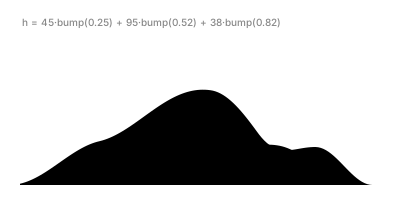
amplitude × bump(t, center, spread) is a term you can say out loud:
"ninety-five tall, centered just past the middle, feet 0.3 wide." Three
sayable terms describe the whole ridge — and moving one peak is editing
one number, not redrawing a curve.
Example 4 — The silhouette is the envelope
On a straight spine, a stroke's silhouette is its width profile — which makes ribbons the perfect x-ray for width functions. (Ribbon machinery glossed in part 2.) Three ribbons: a plain bump, the same bump squared, and an asymmetric sum.
//-- On a straight spine, the silhouette of a stroke IS its width profile.
//-- Three ribbons: a plain bump, the same bump squared (sharper peak,
//-- softer feet), and an asymmetric two-bump sum.

define ViewBox(0, 0, 400, 230);

fn ribbon(name, y0, kind) {
  let mk = {|vo, pb|
    vo.startCap(Cap.tapered(2, CurveContinuity.G0));
    for (i in 0..47) {
      let t = i / 47;
      let w = 0.6;
      if (kind == 0) { w = 0.6 + 13 * bump(t, 0.5, 0.35); }
      if (kind == 1) { w = 0.6 + 13 * pow(bump(t, 0.5, 0.35), 2); }
      if (kind == 2) { w = 0.6 + 10 * bump(t, 0.35, 0.25) + 6 * bump(t, 0.72, 0.18); }
      vo.stop(t, w, CurveContinuity.G1, -w, CurveContinuity.G1);
    }
    vo.endCap(Cap.tapered(2, CurveContinuity.G0));
  };
  let spine = @{ l 330 0 };
  let rib = spine.compoundVariableOffset() << mk;
  let band = PathLayer(name) #{ fill: oklch(0.62 0.16 260); stroke: none; opacity: 0.9; };
  band.apply {
    M calc(35 + rib.anchor.x) calc(y0 + rib.anchor.y)
    rib.draw();
  }
}

ribbon('plain-bump', 48, 0);
ribbon('bump-squared', 118, 1);
ribbon('two-bump-sum', 188, 2);

let labels = TextLayer('labels') #{
  font-family: system-ui, sans-serif;
  font-size: 10;
  fill: #888;
  text-anchor: start;
};
labels.apply {
  text(35, 26)`bump(t, 0.5, 0.35)`
  text(35, 96)`pow(bump(t, 0.5, 0.35), 2)`
  text(35, 166)`10·bump(t, 0.35, 0.25) + 6·bump(t, 0.72, 0.18)`
}
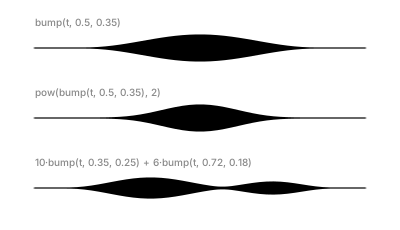
Squaring a bump (pow(bump(...), 2)) is a one-token remix: values below
1 shrink when squared, so the peak stays put while the flanks pull in —
a sharper swell with even softer feet. The third ribbon shows the same
summing trick as the mountain, now shaping ink instead of terrain.
Example 5 — The glow
The finale: twelve translucent layers on one curved spine. Every layer's
width is the same three-term bump expression scaled by its layer index
k, with a per-layer hue shift — bump algebra alone carries the whole
effect.
//-- Twelve compound-offset layers on one curved spine, every width a sum
//-- of bump terms scaled by the layer index, hue shifted per layer. No
//-- jitter, no noise -- bump algebra alone carries the whole glow.

define ViewBox(0, 60, 400, 140);

let spine = @{ c 80 -100 160 100 240 0 };
let px = 80;
let py = 130;
let taperCap = Cap.tapered(2, CurveContinuity.G0);
let base = oklch(0.72 0.14 20);

for (k in 12..1) {
  let mk = {|vo, pb|
    vo.startCap(taperCap);
    for (i in 0..47) {
      let t = i / 47;
      let w = 0.15 * k
            + 0.6 * k * bump(t, 0.35, 0.3)
            + 0.35 * k * pow(bump(t, 0.78, 0.18), 2);
      vo.stop(t, w, CurveContinuity.G1, -w, CurveContinuity.G1);
    }
    vo.endCap(taperCap);
  };
  let halo = spine.compoundVariableOffset() << mk;

  let haloColor = base.hueShift(calc(k * -6));
  let haloLayer = PathLayer(`halo-${k}`) #{
    fill: haloColor;
    stroke: none;
    opacity: 0.25;
  };
  haloLayer.apply {
    M calc(px + halo.anchor.x) calc(py + halo.anchor.y)
    halo.draw();
  }
}
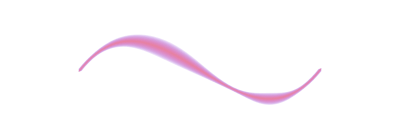
This is the deterministic glow from
"The Reliable Line" with the jitter
deliberately removed, so you can see exactly what the envelope
contributes: the swells sit where the centers put them, on every layer, on
every compile. To add texture back, the sibling posts pick up exactly
here — hash11 adds per-stop shimmer, and
noise2 makes the whole glow flow as one surface.
Where to go next
smoothstep— the ramp to this function's hill; use its plateau when you want to hold at 1 instead of touching and leaving.hash11/noise2— texture on top of bump-shaped envelopes.- Reference: Interpolation & Clamping docs.