noise: Randomness with a Smooth Ride
Part 6 of 7 in our series of stdlib primers — the deterministic hash, noise, and shaping functions.
Series: Stdlib Primers
- hash01 — a random number that never changes its mind
- hash11 — the same dice, rolled between −1 and 1
- hashRange — randomRange with a memory
- smoothstep — the S-curve that turns a cliff into a ramp
- bump — a hill you can put anywhere
- noise (this post) — randomness with a smooth ride
- noise2 — a weather map of smooth randomness
What it does
hash01 rolls dice. noise(x, seed?) draws the
smooth curve through the dice rolls.
The mental model is pins and a glide. At every whole number there's a
pin at a random height — in fact, exactly the hash01 of that number:
noise(3) equals hash01(3), precisely. Between pins, the curve glides
using the same S-shaped ease as smoothstep,
flattening as it touches each pin. So the result is never jumpy and never
cornered: continuous randomness you can drive along without the wheels
leaving the road. Answers stay in [0, 1), seeds pick independent pin
sequences, and negative x works fine.
The one knob that matters is input scale = frequency: noise(t * 8)
passes 8 pins while t goes 0→1, so it wobbles 8 times as fast as
noise(t). You don't configure the character of the wobble — you just
drive faster or slower past the pins.
One difference from its integer cousin: as part 1 noted, the hash shrugs
at weird input (anything non-finite is treated as label 0) — but noise
assumes you're driving along a real road. Feed it Infinity or NaN and you
get NaN back.
Why you'd use it
Whenever neighbors should agree. Hashed randomness gives each index its
own unrelated answer — perfect for scatter, wrong for anything that should
feel like one continuous thing. Surfaces, edges, paths, lighting, and
motion all read as organic only when nearby samples rise and fall
together. noise is that agreement, with the amount of change per unit
distance under your control.
Example 1 — The curve through the dice
The exact relationship, plotted. Dots mark hash01(k) at the whole
numbers 0 through 8; the curve is noise(x) sampled 160 times across the
same span.
//-- The relationship in one picture: dots mark hash01(k) at every whole
//-- number 0..8; the curve is noise(x) sampled finely across the same
//-- span. The curve threads EXACTLY through every dot -- and flattens as
//-- it touches each one.

define ViewBox(0, 0, 400, 190);

let axis = PathLayer('axis') #{ stroke: oklch(0.55 0.02 260); stroke-width: 1; fill: none; };
axis.apply {
  M 30 155 L 370 155
}

let curve = PathLayer('noise-curve') #{ stroke: oklch(0.68 0.13 200); stroke-width: 2; fill: none; };
curve.apply {
  M 30 calc(155 - noise(0) * 115)
  for (i in 1..160) {
    let x = i / 160 * 8;
    L calc(30 + x * 42.5) calc(155 - noise(x) * 115)
  }
}

let pins = PathLayer('hash-pins') #{ fill: oklch(0.62 0.16 260); stroke: none; };
pins.apply {
  for (k in 0..8) {
    circle(calc(30 + k * 42.5), calc(155 - hash01(k) * 115), 3);
  }
}

//-- Legend tinted to match the geometry.
let legendDots = TextLayer('legend-dots') #{ font-family: system-ui, sans-serif; font-size: 10; fill: oklch(0.7 0.15 260); text-anchor: start; };
legendDots.apply { text(30, 26)`dots: hash01(k) at whole numbers` }
let legendCurve = TextLayer('legend-curve') #{ font-family: system-ui, sans-serif; font-size: 10; fill: oklch(0.72 0.13 200); text-anchor: start; };
legendCurve.apply { text(230, 26)`curve: noise(x)` }

let labels = TextLayer('labels') #{
  font-family: system-ui, sans-serif;
  font-size: 10;
  fill: #888;
  text-anchor: start;
};
labels.apply {
  text(28, 172)`0`
  text(360, 172)`8`
}

let scene = GroupLayer('scene') #{};
scene.append(axis, curve, pins, legendDots, legendCurve, labels);
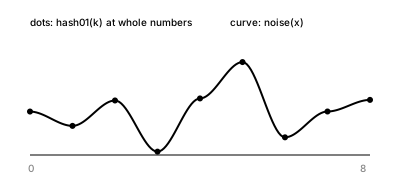
The curve doesn't approximate the dots — it passes exactly through
every one, because at whole numbers noise is hash01. And watch how
it arrives: flat at every pin, courtesy of the smoothstep glide. Those two
facts are the entire function.
Example 2 — The frequency knob
Three wandering lines, one seed, three input scales: t*3, t*6,
t*12.
//-- One knob controls the character: the input scale. noise(t * 3) passes
//-- 3 pins while t crosses 0..1 -- slow swells. noise(t * 6) undulates.
//-- noise(t * 12) chatters. Same function, same seed, different speed
//-- past the pins.

define ViewBox(0, 0, 400, 230);

fn wander(name, y0, freq, hue) {
  let c = Color(0.65, 0.13, hue);
  let line = PathLayer(name) #{ stroke: c; stroke-width: 1.8; fill: none; };
  line.apply {
    M 30 calc(y0 - noise(0) * 34)
    for (i in 1..120) {
      let t = i / 120;
      L calc(30 + t * 340) calc(y0 - noise(t * freq) * 34)
    }
  }
}

//-- Note: the slow line also LOOKS smaller in amplitude -- crossing only
//-- 3 pins, it rarely reaches the range extremes. That's frequency, not a
//-- different amplitude setting.
wander('swells', 70, 3, 260);
wander('undulating', 140, 6, 200);
wander('chattering', 210, 12, 150);

let labels = TextLayer('labels') #{
  font-family: system-ui, sans-serif;
  font-size: 10;
  fill: #888;
  text-anchor: start;
};
labels.apply {
  text(30, 27)`noise(t * 3)`
  text(30, 94)`noise(t * 6)`
  text(30, 164)`noise(t * 12)`
}
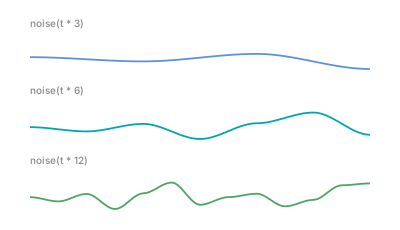
Slow swells, undulation, chatter — the whole personality range is multiplication on the input. No settings, no modes. When something noise-driven feels too busy or too sleepy, tune the factor, nothing else. (One perceptual note: the slow line also looks smaller in amplitude — crossing only three pins, it rarely reaches the range extremes. That's frequency at work, not a different amplitude setting.)
Example 3 — Smooth color
The same randomness source, sampled two ways. Both rows color 60 bars by
lightness; the top asks hash01(i), the bottom asks noise(i * 0.15).
//-- Same randomness source, sampled two ways. Top: each bar's lightness
//-- is hash01(i) -- neighbors are strangers, it reads as static. Bottom:
//-- lightness is noise(i * 0.15) -- neighbors agree, it reads as light
//-- moving across a surface.

define ViewBox(0, 0, 400, 180);

for (i in 0..59) {
  let Lh = 0.3 + hash01(i) * 0.5;
  let ch = Color(Lh, 0.05, 260);
  let barH = PathLayer(`static-${i}`) #{ fill: ch; stroke: none; };
  barH.apply {
    rect(calc(24 + i * 5.9), 34, 5.4, 50);
  }

  let Ln = 0.3 + noise(i * 0.15) * 0.5;
  let cn = Color(Ln, 0.05, 260);
  let barN = PathLayer(`smooth-${i}`) #{ fill: cn; stroke: none; };
  barN.apply {
    rect(calc(24 + i * 5.9), 112, 5.4, 50);
  }
}

let labels = TextLayer('labels') #{
  font-family: system-ui, sans-serif;
  font-size: 10;
  fill: #888;
  text-anchor: start;
};
labels.apply {
  text(24, 26)`hash01(i) — per-bar strangers`
  text(24, 104)`noise(i * 0.15) — neighbors agree`
}
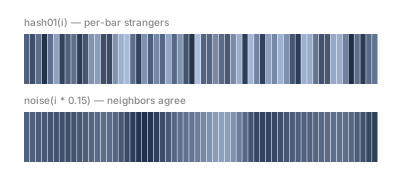
Top: neighbors are strangers — it reads as static. Bottom: each bar sits 0.15 of the way to the next pin from its neighbor, so consecutive bars agree — and the row reads as light moving across one surface. Same determinism, same range; the only change is sampling with a glide.
Example 4 — A stroke with texture
Every ingredient so far on one ribbon (machinery glossed in
part 2). The width is (2 + noise(t*6) * 13) —
organic undulation — times the smoothstep
end-window smoothstep(0, 0.08, t) * smoothstep(1, 0.92, t), which eases
both tips to a point.
//-- Everything so far, on one ribbon: noise drives the width for organic
//-- undulation, and a smoothstep end-window eases both tips to a point.
//-- Width = (2 + noise(t*6) * 13) * smoothstep(0, 0.08, t) * smoothstep(1, 0.92, t).

define ViewBox(0, 0, 400, 130);

let mk = {|vo, pb|
  vo.startCap(Cap.tapered(2, CurveContinuity.G0));
  for (i in 0..63) {
    let t = i / 63;
    let amp = smoothstep(0, 0.08, t) * smoothstep(1, 0.92, t);
    let w = (2 + noise(t * 6) * 13) * amp;
    vo.stop(t, w, CurveContinuity.G1, -w, CurveContinuity.G1);
  }
  vo.endCap(Cap.tapered(2, CurveContinuity.G0));
};

let spine = @{ l 340 0 };
let rib = spine.compoundVariableOffset() << mk;

let band = PathLayer('textured') #{ fill: oklch(0.62 0.16 260); stroke: none; opacity: 0.92; };
band.apply {
  M calc(30 + rib.anchor.x) calc(72 + rib.anchor.y)
  rib.draw();
}

let labels = TextLayer('labels') #{
  font-family: system-ui, sans-serif;
  font-size: 10;
  fill: #888;
  text-anchor: start;
};
labels.apply {
  text(30, 27)`width = (2 + noise(t·6) · 13) × end-window`
}
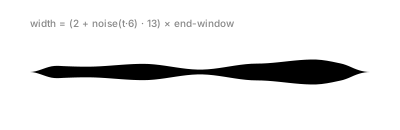
Walk the width line from the inside out: noise(t*6) is the texture
(frequency 6 — moderate undulation), 2 + keeps a minimum body, * 13
sets the amplitude, and the end-window multiplies the whole thing so the
ribbon enters and exits cleanly. Compare the shimmer of
hash11's jittered ribbon: there, adjacent stops
disagree on purpose; here they cooperate — that's the whole difference
between jitter and texture.
Example 5 — Parallax ridges
A finished scene from seeds and frequencies. Four filled ridgelines, back to front — each its own seeded stream, with nearer ridges darker, with bigger swings and finer detail. The front ridge stacks two streams: a slow, tall one for shape plus a fast, quiet one for detail.
//-- Four mountain ridgelines, back to front. Each ridge is one seeded
//-- noise stream; nearer ridges are darker, taller, and busier. The front
//-- ridge stacks two streams -- a slow tall one plus a fast quiet one --
//-- for detail on top of shape.

define ViewBox(0, 0, 400, 250);

fn ridge(name, baseY, seed, freq, amp, L) {
  let c = Color(L, 0.06, 265);
  let hill = PathLayer(name) #{ fill: c; stroke: none; };
  hill.apply {
    M 15 235
    L 15 calc(baseY - noise(0, seed) * amp)
    for (i in 1..140) {
      let t = i / 140;
      L calc(15 + t * 370) calc(baseY - noise(t * freq, seed) * amp)
    }
    L 385 235
    Z
  }
}

ridge('far', 105, 1, 3, 40, 0.72);
ridge('middle', 135, 2, 4, 48, 0.58);
ridge('near', 170, 3, 5, 55, 0.44);

//-- Front ridge: slow + tall stacked with fast + quiet.
let front = PathLayer('front') #{ fill: oklch(0.3 0.06 265); stroke: none; };
front.apply {
  M 15 235
  let h0 = noise(0, 4) * 55 + noise(0, 5) * 12;
  L 15 calc(205 - h0)
  for (i in 1..140) {
    let t = i / 140;
    let h = noise(t * 3, 4) * 55 + noise(t * 9, 5) * 12;
    L calc(15 + t * 370) calc(205 - h)
  }
  L 385 235
  Z
}
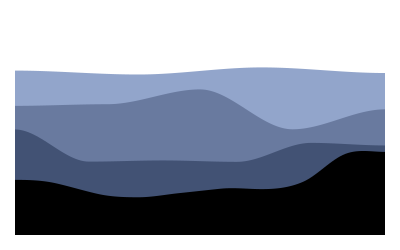
That stacking line — noise(t*3, 4) * 55 + noise(t*9, 5) * 12 — is a
technique worth naming: big slow waves carry the form, small fast waves
carry the texture, and adding them gives you both at once. Graphics people
call the layers octaves and build entire terrains this way — now you can
too, and the whole scene stays as reproducible as everything else in this
series: same seeds, same mountains, every compile. To turn these
ridgelines into fog, water, or anything else that varies in two
directions, you need the second dimension — that's
noise2.
Where to go next
noise2— the same idea spread across a surface.hash01— the pins themselves.smoothstep— the glide between them.- Reference: Hash & Noise docs.