smoothstep: The S-Curve That Turns a Cliff into a Ramp
Part 4 of 7 in our series of stdlib primers — the deterministic hash, noise, and shaping functions.
Series: Stdlib Primers
- hash01 — a random number that never changes its mind
- hash11 — the same dice, rolled between −1 and 1
- hashRange — randomRange with a memory
- smoothstep (this post) — the S-curve that turns a cliff into a ramp
- bump — a hill you can put anywhere
- noise — randomness with a smooth ride
- noise2 — a weather map of smooth randomness
What it does
smoothstep(edge0, edge1, x) is a dimmer between two markers. As x
travels from edge0 to edge1, the answer glides from 0 up to 1. Outside
the window it just holds: 0 before, 1 after — it saturates, never
overshooting in either direction.
What makes it special is the shape of the glide. It's an S-curve whose
slope is zero at both ends — it leaves the floor flat and arrives at
the ceiling flat. (The math name is a Hermite curve; all you need is the
flat-at-both-ends part.) That flatness is why things driven by
smoothstep never kink: whatever you attach to it — a size, a color, a
width — eases out of "off" and eases into "on."
Two idioms are worth learning as vocabulary:
- Reversed markers run the ramp downhill.
smoothstep(1.0, 0.6, t)fades from 1 down to 0 astclimbs through 0.6→1.0. (Shader languages leave this case undefined; Pathogen defines and tests it.) - The plateau: uphill × downhill = a flat-topped window.
smoothstep(0.1, 0.3, t) * smoothstep(0.9, 0.7, t)rises, holds at 1, and falls — the standard way to build "on in the middle, off at the ends."
One gentle warning: keep the markers apart. smoothstep(e, e, x) collapses
to a hard step (and exactly at the shared edge, the math divides zero by
zero and answers NaN).
Why you'd use it
Every time a hard boundary looks mechanical: fading elements in near an
edge, easing a stroke width to zero at its tips, blending two colors
across a horizon, weighting anything by "how far into this zone are we?"
It replaces both the if (x > threshold) cliff and the straight-line
ramp with something that reads as designed. And like everything in this
series, it's a pure function of its inputs — the fades you tune today
render identically on every future compile. It's also the workhorse under
two of its siblings: bump is a hill built from the
same easing idea, and noise uses this exact glide
between its random pins.
Example 1 — Cliff, ramp, S-curve
Three ways from 0 to 1 across the same window. The dashed line is a hard
step. The thin line is a straight ramp. The bold line is smoothstep.
//-- Three ways to get from 0 to 1 across the window 0.3..0.7: a hard step
//-- (cliff), a straight lerp-style ramp, and smoothstep -- the S-curve
//-- that leaves the floor flat and arrives at the ceiling flat.

define ViewBox(0, 0, 400, 200);

let plotX = 50;
let plotW = 300;
let plotY = 150;
let plotH = 90;

let axis = PathLayer('axis') #{ stroke: oklch(0.55 0.02 260); stroke-width: 1; fill: none; };
axis.apply {
  M plotX plotY
  L calc(plotX + plotW) plotY
  M plotX calc(plotY - plotH)
  L calc(plotX + plotW) calc(plotY - plotH)
}

//-- Hard step: 0 before the midpoint of the window, 1 after.
let cliff = PathLayer('cliff') #{ stroke: oklch(0.6 0.1 20); stroke-width: 1.25; stroke-dasharray: 4 3; fill: none; };
cliff.apply {
  M plotX plotY
  L calc(plotX + plotW * 0.5) plotY
  L calc(plotX + plotW * 0.5) calc(plotY - plotH)
  L calc(plotX + plotW) calc(plotY - plotH)
}

//-- Straight ramp across the window.
let ramp = PathLayer('ramp') #{ stroke: oklch(0.72 0.06 260); stroke-width: 1.25; fill: none; };
ramp.apply {
  M plotX plotY
  L calc(plotX + plotW * 0.3) plotY
  L calc(plotX + plotW * 0.7) calc(plotY - plotH)
  L calc(plotX + plotW) calc(plotY - plotH)
}

//-- The S-curve.
let scurve = PathLayer('smoothstep') #{ stroke: oklch(0.62 0.16 260); stroke-width: 2.25; fill: none; };
scurve.apply {
  M plotX plotY
  for (i in 1..96) {
    let t = i / 96;
    let s = smoothstep(0.3, 0.7, t);
    L calc(plotX + plotW * t) calc(plotY - plotH * s)
  }
}

let labels = TextLayer('labels') #{
  font-family: system-ui, sans-serif;
  font-size: 10;
  fill: #888;
  text-anchor: start;
};
labels.apply {
  text(50, 176)`0`
  text(160, 176)`edge0 = 0.3`
  text(255, 176)`edge1 = 0.7`
  text(50, 36)`smoothstep — bold · ramp — thin · step — dashed`
}

let scene = GroupLayer('scene') #{};
scene.append(axis, cliff, ramp, scurve, labels);
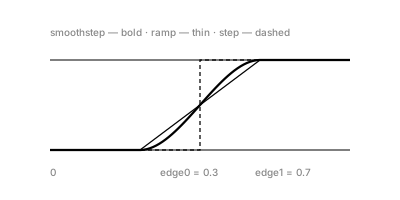
Look at where the bold curve meets the floor and ceiling: it lands flat both times. The straight ramp has corners at both markers — attach a width or a motion to it and you'll see those corners. The S-curve is corner-free by construction.
Example 2 — Fade a row in — and out
The dimmer applied spatially. Top row: dot sizes fade in over the left
half. Bottom row: the markers are reversed — smoothstep(1.0, 0.6, t)
— so the fade runs the other way.
//-- Applying the dimmer spatially. Top row: dot size fades IN across the
//-- left half via smoothstep(0.1, 0.5, t). Bottom row: swap the markers --
//-- smoothstep(1.0, 0.6, t) -- and the ramp runs downhill, fading OUT
//-- toward the right.

define ViewBox(0, 0, 400, 170);

let labels = TextLayer('labels') #{
  font-family: system-ui, sans-serif;
  font-size: 10;
  fill: #888;
  text-anchor: start;
};
labels.apply {
  text(24, 28)`smoothstep(0.1, 0.5, t) — fade in`
  text(24, 100)`smoothstep(1.0, 0.6, t) — reversed markers, fade out`
}

let fadeIn = PathLayer('fade-in') #{ fill: oklch(0.62 0.16 260); stroke: none; };
fadeIn.apply {
  for (i in 0..47) {
    let t = i / 47;
    let s = smoothstep(0.1, 0.5, t);
    circle(calc(24 + i * 7.4), 55, calc(0.4 + 3.4 * s));
  }
}

let fadeOut = PathLayer('fade-out') #{ fill: oklch(0.68 0.13 200); stroke: none; };
fadeOut.apply {
  for (i in 0..47) {
    let t = i / 47;
    let s = smoothstep(1.0, 0.6, t);
    circle(calc(24 + i * 7.4), 127, calc(0.4 + 3.4 * s));
  }
}
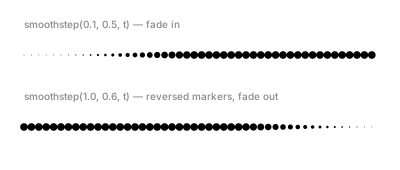
Reversed markers are the idiomatic way to say "fade out": no 1 - s
arithmetic, just swap the edges and the ramp runs downhill.
Example 3 — The plateau
The flagship idiom. One lambda —
smoothstep(0.1, 0.3, t) × smoothstep(0.9, 0.7, t) — drives both the
plot (top) and the bar heights (bottom).
//-- The plateau idiom: an uphill ramp TIMES a downhill ramp makes a
//-- flat-topped window -- rise, hold, fall. The plot (top) and the bar
//-- heights (bottom) share the exact same lambda.

define ViewBox(0, 0, 400, 250);

let win = {|t| return smoothstep(0.1, 0.3, t) * smoothstep(0.9, 0.7, t); };

let plotX = 50;
let plotW = 300;
let plotY = 110;
let plotH = 70;

let unitLine = PathLayer('unit-line') #{ stroke: oklch(0.5 0.02 260); stroke-width: 0.75; stroke-dasharray: 2 4; fill: none; };
unitLine.apply {
  M plotX calc(plotY - plotH)
  L calc(plotX + plotW) calc(plotY - plotH)
}

let axis = PathLayer('axis') #{ stroke: oklch(0.55 0.02 260); stroke-width: 1; fill: none; };
axis.apply {
  M plotX plotY
  L calc(plotX + plotW) plotY
}

let curve = PathLayer('window-curve') #{ stroke: oklch(0.62 0.16 160); stroke-width: 2; fill: none; };
curve.apply {
  M plotX plotY
  for (i in 1..96) {
    let t = i / 96;
    let s = win(t);
    L calc(plotX + plotW * t) calc(plotY - plotH * s)
  }
}

let bars = PathLayer('bars') #{ fill: oklch(0.62 0.16 160); stroke: none; opacity: 0.85; };
bars.apply {
  for (i in 0..47) {
    let t = i / 47;
    let h = win(t) * 60;
    if (h > 0.2) {
      rect(calc(48 + i * 6.4), calc(225 - h), 4.4, h);
    }
  }
}

let labels = TextLayer('labels') #{
  font-family: system-ui, sans-serif;
  font-size: 10;
  fill: #888;
  text-anchor: start;
};
labels.apply {
  text(48, 28)`win = smoothstep(0.1, 0.3, t) × smoothstep(0.9, 0.7, t)`
  text(356, 44)`1.0`
}

let scene = GroupLayer('scene') #{};
scene.append(unitLine, axis, curve, bars, labels);
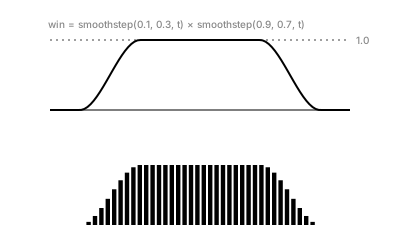
Read the two factors: the first is 0 until t=0.1, then rises to 1 by t=0.3 and stays 1. The second stays 1 until t=0.7, then falls to 0 by t=0.9. Multiplied, you get rise–hold–fall with a genuinely flat top (touching the dashed 1.0 line). Any "active in the middle" behavior — visibility, width, intensity — is this one expression with your own four numbers.
Example 4 — No more blunt ends
A stroke-width application. The top ribbon has constant width, so it ends
in chopped-off edges. The bottom multiplies the same width by an
end-window: smoothstep(0, 0.12, t) * smoothstep(1, 0.88, t). (The
ribbon machinery — compoundVariableOffset, vo.stop, the << worker —
is glossed in part 2; the only part that matters
here is that each stop's width is a number we compute.)
//-- End windows on a stroke. Top: constant width -- the ribbon ends in
//-- chopped-off vertical edges. Bottom: the same width times
//-- smoothstep(0, 0.12, t) * smoothstep(1, 0.88, t), which eases the
//-- width to zero at both tips.

define ViewBox(0, 0, 400, 160);

fn band(name, y0, windowed) {
  let mk = {|vo, pb|
    //-- The blunt band gets Cap.butt() -- an honest straight edge -- so
    //-- the "before" picture really is chopped off.
    if (windowed == 1) {
      vo.startCap(Cap.tapered(2, CurveContinuity.G0));
    }
    if (windowed == 0) {
      vo.startCap(Cap.butt());
    }
    for (i in 0..47) {
      let t = i / 47;
      let amp = 1;
      if (windowed == 1) {
        amp = smoothstep(0, 0.12, t) * smoothstep(1, 0.88, t);
      }
      let w = 9 * amp;
      vo.stop(t, w, CurveContinuity.G1, -w, CurveContinuity.G1);
    }
    if (windowed == 1) {
      vo.endCap(Cap.tapered(2, CurveContinuity.G0));
    }
    if (windowed == 0) {
      vo.endCap(Cap.butt());
    }
  };
  let spine = @{ l 330 0 };
  let rib = spine.compoundVariableOffset() << mk;
  let stroke = PathLayer(name) #{ fill: oklch(0.68 0.13 200); stroke: none; opacity: 0.9; };
  stroke.apply {
    M calc(35 + rib.anchor.x) calc(y0 + rib.anchor.y)
    rib.draw();
  }
}

band('blunt', 45, 0);
band('windowed', 115, 1);

let labels = TextLayer('labels') #{
  font-family: system-ui, sans-serif;
  font-size: 10;
  fill: #888;
  text-anchor: start;
};
labels.apply {
  text(35, 27)`constant width — chopped-off ends`
  text(35, 94)`× smoothstep(0, 0.12, t) × smoothstep(1, 0.88, t)`
}
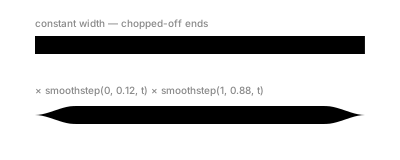
Same plateau idiom, tighter windows: the width is full-strength for the middle 76% of the stroke and eases to zero over the first and last 12%. Both tips taper to a point — and because smoothstep arrives flat, the taper has no corner where it meets the full width.
Example 5 — Horizon
A dusk seascape with no gradients. Sixty horizontal strips each compute
one mix factor — m = smoothstep(0.38, 0.58, t) where t is vertical
position — and use it to blend lightness, hue, and chroma from "sky
values" to "sea values." The sun's halo rings shrink by a reversed
smoothstep of ring index.
//-- A dusk seascape with no gradients: sixty horizontal strips, each
//-- strip's color MIXED between a sky color and a sea color by one
//-- smoothstep of its vertical position. The soft horizon line is the
//-- S-curve; the sun's halo rings shrink by a reversed smoothstep.

define ViewBox(0, 0, 400, 230);

//-- Sky: light warm violet.  Sea: deep teal.
for (i in 0..59) {
  let t = i / 59;
  let m = smoothstep(0.38, 0.58, t);
  let L = 0.78 - 0.42 * m;
  let H = 300 - 100 * m;
  let C = 0.05 + 0.06 * m;
  let c = Color(L, C, H);
  let strip = PathLayer(`strip-${i}`) #{ fill: c; stroke: none; };
  strip.apply {
    rect(15, calc(15 + i * 3.32), 370, 3.45);
  }
}

//-- Sun + halo: ring radius eases DOWN with ring index (reversed markers).
for (k in 0..5) {
  let u = k / 5;
  let fade = smoothstep(1, 0.2, u);
  let r = 6 + 16 * (1 - fade);
  let ring = PathLayer(`halo-${k}`) #{ stroke: oklch(0.88 0.09 75); stroke-width: 1; fill: none; opacity: calc(0.15 + fade * 0.5); };
  ring.apply {
    circle(300, 96, r);
  }
}
let sun = PathLayer('sun') #{ fill: oklch(0.92 0.1 75); stroke: none; };
sun.apply {
  circle(300, 96, 6);
}
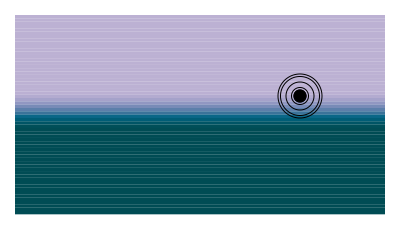
The blend pattern is worth keeping:
value = skyValue + (seaValue - skyValue) * m — with m eased, every
channel crosses the horizon softly and in sync, because they all share
one m. Every soft edge in this scene is the same three-argument call
wearing different numbers.
Where to go next
bump— when you want a hill that touches 1 and leaves, rather than a ramp that holds. (The plateau reappears there as its flat-topped cousin.)noise— smoothstep is the glue between its random pins.- Reference:
Interpolation & Clamping docs
and the callable Easing family
(
smoothstep(0, 1, t)isEasing.Smoothstep).