hash01: A Random Number That Never Changes Its Mind
Part 1 of 7 in our series of stdlib primers — the deterministic hash, noise, and shaping functions.
Series: Stdlib Primers
- hash01 (this post) — a random number that never changes its mind
- hash11 — the same dice, rolled between −1 and 1
- hashRange — randomRange with a memory
- smoothstep — the S-curve that turns a cliff into a ramp
- bump — a hill you can put anywhere
- noise — randomness with a smooth ride
- noise2 — a weather map of smooth randomness
What it does
hash01(n) takes a whole number — an index, a loop counter, any integer
label — and hands back a number between 0 (inclusive) and 1 (exclusive)
that looks random. It isn't random at all: it's a lookup. The same
label always produces the same answer, on every machine, in every browser,
on every recompile, forever.
Under the hood it's a hash — which is just a scrambler: a fixed recipe
of bit-mixing that turns the label 7 into 0.9646… so thoroughly that
neighboring labels produce completely unrelated outputs. hash01(7) and
hash01(8) have nothing to do with each other. And because every step of
the recipe is pinned down exactly by the JavaScript standard — no
trigonometry, no rounding wiggle room — there is no drift between engines.
Your artwork compiles to the same bytes in the CLI, the playground, and the
VS Code preview.
The second argument is a seed: hash01(i, 3) reads the same card
number i from a different shuffled deck. hash01(i, 0) and
hash01(i, 1) are two unrelated sequences over the same indices — which is
how one loop index can drive many independent random-looking properties at
once. (Leaving the seed off means deck 0.)
Why you'd use it
Because random() and randomRange() re-roll on every compile. That's
fine for exploring, but the moment you like what you see, you want it to
stay. hash01 is the version with a memory: randomness as a design
decision rather than a dice throw. Scatter, jitter, texture, variation —
all reproducible, all tunable, all shippable.
Two things to know before the examples:
- It reads only the label, not the fraction. Inputs are truncated to
whole numbers, so
hash01(0.9)is the same ashash01(0)— and anything that isn't a real number at all (a divide-by-zero infinity, a NaN) is quietly treated as label 0. If you want a smooth function of a continuously varying input, that's whatnoise()is for. - The range is 0 up to (but never exactly) 1 — written [0, 1). In practice you'll multiply it into whatever range you need, and the missing endpoint never matters visually.
Example 1 — Ask twice, same answer
The whole function in one picture. The first two rows ask hash01(i) the
same 48 questions from two separate loops. The third row asks
randomRange(0, 1) instead.
//-- Three rows of 48 dots. Rows one and two ask hash01 the same questions
//-- from two separate loops -- identical answers, identical rows. Row three
//-- asks randomRange, which re-rolls on every compile.

define ViewBox(0, 0, 400, 210);

let labels = TextLayer('labels') #{
  font-family: system-ui, sans-serif;
  font-size: 10;
  fill: #888;
  text-anchor: start;
};
labels.apply {
  text(22, 26)`hash01(i) — first loop`
  text(22, 87)`hash01(i) — second loop, same answers`
  text(22, 152)`randomRange(0, 1) — different every compile`
}

let rowA = PathLayer('hash-first-ask') #{ fill: oklch(0.62 0.16 260); stroke: none; };
let rowB = PathLayer('hash-second-ask') #{ fill: oklch(0.62 0.16 260); stroke: none; };
let rowC = PathLayer('random-every-time') #{ fill: oklch(0.6 0.15 20); stroke: none; };

rowA.apply {
  for (i in 0..47) {
    circle(calc(22 + i * 7.6), calc(30 + hash01(i) * 30), 1.8);
  }
}
rowB.apply {
  for (i in 0..47) {
    circle(calc(22 + i * 7.6), calc(95 + hash01(i) * 30), 1.8);
  }
}
rowC.apply {
  for (i in 0..47) {
    circle(calc(22 + i * 7.6), calc(160 + randomRange(0, 1) * 30), 1.8);
  }
}

let scene = GroupLayer('scene') #{};
scene.append(labels, rowA, rowB, rowC);
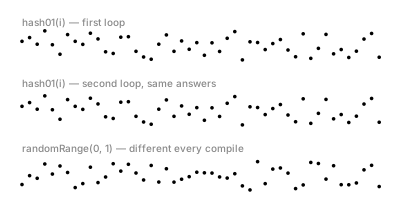
The two blue rows are identical — not similar, identical — because
hash01 is a lookup, not a roll. And here's the part worth trying
yourself: drop this code in the playground and recompile — only the red
row changes. The blue rows are fixtures; the red row is weather. (This
is the one example in this post that uses randomRange — the contrast is
the whole lesson.)
Example 2 — One label, three decks: a starfield
One index i, three seeds. The x-position reads deck 0, the y-position
deck 1, the size deck 2 — three independent random-looking properties from
one loop counter.
//-- One index, three decks: x from the default deck, y from deck 1, size
//-- from deck 2. 140 stars land convincingly at random -- and land in
//-- exactly the same places on every compile.

define ViewBox(0, 0, 400, 220);

let backdrop = PathLayer('night') #{ fill: oklch(0.22 0.04 275); stroke: none; };
backdrop.apply {
  rect(15, 15, 370, 190);
}

let stars = PathLayer('stars') #{ fill: oklch(0.92 0.03 260); stroke: none; };
stars.apply {
  for (i in 0..139) {
    circle(calc(22 + hash01(i) * 356),
           calc(22 + hash01(i, 1) * 176),
           calc(0.5 + hash01(i, 2) * 1.4));
  }
}

If x and y came from the same deck, every star would sit on the diagonal
(x always equal to y, scaled). The seeds are what make the scatter
two-dimensional. This is the core hash01 idiom: one index in, as many
independent properties out as you have seeds.
Example 3 — A grid that isn't boring
Regular structure plus hashed variation. Every tile in this 14×8 grid sits exactly on its grid cell, but its lightness comes from one stream and its hue from another — a woven-textile effect from two lines of code.
//-- A 14 x 8 grid of tiles. Every tile's lightness comes from one hashed
//-- stream and its hue from another -- the grid reads as a woven textile
//-- swatch, and it's the same swatch on every compile.

define ViewBox(0, 0, 400, 240);

for (row in 0..7) {
  for (col in 0..13) {
    let idx = row * 14 + col;
    let L = 0.5 + hash01(idx) * 0.3;
    let H = 200 + hash01(idx, 1) * 130;
    let c = Color(L, 0.11, H);
    let cell = PathLayer(`cell-${idx}`) #{ fill: c; stroke: none; };
    cell.apply {
      roundRect(calc(20 + col * 26), calc(20 + row * 26), 22, 22, 5);
    }
  }
}
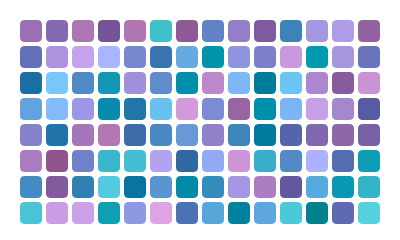
Note how the index is built: row * 14 + col gives every cell its own
integer label. That little arithmetic pattern — flattening a 2D position
into one index — is how you hash grids, and it shows up again in
noise2, where the grid itself becomes the random
thing.
Example 4 — The hand-drawn ruler
Rigid layouts read as mechanical; a few hashed nudges make them read as human. The bottom ruler jitters each tick's x-position, lean, and length by small hashed amounts.
//-- Two rulers. The top one is machine-perfect. The bottom one nudges every
//-- tick's position, lean, and length by a hashed amount -- it reads as
//-- drawn by a person, and redraws identically forever.

define ViewBox(0, 0, 400, 150);

let rigid = PathLayer('machine') #{ stroke: oklch(0.65 0.02 260); stroke-width: 1.2; fill: none; };
rigid.apply {
  M 20 48 L 380 48
  for (i in 0..35) {
    M calc(25 + i * 10) 48
    l 0 -12
  }
}

let loose = PathLayer('hand-drawn') #{ stroke: oklch(0.75 0.12 60); stroke-width: 1.2; fill: none; };
loose.apply {
  M 20 115 L 380 115
  for (i in 0..35) {
    let x = calc(25 + i * 10 + hash01(i) * 3);
    let lean = calc(hash01(i, 1) * 2 - 1);
    let len = calc(10 + hash01(i, 2) * 6);
    M x 115
    l lean calc(0 - len)
  }
}
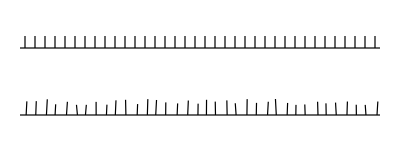
Look at the lean line: hash01(i, 1) * 2 - 1. That * 2 - 1 remaps
[0, 1) into [-1, 1) — "nudge either direction" instead of "nudge one way."
It's such a common move that it has its own function:
hash11, the next post in this series.
Example 5 — A meadow that ships
Everything at once: ninety grass blades and a dozen seed heads, with position, height, lean, and color each drawn from its own seeded stream, composed into a finished little landscape.
//-- Ninety grass blades and a dozen seed heads, every property -- position,
//-- height, lean, color -- drawn from its own hashed stream. A finished
//-- little landscape that regenerates identically on every compile: change
//-- any one seed constant and the whole meadow re-lands in a new (but
//-- equally final) arrangement.

define ViewBox(0, 128, 400, 132);

let ground = PathLayer('ground') #{ fill: oklch(0.32 0.06 145); stroke: none; };
ground.apply {
  rect(15, 228, 370, 17);
}

fn blade(i) {
  let x = 22 + hash01(i) * 356;
  let h = 25 + hash01(i, 1) * 55;
  let lean = hash01(i, 2) * 30 - 15;
  let c = Color(0.52 + hash01(i, 3) * 0.18, 0.13, 135 + hash01(i, 3) * 30);
  let g = PathLayer(`blade-${i}`) #{ stroke: c; stroke-width: 1.6; fill: none; };
  g.apply {
    M x 230
    q calc(lean * 0.3) calc(0 - h * 0.6) lean calc(0 - h)
  }
}

for (i in 0..89) {
  blade(i);
}

let heads = PathLayer('seed-heads') #{ fill: oklch(0.8 0.1 85); stroke: none; };
heads.apply {
  for (k in 0..11) {
    let hx = 30 + hash01(k, 10) * 340;
    let hy = 150 + hash01(k, 11) * 60;
    circle(hx, hy, calc(1.5 + hash01(k, 12) * 1.5));
  }
}
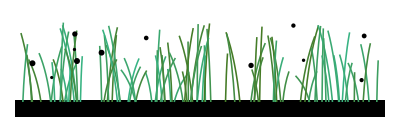
The payoff of determinism is right here: this meadow is done. It will
render exactly like this in a blog post, a client deliverable, or a print
export, next week and next year. And it's still one knob away from being a
different meadow — bump any seed constant (hash01(i, 3) → hash01(i, 7))
and every blade re-lands in a new, equally settled arrangement. Randomness
you can direct.
Where to go next
hash11— the same dice, rolled between −1 and 1 (the* 2 - 1remap, built in).hashRange—randomRangewith a memory.noise— the smooth version, for continuously varying input.- Reference: Hash & Noise docs.