hash11: The Same Dice, Rolled Between −1 and 1
Part 2 of 7 in our series of stdlib primers — the deterministic hash, noise, and shaping functions.
Series: Stdlib Primers
- hash01 — a random number that never changes its mind
- hash11 (this post) — the same dice, rolled between −1 and 1
- hashRange — randomRange with a memory
- smoothstep — the S-curve that turns a cliff into a ramp
- bump — a hill you can put anywhere
- noise — randomness with a smooth ride
- noise2 — a weather map of smooth randomness
What it does
hash11(n, seed?) is hash01's twin for nudges.
Same deterministic lookup, same seeds-as-decks behavior, same "truncates
to whole numbers" rule — but the answer lands between −1 and 1 (−1
inclusive, 1 exclusive) instead of 0 and 1.
The relationship is exact and worth seeing once:
hash11(n) is precisely hash01(n) * 2 - 1. Everything you learned in
part 1 — determinism, bit-exactness across machines, seeds, integer
truncation — carries over unchanged, so this post won't repeat it.
Why you'd use it
Because most design randomness isn't "pick a value" — it's "start from
the right value and drift a little, either direction." Signed means the
drift can be negative: a push left as easily as right, down as easily as
up. Baseline wobble, tilt, breathing room, hand-drawn looseness — they're
all symmetric drifts around a deliberate center, and [−1, 1) is their
natural shape.
The idiom to memorize (it's all over this blog):
let wobble = 1 + hash11(i, layerIndex) * 0.2;
That's "a ±20% factor, per index, per layer" — multiply it onto a width, a
radius, a spacing, anything. The 0.2 is the amplitude dial; the seed
keeps each layer's wobble independent.
Example 1 — Above and below the line
The range, visually: 48 dots whose height is hash11(i) * 43 measured
from a center axis. About half land above, half below, at unrelated
heights.
//-- 48 dots straddling an axis: hash11(i) answers between -1 and 1, so
//-- roughly half land above the line and half below, at hashed heights.

define ViewBox(0, 0, 400, 190);

let axis = PathLayer('axis') #{ stroke: oklch(0.5 0.02 260); stroke-width: 1; fill: none; };
axis.apply {
  M 40 95 L 380 95
}

let ticks = TextLayer('ticks') #{
  font-family: system-ui, sans-serif;
  font-size: 10;
  fill: #888;
  text-anchor: end;
};
ticks.apply {
  text(34, 52)`+1`
  text(34, 99)`0`
  text(34, 146)`−1`
}

let dots = PathLayer('dots') #{ fill: oklch(0.62 0.16 260); stroke: none; };
dots.apply {
  for (i in 0..47) {
    circle(calc(44 + i * 7), calc(95 - hash11(i) * 43), 2);
  }
}
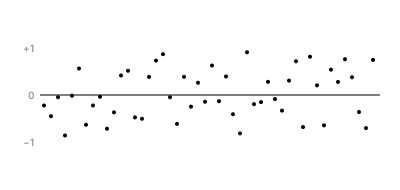
Note the y expression: 95 - hash11(i) * 43. Screen y grows downward, so
subtracting a positive answer moves the dot up — the sign of hash11
maps directly onto "which side of the line."
Example 2 — Hand-set type
The simplest real use: baseline jitter. Both rows are the same 26 bars;
the bottom row drops each baseline by hash11(i) * 5 and leans each bar
by hash11(i, 1) * 4.
//-- Two rows of "type": equal-width bars standing on a baseline. The top
//-- row is machine-set. The bottom row nudges each bar's baseline up or
//-- down and leans it left or right -- instantly warmer, and repeatable.

define ViewBox(0, 0, 400, 170);

let machine = PathLayer('machine-set') #{ stroke: oklch(0.7 0.03 260); stroke-width: 7; fill: none; };
machine.apply {
  for (i in 0..25) {
    M calc(28 + i * 13.5) 62
    l 0 -32
  }
}

let hand = PathLayer('hand-set') #{ stroke: oklch(0.75 0.12 60); stroke-width: 7; fill: none; };
hand.apply {
  for (i in 0..25) {
    let drop = calc(hash11(i) * 5);
    let lean = calc(hash11(i, 1) * 4);
    M calc(28 + i * 13.5) calc(138 + drop)
    l lean -32
  }
}
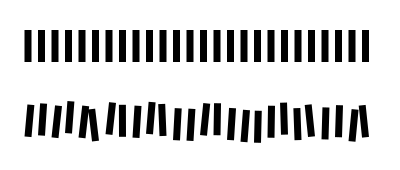
Five pixels of drop and four of lean — tiny numbers, big warmth. Because
the amounts are signed, bars drift both up and down, left and right;
with hash01 you'd get a row that only ever sagged one way.
Example 3 — The jitter knob
Jitter amplitude as a single tunable dial. Three copies of one 10×6 grid,
with every dot offset by (hash11(idx) * j, hash11(idx, 1) * j) — and
j set to 0, 2, and 5.
//-- The same 10 x 6 dot grid three times. The only difference is j -- the
//-- jitter amplitude multiplying hash11: 0 (rigid), 2 (relaxed), 5
//-- (scattered). One number is the entire design decision.

define ViewBox(0, 0, 400, 132);

fn jitteredGrid(name, x0, j) {
  let g = PathLayer(name) #{ fill: oklch(0.68 0.13 200); stroke: none; };
  g.apply {
    for (row in 0..5) {
      for (col in 0..9) {
        let idx = row * 10 + col;
        circle(calc(x0 + col * 11 + hash11(idx) * j),
               calc(48 + row * 11 + hash11(idx, 1) * j),
               1.7);
      }
    }
  }
}

jitteredGrid('rigid', 28, 0);
jitteredGrid('relaxed', 153, 2);
jitteredGrid('scattered', 278, 5);

let labels = TextLayer('labels') #{
  font-family: system-ui, sans-serif;
  font-size: 10;
  fill: #888;
  text-anchor: start;
};
labels.apply {
  text(28, 26)`j = 0`
  text(153, 26)`j = 2`
  text(278, 26)`j = 5`
}
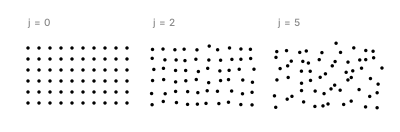
Read it left to right: rigid, relaxed, scattered. Same underlying pattern, same hashed offsets — the entire difference is one number. This is what "randomness as a design decision" means in practice: the amount of chaos is a parameter you tune, not a property you hope for.
Example 4 — ±20% on a stroke
The house idiom applied to a variable-width stroke. Both ribbons share one
smooth width profile (a bump — covered in part 5);
the bottom one multiplies each stop's width by 1 + hash11(i) * 0.25 —
the memorized idiom with its amplitude dialed up to 0.25.
A quick gloss on the stroke machinery, since this is its first appearance
in the series: compoundVariableOffset turns a path into a ribbon by
placing width stops along it — each vo.stop(t, w, ..., -w, ...) call
says "at position t, extend w units each side." The builder function is
applied with the << operator, CurveContinuity.G1 means "no kinks
between stops," and Cap.tapered closes the ends to points. Full story in
the variable-offset docs; here,
all that matters is the width at each stop is a number you compute.
//-- The house idiom: 1 + hash11(i) * 0.25 is a +/-25% wobble factor you
//-- multiply onto anything. Top ribbon: a smooth width profile. Bottom:
//-- the same profile times the wobble -- the edge gets tooth.

define ViewBox(0, 0, 400, 170);

fn ribbon(name, y0, wobble) {
  let mk = {|vo, pb|
    vo.startCap(Cap.tapered(2, CurveContinuity.G0));
    for (i in 0..47) {
      let t = i / 47;
      let w = (3 + 9 * bump(t, 0.5, 0.55)) * (1 + hash11(i) * wobble);
      vo.stop(t, w, CurveContinuity.G1, -w, CurveContinuity.G1);
    }
    vo.endCap(Cap.tapered(2, CurveContinuity.G0));
  };
  let spine = @{ l 330 0 };
  let rib = spine.compoundVariableOffset() << mk;
  let band = PathLayer(name) #{ fill: oklch(0.62 0.16 260); stroke: none; opacity: 0.9; };
  band.apply {
    M calc(35 + rib.anchor.x) calc(y0 + rib.anchor.y)
    rib.draw();
  }
}

ribbon('smooth', 48, 0);
ribbon('jittered', 122, 0.25);
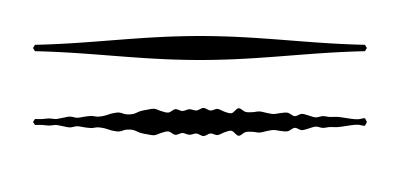
The smooth profile is the design; the wobble factor is the texture. Keeping them separate — a clean profile times a signed jitter — means you can retune either without touching the other. This is exactly how the sixteen-layer glow in "The Reliable Line" gets its shimmer.
Example 5 — Sketchy circles
A finished effect: five concentric "pencil" rings, each drawn twice like overlapping pencil passes. Every ring is a 64-sided polygon whose vertex radius wobbles by ±7%, with the ring-and-pass number as the seed — so every pass wobbles its own way.
//-- Five concentric "pencil" rings, each drawn twice like overlapping
//-- pencil passes. Every vertex radius wobbles by a few percent, with the
//-- ring number and pass number as seeds -- so every pass wobbles its own
//-- way, and the whole sketch is repeatable.

define ViewBox(0, 0, 400, 260);

fn ring(name, r, seed) {
  let g = PathLayer(name) #{ stroke: oklch(0.6 0.11 280); stroke-width: 1; fill: none; opacity: 0.65; };
  g.apply {
    let r0 = calc(r * (1 + hash11(0, seed) * 0.07));
    M calc(200 + r0) 130
    for (k in 1..64) {
      let a = k / 64 * 2 * PI();
      let rk = r * (1 + hash11(k, seed) * 0.07);
      L calc(200 + rk * cos(a)) calc(130 + rk * sin(a))
    }
  }
}

for (i in 0..4) {
  let radius = 28 + i * 20;
  ring(`ring-${i}-a`, radius, calc(i * 2));
  ring(`ring-${i}-b`, radius, calc(i * 2 + 1));
}
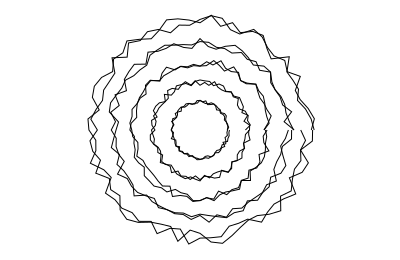
Two passes at 65% opacity is what sells the pencil: where the passes agree
the line darkens, where they disagree it feathers. The whole effect is
one signed wobble (r * (1 + hash11(k, seed) * 0.07)) plus disciplined
seeds — pass A and pass B of ring 2 read decks 4 and 5, so no two strokes
ever wobble in sync.
Where to go next
hashRange— when the drift should live in a min/max band instead of around a center.bump— the smooth width profiles this post's example 4 jitters.noise— when neighboring indices should agree instead of drifting independently.- Reference: Hash & Noise docs.