From Fonts to Paths: Glyph Extraction with PathBlock.fromGlyph()
Part 2 of 2 in our series on TextBlock and font integration.
Series: TextBlock & Font Integration
- TextBlock: Measure-First Text for SVG Diagrams
- From Fonts to Paths: Glyph Extraction with PathBlock.fromGlyph() (this post)
Prerequisites: This post assumes familiarity with PathBlock basics — the
@{}sigil,.draw(),.project(), and boolean operations. If you're new to Pathogen, start with Introduction to PathBlocks. For boolean operations, see Boolean Operations.
TextBlock gives you a compose-measure-position workflow for SVG text. You build text at relative coordinates, measure its bounding box, place it precisely, and draw it to a TextLayer. That covers most labeling and annotation work. But the result is still an SVG <text> element — a string the browser renders with its own font engine. You can't sample points along its outline, apply a fillet to its corners, or punch it out of a rectangle with a boolean difference.
Where Part 1 made text measurable, this post makes it malleable — converting glyphs into path geometry you can transform, decompose, and combine.
What if you need text as geometry — actual path commands you can transform, combine, and query like any other shape? Think logo construction where letters are punched out of a background plate. Or generative typography where each character follows a different arc. Or a stencil design where glyph outlines need to be offset and duplicated. These tasks require the text's vector outline, not its rendered pixels.
That's what font integration provides. The @font directive loads a font file, and PathBlock.fromGlyph() converts each character into a PathBlock with the glyph's full vector outline. From there, everything in the PathBlock series applies: drawing and positioning, parametric sampling, fillets and chamfers, boolean operations, and all the transforms.
Loading Fonts with @font
Before you can extract glyphs, Pathogen needs access to the font's vector data. The @font directive declares a font at the top level of your program:
@font "Inter";
@font "Roboto Mono" 700;
@font "./fonts/CustomFont.ttf";
The directive takes a font source (family name or file path) and an optional numeric weight (100-900, default 400). How the font is actually loaded depends on the environment:
- CLI: Loads from local file paths relative to the source file, or searches system font directories (
/Library/Fonts,/System/Library/Fonts,~/Library/Fontson macOS, with equivalent paths on Linux and Windows). - Playground: Fetches from the Google Fonts CDN automatically. Specify a family name and the playground handles the HTTP request.
The directive is purely declarative — the host environment loads font data before compilation begins. If a font can't be found, a warning is logged and compilation continues. This means @font never blocks the build; it just determines whether glyph extraction and precise TextBlock metrics are available.
A single @font declaration serves double duty: it makes the font available for PathBlock.fromGlyph() glyph extraction and upgrades TextBlock .boundingBox() measurements from estimation tables to exact kerning-aware metrics via opentype.js. You don't need separate declarations for paths and text — one directive covers both.
CLI vs Playground: In the CLI,
@fontloads from local file paths or system font directories. In the Playground, fonts are fetched automatically from Google Fonts by family name. Both environments use the same opentype.js parser, so identical font files produce identical geometry.
Extracting Glyphs with PathBlock.fromGlyph()
PathBlock.fromGlyph(text, styles) is the core conversion function. It takes a text string and a style block, and returns an array of PathBlock values — one per character:
@font "Inter";

let styles = ${ font-family: Inter; font-size: 48; };
let glyphs = PathBlock.fromGlyph("Hello", styles);

log(glyphs.length);    // 5 — one PathBlock per character
The style block must include font-family (matching a loaded @font declaration). font-size defaults to 16 and font-weight defaults to 400 if omitted. The function walks each character in the text string, looks up the glyph in the loaded font, extracts its outline as cubic Bezier curves and line segments, scales to the requested font size, and wraps the result as a PathBlock with relative commands starting at (0, 0).
Each glyph PathBlock is a full PathBlock value with all the standard properties and methods. You can call .draw(), .drawTo(), .project(), .get(), .tangent(), .boundingBox(), .scale(), .fillet(), .union() — everything from the PathBlock documentation. The glyph is geometry now, not text.
@font "Inter";

let glyphs = PathBlock.fromGlyph("A", ${ font-family: Inter; font-size: 72; });

// Draw the glyph
glyphs[0].drawTo(50, 100)

// Query its geometry
log(glyphs[0].length);           // total outline arc-length
log(glyphs[0].boundingBox());    // { x, y, width, height }
log(glyphs[0].vertices.length);  // number of junction points
fromGlyph() always returns an array — one PathBlock per character — even for single characters. That's why we index with glyphs[0] above.
Space characters are handled correctly: they return an empty PathBlock (no path commands, zero length) but still carry a non-zero .advanceWidth for layout purposes. This means a loop over PathBlock.fromGlyph("Hello World", styles) will naturally insert a gap between "Hello" and "World" without special-casing.
If something goes wrong, the error messages are specific. Wrong argument count, missing font-family, no @font loaded, font not found in the registry — each condition has its own message telling you exactly what to fix.
Manual Text Layout with advanceWidth
Drawing glyph PathBlocks is straightforward, but you need to position them correctly. In a font, each glyph has an advance width — the horizontal distance the cursor should move after drawing that glyph before drawing the next one. This is how proportional fonts work: a narrow "i" advances less than a wide "M".
Every glyph PathBlock from fromGlyph() carries an .advanceWidth property. To lay out a word, accumulate advance widths in a loop:
@font "Bebas Neue";
let styles = ${ font-family: BebasNeue-Regular; font-size: 64; };
let glyphs = PathBlock.fromGlyph("PATHOGEN", styles);

let cursor_x = 60;
let baseline_y = 140;
for (g in glyphs) {
  g.drawTo(cursor_x, baseline_y)
  cursor_x = calc(cursor_x + g.advanceWidth);
}
This is the text layout engine's job, and now it's yours. The advance width accumulation produces the same letter spacing that a browser would use for the same font at the same size — because the values come directly from the font file via opentype.js.
The difference between proportional and monospace fonts shows up clearly here. A proportional font like Bebas Neue produces variable spacing: the "P" might advance 22px while the "I" advances 8px. A monospace font like Inconsolata advances every character by the same amount. The demo below renders the same word in both fonts, with dashed tick marks showing each character's advance-width boundary.
// viewBox="0 0 600 300"
// Hello World glyph layout — advance-width loop placing each letter

@font "../../../../fonts/Bebas_Neue/BebasNeue-Regular.ttf"
@font "../../../../fonts/Inconsolata/Inconsolata-Regular.ttf"

// --- Background ---

let bg = PathLayer('bg') ${ fill: Color('#0f172a'); stroke: none; };
bg.apply { rect(0, 0, 600, 300) }

// ─── Glyph layout with advance widths ────────────────────────────

let word = "PATHOGEN";
let styles = ${ font-family: BebasNeue-Regular; font-size: 64; };
let glyphs = PathBlock.fromGlyph(word, styles);

// Place glyphs using advance width accumulation
let glyph_layer = PathLayer('glyphs') ${
  fill: Color('#3b82f6');
  stroke: none;
};

let baseline_y = 140;
let start_x = 60;
let cursor_x = start_x;

glyph_layer.apply {
  for (g in glyphs) {
    g.drawTo(cursor_x, baseline_y)
    cursor_x = calc(cursor_x + g.advanceWidth);
  }
}

// --- Baseline and advance width markers ---

let markers = PathLayer('markers') ${
  stroke: Color('#f59e0b');
  stroke-width: 0.75;
  fill: none;
};

// Baseline
markers.apply {
  M start_x baseline_y h calc(cursor_x - start_x)
}

// Advance width ticks
let ticks = PathLayer('ticks') ${
  stroke: Color('#f59e0b60');
  stroke-width: 0.5;
  stroke-dasharray: "2 3";
  fill: none;
};

let tick_x = start_x;
ticks.apply {
  for (g in glyphs) {
    M tick_x calc(baseline_y - 70) v 80
    let tick_x = calc(tick_x + g.advanceWidth);
  }
  M tick_x calc(baseline_y - 70) v 80
}

// --- Second row: Inconsolata (monospace) ---

let word2 = "PATHOGEN";
let styles2 = ${ font-family: Inconsolata-Regular; font-size: 48; };
let glyphs2 = PathBlock.fromGlyph(word2, styles2);

let glyph_layer2 = PathLayer('glyphs2') ${
  fill: Color('#22c55e');
  stroke: none;
};

let baseline_y2 = 230;
let cursor_x2 = start_x;

glyph_layer2.apply {
  for (g in glyphs2) {
    g.drawTo(cursor_x2, baseline_y2)
    cursor_x2 = calc(cursor_x2 + g.advanceWidth);
  }
}

// Baseline 2
let markers2 = PathLayer('markers2') ${
  stroke: Color('#22c55e');
  stroke-width: 0.75;
  fill: none;
};
markers2.apply {
  M start_x baseline_y2 h calc(cursor_x2 - start_x)
}

// --- Font labels ---

let labels = TextLayer('labels') ${
  font-family: monospace;
  font-size: 8;
  fill: Color('#64748b');
  text-anchor: start;
};
labels.apply {
  text(start_x, calc(baseline_y + 16))`Bebas Neue · 64px · advanceWidth layout`
  text(start_x, calc(baseline_y2 + 16))`Inconsolata · 48px · uniform advance widths`
}

// --- Title ---

let title = TextLayer('title') ${
  font-family: system-ui, sans-serif;
  font-size: 13;
  fill: Color('#e2e8f0');
  text-anchor: start;
};
title.apply { text(30, 30)`Glyph Layout with Advance Widths` }

// --- Code snippet ---

let code_group = GroupLayer('code-block') ${ translate-x: 350; translate-y: 20; };

let code = TextLayer('code') ${
  font-family: monospace;
  font-size: 8;
  fill: Color('#94a3b8');
  text-anchor: start;
};
code.apply {
  text(0, 0)`let cursor_x = start_x;`
  text(0, 12)`for (g in glyphs) {`
  text(8, 24)`g.drawTo(cursor_x, baseline)`
  text(8, 36)`cursor_x += g.advanceWidth`
  text(0, 48)`}`
}

let kw = TextLayer('kw') ${
  font-family: monospace;
  font-size: 8;
  fill: Color('#c084fc');
  text-anchor: start;
};
kw.apply {
  text(0, 0)`let`
  text(0, 12)`for`
}

code_group.append(code, kw);
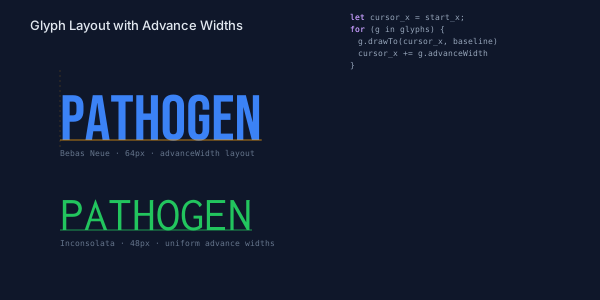
The yellow baseline and dashed tick marks make the layout mechanics visible. In the top row, the proportional font produces uneven column widths — "A" and "H" are wider than "T" and "O". In the bottom row, the monospace font produces a uniform grid. Both layouts use the same accumulation loop; the font's advance widths do all the work.
Because you're controlling the cursor directly, you can adjust spacing however you want. Multiply advance widths by a tracking factor to tighten or loosen letter spacing. Add a fixed offset for extra gaps. Skip characters, reverse the order, lay them out vertically — it's just arithmetic in a loop.
Contour Decomposition
Most glyphs are made of multiple contours. The letter "O" has an outer ring and an inner hole — two closed paths. The letter "i" has a body and a dot — also two. Some glyphs are more complex: "B" has an outer shape plus two enclosed holes.
The .contours property splits a glyph PathBlock into its constituent contours, returning an array of PathBlock values — one per contour:
@font "Inter";
let styles = ${ font-family: Inter; font-size: 48; };
let glyphs = PathBlock.fromGlyph("O", styles);

let contours = glyphs[0].contours;
log(contours.length);    // 2 — outer ring + inner hole
Each contour is a closed PathBlock with all standard properties and methods. You can draw them individually, apply different styles, transform them independently, or use them in boolean operations. Here's what iterating over contours looks like:
@font "Inter";
let styles = ${ font-family: Inter; font-size: 48; };
let glyphs = PathBlock.fromGlyph("B", styles);

let contours = glyphs[0].contours;
// contours[0] = outer shape
// contours[1] = upper hole
// contours[2] = lower hole

// Draw each contour with different styling
for (c in contours) {
  c.drawTo(50, 100)
}
The number of contours per glyph varies by character and font design. Simple glyphs like "n" or "c" typically have a single contour. Letters with enclosed spaces — "o", "e", "d", "g" — usually have two. Letters with multiple enclosed regions — "B", "8" — can have three or more. Punctuation follows the same logic: "!" has two contours (the body stroke and the dot below), while "-" has just one.
To draw each contour with a different fill, iterate over the array and assign colors from a palette:
@font "Inter";
let styles = ${ font-family: Inter; font-size: 56; };
let glyphs = PathBlock.fromGlyph("B", styles);

let colors = [Color('#3b82f6'), Color('#22c55e'), Color('#f59e0b')];
let fills  = [Color('#3b82f630'), Color('#22c55e30'), Color('#f59e0b30')];

let contours = glyphs[0].contours;
let ci = 0;
for (c in contours) {
  let layer = PathLayer('c' + ci) ${
    fill: fills[ci];
    stroke: colors[ci];
    stroke-width: 1.5;
  };
  layer.apply { c.drawTo(50, 100) }
  ci = calc(ci + 1);
}
The demo below decomposes "Bingo!" into its contours. Count them: B has 3 (outer shape + 2 holes), i has 2 (body + dot), n has 1 (solid body), g has 2 (body + descender loop), o has 2 (outer + inner), and ! has 2 (body + dot). That's 12 contours across 6 characters, each drawn in its own color. Each contour is colored from a 12-color palette cycling through blue, green, amber, red, purple, pink, cyan, lime, orange, indigo, teal, and fuchsia.
// viewBox="0 0 660 400"
// Contour decomposition — .contours splits multi-contour glyphs across "Bingo!"

@font "../../../../fonts/Raleway/Raleway-Bold.ttf"

// --- Background ---

let bg = PathLayer('bg') ${ fill: Color('#0f172a'); stroke: none; };
bg.apply { rect(0, 0, 660, 400) }

// --- Contour color palette (12 colors for 12 contours) ---

let colors = [
  Color('#3b82f6'), Color('#22c55e'), Color('#f59e0b'),
  Color('#ef4444'), Color('#a855f7'), Color('#ec4899'),
  Color('#06b6d4'), Color('#84cc16'), Color('#f97316'),
  Color('#6366f1'), Color('#14b8a6'), Color('#e879f9'),
];

let fills = [
  Color('#3b82f630'), Color('#22c55e30'), Color('#f59e0b30'),
  Color('#ef444430'), Color('#a855f730'), Color('#ec489930'),
  Color('#06b6d430'), Color('#84cc1630'), Color('#f9731630'),
  Color('#6366f130'), Color('#14b8a630'), Color('#e879f930'),
];

// --- Font setup ---

let word = "Bingo!";

// ─── LEFT COLUMN ─────────────────────────────────────────────────

let g_left = GroupLayer('left-col') ${ translate-x: 30; translate-y: 0; };

// Title
let title = TextLayer('title') ${
  font-family: system-ui, sans-serif;
  font-size: 14;
  fill: Color('#e2e8f0');
  text-anchor: start;
};
title.apply { text(0, 30)`Contour Decomposition` }

let subtitle = TextLayer('subtitle') ${
  font-family: system-ui, sans-serif;
  font-size: 9;
  fill: Color('#64748b');
  text-anchor: start;
};
subtitle.apply { text(0, 44)`.contours splits glyphs into individual PathBlocks` }

// Assembled word — size to fit within ~290px column
let asm_styles = ${ font-family: Raleway-Bold; font-size: 72; };
let asm_glyphs = PathBlock.fromGlyph(word, asm_styles);

let asm_layer = PathLayer('assembled') ${
  fill: Color('#3b82f6');
  stroke: none;
};

let asm_cursor = 0;
asm_layer.apply {
  for (g in asm_glyphs) {
    g.drawTo(asm_cursor, 115)
    asm_cursor = calc(asm_cursor + g.advanceWidth);
  }
}

let asm_label = TextLayer('asm-label') ${
  font-family: monospace;
  font-size: 8;
  fill: Color('#64748b');
  text-anchor: start;
};
asm_label.apply { text(0, 148)`Assembled — 6 characters, solid fill` }

g_left.append(title, subtitle, asm_layer, asm_label);

// ─── Decomposed contours — smaller size to fit all 6 letters ────

let g_decomp = GroupLayer('decomposed') ${ translate-x: 30; translate-y: 176; };

let dec_styles = ${ font-family: Raleway-Bold; font-size: 56; };
let dec_glyphs = PathBlock.fromGlyph(word, dec_styles);

let letter_gap = 6;

// Compute each letter's x position
let x_B = 0;
let x_i = calc(x_B + dec_glyphs[0].advanceWidth + letter_gap);
let x_n = calc(x_i + dec_glyphs[1].advanceWidth + letter_gap);
let x_g = calc(x_n + dec_glyphs[2].advanceWidth + letter_gap);
let x_o = calc(x_g + dec_glyphs[3].advanceWidth + letter_gap);
let x_ex = calc(x_o + dec_glyphs[4].advanceWidth + letter_gap);

let dec_y = 70;

// --- B: 3 contours (outer + 2 holes) ---
let contours_B = dec_glyphs[0].contours;
let cB0 = PathLayer('cB0') ${ fill: fills[0]; stroke: colors[0]; stroke-width: 1.5; };
let cB1 = PathLayer('cB1') ${ fill: fills[1]; stroke: colors[1]; stroke-width: 1.5; };
let cB2 = PathLayer('cB2') ${ fill: fills[2]; stroke: colors[2]; stroke-width: 1.5; };
cB0.apply { contours_B[0].drawTo(x_B, dec_y) }
cB1.apply { contours_B[1].drawTo(x_B, dec_y) }
cB2.apply { contours_B[2].drawTo(x_B, dec_y) }
g_decomp.append(cB0, cB1, cB2);

// --- i: 2 contours (body + dot) ---
let contours_i = dec_glyphs[1].contours;
let ci0 = PathLayer('ci0') ${ fill: fills[3]; stroke: colors[3]; stroke-width: 1.5; };
let ci1 = PathLayer('ci1') ${ fill: fills[4]; stroke: colors[4]; stroke-width: 1.5; };
ci0.apply { contours_i[0].drawTo(x_i, dec_y) }
ci1.apply { contours_i[1].drawTo(x_i, dec_y) }
g_decomp.append(ci0, ci1);

// --- n: 1 contour ---
let contours_n = dec_glyphs[2].contours;
let cn0 = PathLayer('cn0') ${ fill: fills[5]; stroke: colors[5]; stroke-width: 1.5; };
cn0.apply { contours_n[0].drawTo(x_n, dec_y) }
g_decomp.append(cn0);

// --- g: 2 contours (body + tail) ---
let contours_g = dec_glyphs[3].contours;
let cg0 = PathLayer('cg0') ${ fill: fills[6]; stroke: colors[6]; stroke-width: 1.5; };
let cg1 = PathLayer('cg1') ${ fill: fills[7]; stroke: colors[7]; stroke-width: 1.5; };
cg0.apply { contours_g[0].drawTo(x_g, dec_y) }
cg1.apply { contours_g[1].drawTo(x_g, dec_y) }
g_decomp.append(cg0, cg1);

// --- o: 2 contours (outer + hole) ---
let contours_o = dec_glyphs[4].contours;
let co0 = PathLayer('co0') ${ fill: fills[8]; stroke: colors[8]; stroke-width: 1.5; };
let co1 = PathLayer('co1') ${ fill: fills[9]; stroke: colors[9]; stroke-width: 1.5; };
co0.apply { contours_o[0].drawTo(x_o, dec_y) }
co1.apply { contours_o[1].drawTo(x_o, dec_y) }
g_decomp.append(co0, co1);

// --- !: 2 contours (body + dot) ---
let contours_ex = dec_glyphs[5].contours;
let cex0 = PathLayer('cex0') ${ fill: fills[10]; stroke: colors[10]; stroke-width: 1.5; };
let cex1 = PathLayer('cex1') ${ fill: fills[11]; stroke: colors[11]; stroke-width: 1.5; };
cex0.apply { contours_ex[0].drawTo(x_ex, dec_y) }
cex1.apply { contours_ex[1].drawTo(x_ex, dec_y) }
g_decomp.append(cex0, cex1);

// --- Letter labels and contour counts ---

let char_labels = ["B", "i", "n", "g", "o", "!"];
let char_counts = ["3", "2", "1", "2", "2", "2"];
let x_positions = [x_B, x_i, x_n, x_g, x_o, x_ex];

let lbl_layer = TextLayer('char-labels') ${
  font-family: monospace;
  font-size: 10;
  fill: Color('#e2e8f0');
  text-anchor: middle;
};
let cnt_layer = TextLayer('char-counts') ${
  font-family: monospace;
  font-size: 7;
  fill: Color('#64748b');
  text-anchor: middle;
};

lbl_layer.apply {
  text(calc(x_B + dec_glyphs[0].advanceWidth / 2), 100)`B`
  text(calc(x_i + dec_glyphs[1].advanceWidth / 2), 100)`i`
  text(calc(x_n + dec_glyphs[2].advanceWidth / 2), 100)`n`
  text(calc(x_g + dec_glyphs[3].advanceWidth / 2), 100)`g`
  text(calc(x_o + dec_glyphs[4].advanceWidth / 2), 100)`o`
  text(calc(x_ex + dec_glyphs[5].advanceWidth / 2), 100)`!`
}

cnt_layer.apply {
  text(calc(x_B + dec_glyphs[0].advanceWidth / 2), 112)`3`
  text(calc(x_i + dec_glyphs[1].advanceWidth / 2), 112)`2`
  text(calc(x_n + dec_glyphs[2].advanceWidth / 2), 112)`1`
  text(calc(x_g + dec_glyphs[3].advanceWidth / 2), 112)`2`
  text(calc(x_o + dec_glyphs[4].advanceWidth / 2), 112)`2`
  text(calc(x_ex + dec_glyphs[5].advanceWidth / 2), 112)`2`
}

g_decomp.append(lbl_layer, cnt_layer);

// Decomposed section footer
let dec_footer = TextLayer('dec-footer') ${
  font-family: monospace;
  font-size: 8;
  fill: Color('#64748b');
  text-anchor: start;
};
dec_footer.apply { text(0, 135)`12 contours across 6 characters` }
g_decomp.append(dec_footer);

// ─── RIGHT COLUMN ────────────────────────────────────────────────

let g_right = GroupLayer('right-col') ${ translate-x: 360; translate-y: 0; };

// Contour Color Key title
let leg_title = TextLayer('leg-title') ${
  font-family: system-ui, sans-serif;
  font-size: 10;
  fill: Color('#e2e8f0');
  text-anchor: start;
};
leg_title.apply { text(0, 30)`Contour Color Key` }

// Legend entries — 12 rows
let leg_top = 44;
let leg_h = 14;

let ld0 = PathLayer('ld0') ${ fill: colors[0]; stroke: none; };
let ld1 = PathLayer('ld1') ${ fill: colors[1]; stroke: none; };
let ld2 = PathLayer('ld2') ${ fill: colors[2]; stroke: none; };
let ld3 = PathLayer('ld3') ${ fill: colors[3]; stroke: none; };
let ld4 = PathLayer('ld4') ${ fill: colors[4]; stroke: none; };
let ld5 = PathLayer('ld5') ${ fill: colors[5]; stroke: none; };
let ld6 = PathLayer('ld6') ${ fill: colors[6]; stroke: none; };
let ld7 = PathLayer('ld7') ${ fill: colors[7]; stroke: none; };
let ld8 = PathLayer('ld8') ${ fill: colors[8]; stroke: none; };
let ld9 = PathLayer('ld9') ${ fill: colors[9]; stroke: none; };
let ld10 = PathLayer('ld10') ${ fill: colors[10]; stroke: none; };
let ld11 = PathLayer('ld11') ${ fill: colors[11]; stroke: none; };

ld0.apply { rect(0, leg_top, 8, 8) }
ld1.apply { rect(0, calc(leg_top + leg_h), 8, 8) }
ld2.apply { rect(0, calc(leg_top + leg_h * 2), 8, 8) }
ld3.apply { rect(0, calc(leg_top + leg_h * 3), 8, 8) }
ld4.apply { rect(0, calc(leg_top + leg_h * 4), 8, 8) }
ld5.apply { rect(0, calc(leg_top + leg_h * 5), 8, 8) }
ld6.apply { rect(0, calc(leg_top + leg_h * 6), 8, 8) }
ld7.apply { rect(0, calc(leg_top + leg_h * 7), 8, 8) }
ld8.apply { rect(0, calc(leg_top + leg_h * 8), 8, 8) }
ld9.apply { rect(0, calc(leg_top + leg_h * 9), 8, 8) }
ld10.apply { rect(0, calc(leg_top + leg_h * 10), 8, 8) }
ld11.apply { rect(0, calc(leg_top + leg_h * 11), 8, 8) }

let leg_text = TextLayer('leg-text') ${
  font-family: monospace;
  font-size: 8;
  fill: Color('#94a3b8');
  text-anchor: start;
};
let ty = calc(leg_top + 7);
leg_text.apply {
  text(14, ty)`B outer`
  text(14, calc(ty + leg_h))`B hole 1`
  text(14, calc(ty + leg_h * 2))`B hole 2`
  text(14, calc(ty + leg_h * 3))`i body`
  text(14, calc(ty + leg_h * 4))`i dot`
  text(14, calc(ty + leg_h * 5))`n body`
  text(14, calc(ty + leg_h * 6))`g body`
  text(14, calc(ty + leg_h * 7))`g tail`
  text(14, calc(ty + leg_h * 8))`o outer`
  text(14, calc(ty + leg_h * 9))`o hole`
  text(14, calc(ty + leg_h * 10))`! body`
  text(14, calc(ty + leg_h * 11))`! dot`
}

g_right.append(leg_title, ld0, ld1, ld2, ld3, ld4, ld5, ld6, ld7, ld8, ld9, ld10, ld11, leg_text);

// Code snippet — well below the legend
let code_top = calc(leg_top + leg_h * 12 + 30);

let code_title = TextLayer('code-title') ${
  font-family: system-ui, sans-serif;
  font-size: 10;
  fill: Color('#e2e8f0');
  text-anchor: start;
};
code_title.apply { text(0, code_top)`Usage` }

let code = TextLayer('code') ${
  font-family: monospace;
  font-size: 8;
  fill: Color('#94a3b8');
  text-anchor: start;
};
let cl = calc(code_top + 18);
code.apply {
  text(0, cl)`let glyphs = PathBlock.fromGlyph("Bingo!", styles);`
  text(0, calc(cl + 18))`for (g in glyphs) {`
  text(10, calc(cl + 30))`let parts = g.contours;`
  text(10, calc(cl + 42))`// each part is a PathBlock`
  text(0, calc(cl + 54))`}`
}

let kw = TextLayer('kw') ${
  font-family: monospace;
  font-size: 8;
  fill: Color('#c084fc');
  text-anchor: start;
};
kw.apply {
  text(0, cl)`let`
  text(0, calc(cl + 18))`for`
  text(10, calc(cl + 30))`let`
}

g_right.append(code_title, code, kw);

// ─── Divider ─────────────────────────────────────────────────────

let divider = PathLayer('divider') ${
  stroke: Color('#1e293b');
  stroke-width: 1;
  fill: none;
};
divider.apply { M 345 20 v 370 }
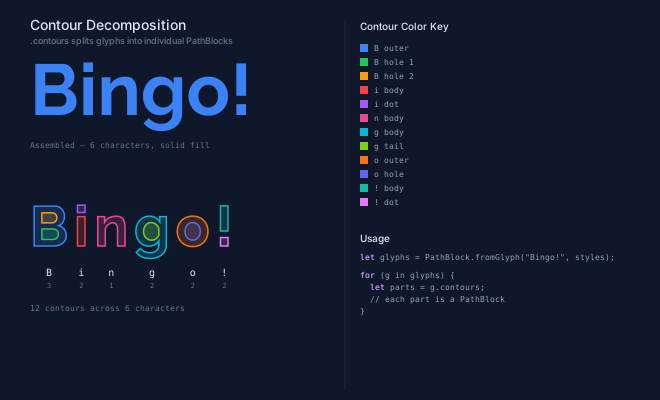
The top row shows the assembled word rendered normally — solid fill, single color. The decomposed version below separates every contour into its own PathBlock, each with a distinct stroke color and semi-transparent fill. The color key on the right identifies each piece: B's three parts, i's body and dot, and so on.
When would you use contour decomposition? Anytime you need to treat parts of a glyph independently. Color the inside of an "O" differently from its ring. Animate the dot of an "i" separately from its stem. Extract just the outer contour of a "B" for a custom logo mark. Each contour is a full PathBlock, so it composes with everything else in the language.
Per-Character Transforms
When each character is its own PathBlock, you can transform them individually. The standard PathBlock transform methods — .scale(), .rotateAtVertexIndex(), .mirror() — work on glyph PathBlocks just like any other shape.
These patterns appear frequently in poster design, motion graphics titles, custom lettering, and generative art.
The interesting part is combining transforms with the advance-width layout loop. Instead of just placing each glyph at the cursor position, you apply a per-character transformation first:
Wave Effect
Offset each character vertically using a sine function:
let idx = 0;
for (g in glyphs) {
  let y_offset = calc(sin(idx * 0.8) * 15);
  g.drawTo(cursor_x, calc(baseline + y_offset))
  cursor_x = calc(cursor_x + g.advanceWidth);
  idx = calc(idx + 1);
}
Each character sits at a different vertical position along the sine curve, creating a wave pattern. The advance widths still control horizontal spacing — only the y-coordinate changes.
Scale Cascade
Increase the scale of each successive character:
let idx = 0;
for (g in glyphs) {
  let s = calc(0.5 + idx * 0.25);
  let scaled = g.scale(s, s);
  scaled.drawTo(cursor_x, baseline)
  cursor_x = calc(cursor_x + g.advanceWidth * s);
  idx = calc(idx + 1);
}
Notice that both the glyph and its advance width are scaled by the same factor. This keeps the spacing proportional to the size. The first character is half-size, the second is 75%, and so on.
Circular Arc Text
The key geometric relationship is angle = arc_length / radius — dividing a character's advance width by the arc radius converts linear distance to angular offset in radians. This lets you place characters along a circular path using trigonometry:
for (g in glyphs) {
  let char_mid = calc(arc_cursor + g.advanceWidth / 2);
  let angle = calc(arc_start + char_mid / arc_r);
  let cx = calc(arc_cx + cos(angle) * arc_r);
  let cy = calc(arc_cy + sin(angle) * arc_r);
  let rotated = g.rotateAtVertexIndex(0, calc(angle + 0.5pi));
  rotated.drawTo(cx, cy)
  arc_cursor = calc(arc_cursor + g.advanceWidth);
}
Each glyph is rotated to follow the arc's tangent direction using .rotateAtVertexIndex(0, angle), then placed at the corresponding position on the circle. The 0.5pi uses Pathogen's numeric suffix notation — a shorthand for π/2 (a quarter turn) — which converts the radial angle to the tangent direction. The advance widths are converted to angular offsets by dividing by the arc radius.
// viewBox="0 0 600 220"
// Per-character transforms — wave, scale, and arc effects on individual glyphs

@font "../../../../fonts/Bebas_Neue/BebasNeue-Regular.ttf"

// --- Background ---

let bg = PathLayer('bg') ${ fill: Color('#0f172a'); stroke: none; };
bg.apply { rect(0, 0, 600, 220) }

// Shared font styles
let styles = ${ font-family: BebasNeue-Regular; font-size: 72; };
let label_styles = ${ font-family: monospace; font-size: 8; };

// Column geometry: three equal columns across 600px
// Each column ~200px wide, starting at x=0, x=200, x=400
let col_w = 200;

// Track all labels for intersection checks
let placed_labels = [];

// ═══════════════════════════════════════════════════════════════════
// WAVE — sin() vertical offset per character (left column)
// ═══════════════════════════════════════════════════════════════════

let g_wave = GroupLayer('wave-group') ${ translate-x: 20; translate-y: 30; };

// Effect name
let wave_title = TextLayer('wave-title') ${
  font-family: system-ui, sans-serif;
  font-size: 11;
  fill: Color('#94a3b8');
  text-anchor: start;
};
wave_title.apply { text(0, 0)`WAVE` }

let word = "WAVE";
let glyphs = PathBlock.fromGlyph(word, styles);

let wave_layer = PathLayer('wave') ${
  fill: Color('#3b82f6');
  stroke: none;
};

let wave_x = 0;
let wave_baseline = 90;

wave_layer.apply {
  let idx = 0;
  for (g in glyphs) {
    let y_offset = calc(sin(idx * 0.8) * 15);
    g.drawTo(wave_x, calc(wave_baseline + y_offset))
    wave_x = calc(wave_x + g.advanceWidth);
    idx = calc(idx + 1);
  }
}

// Description label
let wave_label_block = &{ text(0, 8)`sin(i) vertical offset` } << label_styles;
let wave_label_proj = wave_label_block.project(0, 120);

let wave_label = TextLayer('wave-label') ${
  font-family: monospace;
  font-size: 8;
  fill: Color('#64748b');
  text-anchor: start;
};
wave_label.apply {
  wave_label_proj.draw();
}

placed_labels.push(wave_label_proj);

g_wave.append(wave_title, wave_layer, wave_label);

// ═══════════════════════════════════════════════════════════════════
// GROW — increasing scale per character (center column)
// ═══════════════════════════════════════════════════════════════════

let g_scale = GroupLayer('scale-group') ${ translate-x: 210; translate-y: 30; };

// Effect name
let grow_title = TextLayer('grow-title') ${
  font-family: system-ui, sans-serif;
  font-size: 11;
  fill: Color('#94a3b8');
  text-anchor: start;
};
grow_title.apply { text(0, 0)`GROW` }

let word2 = "GROW";
let glyphs2 = PathBlock.fromGlyph(word2, styles);

let scale_layer = PathLayer('scale') ${
  fill: Color('#22c55e');
  stroke: none;
};

let scale_x = 0;

scale_layer.apply {
  let idx2 = 0;
  for (g in glyphs2) {
    let s = calc(0.5 + idx2 * 0.25);
    let scaled = g.scale(s, s);
    scaled.drawTo(scale_x, 90)
    scale_x = calc(scale_x + g.advanceWidth * s);
    idx2 = calc(idx2 + 1);
  }
}

// Description label
let scale_label_block = &{ text(0, 8)`scale(0.5 + i * 0.25)` } << label_styles;
let scale_label_proj = scale_label_block.project(0, 120);

let scale_label = TextLayer('scale-label') ${
  font-family: monospace;
  font-size: 8;
  fill: Color('#64748b');
  text-anchor: start;
};
scale_label.apply {
  scale_label_proj.draw();
}

placed_labels.push(scale_label_proj);

g_scale.append(grow_title, scale_layer, scale_label);

// ═══════════════════════════════════════════════════════════════════
// CIRCULAR — characters along a circular arc (right column)
// ═══════════════════════════════════════════════════════════════════

let g_arc = GroupLayer('arc-group') ${ translate-x: 400; translate-y: 30; };

// Effect name
let arc_title = TextLayer('arc-title') ${
  font-family: system-ui, sans-serif;
  font-size: 11;
  fill: Color('#94a3b8');
  text-anchor: start;
};
arc_title.apply { text(0, 0)`CIRCULAR` }

let word3 = "CIRCULAR";
let arc_styles = ${ font-family: BebasNeue-Regular; font-size: 30; };
let glyphs3 = PathBlock.fromGlyph(word3, arc_styles);

// Compute total width for arc distribution
let total_width = 0;
for (g in glyphs3) {
  total_width = calc(total_width + g.advanceWidth);
}

let arc_layer = PathLayer('arc') ${
  fill: Color('#f59e0b');
  stroke: none;
};

// Center the arc in the column: column is ~180px usable, center at 90
let arc_cx = 90;
let arc_cy = 75;
let arc_r = 55;
// Spread characters over an arc
let arc_span = calc(total_width / arc_r);
let arc_start = calc(-0.5pi - arc_span / 2);
let arc_cursor = 0;

arc_layer.apply {
  for (g in glyphs3) {
    let char_mid = calc(arc_cursor + g.advanceWidth / 2);
    let angle = calc(arc_start + char_mid / arc_r);

    let cx = calc(arc_cx + cos(angle) * arc_r);
    let cy = calc(arc_cy + sin(angle) * arc_r);

    // Rotate glyph to follow the arc tangent
    let rotated = g.rotateAtVertexIndex(0, calc(angle + 0.5pi));
    rotated.drawTo(cx, cy)

    arc_cursor = calc(arc_cursor + g.advanceWidth);
  }
}

// Guide arc (dashed circle)
let guide = PathLayer('guide') ${
  stroke: Color('#334155');
  stroke-width: 0.5;
  stroke-dasharray: "2 3";
  fill: none;
};
guide.apply { circle(calc(arc_cx), calc(arc_cy), arc_r) }

// Description label
let arc_label_block = &{ text(0, 8)`rotateAtVertexIndex along arc` } << label_styles;
let arc_label_proj = arc_label_block.project(calc(arc_cx - 50), 140);

let arc_label = TextLayer('arc-label') ${
  font-family: monospace;
  font-size: 8;
  fill: Color('#64748b');
  text-anchor: start;
};
arc_label.apply {
  arc_label_proj.draw();
}

placed_labels.push(arc_label_proj);

g_arc.append(arc_title, arc_layer, guide, arc_label);

// ═══════════════════════════════════════════════════════════════════
// Collision verification — check all label pairs
// ═══════════════════════════════════════════════════════════════════

let collision_count = 0;
let ci = 0;
for (a in placed_labels) {
  let cj = 0;
  for (b in placed_labels) {
    if (cj > ci) {
      if (a.intersects(b)) {
        collision_count = calc(collision_count + 1);
        log("WARN: label collision detected between labels ", ci, " and ", cj);
      }
    }
    cj = calc(cj + 1);
  }
  ci = calc(ci + 1);
}
log("Label collisions: ", collision_count, " (0 expected)");

// ═══════════════════════════════════════════════════════════════════
// Title (bottom)
// ═══════════════════════════════════════════════════════════════════

let title = TextLayer('title') ${
  font-family: system-ui, sans-serif;
  font-size: 13;
  fill: Color('#e2e8f0');
  text-anchor: start;
};
title.apply { text(30, 205)`Per-Character Transforms` }
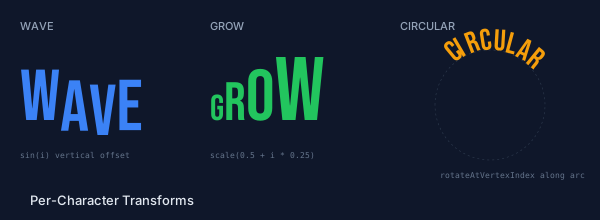
The three columns show each effect in isolation. The wave uses sin() to offset characters vertically. The grow effect scales each successive character larger with .scale(). The circular layout places rotated characters along a dashed guide circle. All three use the same advance-width accumulation loop — the only difference is what happens to each glyph before it's drawn.
These are building blocks, not finished effects. Combine a wave offset with a scale cascade. Apply a color gradient by assigning each character to a different layer with different fill colors. Use .mirror() to flip alternating characters for a decorative pattern. Apply a rotation to characters along a Bezier curve instead of a circle (using parametric sampling from Part 2 of the PathBlock series). The transform methods compose freely because each one returns a new PathBlock.
The key insight is that the advance-width loop structure stays the same across all these effects. You always accumulate cursor positions using .advanceWidth. The creative part is what you do to each glyph before drawing it — and since PathBlock transforms return new PathBlocks without modifying the original, you can experiment freely.
Text Cutout with Boolean Operations
One of the most visually striking uses of glyph extraction is punching text out of geometry. The conceptual pipeline has three stages: extract the glyph paths, combine them into a single outline, then subtract that outline from a background shape.
Punching Text from Geometry
The approach uses .union() and .difference() from the boolean operations post. First, extract and lay out the glyphs, then union them into a single outline and subtract from a plate:
@font "Bebas Neue";
let glyphs = PathBlock.fromGlyph("CUTTING", styles);

// Project each glyph at its layout position (advance-width loop)
let tracking = 0.8;
let cursor = 0;
let projected = [];
for (g in glyphs) {
  projected.push(g.project(cursor, 0));
  cursor = calc(cursor + g.advanceWidth * tracking);
}

// Union into a single path, then punch from a rectangle
let combined = projected[0];
for (i in 1..6) {  // remaining 6 of 7 glyphs
  combined = combined.union(projected[i]);
}
let cutout = plate.project(px, py).difference(combined);
The chaining works because every boolean operation returns a PathBlock, so the result of .union() feeds directly into the next .union() or .difference() — for any number of glyphs. Because boolean operations preserve curve types, the glyph outlines stay smooth at any zoom level.
The demo below shows the full pipeline in five panels: individual glyph outlines, a .union() arrow, the combined path, a .difference() arrow, and the final cutout. Stage 1 lays out each of the seven glyphs as a separate colored outline. Stage 2 unions all seven into a single solid path. Stage 3 punches the united text out of a green rectangle using .difference().
// viewBox="0 0 900 310"
// Text cutout — seven-glyph pipeline: glyph outlines → union → difference

@font "../../../../fonts/Bebas_Neue/BebasNeue-Regular.ttf"

// --- Background ---

let bg = PathLayer('bg') ${ fill: Color('#0f172a'); stroke: none; };
bg.apply { rect(0, 0, 900, 310) }

// --- Palette ---

let c_blue   = Color('#3b82f6');
let c_green  = Color('#22c55e');
let c_amber  = Color('#f59e0b');
let c_rose   = Color('#f43f5e');
let c_violet = Color('#8b5cf6');
let c_cyan   = Color('#06b6d4');
let c_orange = Color('#f97316');
let c_text   = Color('#e2e8f0');
let c_muted  = Color('#64748b');
let c_faint  = Color('#94a3b8');
let c_arrow  = Color('#475569');

let palette = [c_blue, c_green, c_amber, c_rose, c_violet, c_cyan, c_orange];
let palette_fill = [Color('#3b82f618'), Color('#22c55e18'), Color('#f59e0b18'), Color('#f43f5e18'), Color('#8b5cf618'), Color('#06b6d418'), Color('#f9731618')];

// ─── Build glyph paths with advance-width layout ──────────────────

let word = "CUTTING";
let styles = ${ font-family: BebasNeue-Regular; font-size: 60; };
let glyphs = PathBlock.fromGlyph(word, styles);

// Compute cursor positions with tracking
let tracking = 0.8;
let cursor = 0;
let positions = [];
let projected = [];
for (g in glyphs) {
  positions.push(cursor);
  projected.push(g.project(cursor, 0));
  cursor = calc(cursor + g.advanceWidth * tracking);
}

// ─── Boolean operations ──────────────────────────────────────────

// Union all projected glyphs into a single path
let combined = projected[0];
for (i in 1..6) {  // remaining 6 of 7 glyphs
  combined = combined.union(projected[i]);
}

// .project(0, 0) converts union result to positioned path for boundingBox/difference
let cbb = combined.project(0, 0).boundingBox();
let pad = 15;
let plate = @{ h calc(cbb.width + pad * 2) v calc(cbb.height + pad * 2) h calc(-(cbb.width + pad * 2)) z };
let plate_proj = plate.project(calc(cbb.x - pad), calc(cbb.y - pad));

// Punch the text out of the plate
let cutout = plate_proj.difference(combined.project(0, 0));

// ─── 5-column layout constants ──────────────────────────────────────
// [ Stage 1 (glyphs) | Arrow 1 | Stage 2 (union) | Arrow 2 | Stage 3 (cutout) ]
//   0..240              240..320   320..520          520..610   610..900

let geo_y = 50;
let baseline_y = 80;
let label_y = 200;

// ═══════════════════════════════════════
// Stage 1: Individual glyph outlines
// ═══════════════════════════════════════

let g_stage1 = GroupLayer('stage1') ${ translate-x: 0; translate-y: 0; };

let s1_x = 30;
let gi = 0;
for (g in glyphs) {
  let gl = PathLayer(`g-${gi}`) ${
    stroke: palette[gi];
    stroke-width: 1.5;
    fill: palette_fill[gi];
  };
  gl.apply { g.drawTo(calc(s1_x + positions[gi]), calc(geo_y + baseline_y)) }
  g_stage1.append(gl);
  gi = calc(gi + 1);
}

let s1_label = TextLayer('s1-label') ${ font-family: monospace; font-size: 8; fill: c_muted; text-anchor: start; };
s1_label.apply {
  text(s1_x, label_y)`7 glyph PathBlocks`
  text(s1_x, calc(label_y + 12))`laid out by advanceWidth`
}

g_stage1.append(s1_label);

// ═══════════════════════════════════════
// Stage 2: Union result
// ═══════════════════════════════════════

let g_stage2 = GroupLayer('stage2') ${ translate-x: 320; translate-y: 0; };

let union_layer = PathLayer('union-result') ${ fill: c_blue; stroke: none; };
union_layer.apply { combined.drawTo(30, calc(geo_y + baseline_y)) }

let s2_label = TextLayer('s2-label') ${ font-family: monospace; font-size: 8; fill: c_muted; text-anchor: start; };
s2_label.apply { text(30, label_y)`single united path` }

g_stage2.append(union_layer, s2_label);

// ═══════════════════════════════════════
// Stage 3: Difference cutout
// ═══════════════════════════════════════

let g_stage3 = GroupLayer('stage3') ${ translate-x: 610; translate-y: 0; };

let cutout_layer = PathLayer('cutout-result') ${ fill: c_green; stroke: none; };
cutout_layer.apply { cutout.drawTo(30, calc(geo_y + baseline_y)) }

let s3_label = TextLayer('s3-label') ${ font-family: monospace; font-size: 8; fill: c_muted; text-anchor: start; };
s3_label.apply { text(30, label_y)`text punched from plate` }

g_stage3.append(cutout_layer, s3_label);

// ═══════════════════════════════════════
// Arrows between stages (dedicated channels)
// ═══════════════════════════════════════

let arrow_y = calc(geo_y + baseline_y - 20);

// Arrow 1: Stage 1 → Stage 2 (x=240..320, centered at x=280)
let a1_x = 252;
let arrow1 = PathLayer('arrow1') ${ stroke: c_arrow; stroke-width: 1.5; fill: c_arrow; };
arrow1.apply { M a1_x arrow_y h 50  M calc(a1_x + 46) calc(arrow_y - 4) l 8 4 l -8 4 z }

let arrow1_label = TextLayer('arrow1-label') ${ font-family: monospace; font-size: 9; fill: c_faint; text-anchor: middle; };
arrow1_label.apply { text(280, calc(arrow_y + 16))`.union()` }

// Arrow 2: Stage 2 → Stage 3 (x=520..610, centered at x=565)
let a2_x = 532;
let arrow2 = PathLayer('arrow2') ${ stroke: c_arrow; stroke-width: 1.5; fill: c_arrow; };
arrow2.apply { M a2_x arrow_y h 60  M calc(a2_x + 56) calc(arrow_y - 4) l 8 4 l -8 4 z }

let arrow2_label = TextLayer('arrow2-label') ${ font-family: monospace; font-size: 9; fill: c_faint; text-anchor: middle; };
arrow2_label.apply { text(565, calc(arrow_y + 16))`.difference()` }

// ═══════════════════════════════════════
// Title and subtitle
// ═══════════════════════════════════════

let title = TextLayer('title') ${ font-family: system-ui, sans-serif; font-size: 14; fill: c_text; text-anchor: start; };
title.apply { text(30, 28)`Text Cutout with Boolean Operations` }

let subtitle = TextLayer('subtitle') ${ font-family: system-ui, sans-serif; font-size: 9; fill: c_muted; text-anchor: start; };
subtitle.apply { text(30, 43)`7 glyph paths → .union() chain → .difference() from rectangle` }

// ═══════════════════════════════════════
// Code snippet (bottom, fitted to content)
// ═══════════════════════════════════════

let code_group = GroupLayer('code-block') ${ translate-x: 235; translate-y: 255; };

let code_bg = PathLayer('code-bg') ${ fill: Color('#1e293b'); stroke: Color('#334155'); stroke-width: 0.5; };
code_bg.apply { roundRect(0, 0, 430, 42, 4) }

let code = TextLayer('code') ${ font-family: monospace; font-size: 8; fill: c_faint; text-anchor: start; };
code.apply {
  text(10, 16)`let combined = projected[0];  for ... combined.union(projected[i]);`
  text(10, 30)`let cutout = plate.difference(combined);`
}

let kw = TextLayer('kw') ${ font-family: monospace; font-size: 8; fill: Color('#c084fc'); text-anchor: start; };
kw.apply {
  text(10, 16)`let`
  text(10, 30)`let`
}

code_group.append(code_bg, code, kw);
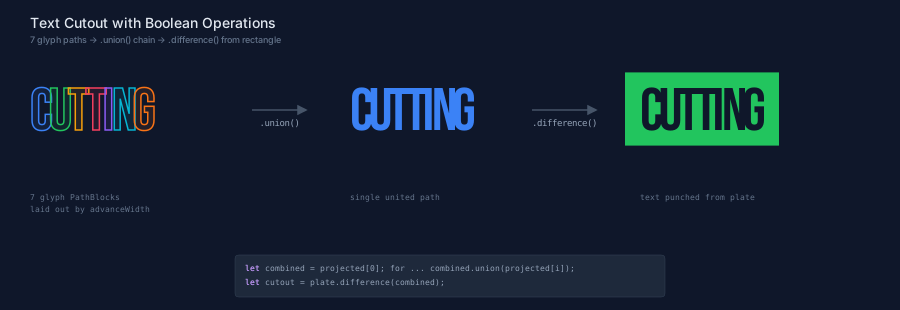
Text cutouts are common in logo design, stencil art, and anywhere you need negative-space typography. The pipeline is .union() calls followed by .difference() — a few lines of code instead of manual path editing in a vector graphics tool.
You can extend the boolean pipeline further. Apply a fillet to the plate's corners before punching to get a rounded badge. Use .intersection() instead of .difference() to clip text to a circular mask. Chain multiple .difference() calls to punch text at different positions on the same plate. The boolean operations return PathBlocks, so the entire PathBlock composability model is available at every stage.
Paths vs Text: Why @font Matters
Converting text to paths produces more SVG data than <text> elements — a single glyph may contain 20+ Bezier segments. For short words and display text this is negligible; for paragraph-length content, prefer TextBlock. Glyph extraction runs once at compile time — the PathBlock values stored in variables are reused across parameter changes without re-extracting from the font.
Accessibility note: Glyph paths are not accessible to screen readers the way
<text>elements are. For content that needs to be machine-readable or searchable, prefer TextBlock. ReservefromGlyph()for decorative, logotype, and generative typography use cases where the visual treatment requires actual path geometry.
There's a subtle but important benefit to the font integration model that's easy to overlook. When you use PathBlock.fromGlyph(), the loaded font is both the renderer and the measurer. The path commands that define each glyph's shape come from the same font file that provides the advance widths and bounding boxes. There's no mismatch — the geometry and the metrics are always in agreement.
Contrast this with SVG <text>. When you write <text font-family="Inter">Hello</text>, the browser picks the font and renders the text. If you need to know how wide "Hello" is before drawing it, you're estimating — either with built-in character width tables (which TextBlock uses when no font is loaded) or with a @font declaration that might not exactly match what the browser loads. The estimation tables are ~85-90% accurate for Latin text, which is usually good enough for layout decisions. But for tight positioning — aligning a bounding box precisely to rendered text, for example — the gap can be visible.
With fromGlyph(), there's no gap. The path commands are the rendering. The advance widths are the layout. Everything comes from one source — the loaded font file.
// viewBox="0 0 600 340"
// @font precision — fromGlyph() uses the exact same font for both paths and metrics

@font "../../../../fonts/Bebas_Neue/BebasNeue-Regular.ttf"
@font "../../../../fonts/Inconsolata/Inconsolata-Regular.ttf"

// --- Background ---

let bg = PathLayer('bg') ${ fill: Color('#0f172a'); stroke: none; };
bg.apply { rect(0, 0, 600, 340) }

// ─── Left: fromGlyph() — paths AND metrics from the same font ──

let g_left = GroupLayer('glyph-side') ${ translate-x: 30; translate-y: 50; };

let word = "LAYOUT";
let styles = ${ font-family: BebasNeue-Regular; font-size: 56; };
let glyphs = PathBlock.fromGlyph(word, styles);

let path_layer = PathLayer('glyph-paths') ${
  fill: Color('#3b82f6');
  stroke: none;
};

// Draw glyphs using advanceWidth — inherently precise
let cursor = 0;
let glyph_bboxes = [];
path_layer.apply {
  for (g in glyphs) {
    let proj = g.drawTo(cursor, 60);
    glyph_bboxes.push(proj.boundingBox());
    cursor = calc(cursor + g.advanceWidth);
  }
}

// Total width from advance widths
let total_w = cursor;

// Bounding box from summed advance widths — matches perfectly
let total_bbox = PathLayer('total-bbox') ${
  fill: none;
  stroke: Color('#22c55e');
  stroke-width: 1.5;
};

// Get overall bounding box from first and last glyph
let first_bb = glyph_bboxes[0];
let last_bb = glyph_bboxes[calc(glyph_bboxes.length - 1)];
let combined_w = calc(last_bb.x + last_bb.width - first_bb.x);
let combined_h = calc(first_bb.height);

total_bbox.apply {
  rect(first_bb.x, first_bb.y, combined_w, combined_h)
}

// Per-glyph advance width markers
let tick_layer = PathLayer('ticks') ${
  stroke: Color('#22c55e50');
  stroke-width: 0.5;
  stroke-dasharray: "2 3";
  fill: none;
};
let tick_cursor = 0;
tick_layer.apply {
  for (g in glyphs) {
    M tick_cursor calc(first_bb.y - 2) v calc(combined_h + 4)
    let tick_cursor = calc(tick_cursor + g.advanceWidth);
  }
  M tick_cursor calc(first_bb.y - 2) v calc(combined_h + 4)
}

let left_label = TextLayer('left-label') ${
  font-family: monospace;
  font-size: 8;
  fill: Color('#22c55e');
  text-anchor: start;
};
left_label.apply {
  text(0, 100)`advanceWidth layout = ${round(total_w * 10) / 10}px total`
  text(0, 112)`paths + metrics from same font file`
}

g_left.append(path_layer, total_bbox, tick_layer, left_label);

// ─── Right: same word as SVG text (browser font) ───────────────

let g_right = GroupLayer('text-side') ${ translate-x: 310; translate-y: 50; };

// Render as SVG <text> — browser picks its own font
let text_layer = TextLayer('svg-text') ${
  font-family: monospace;
  font-size: 24;
  fill: Color('#94a3b8');
};
text_layer.apply {
  text(0, 60)`LAYOUT`
}

// Measure with monospace table — use same y coordinate as rendering
let text_label_block = &{ text(0, 60)`LAYOUT` } << ${ font-size: 24; font-family: monospace; };
let text_bb = text_label_block.boundingBox();

let text_bbox = PathLayer('text-bbox') ${
  fill: none;
  stroke: Color('#f59e0b');
  stroke-width: 1;
  stroke-dasharray: "4 3";
};
text_bbox.apply {
  rect(text_bb.x, text_bb.y, text_bb.width, text_bb.height)
}

let right_label = TextLayer('right-label') ${
  font-family: monospace;
  font-size: 8;
  fill: Color('#f59e0b');
  text-anchor: start;
};
right_label.apply {
  text(0, 100)`estimation table = ${round(text_bb.width * 10) / 10}px`
  text(0, 112)`browser picks its own monospace font`
}

// Note about the mismatch
let note = TextLayer('note') ${
  font-family: monospace;
  font-size: 7;
  fill: Color('#64748b');
  text-anchor: start;
};
note.apply {
  text(0, 132)`bbox may not match — different font`
  text(0, 144)`than what the browser renders`
}

g_right.append(text_layer, text_bbox, right_label, note);

// ─── Section titles ─────────────────────────────────────────────

let left_title = TextLayer('l-title') ${
  font-family: system-ui, sans-serif;
  font-size: 10;
  fill: Color('#22c55e');
  text-anchor: start;
};
left_title.apply { text(30, 42)`PathBlock.fromGlyph() — exact` }

let right_title = TextLayer('r-title') ${
  font-family: system-ui, sans-serif;
  font-size: 10;
  fill: Color('#f59e0b');
  text-anchor: start;
};
right_title.apply { text(310, 42)`SVG <text> — estimated` }

// ─── Divider ─────────────────────────────────────────────────────

let divider = PathLayer('divider') ${
  stroke: Color('#334155');
  stroke-width: 1;
  fill: none;
};
divider.apply { M 295 40 v 170 }

// ─── Title ───────────────────────────────────────────────────────

let title = TextLayer('title') ${
  font-family: system-ui, sans-serif;
  font-size: 13;
  fill: Color('#e2e8f0');
  text-anchor: start;
};
title.apply { text(30, 25)`Why @font Matters: Paths vs Text` }

// ─── Bottom annotation ──────────────────────────────────────────

let anno = TextLayer('anno') ${
  font-family: monospace;
  font-size: 8;
  fill: Color('#94a3b8');
  text-anchor: start;
};
anno.apply {
  text(30, 270)`fromGlyph() renders text AS paths — the loaded font is`
  text(30, 282)`both the renderer and the measurer. No mismatch possible.`
  text(30, 300)`SVG <text> relies on the browser's font — estimation tables`
  text(30, 312)`or a different @font can diverge from what's rendered.`
}

// ─── Key insight callout ────────────────────────────────────────

let insight = TextLayer('insight') ${
  font-family: monospace;
  font-size: 9;
  fill: Color('#3b82f6');
  text-anchor: start;
};
insight.apply {
  text(30, 332)`Paths = single source of truth for geometry AND metrics`
}
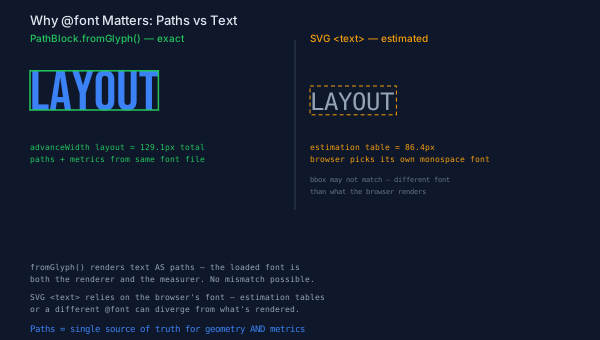
The left side shows "LAYOUT" rendered as glyph PathBlocks with advance-width ticks and a bounding box computed from the actual font geometry. The right side shows the same word as SVG <text> with a bounding box from estimation tables. The green box on the left fits tightly because paths and metrics come from the same font. The amber dashed box on the right may not align as well, because the browser's font and Pathogen's estimation table can diverge.
This doesn't mean <text> is wrong for all cases — TextBlock with estimation tables works well for most label placement, especially with .intersects() collision avoidance where a few percent of width variation doesn't matter. But when you need pixel-level precision — logo construction, stencil output, precise baseline alignment — fromGlyph() eliminates the measurement-rendering mismatch entirely.
Putting It Together
Here's the full pipeline from font declaration to rendered output — the workflow that ties together everything in this post:
// 1. Load the font
@font "Inter";
let styles = ${ font-family: Inter; font-size: 64; };

// 2. Extract glyphs
let glyphs = PathBlock.fromGlyph("HELLO", styles);

// 3. Lay out with advance widths
let cursor_x = 50;
let baseline_y = 120;
for (g in glyphs) {
  g.drawTo(cursor_x, baseline_y)
  cursor_x = calc(cursor_x + g.advanceWidth);
}
That's three steps: @font declares the font, fromGlyph() converts text to geometry, and an advance-width loop handles layout. From there, every PathBlock operation is available — transforms, sampling, fillets, boolean operations, contour decomposition. The glyph is geometry now, and geometry composes.
What's Next
TextBlock and glyph extraction form two sides of the same coin. TextBlock gives you a fast, compose-measure-position workflow for text labels in diagrams — estimation-based measurement is good enough, and the output is semantic SVG <text> that's accessible and searchable. PathBlock.fromGlyph() gives you text as geometry — exact outlines you can transform, decompose, and combine with any PathBlock operation.
Together, they cover the full spectrum of text needs in programmatic SVG. Labels that need to avoid overlapping? TextBlock with .intersects(). A logo with text punched out of a shape? fromGlyph() with .difference(). Characters scattered along a curved path? fromGlyph() with parametric sampling. A diagram with precisely measured annotations? TextBlock with a loaded @font for exact metrics.
The font integration features build directly on the PathBlock foundation covered in the PathBlock series — if you haven't explored transforms, sampling, fillets, and boolean operations, those posts show the full range of what glyph PathBlocks inherit. Every operation that works on a hand-drawn @{ h 50 v 30 z } shape works identically on a glyph extracted from a font.
Try it yourself in the Pathogen playground — load a font with @font, extract some glyphs, and see what happens when typography becomes geometry.