TextBlock: Measure-First Text for SVG Diagrams
Part 1 of 2 in our series on TextBlock and font integration.
Series: TextBlock & Font Integration
- TextBlock: Measure-First Text for SVG Diagrams (this post)
- From Fonts to Paths: Glyph Extraction with PathBlock.fromGlyph()
Prerequisites: This post assumes familiarity with PathBlock basics — the
@{}sigil,.draw(), and.project(). If you're new to Pathogen, start with Introduction to PathBlocks.
Labels on parametric diagrams have a coordination problem. The geometry is computed — points, curves, bounding boxes are all known values — but the text that annotates that geometry gets hard-coded at pixel offsets, with no way to ask "how wide is this string?" before placing it. When the font size changes, the data changes, or the viewport scales, those hard-coded offsets break silently, producing overlapping labels or text that drifts away from the thing it's supposed to annotate.
TextBlock solves this by making text a measurable, positionable value — the same compose-then-place pattern that PathBlock brought to shapes. You compose text at relative coordinates, measure its bounding box before placing it, project it into position using polar coordinates and semantic anchors, and check for collisions against other labels and geometry. The result is label placement that adapts automatically when anything changes.
What Is a TextBlock?
A TextBlock is a composition of text elements at relative coordinates. You create one with the &{ } sigil — the text counterpart to PathBlock's @{ } — and the elements inside are positioned relative to an implicit (0, 0) origin. Like a PathBlock, the TextBlock doesn't draw anything on its own. It's a value: a template holding text content and relative positions, waiting to be styled, measured, and placed. See the full TextBlock syntax documentation for details.
let label = &{
  text(0, 14)`Server Node`
  text(0, 30)`Status: online`
  text(0, 48)`Latency: 12ms`
};
Each text(x, y) statement positions a text element relative to the block's origin. The backtick-delimited content follows the coordinate pair. You can have as many text() statements as you need — a single-line label, a multi-line card, a table of values.
The anatomy diagram below shows how this works in practice. A three-line TextBlock is defined once, then drawn at two different positions using .drawTo(). The green crosshairs mark each placement's origin. The dashed amber rectangles show the bounding box — measured once from the TextBlock value, valid at both locations. The arrow connecting the placements reinforces the key idea: one definition, many positions.
// viewBox="0 0 600 340"
// TextBlock Anatomy — compose text at relative coordinates, then position

// ─── Background ─────────────────────────────────────────────────────

let bg = PathLayer('bg') ${ fill: Color('#0f172a'); stroke: none; };
bg.apply { rect(0, 0, 600, 340) }

let grid = PathLayer('grid') ${
  stroke: Color('#1e293b');
  stroke-width: 0.5;
  fill: none;
};
grid.apply {
  for (i in 0..17) { M 0 calc(i * 20) h 600 }
  for (j in 0..30) { M calc(j * 20) 0 v 340 }
}

// ─── Define a TextBlock at relative coordinates ─────────────────────

let mono_styles = ${ font-family: monospace; font-size: 11; };

let card = &{
  text(0, 14)`Server Node`
  text(0, 32)`Status: online`
  text(0, 48)`Latency: 12ms`
} << mono_styles;

// Measure the block with correct monospace metrics
let bb = card.boundingBox();

// ─── Card 1: First placement ────────────────────────────────────────

let g1 = GroupLayer('card1') ${ translate-x: 80; translate-y: 100; };

let demo1 = TextLayer('demo1') ${ font-family: monospace; font-size: 11; fill: Color('#e2e8f0'); };
demo1.apply { card.drawTo(0, 0); }

// Bounding box overlay
let bb1_layer = PathLayer('bb1') ${
  fill: none;
  stroke: Color('#f59e0b');
  stroke-width: 1;
  stroke-dasharray: "4 3";
};
bb1_layer.apply { rect(bb.x, bb.y, bb.width, bb.height) }

// Origin crosshair
let cross1 = PathLayer('cross1') ${
  stroke: Color('#22c55e');
  stroke-width: 1.5;
  fill: none;
};
cross1.apply { M -7 0 h 14  M 0 -7 v 14 }

// Collision check: bbox overlay vs text content
let card1_proj = card.project(0, 0);
let card1_bbox_rect = { x: bb.x, y: bb.y, width: bb.width, height: bb.height };
if (card1_proj.intersects(card1_bbox_rect)) {
  // Expected: bounding box encloses the text — no clipping
} else {
  log("WARN: card1 bbox does not contain text — possible clipping");
}

g1.append(demo1, bb1_layer, cross1);

// ─── Card 2: Second placement ───────────────────────────────────────

let g2 = GroupLayer('card2') ${ translate-x: 360; translate-y: 180; };

let demo2 = TextLayer('demo2') ${ font-family: monospace; font-size: 11; fill: Color('#e2e8f0'); };
demo2.apply { card.drawTo(0, 0); }

// Bounding box overlay
let bb2_layer = PathLayer('bb2') ${
  fill: none;
  stroke: Color('#f59e0b');
  stroke-width: 1;
  stroke-dasharray: "4 3";
};
bb2_layer.apply { rect(bb.x, bb.y, bb.width, bb.height) }

// Origin crosshair
let cross2 = PathLayer('cross2') ${
  stroke: Color('#22c55e');
  stroke-width: 1.5;
  fill: none;
};
cross2.apply { M -7 0 h 14  M 0 -7 v 14 }

// Collision check: bbox overlay vs text content
let card2_proj = card.project(0, 0);
if (card2_proj.intersects(card1_bbox_rect)) {
  // Expected: same block, same bbox — should match
} else {
  log("WARN: card2 bbox does not contain text — possible clipping");
}

g2.append(demo2, bb2_layer, cross2);

// ─── Leader lines and connection arrow ──────────────────────────────

let leader_group = GroupLayer('leaders-group') ${};

let leaders = PathLayer('leaders') ${
  fill: none;
  stroke: Color('#475569');
  stroke-width: 0.5;
};
leaders.apply {
  // Card 1 origin → annotation label
  M 80 100 L 40 60
  // Card 2 origin → annotation label
  M 360 180 L 320 260
  // Connection between placements
  M 200 120 L 340 180
}

// Arrowhead at connection endpoint
let arrow_layer = PathLayer('arrow') ${
  fill: Color('#818cf8');
  stroke: none;
};
arrow_layer.apply {
  M 332 176 l 10 4 l -10 4 z
}

leader_group.append(leaders, arrow_layer);

// ─── Annotations ────────────────────────────────────────────────────

let anno_group = GroupLayer('anno-group') ${};

let anno = TextLayer('anno') ${
  font-family: system-ui, sans-serif;
  font-size: 9;
  fill: Color('#94a3b8');
  text-anchor: start;
};
anno.apply {
  text(15, 55)`origin (80, 100)`
  text(175, 170)`same block, different position`
  text(295, 270)`origin (360, 180)`
}

anno_group.append(anno);

// ─── Code block (top-right) ─────────────────────────────────────────

let code_group = GroupLayer('code-block') ${ translate-x: 400; translate-y: 22; };

let code = TextLayer('code') ${
  font-family: monospace;
  font-size: 9;
  fill: Color('#94a3b8');
  text-anchor: start;
};
code.apply {
  text(0, 12)`let card = &{`
  text(12, 24)`text(0, 14)\`Server Node\``
  text(12, 36)`text(0, 32)\`Status: online\``
  text(12, 48)`text(0, 48)\`Latency: 12ms\``
  text(0, 60)`} << monospace styles;`
  text(0, 80)`card.drawTo(80, 100)`
  text(0, 92)`card.drawTo(360, 180)`
}

let kw = TextLayer('kw') ${
  font-family: monospace;
  font-size: 9;
  fill: Color('#c084fc');
  text-anchor: start;
};
kw.apply {
  text(0, 12)`let`
}

code_group.append(code, kw);

// ─── Title ──────────────────────────────────────────────────────────

let title_group = GroupLayer('title-group') ${};

let title = TextLayer('title') ${
  font-family: system-ui, sans-serif;
  font-size: 14;
  fill: Color('#e2e8f0');
  text-anchor: start;
};
title.apply {
  text(30, 310)`TextBlock — Compose Once, Place Anywhere`
}

title_group.append(title);

// ─── Legend ──────────────────────────────────────────────────────────

let legend_group = GroupLayer('legend-group') ${ translate-x: 400; translate-y: 300; };

let leg = TextLayer('legend') ${
  font-family: system-ui, sans-serif;
  font-size: 8;
  fill: Color('#64748b');
  text-anchor: start;
};
let leg_o = PathLayer('leg-o') ${ fill: Color('#22c55e'); stroke: none; };
let leg_b = PathLayer('leg-b') ${ fill: Color('#f59e0b'); stroke: none; };

leg_o.apply { rect(0, 0, 8, 8) }
leg_b.apply { rect(0, 14, 8, 8) }

leg.apply {
  text(12, 7)`Origin`
  text(12, 21)`Bounding box`
}

legend_group.append(leg_o, leg_b, leg);
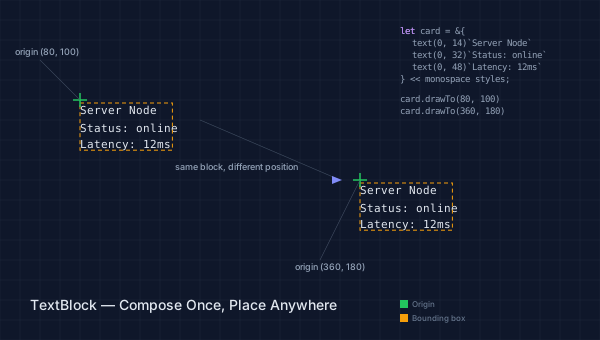
The coordinate model mirrors SVG's <text> element: y is the baseline position, so text(0, 14) places the first baseline 14 units below the origin. This means the text's visible pixels extend above that y coordinate, not below it.
TextBlocks also support control flow — let, for, and if work inside the block just as they do elsewhere in Pathogen:
let items = ["CPU: 42%", "MEM: 1.2G", "NET: 88Mb/s"];
let card = &{
  text(0, 14)`Dashboard`
  for (i in 0..2) {
    text(0, calc(30 + i * 14))`${items[i]}`
  }
};
Notice the parallel with PathBlock: @{ h 40 v 20 h -40 z } captures relative path commands, while &{ text(0, 14)\Hello` }` captures relative text elements. Both are inert values until you project or draw them. Both carry metadata (bounds, element count) you can query before committing to a position.
Drawing and Positioning
Once you have a TextBlock, you need to place it. There are three positioning methods, each returning a ProjectedTextValue — text with absolute coordinates:
.project(x, y)— offset all elements to absolute coordinates without drawing. Useful when you need to measure or test collisions before committing..drawTo(x, y)— project and immediately emit to the active TextLayer. This is the most common method..polarProject(cx, cy, angle, distance, anchor)— project along a polar vector with anchor alignment. We'll cover this in detail below.
TextBlocks emit to TextLayers, which are the text counterpart to PathLayers. You define one with define TextLayer('name') ${ styles } and activate it with layer('name').apply { ... }:
define TextLayer('labels') ${ font-size: 12; fill: #333; }

layer('labels').apply {
  label.drawTo(50, 100);
}
This layer model keeps text and path geometry in separate SVG elements, which matters for rendering order, styling, and accessibility.
Style Merge with <<
A TextBlock starts unstyled — it has no font-size, no font-family, no fill color. The << operator merges a style block into the TextBlock, producing a new styled TextBlock with block-level styles that apply to all elements unless overridden at the element level:
let info = &{
  text(0, 14)`Node Status`
  text(0, 30)`CPU: 42%`
  text(0, 44)`MEM: 1.2G`
};

let styled = info << ${ font-family: monospace; font-size: 12; };
The power here is that info remains unstyled. You can merge different styles into the same TextBlock to produce different presentations — and the bounding box adapts to each one:
let mono_sm = ${ font-family: monospace; font-size: 10; };
let mono_lg = ${ font-family: monospace; font-size: 14; };
let sans    = ${ font-family: sans-serif; font-size: 12; };

let bb1 = (info << mono_sm).boundingBox();  // compact
let bb2 = (info << mono_lg).boundingBox();  // wider, taller
let bb3 = (info << sans).boundingBox();     // different widths
This separation of content from presentation is what makes TextBlock composable. Define the text structure once, apply different styles for different contexts, measure for layout, then place. The << operator does not mutate the original — it returns a new value with the styles merged in, leaving the original available for reuse.
The demo below shows the same three-line TextBlock rendered with three different style blocks. The dashed outlines are the bounding boxes — each one reflects the actual measured dimensions for that style variant.
// viewBox="0 0 600 300"
// Style merging — << operator sets block-level styles

// --- Background ---

let bg = PathLayer('bg') ${ fill: Color('#0f172a'); stroke: none; };
bg.apply { rect(0, 0, 600, 300) }

let grid = PathLayer('grid') ${
  stroke: Color('#1e293b');
  stroke-width: 0.5;
  fill: none;
};
grid.apply {
  for (i in 0..15) { M 0 calc(i * 20) h 600 }
  for (j in 0..30) { M calc(j * 20) 0 v 300 }
}

// --- Base text block (unstyled) ---

let info = &{
  text(0, 14)`Node Status`
  text(0, 30)`CPU: 42%`
  text(0, 44)`MEM: 1.2G`
};

// --- Three style variations ---

let mono_sm = ${ font-family: monospace; font-size: 10; };
let mono_lg = ${ font-family: monospace; font-size: 14; };
let sans = ${ font-family: system-ui, sans-serif; font-size: 12; };

// --- Shared annotation style for .intersects() checks ---

let anno_styles = ${ font-family: monospace; font-size: 8; };

// ─── Variant 1: mono 10px ────────────────────────────────────────

let g1 = GroupLayer('variant1') ${ translate-x: 30; translate-y: 70; };

let v1_text = TextLayer('v1-text') ${ font-family: monospace; font-size: 10; fill: Color('#22c55e'); };
v1_text.apply { (info << mono_sm).drawTo(0, 0); }

let styled1 = info << mono_sm;
let bb1 = styled1.boundingBox();

let v1_bbox = PathLayer('v1-bbox') ${ fill: none; stroke: Color('#22c55e40'); stroke-width: 0.75; stroke-dasharray: "3 2"; };
v1_bbox.apply { rect(bb1.x, bb1.y, bb1.width, bb1.height) }

let v1_label = TextLayer('v1-label') ${ font-family: monospace; font-size: 8; fill: Color('#64748b'); text-anchor: start; };
v1_label.apply { text(0, -10)`mono 10px` }

g1.append(v1_text, v1_bbox, v1_label);

// Collision checks within variant 1
let v1_label_proj = (&{ text(0, 8)`mono 10px` } << anno_styles).project(0, -10);
let v1_text_proj = styled1.project(0, 0);
if (v1_label_proj.intersects(v1_text_proj)) { log("WARN: v1 label intersects text"); }

let v1_bbox_rect = { x: bb1.x, y: bb1.y, width: bb1.width, height: bb1.height };
if (v1_label_proj.intersects(v1_bbox_rect)) { log("WARN: v1 label intersects bbox overlay"); }

// ─── Variant 2: mono 14px ────────────────────────────────────────

let g2 = GroupLayer('variant2') ${ translate-x: 210; translate-y: 70; };

let v2_text = TextLayer('v2-text') ${ font-family: monospace; font-size: 14; fill: Color('#3b82f6'); };
v2_text.apply { (info << mono_lg).drawTo(0, 0); }

let styled2 = info << mono_lg;
let bb2 = styled2.boundingBox();

let v2_bbox = PathLayer('v2-bbox') ${ fill: none; stroke: Color('#3b82f640'); stroke-width: 0.75; stroke-dasharray: "3 2"; };
v2_bbox.apply { rect(bb2.x, bb2.y, bb2.width, bb2.height) }

let v2_label = TextLayer('v2-label') ${ font-family: monospace; font-size: 8; fill: Color('#64748b'); text-anchor: start; };
v2_label.apply { text(0, -10)`mono 14px` }

g2.append(v2_text, v2_bbox, v2_label);

// Collision checks within variant 2
let v2_label_proj = (&{ text(0, 8)`mono 14px` } << anno_styles).project(0, -10);
let v2_text_proj = styled2.project(0, 0);
if (v2_label_proj.intersects(v2_text_proj)) { log("WARN: v2 label intersects text"); }

let v2_bbox_rect = { x: bb2.x, y: bb2.y, width: bb2.width, height: bb2.height };
if (v2_label_proj.intersects(v2_bbox_rect)) { log("WARN: v2 label intersects bbox overlay"); }

// ─── Variant 3: sans-serif 12px ─────────────────────────────────

let g3 = GroupLayer('variant3') ${ translate-x: 420; translate-y: 70; };

let v3_text = TextLayer('v3-text') ${ font-family: system-ui, sans-serif; font-size: 12; fill: Color('#f59e0b'); };
v3_text.apply { (info << sans).drawTo(0, 0); }

let styled3 = info << sans;
let bb3 = styled3.boundingBox();

let v3_bbox = PathLayer('v3-bbox') ${ fill: none; stroke: Color('#f59e0b40'); stroke-width: 0.75; stroke-dasharray: "3 2"; };
v3_bbox.apply { rect(bb3.x, bb3.y, bb3.width, bb3.height) }

let v3_label = TextLayer('v3-label') ${ font-family: monospace; font-size: 8; fill: Color('#64748b'); text-anchor: start; };
v3_label.apply { text(0, -10)`sans-serif 12px` }

g3.append(v3_text, v3_bbox, v3_label);

// Collision checks within variant 3
let v3_label_proj = (&{ text(0, 8)`sans-serif 12px` } << anno_styles).project(0, -10);
let v3_text_proj = styled3.project(0, 0);
if (v3_label_proj.intersects(v3_text_proj)) { log("WARN: v3 label intersects text"); }

let v3_bbox_rect = { x: bb3.x, y: bb3.y, width: bb3.width, height: bb3.height };
if (v3_label_proj.intersects(v3_bbox_rect)) { log("WARN: v3 label intersects bbox overlay"); }

// ─── Code block ─────────────────────────────────────────────────

let g4 = GroupLayer('code-block') ${ translate-x: 30; translate-y: 190; };

let code = TextLayer('code') ${
  font-family: monospace;
  font-size: 9;
  fill: Color('#94a3b8');
  text-anchor: start;
};
code.apply {
  text(0, 0)`// One block, three styles`
  text(0, 16)`(info << mono_sm).drawTo(50, 100)`
  text(0, 30)`(info << mono_lg).drawTo(220, 100)`
  text(0, 44)`(info << sans).drawTo(430, 100)`
}

let kw = TextLayer('kw') ${
  font-family: monospace;
  font-size: 9;
  fill: Color('#c084fc');
  text-anchor: start;
};

g4.append(code);

// --- Title (top-level) ---

let title = TextLayer('title') ${
  font-family: system-ui, sans-serif;
  font-size: 14;
  fill: Color('#e2e8f0');
  text-anchor: start;
};
title.apply {
  text(30, 30)`Style Merge Operator (<<)`
}

// --- Subtitle (top-level) ---

let subtitle = TextLayer('subtitle') ${
  font-family: system-ui, sans-serif;
  font-size: 9;
  fill: Color('#64748b');
  text-anchor: start;
};
subtitle.apply {
  text(30, 44)`Same content, different presentation — bbox adapts automatically`
}

// --- Size annotations (top-level) ---

let dims = TextLayer('dims') ${
  font-family: monospace;
  font-size: 7;
  fill: Color('#475569');
  text-anchor: start;
};
dims.apply {
  text(30, 175)`${round(bb1.width)}x${round(bb1.height)}`
  text(210, 175)`${round(bb2.width)}x${round(bb2.height)}`
  text(420, 175)`${round(bb3.width)}x${round(bb3.height)}`
}
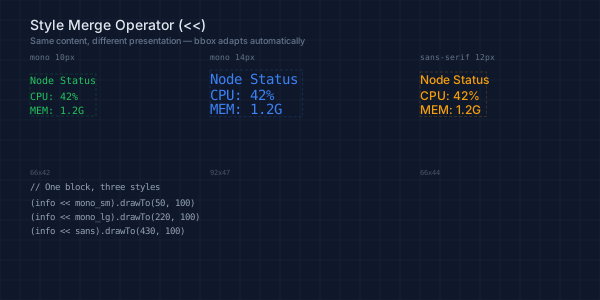
The dimension annotations at the bottom of each variant confirm what the code reports: same content, different measurements. A monospace 10px version is compact; monospace 14px is proportionally larger; sans-serif 12px has different character widths entirely. The << operator and .boundingBox() handle all of this transparently.
Measuring Before You Place
The central insight of TextBlock is that you can measure text before deciding where to put it. The .boundingBox() method returns an object with x, y, width, and height — the estimated bounding rectangle of all text elements in the block. Using the << operator introduced above, you style a TextBlock before measuring so the metrics reflect the actual font configuration:
let label = &{ text(0, 14)`Hello World` } << ${ font-size: 14; };
let bb = label.boundingBox();
log(bb.width);   // estimated pixel width
log(bb.height);  // fontSize * 1.2 (line height)
This measurement drives layout decisions. Need to center a label above a shape? Subtract half the width. Need to check whether two labels overlap? Compare their bounding boxes. Need to draw a background rectangle behind text? Use the bbox dimensions directly. Need to verify that a label fits inside a container? Compare bbox width to the container's width.
The measurement works on both TextBlockValues (relative coordinates) and ProjectedTextValues (absolute coordinates). On a TextBlockValue, the bbox is relative to the origin — just like measuring a PathBlock's .bounds before drawing. On a ProjectedTextValue, the bbox reflects the absolute position.
TextBlock computes these estimates using built-in character width tables that cover three font categories:
- Sans-serif (default): per-character widths approximating Arial/Helvetica
- Serif: per-character widths approximating Times New Roman
- Monospace: uniform character width approximating Courier New
The metrics respect several style properties:
font-size(default 16) — scales all character widths proportionallyfont-family— selects the appropriate width table (category detection: serif, sans-serif, or monospace)font-weight— bold applies a ~6% width increaseletter-spacing— adds uniform spacing between characters- tspan
dx/dyoffsets — accounted for in multi-span text elements
Accuracy: 85-90% for Latin text. A label that measures 87px might actually render at 100px — a gap of roughly one character width at typical font sizes. This is sufficient for collision avoidance, anchor-based layout, and background rectangle sizing, where a few pixels of margin are invisible. It is not sufficient for pixel-perfect alignment, tight kerning, or text that must match an exact grid. For those cases, Part 2 of this series covers the
@fontdirective, which loads OpenType font files for exact glyph measurement.
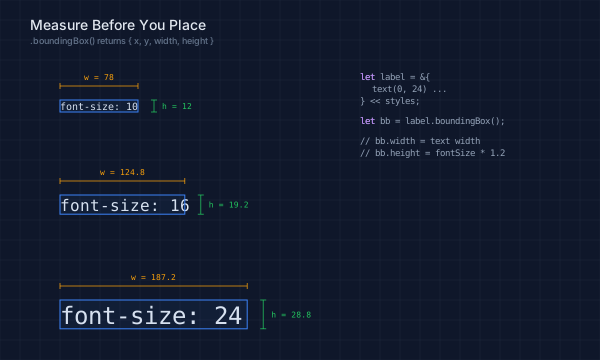
The demo below shows .boundingBox() at three different font sizes. Each row renders the same text, measures it, and draws width/height dimension lines. Notice how the bounding box scales with font size — the measurement adapts automatically.
// viewBox="0 0 600 360"
// Bounding box measurement — .boundingBox() returns {x, y, width, height}

// --- Background ---

let bg = PathLayer('bg') ${ fill: Color('#0f172a'); stroke: none; };
bg.apply { rect(0, 0, 600, 360) }

let grid = PathLayer('grid') ${
  stroke: Color('#1e293b');
  stroke-width: 0.5;
  fill: none;
};
grid.apply {
  for (i in 0..18) { M 0 calc(i * 20) h 600 }
  for (j in 0..30) { M calc(j * 20) 0 v 360 }
}

// ─── Shared constants ─────────────────────────────────────────────

let dim_above = 14;
let dim_label_above = 6;
let bracket_right = 16;
let h_label_gap = 8;
let anno_styles = ${ font-size: 8; font-family: monospace; };

// ─── Row 1: font-size 10 ─────────────────────────────────────────

let t1 = &{ text(0, 10)`font-size: 10` } << ${ font-size: 10; font-family: monospace; };
let bb1 = t1.boundingBox();

let g1 = GroupLayer('row-10') ${ translate-x: 60; translate-y: 100; };

let t1_layer = TextLayer('t1') ${ font-family: monospace; font-size: 10; fill: Color('#e2e8f0'); };
t1_layer.apply { t1.drawTo(0, 0); }

let bb1_layer = PathLayer('bb1') ${ fill: Color('#3b82f610'); stroke: Color('#3b82f6'); stroke-width: 1; };
bb1_layer.apply { rect(bb1.x, bb1.y, bb1.width, bb1.height) }

let wy1 = calc(bb1.y - dim_above);
let wd1 = PathLayer('wd1') ${ stroke: Color('#f59e0b'); stroke-width: 0.75; fill: none; };
wd1.apply { M 0 wy1 h bb1.width  M 0 calc(wy1 - 3) v 6  M bb1.width calc(wy1 - 3) v 6 }

let wl1 = TextLayer('wl1') ${ font-family: monospace; font-size: 8; fill: Color('#f59e0b'); text-anchor: middle; };
wl1.apply { text(calc(bb1.width / 2), calc(wy1 - dim_label_above))`w = ${round(bb1.width)}` }

let hx1 = calc(bb1.width + bracket_right);
let hd1 = PathLayer('hd1') ${ stroke: Color('#22c55e'); stroke-width: 0.75; fill: none; };
hd1.apply { M hx1 bb1.y v bb1.height  M calc(hx1 - 3) bb1.y h 6  M calc(hx1 - 3) calc(bb1.y + bb1.height) h 6 }

let hl1 = TextLayer('hl1') ${ font-family: monospace; font-size: 8; fill: Color('#22c55e'); text-anchor: start; };
hl1.apply { text(calc(hx1 + h_label_gap), calc(bb1.y + bb1.height / 2 + 3))`h = ${round(bb1.height)}` }

g1.append(t1_layer, bb1_layer, wd1, wl1, hd1, hl1);

// Collision checks within row 1
let hl1_proj = (&{ text(0, 8)`h = ${round(bb1.height)}` } << anno_styles).project(calc(hx1 + h_label_gap), calc(bb1.y + bb1.height / 2 + 3));
let t1_proj = t1.project(0, 0);
if (hl1_proj.intersects(t1_proj)) { log("WARN: row-10 h-label intersects text"); }
if (hl1_proj.intersects({ x: calc(hx1 - 3), y: bb1.y, width: 6, height: bb1.height })) { log("WARN: row-10 h-label intersects bracket"); }

// ─── Row 2: font-size 16 ─────────────────────────────────────────

let t2 = &{ text(0, 16)`font-size: 16` } << ${ font-size: 16; font-family: monospace; };
let bb2 = t2.boundingBox();

let g2 = GroupLayer('row-16') ${ translate-x: 60; translate-y: 195; };

let t2_layer = TextLayer('t2') ${ font-family: monospace; font-size: 16; fill: Color('#e2e8f0'); };
t2_layer.apply { t2.drawTo(0, 0); }

let bb2_layer = PathLayer('bb2') ${ fill: Color('#3b82f610'); stroke: Color('#3b82f6'); stroke-width: 1; };
bb2_layer.apply { rect(bb2.x, bb2.y, bb2.width, bb2.height) }

let wy2 = calc(bb2.y - dim_above);
let wd2 = PathLayer('wd2') ${ stroke: Color('#f59e0b'); stroke-width: 0.75; fill: none; };
wd2.apply { M 0 wy2 h bb2.width  M 0 calc(wy2 - 3) v 6  M bb2.width calc(wy2 - 3) v 6 }

let wl2 = TextLayer('wl2') ${ font-family: monospace; font-size: 8; fill: Color('#f59e0b'); text-anchor: middle; };
wl2.apply { text(calc(bb2.width / 2), calc(wy2 - dim_label_above))`w = ${round(bb2.width * 10) / 10}` }

let hx2 = calc(bb2.width + bracket_right);
let hd2 = PathLayer('hd2') ${ stroke: Color('#22c55e'); stroke-width: 0.75; fill: none; };
hd2.apply { M hx2 bb2.y v bb2.height  M calc(hx2 - 3) bb2.y h 6  M calc(hx2 - 3) calc(bb2.y + bb2.height) h 6 }

let hl2 = TextLayer('hl2') ${ font-family: monospace; font-size: 8; fill: Color('#22c55e'); text-anchor: start; };
hl2.apply { text(calc(hx2 + h_label_gap), calc(bb2.y + bb2.height / 2 + 3))`h = ${round(bb2.height * 10) / 10}` }

g2.append(t2_layer, bb2_layer, wd2, wl2, hd2, hl2);

let hl2_proj = (&{ text(0, 8)`h = ${round(bb2.height * 10) / 10}` } << anno_styles).project(calc(hx2 + h_label_gap), calc(bb2.y + bb2.height / 2 + 3));
let t2_proj = t2.project(0, 0);
if (hl2_proj.intersects(t2_proj)) { log("WARN: row-16 h-label intersects text"); }

// ─── Row 3: font-size 24 ─────────────────────────────────────────

let t3 = &{ text(0, 24)`font-size: 24` } << ${ font-size: 24; font-family: monospace; };
let bb3 = t3.boundingBox();

let g3 = GroupLayer('row-24') ${ translate-x: 60; translate-y: 300; };

let t3_layer = TextLayer('t3') ${ font-family: monospace; font-size: 24; fill: Color('#e2e8f0'); };
t3_layer.apply { t3.drawTo(0, 0); }

let bb3_layer = PathLayer('bb3') ${ fill: Color('#3b82f610'); stroke: Color('#3b82f6'); stroke-width: 1; };
bb3_layer.apply { rect(bb3.x, bb3.y, bb3.width, bb3.height) }

let wy3 = calc(bb3.y - dim_above);
let wd3 = PathLayer('wd3') ${ stroke: Color('#f59e0b'); stroke-width: 0.75; fill: none; };
wd3.apply { M 0 wy3 h bb3.width  M 0 calc(wy3 - 3) v 6  M bb3.width calc(wy3 - 3) v 6 }

let wl3 = TextLayer('wl3') ${ font-family: monospace; font-size: 8; fill: Color('#f59e0b'); text-anchor: middle; };
wl3.apply { text(calc(bb3.width / 2), calc(wy3 - dim_label_above))`w = ${round(bb3.width * 10) / 10}` }

let hx3 = calc(bb3.width + bracket_right);
let hd3 = PathLayer('hd3') ${ stroke: Color('#22c55e'); stroke-width: 0.75; fill: none; };
hd3.apply { M hx3 bb3.y v bb3.height  M calc(hx3 - 3) bb3.y h 6  M calc(hx3 - 3) calc(bb3.y + bb3.height) h 6 }

let hl3 = TextLayer('hl3') ${ font-family: monospace; font-size: 8; fill: Color('#22c55e'); text-anchor: start; };
hl3.apply { text(calc(hx3 + h_label_gap), calc(bb3.y + bb3.height / 2 + 3))`h = ${round(bb3.height * 10) / 10}` }

g3.append(t3_layer, bb3_layer, wd3, wl3, hd3, hl3);

let hl3_proj = (&{ text(0, 8)`h = ${round(bb3.height * 10) / 10}` } << anno_styles).project(calc(hx3 + h_label_gap), calc(bb3.y + bb3.height / 2 + 3));
let t3_proj = t3.project(0, 0);
if (hl3_proj.intersects(t3_proj)) { log("WARN: row-24 h-label intersects text"); }

// ─── Code block (top-right) ──────────────────────────────────────

let code_group = GroupLayer('code-group') ${ translate-x: 360; translate-y: 80; };

let code = TextLayer('code') ${ font-family: monospace; font-size: 9; fill: Color('#94a3b8'); text-anchor: start; };
code.apply {
  text(0, 0)`let label = &{`
  text(12, 12)`text(0, 24) ...`
  text(0, 24)`} << styles;`
  text(0, 44)`let bb = label.boundingBox();`
  text(0, 64)`// bb.width  = text width`
  text(0, 76)`// bb.height = fontSize * 1.2`
}

let kw = TextLayer('kw') ${ font-family: monospace; font-size: 9; fill: Color('#c084fc'); text-anchor: start; };
kw.apply {
  text(0, 0)`let`
  text(0, 44)`let`
}

code_group.append(code, kw);

// ─── Title ───────────────────────────────────────────────────────

let title = TextLayer('title') ${ font-family: system-ui, sans-serif; font-size: 14; fill: Color('#e2e8f0'); text-anchor: start; };
title.apply { text(30, 30)`Measure Before You Place` }

let subtitle = TextLayer('subtitle') ${ font-family: system-ui, sans-serif; font-size: 9; fill: Color('#64748b'); text-anchor: start; };
subtitle.apply { text(30, 44)`.boundingBox() returns { x, y, width, height }` }
Polar Projection with BBoxAnchor
Placing labels around a shape — node diagrams, compass roses, radial charts — is one of the most common annotation patterns in technical SVGs. The naive approach is to compute x and y offsets by hand, adjusting for text width and height at each position. A label to the right of a circle needs x = centerX + radius + gap; a label above needs y = centerY - radius - textHeight. Each direction requires different math, and every label with different content needs a different width offset. This is tedious, error-prone, and breaks the moment the text content or font size changes.
.polarProject() replaces all of that with two clean ideas: polar coordinates for direction and distance, and anchor alignment for text positioning.
let label = &{ text(0, 14)`Node A` } << ${ font-size: 14; };

// Place 80px from center at 45 degrees, anchored at center-left
let placed = label.polarProject(100, 100, 45deg, 80, BBoxAnchor.Left);
The first two arguments are the center point (the thing you're labeling). The angle and distance describe where the label goes in polar coordinates. The fifth argument — the BBoxAnchor — is the key innovation: it specifies which point of the text's bounding box lands on the target location.
The nine anchor positions form a grid over the bounding box:
BBoxAnchor.TopLeft      BBoxAnchor.Top      BBoxAnchor.TopRight
BBoxAnchor.Left         BBoxAnchor.Center   BBoxAnchor.Right
BBoxAnchor.BottomLeft   BBoxAnchor.Bottom   BBoxAnchor.BottomRight
The convention is that the anchor faces the center — so a label projected to the right of a shape uses BBoxAnchor.Left (the left edge of the text box is closest to the center), while a label above uses BBoxAnchor.Bottom. This keeps text radiating outward naturally.
The compass demo below shows this in action. Eight labels are placed at 45-degree intervals around a central hexagon, each using the appropriate anchor. The amber dots mark the polar target points on the guide circle; the text stays clear of the shape at every position.
// viewBox="0 0 500 500"
// Polar projection — labels placed at compass positions around a shape
// Uses GroupLayers per Code Example Guideline §9

// --- Background ---

let bg = PathLayer('bg') ${ fill: Color('#0f172a'); stroke: none; };
bg.apply { rect(0, 0, 500, 500) }

// --- Title (top-level) ---

let title = TextLayer('title') ${
  font-family: system-ui, sans-serif;
  font-size: 12;
  fill: Color('#e2e8f0');
  text-anchor: end;
};
title.apply {
  text(475, 30)`Polar Projection with BBoxAnchor`
}

// --- Annotations (top-level) ---

let anno = TextLayer('anno') ${
  font-family: monospace;
  font-size: 8;
  fill: Color('#64748b');
  text-anchor: start;
};
anno.apply {
  text(30, 470)`polarProject(cx, cy, angle, distance, anchor)`
  text(30, 482)`anchor faces center — text stays outside`
}

// ─── Compass group ── hexagon + center + guide + radials + dots + labels ───

let compass = GroupLayer('compass') ${ translate-x: 250; translate-y: 250; };

// Central hexagon (coordinates relative to group origin)
let hex = PathLayer('hex') ${
  fill: Color('#3b82f615');
  stroke: Color('#3b82f6');
  stroke-width: 2;
};
hex.apply { polygon(0, 0, 80, 6) }

// Center marker
let center_dot = PathLayer('center-dot') ${
  fill: Color('#22c55e');
  stroke: none;
};
center_dot.apply { circle(0, 0, 3) }

// Guide circle
let guide = PathLayer('guide') ${
  stroke: Color('#334155');
  stroke-width: 0.5;
  stroke-dasharray: "3 4";
  fill: none;
};
guide.apply { circle(0, 0, 140) }

// Radial lines from hex edge to guide circle
let radials = PathLayer('radials') ${
  stroke: Color('#475569');
  stroke-width: 0.5;
  fill: none;
};
radials.apply {
  for (i in 0..7) {
    let angle = calc(i * 0.7854 - 1.5708);
    let inner_x = calc(cos(angle) * 85);
    let inner_y = calc(sin(angle) * 85);
    let outer_x = calc(cos(angle) * 130);
    let outer_y = calc(sin(angle) * 130);
    M inner_x inner_y L outer_x outer_y
  }
}

// Anchor dots ON the guide circle (r=140)
let dots = PathLayer('dots') ${
  fill: Color('#f59e0b');
  stroke: Color('#0f172a');
  stroke-width: 1.5;
};
dots.apply {
  for (i in 0..7) {
    let angle = calc(i * 0.7854 - 1.5708);
    let dx = calc(cos(angle) * 140);
    let dy = calc(sin(angle) * 140);
    circle(dx, dy, 3)
  }
}

// Labels placed beyond the guide circle (r=160) so they don't overlap dots
let names = ["North", "NE", "East", "SE", "South", "SW", "West", "NW"];
let anchors = [
  BBoxAnchor.Bottom,
  BBoxAnchor.BottomLeft,
  BBoxAnchor.Left,
  BBoxAnchor.TopLeft,
  BBoxAnchor.Top,
  BBoxAnchor.TopRight,
  BBoxAnchor.Right,
  BBoxAnchor.BottomRight,
];

let label_styles = ${ font-family: monospace; font-size: 11; };

define TextLayer('labels') ${
  font-family: monospace;
  font-size: 11;
  fill: Color('#e2e8f0');
}

// Hex bounding box for central shape intersection check
let hex_bb = { x: -80, y: -80, width: 160, height: 160 };

let placed_labels = [];
let label_distance = 160;

layer('labels').apply {
  for (i in 0..7) {
    let angle = calc(i * 0.7854 - 1.5708);
    let label = &{ text(0, 11)`${names[i]}` } << label_styles;
    let proj = label.polarProject(0, 0, angle, label_distance, anchors[i]);

    // Verify label doesn't overlap central hexagon
    if (proj.intersects(hex_bb)) {
      log(`WARN: label "${names[i]}" intersects central hexagon`)
    }

    // Verify label doesn't overlap any previously placed label
    for (prev in placed_labels) {
      if (proj.intersects(prev)) {
        log(`WARN: label "${names[i]}" intersects a previously placed label`)
      }
    }

    proj.draw();
    placed_labels.push(proj);
  }
}

compass.append(hex, center_dot, guide, radials, dots, layer('labels'));

// ─── Code block group ── code snippet at top-left ────────────────────

let code_group = GroupLayer('code-block') ${ translate-x: 30; translate-y: 22; };

let code = TextLayer('code') ${
  font-family: monospace;
  font-size: 9;
  fill: Color('#94a3b8');
  text-anchor: start;
};
code.apply {
  text(0, 8)`label.polarProject(`
  text(12, 20)`250, 250,`
  text(12, 32)`angle,`
  text(12, 44)`140,`
  text(12, 56)`BBoxAnchor.Left`
  text(0, 68)`)`
}

let kw = TextLayer('kw') ${
  font-family: monospace;
  font-size: 9;
  fill: Color('#64748b');
  text-anchor: start;
};
kw.apply {
  text(120, 20)`// center`
  text(120, 32)`// radians`
  text(120, 44)`// distance`
  text(120, 56)`// anchor`
}

code_group.append(code, kw);
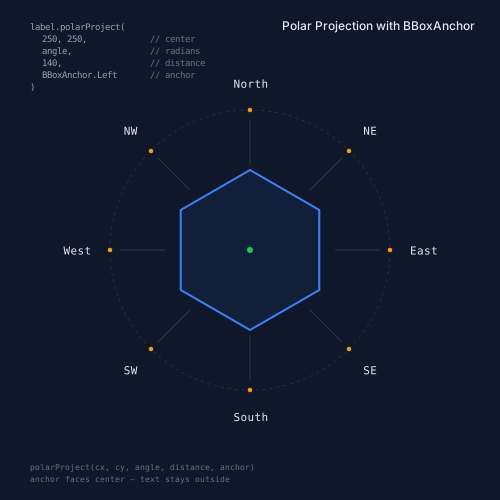
The code for each label is minimal — a one-line TextBlock, a polarProject() call, and a draw(). The loop at the center of the demo iterates through names and anchors in parallel:
for (i in 0..7) {
  let angle = calc(i * 0.7854 - 1.5708);
  let label = &{ text(0, 11)`${names[i]}` } << label_styles;
  let proj = label.polarProject(0, 0, angle, 160, anchors[i]);
  proj.draw();
}
No magic offsets. No per-label width calculations. Change the label text, the font size, or the radius, and the layout adapts. The polarProject() method handles the trigonometry internally — computing cos(angle) * distance and sin(angle) * distance for the target point, then shifting the text so the specified anchor point lands exactly there.
This matters because label placement around shapes is combinatorial. A hexagon with 6 vertex labels, 6 edge labels, and a center label requires 13 placements. Doing those with manual offsets means 26 magic numbers (x and y for each). With polarProject(), it's 13 calls with angles, one shared radius, and the appropriate anchors. When you add a seventh vertex to the polygon, the labels redistribute automatically.
Collision Avoidance
Placing labels one at a time works until two of them end up on top of each other. Scatter plots, node graphs, and dense diagrams inevitably produce clusters where data points are close together and naive placement causes overlaps. A label that's perfectly clear in one dataset collides with its neighbor when the data changes. This is the label placement problem — well-studied in cartography and information visualization — and TextBlock brings a pragmatic solution directly into the language.
TextBlock's .intersects() method detects collisions using axis-aligned bounding box (AABB) overlap testing.
let label1 = (&{ text(0, 14)`First` } << styles).project(50, 50);
let label2 = (&{ text(0, 14)`Second` } << styles).project(55, 55);

if (label1.intersects(label2)) {
  // Labels overlap — try a different position
}
.intersects() accepts a ProjectedTextValue (for text-vs-text checks), a ProjectedPathValue (for text-vs-shape checks), or a plain object with {x, y, width, height} (for text-vs-rectangle checks). The test is fast — it's a simple AABB comparison — which makes it practical to run in a loop over multiple candidate positions.
The simplest collision check is a single-direction attempt: project the label in your preferred direction and test whether it overlaps anything already placed:
let candidate = label.polarProject(
  pt.x, pt.y, 0, dist, BBoxAnchor.Left
);
// (dot-position checks omitted — see full sample)
if (!candidate.intersects(prevLabel)) {
  candidate.draw();
}
When a single direction isn't enough, expand to an 8-angle search that tries each compass direction in order and picks the first collision-free position:
let try_anchors = [
  BBoxAnchor.Left, BBoxAnchor.BottomLeft,
  BBoxAnchor.Bottom, BBoxAnchor.BottomRight,
  BBoxAnchor.Right, BBoxAnchor.TopRight,
  BBoxAnchor.Top, BBoxAnchor.TopLeft,
];

for (ai in 0..7) {
  let angle = calc(ai * 0.7854);
  let candidate = label.polarProject(
    pt.x, pt.y, angle, dist, try_anchors[ai]
  );
  // (dot-position checks omitted — see full sample)
  let ok = true;
  for (prev in placed) {
    if (candidate.intersects(prev)) { ok = false; }
  }
  if (ok) { best = candidate; found = true; }
}
Each angle is paired with an anchor that faces back toward the center point. This means the label always radiates outward, regardless of which direction it ends up. The search stops at the first collision-free candidate, so labels near the top of the list get their preferred direction (right, then bottom-left, then bottom, and so on).
The demo below shows the full pattern in action: a scatter of 8 data points, labeled in two ways. The left panel uses naive fixed-offset placement — every label is shifted right of its point by 8 pixels. Three clusters produce visible collisions, highlighted with red dashed boxes. The right panel uses the 8-angle search above. Study the demo source to see how the complete loop integrates with the data point geometry checks.
// viewBox="0 0 600 400"
// Collision avoidance — before/after with .polarProject() + .intersects()

// --- Background ---

let bg = PathLayer('bg') ${ fill: Color('#0f172a'); stroke: none; };
bg.apply { rect(0, 0, 600, 400) }

// --- Divider ---

let divider = PathLayer('divider') ${
  stroke: Color('#334155');
  stroke-width: 1;
  fill: none;
};
divider.apply { M 300 50 v 300 }

// --- Data points (same for both panels) ---

let points = [
  { x: 65,  y: 100, name: "alpha" },
  { x: 75,  y: 110, name: "beta" },
  { x: 85,  y: 100, name: "gamma" },
  { x: 140, y: 175, name: "delta" },
  { x: 150, y: 185, name: "epsilon" },
  { x: 145, y: 195, name: "zeta" },
  { x: 200, y: 130, name: "eta" },
  { x: 210, y: 140, name: "theta" },
];

let label_styles = ${ font-family: monospace; font-size: 9; };
let dot_r = 3.5;
let label_dist = 10;

// Anchors that face inward per angle bracket (8 directions)
let try_anchors = [
  BBoxAnchor.Left,
  BBoxAnchor.BottomLeft,
  BBoxAnchor.Bottom,
  BBoxAnchor.BottomRight,
  BBoxAnchor.Right,
  BBoxAnchor.TopRight,
  BBoxAnchor.Top,
  BBoxAnchor.TopLeft,
];

// ═══════════════════════════════════════════════════════════════════
// LEFT PANEL — Naive: all labels offset to the right (shows collisions)
// ═══════════════════════════════════════════════════════════════════

let left = GroupLayer('left-panel') ${ translate-x: 10; translate-y: 0; };

let left_title = TextLayer('l-title') ${
  font-family: system-ui, sans-serif;
  font-size: 11;
  fill: Color('#e2e8f0');
  text-anchor: middle;
};
left_title.apply { text(140, 42)`Naive Placement` }

let left_sub = TextLayer('l-sub') ${
  font-family: system-ui, sans-serif;
  font-size: 8;
  fill: Color('#ef4444');
  text-anchor: middle;
};
left_sub.apply { text(140, 54)`fixed offset — labels collide` }

// Dots
let l_dots = PathLayer('l-dots') ${
  fill: Color('#3b82f6');
  stroke: Color('#0f172a');
  stroke-width: 1.5;
};
l_dots.apply {
  for (pt in points) { circle(pt.x, pt.y, dot_r) }
}

// Labels — all placed to the right (naive)
let l_labels = TextLayer('l-labels') ${
  font-family: monospace;
  font-size: 9;
  fill: Color('#e2e8f0');
};

let naive_placed = [];
let naive_collisions = 0;

l_labels.apply {
  for (pt in points) {
    let label = &{ text(0, 9)`${pt.name}` } << label_styles;
    let proj = label.project(calc(pt.x + 8), calc(pt.y - 3));

    // Check for collisions with previously placed labels
    for (prev in naive_placed) {
      if (proj.intersects(prev)) {
        naive_collisions = calc(naive_collisions + 1);
      }
    }

    proj.draw();
    naive_placed.push(proj);
  }
}

// Collision markers — red boxes around overlapping labels
let l_collision_boxes = PathLayer('l-collisions') ${
  fill: Color('#ef444410');
  stroke: Color('#ef4444');
  stroke-width: 1;
  stroke-dasharray: "3 2";
};

// Check all pairs and draw red boxes around colliding ones
let collision_indices = [];
l_collision_boxes.apply {
  let ci = 0;
  for (a in naive_placed) {
    let cj = 0;
    for (b in naive_placed) {
      if (cj > ci) {
        if (a.intersects(b)) {
          let abb = a.boundingBox();
          let bbb = b.boundingBox();
          rect(abb.x, abb.y, abb.width, abb.height)
          rect(bbb.x, bbb.y, bbb.width, bbb.height)
        }
      }
      cj = calc(cj + 1);
    }
    ci = calc(ci + 1);
  }
}

left.append(left_title, left_sub, l_dots, l_labels, l_collision_boxes);

log("Naive placement: ", naive_collisions, " collisions detected");

// ═══════════════════════════════════════════════════════════════════
// RIGHT PANEL — Smart: .polarProject() tries 8 angles per label
// ═══════════════════════════════════════════════════════════════════

let right = GroupLayer('right-panel') ${ translate-x: 300; translate-y: 0; };

let right_title = TextLayer('r-title') ${
  font-family: system-ui, sans-serif;
  font-size: 11;
  fill: Color('#e2e8f0');
  text-anchor: middle;
};
right_title.apply { text(140, 42)`Smart Placement` }

let right_sub = TextLayer('r-sub') ${
  font-family: system-ui, sans-serif;
  font-size: 8;
  fill: Color('#22c55e');
  text-anchor: middle;
};
right_sub.apply { text(140, 54)`polarProject tries 8 angles` }

// Dots
let r_dots = PathLayer('r-dots') ${
  fill: Color('#3b82f6');
  stroke: Color('#0f172a');
  stroke-width: 1.5;
};
r_dots.apply {
  for (pt in points) { circle(pt.x, pt.y, dot_r) }
}

// Labels — smart placement using polarProject with collision avoidance
let r_labels = TextLayer('r-labels') ${
  font-family: monospace;
  font-size: 9;
  fill: Color('#e2e8f0');
};

let smart_placed = [];
let smart_bboxes = [];

// Leader lines from dot to label anchor point
let r_leaders = PathLayer('r-leaders') ${
  stroke: Color('#47556950');
  stroke-width: 0.5;
  fill: none;
};

r_labels.apply {
  for (pt in points) {
    let label = &{ text(0, 9)`${pt.name}` } << label_styles;
    let found = false;
    let best_proj = label.polarProject(pt.x, pt.y, 0, label_dist, BBoxAnchor.Left);

    // Try 8 angles around the point
    for (ai in 0..7) {
      if (found == false) {
        let angle = calc(ai * 0.7854);
        let candidate = label.polarProject(pt.x, pt.y, angle, label_dist, try_anchors[ai]);

        // Check against all previously placed labels
        let ok = true;
        for (prev in smart_placed) {
          if (candidate.intersects(prev)) {
            ok = false;
          }
        }

        // Also check against all dot positions (as rects)
        if (ok) {
          for (dpt in points) {
            let dot_rect = { x: calc(dpt.x - dot_r), y: calc(dpt.y - dot_r), width: calc(dot_r * 2), height: calc(dot_r * 2) };
            if (candidate.intersects(dot_rect)) {
              ok = false;
            }
          }
        }

        if (ok) {
          best_proj = candidate;
          found = true;
        }
      }
    }

    best_proj.draw();
    smart_placed.push(best_proj);
    smart_bboxes.push(best_proj.boundingBox());
  }
}

// Draw green bboxes around smartly placed labels
let r_ok_rects = PathLayer('r-ok') ${
  fill: Color('#22c55e08');
  stroke: Color('#22c55e');
  stroke-width: 0.75;
};
r_ok_rects.apply {
  for (sbb in smart_bboxes) {
    rect(sbb.x, sbb.y, sbb.width, sbb.height)
  }
}

// Draw leader lines
r_leaders.apply {
  for (si in 0..7) {
    let sbb = smart_bboxes[si];
    let pt = points[si];
    let anchor_x = calc(sbb.x + sbb.width / 2);
    let anchor_y = calc(sbb.y + sbb.height / 2);
    M pt.x pt.y L anchor_x anchor_y
  }
}

right.append(right_title, right_sub, r_dots, r_labels, r_ok_rects, r_leaders);

// Post-placement verification
let smart_collisions = 0;
let svi = 0;
for (a in smart_placed) {
  let svj = 0;
  for (b in smart_placed) {
    if (svj > svi) {
      if (a.intersects(b)) {
        smart_collisions = calc(smart_collisions + 1);
        log("WARN: smart placement collision between labels");
      }
    }
    svj = calc(svj + 1);
  }
  svi = calc(svi + 1);
}
log("Smart placement: ", smart_collisions, " collisions (0 expected)");

// ═══════════════════════════════════════════════════════════════════
// Shared: Title + Code block
// ═══════════════════════════════════════════════════════════════════

let title = TextLayer('title') ${
  font-family: system-ui, sans-serif;
  font-size: 13;
  fill: Color('#e2e8f0');
  text-anchor: middle;
};
title.apply { text(300, 385)`Label Placement: Naive vs polarProject()` }

// Code snippet
let code_group = GroupLayer('code-block') ${ translate-x: 330; translate-y: 270; };

let code = TextLayer('code') ${
  font-family: monospace;
  font-size: 8;
  fill: Color('#94a3b8');
  text-anchor: start;
};
code.apply {
  text(0, 0)`for (ai in 0..7) {`
  text(8, 10)`let angle = ai * 0.7854;`
  text(8, 20)`let c = label.polarProject(`
  text(16, 30)`pt.x, pt.y, angle,`
  text(16, 40)`dist, anchors[ai]);`
  text(8, 50)`if (!c.intersects(prev))`
  text(16, 60)`best = c; // found!`
  text(0, 70)`}`
}

let kw = TextLayer('kw') ${
  font-family: monospace;
  font-size: 8;
  fill: Color('#c084fc');
  text-anchor: start;
};
kw.apply {
  text(0, 0)`for`
  text(8, 50)`if`
}

code_group.append(code, kw);

// Legend
let leg = TextLayer('legend') ${
  font-family: system-ui, sans-serif;
  font-size: 7;
  fill: Color('#64748b');
  text-anchor: start;
};
let leg_red = PathLayer('leg-red') ${ fill: Color('#ef4444'); stroke: none; };
let leg_green = PathLayer('leg-green') ${ fill: Color('#22c55e'); stroke: none; };
let leg_blue = PathLayer('leg-blue') ${ fill: Color('#3b82f6'); stroke: none; };

leg_red.apply { rect(20, 370, 6, 6) }
leg_green.apply { rect(20, 380, 6, 6) }
leg_blue.apply { rect(110, 370, 6, 6) }

leg.apply {
  text(30, 375)`Collision detected`
  text(30, 385)`No collision`
  text(120, 375)`Data point`
}
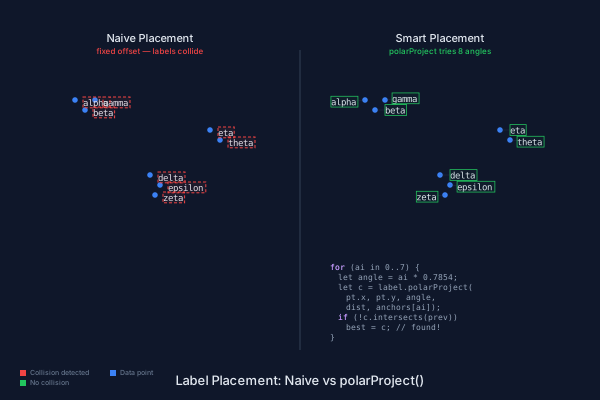
Unlike force-directed label placement (as in D3), TextBlock's collision avoidance is deterministic and runs at compile time — the same input always produces the same layout.
This is a greedy algorithm — it doesn't guarantee a globally optimal layout, but it's fast and produces good results for the cluster sizes typical in diagrams. The search is O(N^2) in the number of labels — fast for typical diagrams with 2-20 labels, but worth noting at larger scales. You could customize the preference order, increase the number of angles for finer-grained search, or adjust the distance for denser layouts. For truly dense point clouds, you might combine this with .translate() as a fallback — nudging a label incrementally until it clears.
The .intersects() check also works against path geometry and plain rectangles, not just other TextBlocks. This means you can verify that labels don't overlap shapes, borders, axis lines, or any other element in the diagram. The collision-avoidance demo checks against both previously placed labels and the data point circles themselves, ensuring labels don't obscure the data they annotate.
Magic Numbers vs Semantic Anchors
To see why polarProject() matters, compare the two approaches side by side. The left panel places four cardinal labels around a hexagon using manual offset arithmetic:
// Manual: compute x from center minus half text width
text(133, 138)`Top`     // 150 - 17 = 133 (how wide is "Top"?)
text(218, 213)`Right`   // 210 + 8 = 218 (what's the gap?)
text(124, 290)`Bottom`  // 150 - 26 = 124 (different width!)
text(57, 213)`Left`     // 90 - 38 = 52 (why 38?)
Every position is a magic number derived from the text content, the font metrics, and the shape geometry. Change the text from "Top" to "North" and the offset is wrong. Change the font size and every number needs recalculation.
The right panel uses polarProject():
top_label.polarProject(450, 210, -PI/2, 75, BBoxAnchor.Bottom)
right_label.polarProject(450, 210, 0, 75, BBoxAnchor.Left)
bottom_label.polarProject(450, 210, PI/2, 75, BBoxAnchor.Top)
left_label.polarProject(450, 210, PI, 75, BBoxAnchor.Right)
Four calls, four directions, one radius. The text content doesn't appear in the positioning logic at all — it's fully decoupled. The demo below makes the contrast visual: red annotations on the left expose the fragile arithmetic; green annotations on the right show the semantic anchor names.
// viewBox="0 0 600 400"
// Before/After — manual offset math vs .polarProject()
// Uses GroupLayers per Code Example Guideline §9

// --- Background ---

let bg = PathLayer('bg') ${ fill: Color('#0f172a'); stroke: none; };
bg.apply { rect(0, 0, 600, 400) }

// --- Divider ---

let divider = PathLayer('divider') ${
  stroke: Color('#334155');
  stroke-width: 1;
  fill: none;
};
divider.apply { M 300 40 v 320 }

// --- Title (top-level, not in a panel) ---

let title = TextLayer('title') ${
  font-family: system-ui, sans-serif;
  font-size: 14;
  fill: Color('#e2e8f0');
  text-anchor: middle;
};
title.apply {
  text(300, 385)`Magic Numbers vs Semantic Anchors`
}

// --- Guide circles (top-level) ---

let guides = PathLayer('guides') ${
  stroke: Color('#334155');
  stroke-width: 0.5;
  stroke-dasharray: "2 3";
  fill: none;
};
guides.apply {
  circle(150, 210, 75)
  circle(450, 210, 75)
}

// ═══════════════════════════════════════════════════════════════════
// LEFT PANEL — Manual positioning with hardcoded magic-number offsets
// ═══════════════════════════════════════════════════════════════════

let left_panel = GroupLayer('left-panel') ${ translate-x: 0; translate-y: 0; };

// Section heading
let left_title = TextLayer('left-title') ${
  font-family: system-ui, sans-serif;
  font-size: 12;
  fill: Color('#e2e8f0');
  text-anchor: middle;
};
left_title.apply { text(150, 50)`Manual Offsets` }

let left_sub = TextLayer('left-sub') ${
  font-family: system-ui, sans-serif;
  font-size: 9;
  fill: Color('#ef4444');
  text-anchor: middle;
};
left_sub.apply { text(150, 64)`fragile, breaks with font changes` }

// Hex shape
let hex_left = PathLayer('hex-l') ${
  fill: Color('#3b82f615');
  stroke: Color('#3b82f6');
  stroke-width: 1.5;
};
hex_left.apply { polygon(150, 210, 55, 6) }

// Manual labels — hardcoded positions with magic numbers
let manual_labels = TextLayer('manual') ${
  font-family: monospace;
  font-size: 10;
  fill: Color('#e2e8f0');
};
manual_labels.apply {
  // Top: text width ~35px, centered → x = 150 - 17 = 133
  text(133, 138)`Top`
  // Right: anchor at left edge → x = 210 + 8 = 218
  text(218, 213)`Right`
  // Bottom: text width ~52px, centered → x = 150 - 26 = 124
  text(124, 290)`Bottom`
  // Left: text width ~30px, anchor at right → x = 90 - 38 = 52
  text(57, 213)`Left`
}

// Red annotations showing the hardcoded offset math
// Positioned along radial lines, further out from labels to avoid overlap
let offset_anno = TextLayer('offsets') ${
  font-family: monospace;
  font-size: 7;
  fill: Color('#ef4444');
  text-anchor: middle;
};
offset_anno.apply {
  // Top annotation: above and to the left of "Top" label, along the radial
  text(150, 118)`x = 150 - 17 ???`
  // Right annotation: further right of "Right" label
  text(240, 236)`x = 210 + 8`
  // Bottom annotation: below "Bottom" label
  text(150, 310)`x = 150 - 26 ???`
  // Left annotation: further left of "Left" label
  text(45, 236)`x = 90 - 38`
}

// --- Collision checks for left panel ---

let mono_styles = ${ font-family: monospace; font-size: 10; };
let anno_styles = ${ font-family: monospace; font-size: 7; };

// Top label vs top annotation
let l_top_label = (&{ text(0, 10)`Top` } << mono_styles).project(133, 138);
let l_top_anno = (&{ text(0, 7)`x = 150 - 17 ???` } << anno_styles).project(calc(150 - 43), 118);
if (l_top_label.intersects(l_top_anno)) { log("WARN: left Top label intersects top annotation"); }

// Right label vs right annotation
let l_right_label = (&{ text(0, 10)`Right` } << mono_styles).project(218, 213);
let l_right_anno = (&{ text(0, 7)`x = 210 + 8` } << anno_styles).project(calc(240 - 28), 236);
if (l_right_label.intersects(l_right_anno)) { log("WARN: left Right label intersects right annotation"); }

// Bottom label vs bottom annotation
let l_bot_label = (&{ text(0, 10)`Bottom` } << mono_styles).project(124, 290);
let l_bot_anno = (&{ text(0, 7)`x = 150 - 26 ???` } << anno_styles).project(calc(150 - 43), 310);
if (l_bot_label.intersects(l_bot_anno)) { log("WARN: left Bottom label intersects bottom annotation"); }

// Left label vs left annotation
let l_left_label = (&{ text(0, 10)`Left` } << mono_styles).project(57, 213);
let l_left_anno = (&{ text(0, 7)`x = 90 - 38` } << anno_styles).project(calc(45 - 28), 236);
if (l_left_label.intersects(l_left_anno)) { log("WARN: left Left label intersects left annotation"); }

left_panel.append(left_title, left_sub, hex_left, manual_labels, offset_anno);

// ═══════════════════════════════════════════════════════════════════
// RIGHT PANEL — polarProject with BBoxAnchor (automatic alignment)
// ═══════════════════════════════════════════════════════════════════

let right_panel = GroupLayer('right-panel') ${ translate-x: 0; translate-y: 0; };

// Section heading
let right_title = TextLayer('right-title') ${
  font-family: system-ui, sans-serif;
  font-size: 12;
  fill: Color('#e2e8f0');
  text-anchor: middle;
};
right_title.apply { text(450, 50)`polarProject()` }

let right_sub = TextLayer('right-sub') ${
  font-family: system-ui, sans-serif;
  font-size: 9;
  fill: Color('#22c55e');
  text-anchor: middle;
};
right_sub.apply { text(450, 64)`adapts to any text or font size` }

// Hex shape
let hex_right = PathLayer('hex-r') ${
  fill: Color('#3b82f615');
  stroke: Color('#3b82f6');
  stroke-width: 1.5;
};
hex_right.apply { polygon(450, 210, 55, 6) }

// Polar-projected labels
let styles = ${ font-family: monospace; font-size: 10; };

let top_label = &{ text(0, 10)`Top` } << styles;
let right_label = &{ text(0, 10)`Right` } << styles;
let bottom_label = &{ text(0, 10)`Bottom` } << styles;
let left_label = &{ text(0, 10)`Left` } << styles;

let polar_labels = TextLayer('polar') ${
  font-family: monospace;
  font-size: 10;
  fill: Color('#e2e8f0');
};

// Project labels at cardinal directions, radius 75, with semantic anchors
let top_proj = top_label.polarProject(450, 210, calc(-0.5 * 3.14159265358979), 75, BBoxAnchor.Bottom);
let right_proj = right_label.polarProject(450, 210, 0, 75, BBoxAnchor.Left);
let bottom_proj = bottom_label.polarProject(450, 210, calc(0.5 * 3.14159265358979), 75, BBoxAnchor.Top);
let left_proj = left_label.polarProject(450, 210, calc(3.14159265358979), 75, BBoxAnchor.Right);

polar_labels.apply {
  top_proj.draw()
  right_proj.draw()
  bottom_proj.draw()
  left_proj.draw()
}

// Green annotations showing BBoxAnchor names
// Placed further along the radial than the labels, with offset to avoid overlap
let anchor_anno = TextLayer('anchors') ${
  font-family: monospace;
  font-size: 7;
  fill: Color('#22c55e');
  text-anchor: middle;
};
anchor_anno.apply {
  // Top annotation: above the "Top" label
  text(450, 112)`BBoxAnchor.Bottom`
  // Right annotation: further right
  text(540, 236)`BBoxAnchor.Left`
  // Bottom annotation: below the "Bottom" label
  text(450, 310)`BBoxAnchor.Top`
  // Left annotation: further left
  text(352, 236)`BBoxAnchor.Right`
}

// --- Collision checks for right panel ---

// Top label vs top annotation
let r_top_bb = top_proj.boundingBox();
let r_top_anno = (&{ text(0, 7)`BBoxAnchor.Bottom` } << anno_styles).project(calc(450 - 45), 112);
if (top_proj.intersects(r_top_anno)) { log("WARN: right Top label intersects top annotation"); }

// Right label vs right annotation
let r_right_anno = (&{ text(0, 7)`BBoxAnchor.Left` } << anno_styles).project(calc(540 - 42), 236);
if (right_proj.intersects(r_right_anno)) { log("WARN: right Right label intersects right annotation"); }

// Bottom label vs bottom annotation
let r_bot_anno = (&{ text(0, 7)`BBoxAnchor.Top` } << anno_styles).project(calc(450 - 38), 310);
if (bottom_proj.intersects(r_bot_anno)) { log("WARN: right Bottom label intersects bottom annotation"); }

// Left label vs left annotation
let r_left_anno = (&{ text(0, 7)`BBoxAnchor.Right` } << anno_styles).project(calc(352 - 42), 236);
if (left_proj.intersects(r_left_anno)) { log("WARN: right Left label intersects left annotation"); }

right_panel.append(right_title, right_sub, hex_right, polar_labels, anchor_anno);
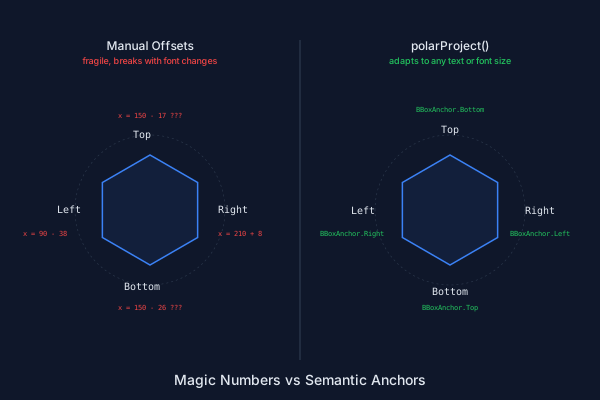
The right panel adapts to any text content, font size, or font family without changing a single coordinate. Swap "Top" for "North" and the anchor still centers the text correctly above the shape. Double the font size and the label still clears the hexagon's edge. This is the fundamental value proposition of TextBlock: text becomes a measurable, composable value that participates in the same spatial reasoning as paths and shapes.
The manual approach isn't just more work — it's more fragile work. Every time the diagram's parameters change (and in parametric SVGs, that's the whole point), the magic numbers need manual recalculation. polarProject() makes the positioning logic parameter-free with respect to text content.
Putting It Together
TextBlock follows the same lifecycle as PathBlock: compose, measure, position, draw. Here's the complete pipeline in one snippet:
// 1. Compose — relative coordinates, no styles yet
let label = &{
  text(0, 14)`Temperature`
  text(0, 28)`23.4 C`
};

// 2. Style — merge font and color properties
let styled = label << ${ font-family: monospace; font-size: 12; };

// 3. Measure — get bounding box before placing
let bb = styled.boundingBox();

// 4. Position — project with collision awareness
let placed = styled.polarProject(cx, cy, angle, radius, BBoxAnchor.Left);

// 5. Verify — check for overlaps
if (!placed.intersects(otherLabel)) {
  // 6. Draw — emit to the active TextLayer
  placed.draw();
}
Each step is a pure value transformation until .draw(). You can inspect, branch on, and iterate over the intermediate results. This pipeline means text is no longer an afterthought bolted onto a diagram. It's a first-class participant in the layout — queryable, testable, and automatically adaptive. Labels can respond to the geometry they annotate instead of being hard-coded beside it.
The TextBlock API surface is small by design — a handful of methods that compose cleanly. For a deeper look at each one, see the TextBlock documentation, which covers all methods, properties, style merging, BBoxAnchor, font metrics, polar projection, and intersection detection.
What's Next
The built-in character width tables get you 85-90% accuracy — enough for layout and collision avoidance. But sometimes you need exact metrics: tight-fitting background rectangles, precise kerning, or text that aligns to a pixel grid. The next post, From Fonts to Paths: Glyph Extraction with PathBlock.fromGlyph(), covers the @font directive that loads OpenType font files for exact measurement, and PathBlock.fromGlyph() that converts individual glyphs into PathBlocks — actual SVG path geometry — that you can transform, sample, fillet, and boolean-combine just like any other shape.
Text as geometry. That's where this is headed.
Paste the collision-avoidance snippet into the playground and change the data point positions — watch the labels redistribute automatically.